Hallo plc-user,
you can change directory official or custom collection on the fly,
1] change PATH for custom collection.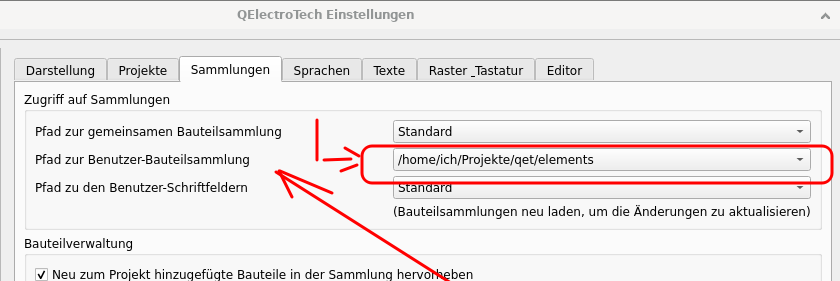
2] on element collection tree field make a right click -> reload, and voila. 
Regards,
laurent

You are not logged in. Please login or register.
QElectroTech → Posts by scorpio810
Hallo plc-user,
you can change directory official or custom collection on the fly,
1] change PATH for custom collection.
2] on element collection tree field make a right click -> reload, and voila.
Regards,
laurent
@rvamerongen, and all: the magic thing about incliude element editor: that you open several element select many part of other symbol and paste this part and create a complex symbol from scratch like frankeintein, if you understand what I say..
Best regards,
Laurent
Workaround was power and I was the master, 
My idol is Mac Giver...since my my childhood, uhuhu
...
Like Plc-user: for draw simple symbol like your battery, please use element editor include is so easy.
DXF2elmt is used fand needed for complex symbols like this:
Hmm tu n'aurais pas des fois plusieurs écrans et un pc portable?
Quelle version de QET utilises tu?
Je te conseilles fortement la 0.100.0. devel
La 0.9 stable est pleine de bugs qui ont été remonté après sa sortie entre temps ces bugs ont été corrigés dans la version devel.. donc la 0.100.0-dev.
Je n'ai pas la force et encore moins l'envie de releaser une 0.9 fixed, de devoir modifier tous mes scripts de packaging...
Bonjour Jérôme,
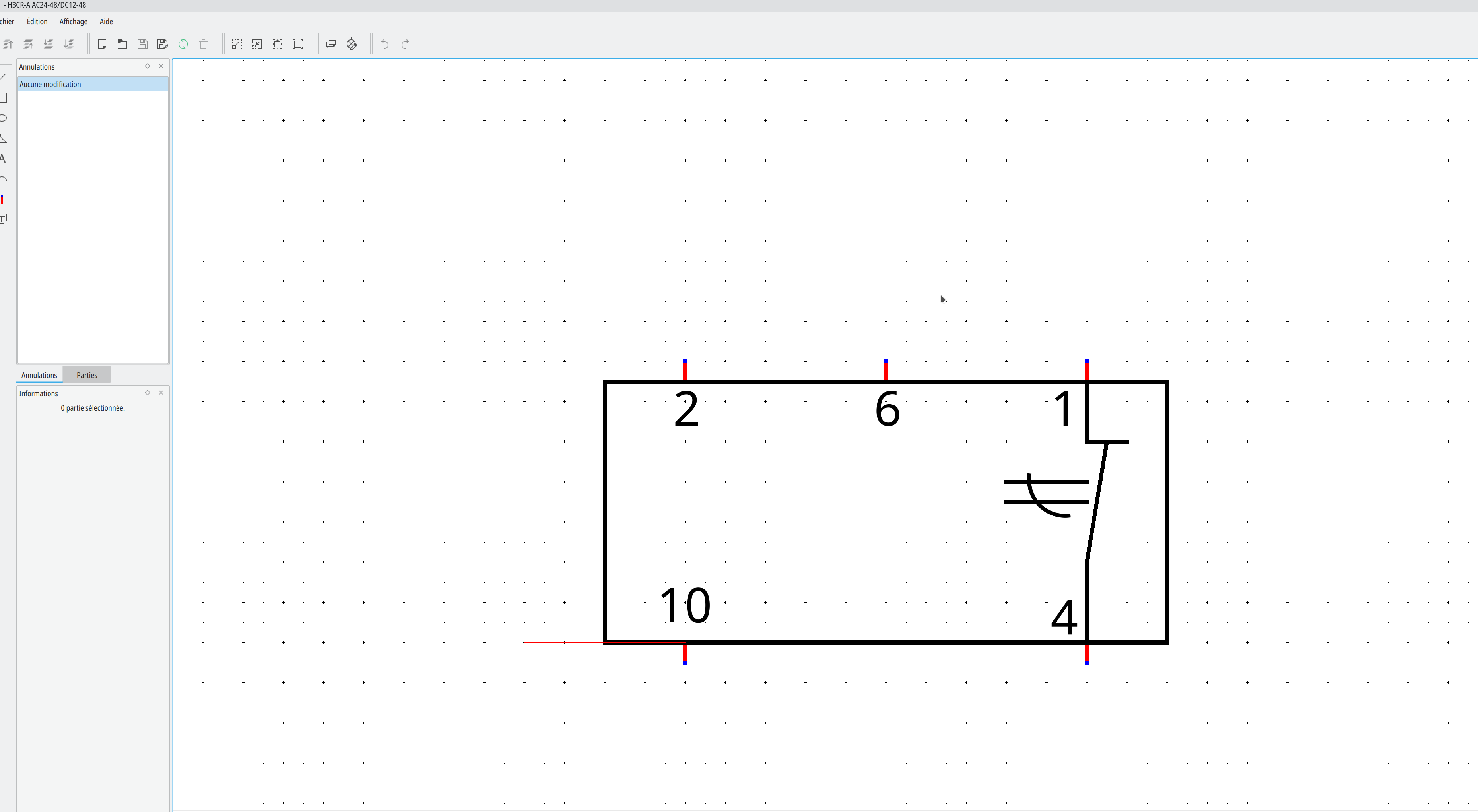
une capture de ton symbole dans l’éditeur d’élément en version 0.100.0 devel..
Le symbole a peut-etre été crée sur une vielle version de QET?
Laurent
Alexis, merci ça me touche beaucoup, mais je ne suis pas encore tiré d'affaire...!
Je le serai mi-janvier après un énième passage au scanner avec produit de contraste d'iode: si les prothèses sont étanches ce sera super, sinon je filerai direct sur Toulouse... on l'on devrait avec des longues aiguilles depuis le dos au travers de la colonne vertébrales aller colmater les micro fuites entre la prothèse et le/les anévrismes.. et je risque encore d'en baver et de bien déguster...
Je devrai vivre avec cette épée de Damoclès au dessus de ma tète le restant de mes jours...et me faire contrôler régulièrement..
Je croise les doigts pour la compagne de Joshua: elle devait rentrer en urgence hier dans un centre hospitalier .... d’après ce que Joshua m'a dit sur IRC il y a un mois..
Elle soufre beaucoup et son moral est au plus bas..
Elle redoute l’opération encore plus..ou autant que moi..
Maybe try online converter SVG to DXF...
Good night..
Hello rvamerongen,
if you have SVG, you have possibility to convert your file to with Inkscape (a best open source software) to DXF format , after use dxf2elmt plugin for converter and transform your DXF to QET elment *.elmt file.
Best regards,
Laurent
I return to sleeping.. I am so tired!
New .dxf to .elmt Conversion Program
https://qelectrotech.org/forum/viewforum.php?id=12
Download
https://download.qelectrotech.org/qet/b … mt/V0.3.0/
MacOS apple SiliconQET-Element to SVG binary compiled from scratch, not authentified and not notarized by Apple severs.
Sleep time...for me!
Salut Laurent!
Thank you for your feedback!
As already said:
I do not get any errors on Debian, ReactOS or Win10 ... strange.
I just tried on OSX ... no luck, uhuhu
I think is to be so easy to compile it under my Debian Unstable..
Hallo Plc-user!
I asked Remi Collet, a Red Hat developer who I have met every day for 15 years on the IRC QET channel, if he had 5 minutes to try on his new AMPERE arm64 machine, and compile your code, it compile it very well on Fedora Aarch64, so I looked for what I might be missing, maybe a library or something missing in the headers in my OSX Sonoma toochain.
Hallo plc-user
fixed for me, yeahh
Edit :
I just saw your answer now:
there is my patch/workaround... uhuhu
Isn't perfect, but that compile fine..
laurent@mac-mini-de-laurent QET_ElementScaler % git diff
diff --git a/inc/elements.h b/inc/elements.h
index 0e4b024..129d4e9 100644
--- a/inc/elements.h
+++ b/inc/elements.h
@@ -31,7 +31,8 @@
 #include <cmath>        // sqrt, ...
 #include <vector>       // für Polygone
 #include <tuple>        // einzelne Punkte des Polygons
-
+#include <sstream>
+#include <vector>
 #include "pugixml/pugixml.hpp"

 #define _DEBUG_ 0
diff --git a/inc/helpers.h b/inc/helpers.h
index 42c7a35..a07ecc4 100644
--- a/inc/helpers.h
+++ b/inc/helpers.h
@@ -28,7 +28,8 @@

 #include <iostream>     // for IO-Operations
 #include <cstdint>      // int8_t, ...
-
+#include <sstream>
+#include <vector>
 #define _DEBUG_ 0


diff --git a/main.h b/main.h
index f7215ad..3cf44aa 100644
--- a/main.h
+++ b/main.h
@@ -33,6 +33,8 @@
 #include <getopt.h>     // for Commandline-Parameters
 #include <filesystem>   // for exe-filename
 #include <regex>        // for "double"-Check
+#include <sstream>
+#include <vector>

 #define _DEBUG_ 0
Hallo Plc-user
I tried to compile it on OSX arm64.. on my mac Mini M2...
What could I have forgotten?
laurent@mac-mini-de-laurent ~ % cd QET_ElementScaler
laurent@mac-mini-de-laurent QET_ElementScaler % git pull
remote: Enumerating objects: 131, done.
remote: Counting objects: 100% (131/131), done.
remote: Compressing objects: 100% (74/74), done.
remote: Total 131 (delta 83), reused 102 (delta 57), pack-reused 0
Receiving objects: 100% (131/131), 54.95 KiB | 2.50 MiB/s, done.
Resolving deltas: 100% (83/83), completed with 8 local objects.
From https://github.com/plc-user/QET_ElementScaler
   5505d2a..e849cd7  master     -> origin/master
 * [new tag]         0.5.0beta5 -> 0.5.0beta5
 * [new tag]         0.5.0beta1 -> 0.5.0beta1
 * [new tag]         0.5.0beta2 -> 0.5.0beta2
 * [new tag]         0.5.0beta3 -> 0.5.0beta3
 * [new tag]         0.5.0beta4 -> 0.5.0beta4
Updating 5505d2a..e849cd7
Fast-forward
 LICENSE                    |    2 +-
 QET_ElementScaler.cbp      |    4 +
 README.md                  |   34 +-
 compile.cmd                |   24 +-
 compile.sh                 |   39 +-
 inc/elements.cpp           | 1591 ++++++++++++++++++++++++++++++++++++++++
 inc/elements.h             |  694 ++++++++++++++++++
 inc/helpers.cpp            |  177 +++++
 inc/helpers.h              |   98 +++
 inc/pugixml/pugiconfig.hpp |    6 +-
 inc/pugixml/pugixml.cpp    | 1744 +++++++++++++++++++++++---------------------
 inc/pugixml/pugixml.hpp    |   28 +-
 main.cpp                   |  982 +++----------------------
 main.h                     |  810 ++++++++++++--------
 scale.cmd                  |    2 +-
 scale.sh                   |    2 +-
 toSVG.cmd                  |   38 +
 toSVG.sh                   |   24 +
 18 files changed, 4208 insertions(+), 2091 deletions(-)
 create mode 100644 inc/elements.cpp
 create mode 100644 inc/elements.h
 create mode 100644 inc/helpers.cpp
 create mode 100644 inc/helpers.h
 create mode 100644 toSVG.cmd
 create mode 100755 toSVG.sh
laurent@mac-mini-de-laurent QET_ElementScaler % git stash
No local changes to save
laurent@mac-mini-de-laurent QET_ElementScaler % ./compile.sh


--------------------------------------------------------------------------------
inc/helpers.cpp:91:23: error: implicit instantiation of undefined template 'std::basic_stringstream<char>'
    std::stringstream ss;
                      ^
/Applications/Xcode.app/Contents/Developer/Platforms/MacOSX.platform/Developer/SDKs/MacOSX.sdk/usr/include/c++/v1/iosfwd:134:32: note: template is declared here
    class _LIBCPP_TEMPLATE_VIS basic_stringstream;
                               ^
1 error generated.
inc/elements.cpp:289:23: error: implicit instantiation of undefined template 'std::basic_stringstream<char>'
    std::stringstream ss(font);
                      ^
/Applications/Xcode.app/Contents/Developer/Platforms/MacOSX.platform/Developer/SDKs/MacOSX.sdk/usr/include/c++/v1/iosfwd:134:32: note: template is declared here
    class _LIBCPP_TEMPLATE_VIS basic_stringstream;
                               ^
inc/elements.cpp:412:23: error: implicit instantiation of undefined template 'std::basic_stringstream<char>'
    std::stringstream ss(font);
                      ^
/Applications/Xcode.app/Contents/Developer/Platforms/MacOSX.platform/Developer/SDKs/MacOSX.sdk/usr/include/c++/v1/iosfwd:134:32: note: template is declared here
    class _LIBCPP_TEMPLATE_VIS basic_stringstream;
                               ^
2 errors generated.
In file included from main.cpp:52:
./main.h:247:23: error: implicit instantiation of undefined template 'std::basic_stringstream<char>'
    std::stringstream ss;
                      ^
/Applications/Xcode.app/Contents/Developer/Platforms/MacOSX.platform/Developer/SDKs/MacOSX.sdk/usr/include/c++/v1/iosfwd:134:32: note: template is declared here
    class _LIBCPP_TEMPLATE_VIS basic_stringstream;
                               ^
1 error generated.
clang: error: no such file or directory: 'obj/inc/helpers.o'
clang: error: no such file or directory: 'obj/inc/elements.o'
clang: error: no such file or directory: 'obj/main.o'
--------------------------------------------------------------------------------


laurent@mac-mini-de-laurent QET_ElementScaler %
Best regards,
Laurent
@Joshua: je souhaite de tout mon cœur que ta compagne puisse vaincre cette saleté de paralysie de la colonne vertébrale qui la ronge et la fait tellement souffrir. et la paralyse petit à petit..., Je sais ça fait peur une grosse hospitalisation de la moelle épinière , mais dit lui que si tu as de la chance de tomber sur de belles personnes, ils feront tout pour t’éviter la souffrance, et t'accompagner vers la guérison, rassure là de ma part.
J’espère aussi que toi aussi tu retrouves enfin une vie paisible pour toute ta famille et aussi pour ta fille en bas age ... qui la pauvre doit souffrir autant sinon plus que ses parents.. QET c'est secondaire... rétablissez vous!
Amicalement,
Laurent
Edit: mon ancienne RX550 est prête pour t'être envoyé par la poste...
Il te suffit de me re confirmer ton adresse postale exacte par email ou sur IRC, la RX550 pourra te dépanner quelques temps vu que ta Nvidia est HS..
Apres je comprend que tu n'as pas/plus le temps d'allumer ton PC avec toutes ces douloureuses épreuves que ton couple traverse aussi... Mais je comprend qu'en ce moment difficile tu as d'autres priorités..
Que cette tres belle et magnifique mélodie puisse apaiser ton âme, ta souffrance qui doit etre terrible, quelle puisse sécher tes larmes et ton chagrin, soulager tes douleurs et aussi celles de ta compagne.. dans ce tres dur moment..
Amicalement,
Laurent
Hallo plc-user,
WoW... \o/ very good job, thank you again..
Cheers,
Laurent
Environ 9 jours après mon entré dans un hôpital du Tarn, dont 3 ou 4 jours en soins intensifs..
J'ai du ré apprendre à remarcher, l'intervention était plus compliquée à cause de mon hémophilie...
je remercie au passage toutes ces équipes qui mon traité comme un prince...\o/
je me suis promis de leurs amener des chocolats pour les remercier ... Ils le méritent amplement..
j'ai fait le tour pour les remercier: de ma cardiologue, chirurgien, pas encore eut le temps pour remercier la professeur du sang "Toulouse Purpan" qui a établi un protocole spécial et adapté pour mon cas ... Et aussi toutes les personnes qui m'ont suivis pour les remercier...
Je suis sorti hier, je profite de mon second petit fils qui est né pendant mon hospitalisation, maintenant je compte sur vous pour aider les nouveaux ou ne pas leur répondre s'ils n'ont pas fait de recherches.. ... j'ai mis en place 2 moteurs de recherches dont un basé sur le moteur punBB, l'autre sur google plus précis et puissant, donc je compte me reposer après tout ce que j'ai vécu et profiter de mes deux petits fils qui sont deux bouts de choux et qui ont juste 1 an d'intervalle... pauvre papa et maman ça va être chaud pour eux ... mais les 2 papy et mamies sont follement amoureux de ces deux bouts de choux...
Bref!
Je serai donc absent du forum pour quelques temps ..., les messages ou l'auteur n'a pas fait de recherches je n'y répondrai plus .. avant c'étais pour m’occuper l'esprit et ne pas / plus penser à la lourde opération qui m'attendait, ....j'ai fais ma valise au dernier moment juste avant de partir et si madame n'avait pas été là ....je n'y serai pas allé... tellement j'avais la trouille , moi un gros dur ...
Je pensai re sortir les pieds devant...!
Ce sont des pros avec un grand cœur et je tiens à les remercier de tout mon cœur, ils font un travail difficile. Ils sont très patients, toujours disponibles pour leurs patients...
J'ai eu la chance de tomber sur un chirurgien très professionnel et surtout très gentil et humain ..
J'ai rencontré des femmes et des hommes merveilleux, qui font comme moi leur boulot surtout par passion malgré un stress énorme et permanent ...
Là ! Je vais devoir me reposer quelques temps,
vous serez obliger de me remplacer, et de ne surtout pas répondre ... à ceux qui ont la flemme de chercher... !
Tout ce mérite.. dans ce monde...
Element is only a. elmt file....
Thank you, I can't wait to try this work but at the moment I have to fight for my health against death....
Regards,
Laurent
Hello,
Yes off course, search terminal block on forum and look us youtu.be channels video.
I' not acces to my setup machines, I only have a smartphone also please sorry me... .
You do search by yourself... On forum search motor on header.
I have major health problems at the moment...
Regards,
Laurent
Wow.......
Wonderful... Better for php scripting. Thank again plc_user.
Regards.
Laurent
Hallo plc-user,
Wow that's very good, thank you for the great support.
Best regards
Laurent
Hallo
go in this section
https://qelectrotech.org/forum/viewforum.php?id=10
You need to search "howto use github on windows"
Example:
https://www.simplilearn.com/tutorials/g … on-windows
Remember to send us your translations, otherwise your work will be of no use and will not follow the developments of the software and will not be visible on other OS like Linux/BSD like macOS, etc.
QElectroTech → Posts by scorpio810
Powered by PunBB, supported by Informer Technologies, Inc.
Generated in 0.096 seconds (30% PHP - 70% DB) with 5 queries