Hello Orwo,
on the second computer, run qelectrotech in a shell or terminal and after try in the QET program to open your project located in your USB key, paste the message from the terminal here to understand what your problem is.

You are not logged in. Please login or register.
QElectroTech → Posts by scorpio810
Hello Orwo,
on the second computer, run qelectrotech in a shell or terminal and after try in the QET program to open your project located in your USB key, paste the message from the terminal here to understand what your problem is.
Merci Alexis pour la vidéo, je vais la transférer à Joshua, et aller me reposer un peu....j'ai du mal à conserver les yeux ouverts..
De nouveaux paquets sont encours de builds et d'upload.
Si, sur mon esclave déja relié, je rajoute un nouveau texte dynamique "information de l’élément" puis "label", il prend bien le label du maître ainsi que la XREF du maître déjà relié .. et je me retrouve bien avec deux fois la même chose..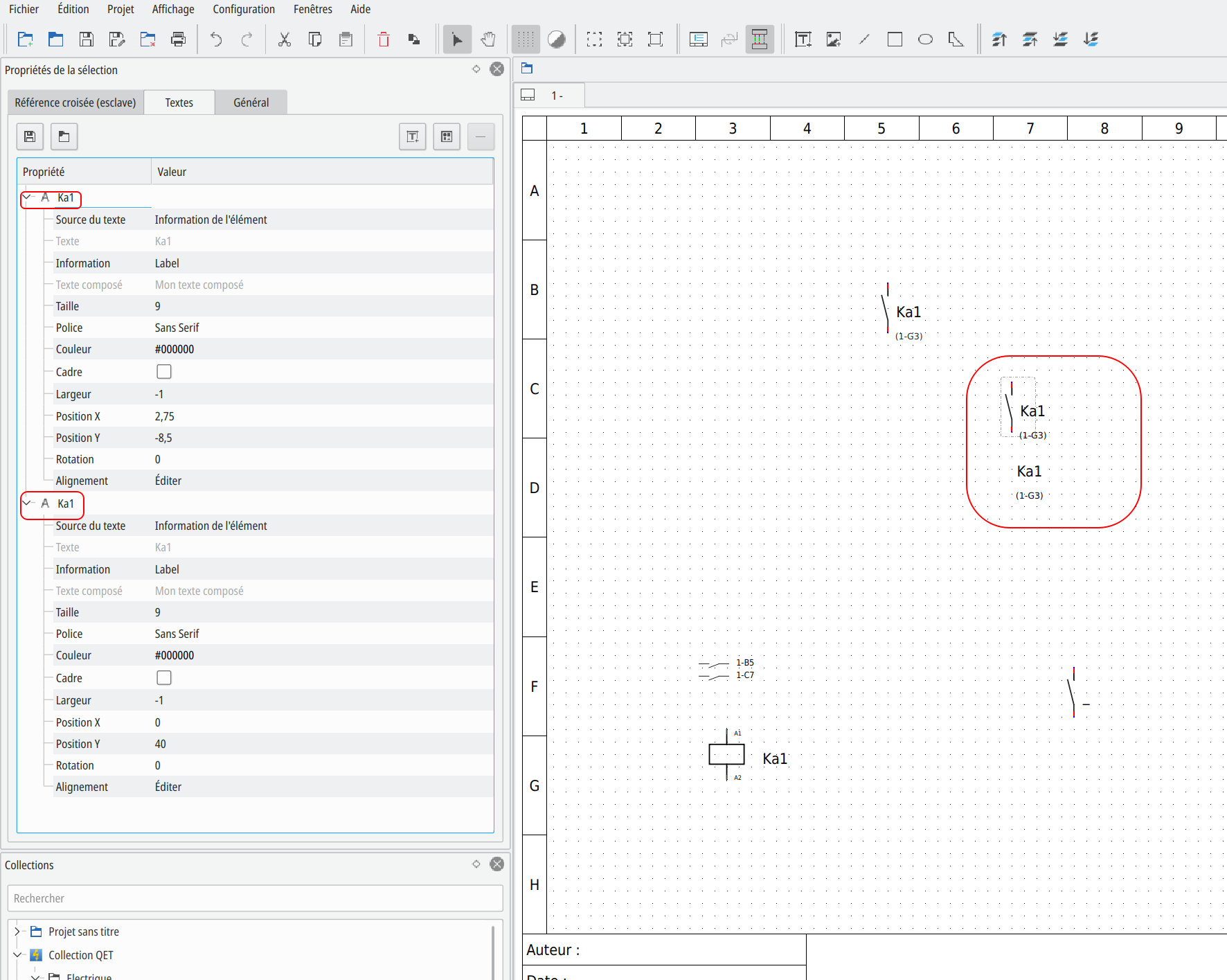
scorpio810 wrote:Sous linuxmint les paquets ne devraient pas tarder à arriver, le temps que les builder PPA de Ubuntu compilent les différentes versions.
Par contre les deb, Windows, macOS, AppImages et Flatpak, c'est déjà envoyé.
Il n'y a que les Snap et le paquets du PPA qui ne sont pas compilés par ma workstation, ça va très vite maintenant avec le Threadripper ^^.Sous linuxmint, je suis à jour....
Je vais attendre un peu pour faire de nouveaux build de paquets, Joshua corrige des bugs à la pelle aujourd'hui ^^.
- Log -----------------------------------------------------------------
commit 5c6f556ad3b21ff827d3a11fb1eb383858ca7e59
Author: Claveau Joshua <Joshua@>
Date: Thu Apr 9 16:58:05 2020 +0200
Minor revamp
Remove unused include.
QETproject : Default titleblock are set in the default constructor
instead of set by qetdiagrameditor.
conductor, border, report and xref propertie are now set in the header
of QETProject instead of set by the qetdiagrameditor just after the
creation of a new project.
Alexis, tu peux envoyer un bout de schéma reproduisant ton soucis?
Good day,
I have stored a qet file on a memory stick in order to open it again on another computer and continue to edit it.
The file cannot be opened directly from the stick with version 7. If the file is on the desktop, it can be opened. The file then does not contain the user collection. Editing on the second computer is then not possible.
UBUNTU 18.04 runs on both computers.Are there any version problems?
Where can I find the release note on the respective computers within the program?
I would be happy to receive an answer.
Yours sincerely
Guten Tag,
I think you have a problem in your Ubuntu, off course you can open project file on memory sticky without problem.
Where are you found this QET package, in ùy repository or Ubuntu official deb package?
The User collection is stored in your ~/.qet/elements/ folder, you need to copy this directory to your memory stick and choose In QET settings the right PAH for Custom collection and reload collection by right click on elements panel to have these elements for drag and drop in yours projects.
I hope that can help you?
Laurent
- Log -----------------------------------------------------------------
commit 017f78fb13a17f0dcf37e54b594190b7312997ac
Author: Claveau Joshua <Joshua@>
Date: Thu Apr 9 16:12:21 2020 +0200
Fix crash when close project
At time of closing project, if a master element(may be every linkable
element) is selected and the editor dock display a lot of available
slave, qet crash.
Exemple je pose une bobine "maître" KA1, je pose ensuite 4 contact NO "esclave" je les relies tous à ma bobine maître, tous mes contacts ont le label KA1.
Sous linuxmint les paquets ne devraient pas tarder à arriver, le temps que les builder PPA de Ubuntu compilent les différentes versions.
Par contre les deb, Windows, macOS, AppImages et Flatpak, c'est déjà envoyé.
Il n'y a que les Snap et le paquets du PPA qui ne sont pas compilés par ma workstation, ça va très vite maintenant avec le Threadripper ^^.
La derniere version en paquet c'est la 6179.
Salut,
bon tu as le don d'expliquer quelque chose de simple en le rendant compliqué à lire, ou c'est mon cerveau qui fatigue à cette heure, j'aurais dut peut-être du aller faire une 'tit sieste cet après-midi..., vi je suis debout depuis 3h du mat. :p
Déjà pour moi le voyant est l'esclave du contact du bouton poussoir, ce contact active une entrée automate, et suivant ta programmation et l’état du poussoir une sortie automate alimente ton voyant ou pas.
Reprend moi, si je suis passé à coté de la plaque  et je m'excuse d'avance si j'ai mal compris ta question.
T'as essayé avec la dernière fournée de paquets que je viens juste d'envoyer?
- Log -----------------------------------------------------------------
commit 94aa5c024734352ee62402450d48af18fba8ae90
Author: Claveau Joshua <Joshua@>
Date: Wed Apr 8 19:27:24 2020 +0200
Minor fix : in some condition master cross Xref are not displayed
Thanks Joan.
merci, j'ai corrigé cette typo.
J'avoue que je ne comprend pas très bien ton besoin.
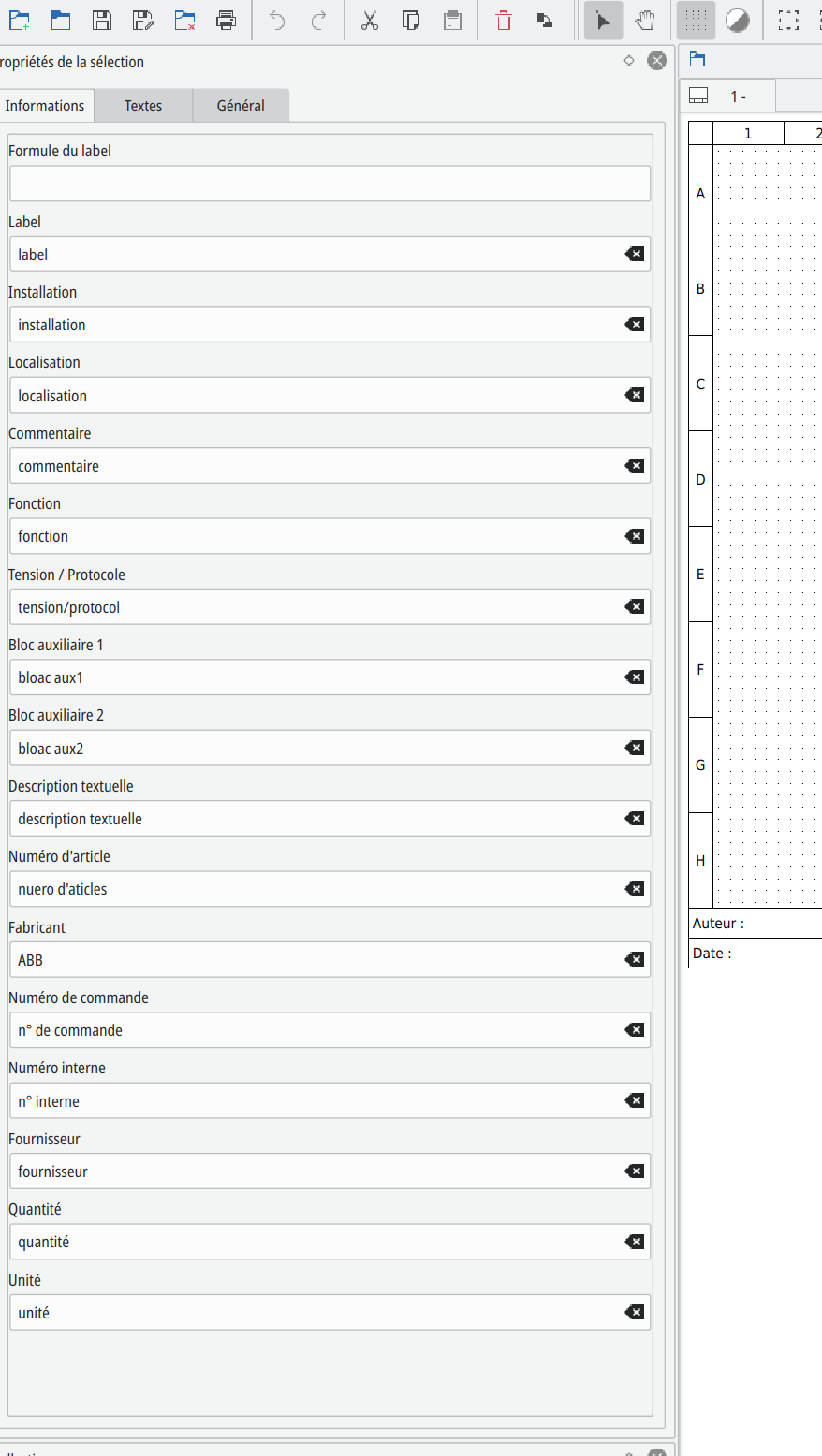
<elementInformations>
                    <elementInformation name="plant" show="1">installation</elementInformation>
                    <elementInformation name="tension-protocol" show="1">tension/protocol</elementInformation>
                    <elementInformation name="manufacturer" show="1">ABB</elementInformation>
                    <elementInformation name="quantity" show="1">quantité</elementInformation>
                    <elementInformation name="unity" show="1">unité</elementInformation>
                    <elementInformation name="auxiliary2" show="1">bloac aux2</elementInformation>
                    <elementInformation name="machine-manufacturer-reference" show="1">n° interne</elementInformation>
                    <elementInformation name="function" show="1">fonction</elementInformation>
                    <elementInformation name="auxiliary1" show="1">bloac aux1</elementInformation>
                    <elementInformation name="manufacturer-reference" show="1">n° de commande</elementInformation>
                    <elementInformation name="description" show="1">description textuelle</elementInformation>
                    <elementInformation name="supplier" show="1">fournisseur</elementInformation>
                    <elementInformation name="label" show="1">label</elementInformation>
                    <elementInformation name="location" show="1">localisation</elementInformation>
                    <elementInformation name="designation" show="1">nuero d'aticles</elementInformation>
                    <elementInformation name="comment" show="1">commentaire</elementInformation>
</elementInformations>
Filtres :
SELECT ei.label, ei.plant, ei.location, ei.comment, ei.FUNCTION, ei.tension_protocol, ei.auxiliary1, ei.auxiliary2, ei.description, ei.designation, ei.manufacturer, ei.manufacturer_reference, ei.machine_manufacturer_reference, ei.supplier, ei.quantity, ei.unity, e.pos, di.title, di.folio, d.pos FROM element_info ei, element e, diagram d, diagram_info di WHERE ei.element_uuid = e.uuid AND di.diagram_uuid = d.uuid AND e.diagram_uuid = d.uuid AND ei.label IS NOT NULL AND ei.comment LIKE'%interface%' ORDER BY ei.label, ei.plant, ei.location, ei.comment, ei.FUNCTION, ei.tension_protocol, ei.auxiliary1, ei.auxiliary2, ei.description, ei.designation, ei.manufacturer, ei.manufacturer_reference, ei.machine_manufacturer_reference, ei.supplier, ei.quantity, ei.unity, e.pos, di.title, di.folio, d.pos
Malheureusement c'est en dur dans le code, a moins d’éditer et de recompiler le programme tu ne pourras pas changer de nom ce champ.
Same things on new Qt 5.14.2... and always on windows platform..
Bonjour Robert,
dans ce même widget, tu vas sur l'onglet textes, là tu changes l’affectation de ton texte sur le type Référence Fabricant.
Bojour,
oui on peut remplacer dans l’éditeur les entêtes de champ, mais si l'element est déja posé et le champ Numéro d'article renseigné et affiché sur le folio, il faut changer dans ce texte dynamique l'affectation du champ en Référence Fabricant.
Hallo,
thanks Achim for your help.
Gruß
Laurent
On OSX you need to update your python framework to 3.8 version to launch qet-tb-generator plugin for future 0.8-dev bundles.
https://git.tuxfamily.org/qet/qet.git/c … 5323d4bb76
https://www.python.org/ftp/python/3.8.2 … sx10.9.pkg
macOS users
For Python 3.8, we provide one installer: 64-bit-only that works on macOS 10.9 (Mavericks) and later systems.
Please read the "Important Information" displayed during installation for information about SSL/TLS certificate validation and the running the "Install Certificates.command".
Bonjour,
je ne pense pas : https://doc.qt.io/qt-5/macos.html
Supported Versions
When talking about version support on macOS, it's important to distinguish between the build environment; the platform you're building on or with, and the target platforms; the platforms you are building for. The following macOS versions are supported.

Target Platform    Architecture    Build Environment
macOS 10.13, 10.14, 10.15    x86_64 and x86_64h    Xcode 11 (10.15 SDK)
Par contre tu peux essayer de la compiler sur ton El capitan avec une vieille version de Qt et de Xcode?
https://qelectrotech.org/forum/viewtopic.php?id=1401
re,
Il te faut lancer le plugin "qet-tb-generator" manuellement :
/Library/Frameworks/Python.framework/Versions/3.8/bin/qet_tb_generator, ou peut-être créer un lien symbolique, car la commande n'est pas variable et le chemin (PATH) fixé en dur pour python 3.5 dans le code pour lancer qet-tb-generator depuis QElectroTech:
#ifdef Q_OS_MAC
    if (openedProjects().count()){
        success = process->startDetached("/Library/Frameworks/Python.framework/Versions/3.5/bin/qet_tb_generator", {(QETDiagramEditor::currentProjectView()->project()->filePath())});
    }
else {QElectroTech → Posts by scorpio810
Powered by PunBB, supported by Informer Technologies, Inc.
Generated in 0.109 seconds (30% PHP - 70% DB) with 6 queries