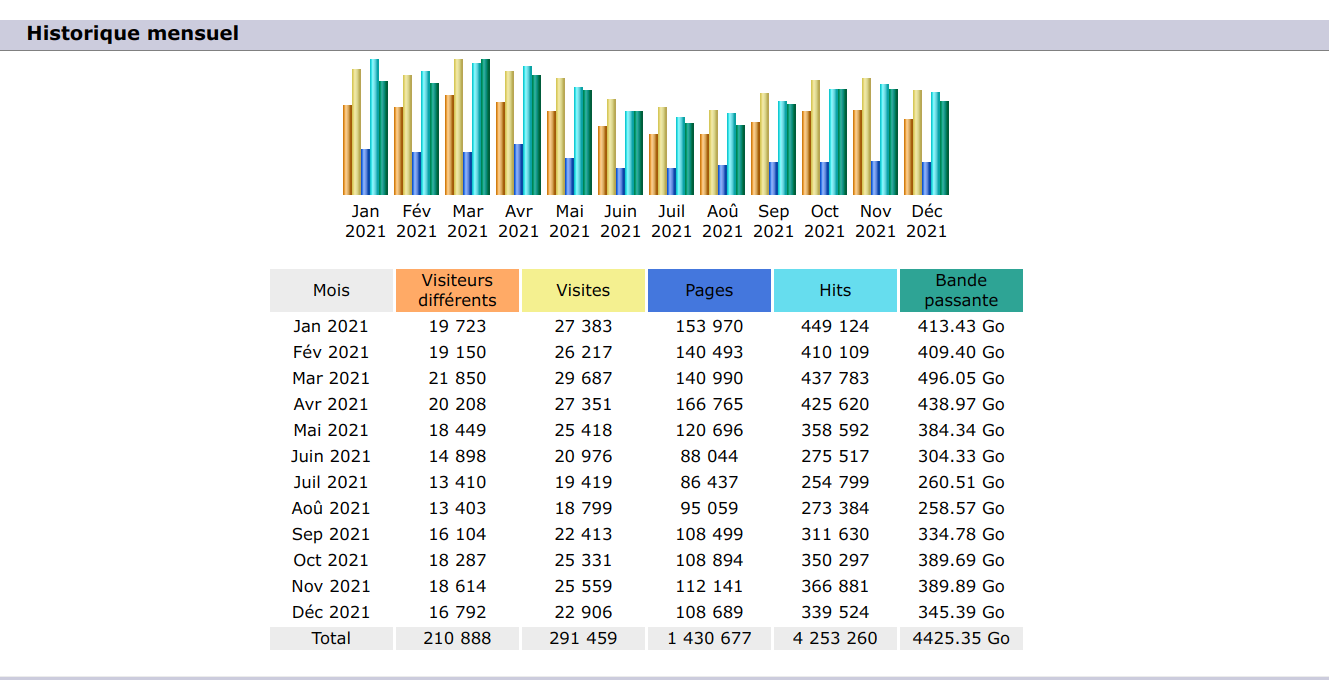
Statistics 2021
Download server:
Web area server : forum, wiki, bugtracker, etc.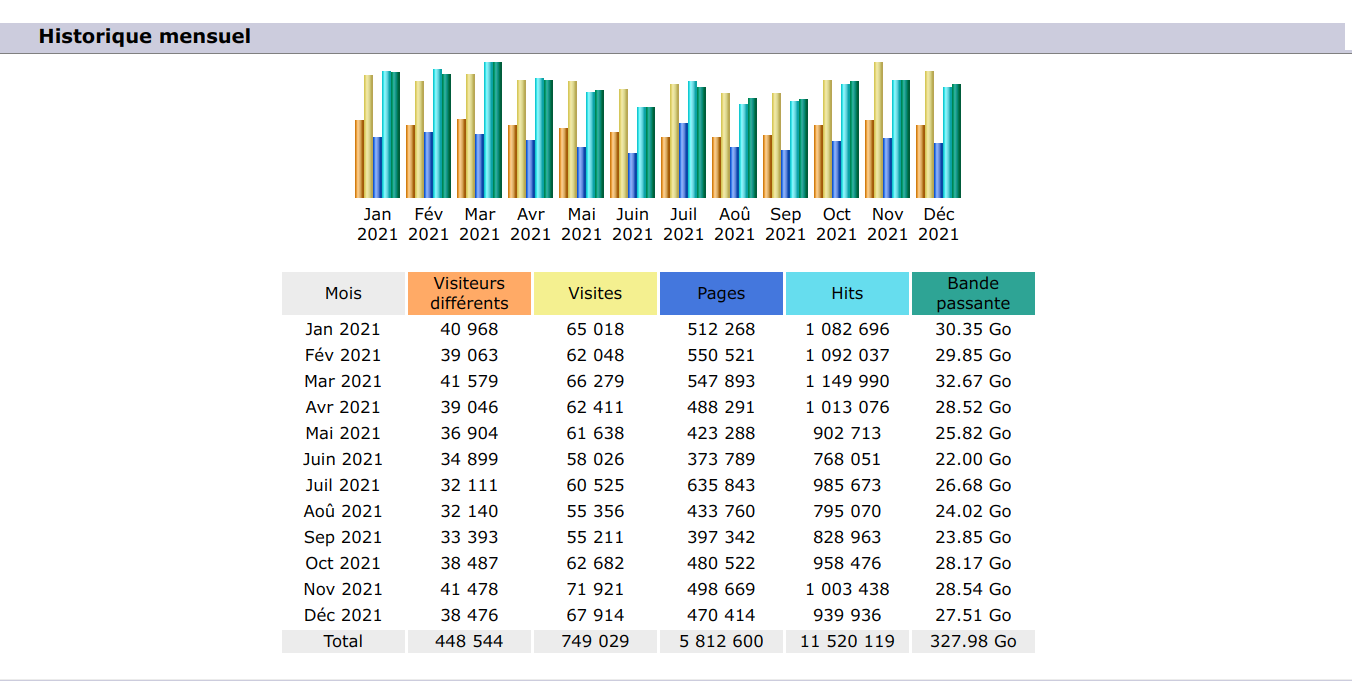

You are not logged in. Please login or register.
QElectroTech → Posts by scorpio810
Statistics 2021
Download server:
Web area server : forum, wiki, bugtracker, etc.
Please try new Debian and Windows packages based on branch pixel_size_font.
See: https://qelectrotech.org/forum/viewtopi … 650#p15650
Edit : for Debian package is here :
https://download.qelectrotech.org/qet/s … size_font/
Please try new Debian and Windows packages based on branch pixel_size_font.
https://git.tuxfamily.org/qet/qet.git/c … _size_font
Edit : for Debian package is here :
https://download.qelectrotech.org/qet/s … size_font/
Add new packages (qelectrotech qelectrotech-data qelectrotech-examples qet-tb-generator PySimpleGUI) for Ubuntu 21.10 “Impish Indri” on my PPA.
https://launchpad.net/~scorpio/+archive … rotech-dev
Wait a few hours for the Ubuntu builders to do the binary packages
Maybe specific to Windows?
https://docs.microsoft.com/en-us/window … ent-pixels
https://qelectrotech.org/bugtracker/view.php?id=150
Maybe include manifest to windows platform?
Bonjour, tu peux regarder sur ce dépôt https://github.com/qelectrotech/qelectr … nt-contrib
Tried on other computer?
Sometimes is a problem with GPU driver's?
What version and OS?, downloaded here?
Il doit prendre une autre police de substitution...
Bonjour,
tu peux importer des images en arrière plan dans tes folios, et dessiner par dessus.
La methode que je conseillerai est de convertir ce PDF en DXF, isoler les symboles qui te manquent, afin de les convertir avec le convertisseur dxftoelmt.
I saw the same thing when I upgraded to this version.
But I saw great improvement on loading elements collection under Windows ... same like Linux ..
Windows :
https://qelectrotech.org/forum/viewtopi … 614#p15614
My Debian worstation :
https://qelectrotech.org/forum/viewtopi … 563#p15563
BTW, a workaround is to increase folio size like this:
La police utilisée par défaut sur un Windows sera MS Shell Dlg 2..
P-e sur PC redéfinir toutes les polices dans la config en Sans Serif en size 9, puis relancer le projet.
Bonjour,
la même police doit-être utilisée sur les deux OS!
https://qelectrotech.org/forum/viewtopi … 8818#p8818
In this video I explain briefly how the terminal plan plugin Caution Version 09. DEV works and what you can do with it. But that will definitely change in the next versions.
https://git.tuxfamily.org/qet/qet.git/c … f509e23332
Checked changes on my HP elitebook 4K laptop + nvme ssd.
10:46:05.894 Info: Start-up
10:46:05.897 Debug: "File C:/Users/hp/Application Data/qet/20211120.log is deleted!" (../sources/main.cpp:150, void delete_old_log_files(int))
10:46:06.231 Info: debugging enabled: false
10:46:06.232 Info: Qt library version: 5.15.2
10:46:06.232 Info: Qt library location default prefix: "/home/laurent/digikam3/project/bundles/mxe/build.win64/usr/x86_64-w64-mingw32.static/qt5"
10:46:06.232 Info: Qt library location documentation: "/home/laurent/digikam3/project/bundles/mxe/build.win64/usr/x86_64-w64-mingw32.static/qt5/doc"
10:46:06.233 Info: Qt library location headers: "/home/laurent/digikam3/project/bundles/mxe/build.win64/usr/x86_64-w64-mingw32.static/qt5/include"
10:46:06.233 Info: Qt library location libraries: "/home/laurent/digikam3/project/bundles/mxe/build.win64/usr/x86_64-w64-mingw32.static/qt5/lib"
10:46:06.235 Info: Qt library location executables: "/home/laurent/digikam3/project/bundles/mxe/build.win64/usr/x86_64-w64-mingw32.static/qt5/bin"
10:46:06.235 Info: Qt library location Qt binaries: "/home/laurent/digikam3/project/bundles/mxe/build.win64/usr/x86_64-w64-mingw32.static/qt5/bin"
10:46:06.235 Info: Qt library location Qt plugins: "/home/laurent/digikam3/project/bundles/mxe/build.win64/usr/x86_64-w64-mingw32.static/qt5/plugins"
10:46:06.236 Info: Qt library location installed QML extensions: "/home/laurent/digikam3/project/bundles/mxe/build.win64/usr/x86_64-w64-mingw32.static/qt5/imports"
10:46:06.236 Info: Qt library location installed QML extensions: "/home/laurent/digikam3/project/bundles/mxe/build.win64/usr/x86_64-w64-mingw32.static/qt5/qml"
10:46:06.237 Info: Qt library location dependent Qt data: "/home/laurent/digikam3/project/bundles/mxe/build.win64/usr/x86_64-w64-mingw32.static/qt5"
10:46:06.237 Info: Qt library location independent Qt data: "/home/laurent/digikam3/project/bundles/mxe/build.win64/usr/x86_64-w64-mingw32.static/qt5"
10:46:06.238 Info: Qt library location translation: "/home/laurent/digikam3/project/bundles/mxe/build.win64/usr/x86_64-w64-mingw32.static/qt5/translations"
10:46:06.238 Info: Qt library location examples: "/home/laurent/digikam3/project/bundles/mxe/build.win64/usr/x86_64-w64-mingw32.static/qt5/examples"
10:46:06.239 Info: Qt library location Qt testcases: "/home/laurent/digikam3/project/bundles/mxe/build.win64/usr/x86_64-w64-mingw32.static/qt5/tests"
10:46:06.239 Info: "QElectroTech V 0.90-DEV+56685d0f3b0a58100c957a06d79751d3"
10:46:06.240 Info: "Compilation : GCC 9.3.0"
10:46:06.240 Info: "Built with Qt 5.15.2 - Date : Dec 18 2021 : 09:31:45"
10:46:06.241 Info: "Run with Qt 5.15.2 using 8 thread(s)"
10:46:06.241 Info: "CPU : NAME                                      \r\r\nINTEL(R) CORE(TM) I7-8550U CPU @ 1.80GHZ  \r\r\n\r\r\n"
10:46:06.241 Info: "RAM Total : 16199 MB"
10:46:06.242 Info: "RAM Available : 12333 MB"
10:46:06.242 Info: "GPU : VideoProcessor                \r\r\nIntel(R) UHD Graphics Family  \r\r\n\r\r\n"
10:46:06.242 Info: "GPU RAM : RAM Total : AdapterRAM  \r\r\n1073741824  \r\r\n\r\r\n B"
10:46:06.243 Info: "OS : winnt  - x86_64 - Version : Windows 10 Version 2009 - Kernel : 10.0.19044"
10:46:06.243 Info: *** Qt screens ***
10:46:06.244 Info: "( 1 : 3840 x 2160 )"
10:46:06.258 Info: Elements collection reload
10:46:07.731 Info: Elements collection finished to be load/ed
WOW under Windows ...... great improvement !!
10:46:06.258 Info: Elements collection reload
10:46:07.731 Info: Elements collection finished to be load/ed
You could share your project?
Maybe I can try on my Debian with 4K display + 1080P screen
or on my 4K laptop..
https://doc.qt.io/qt-5/highdpi.html
void QGuiApplication::setHighDpiScaleFactorRoundingPolicy(Qt::HighDpiScaleFactorRoundingPolicy policy)
Sets the high-DPI scale factor rounding policy for the application. The policy decides how non-integer scale factors (such as Windows 150%) are handled, for applications that have AA_EnableHighDpiScaling enabled.The two principal options are whether fractional scale factors should be rounded to an integer or not. Keeping the scale factor as-is will make the user interface size match the OS setting exactly, but may cause painting errors, for example with the Windows style.
If rounding is wanted, then which type of rounding should be decided next. Mathematically correct rounding is supported but may not give the best visual results: Consider if you want to render 1.5x as 1x ("small UI") or as 2x ("large UI"). See the Qt::HighDpiScaleFactorRoundingPolicy enum for a complete list of all options.
This function must be called before creating the application object, and can be overridden by setting the QT_SCALE_FACTOR_ROUNDING_POLICY environment variable. The QGuiApplication::highDpiScaleFactorRoundingPolicy() accessor will reflect the environment, if set.
The default value is Qt::HighDpiScaleFactorRoundingPolicy::Round. On Qt for Android the default is Qt::HighDpiScaleFactorRoundingPolicy::PassThrough, which preserves historical behavior from earlier Qt versions.
This function was introduced in Qt 5.14.
See also highDpiScaleFactorRoundingPolicy().
https://doc.qt.io/qt-5/qt.html#HighDpiS … olicy-enum
Constant    Value    Description
Qt::HighDpiScaleFactorRoundingPolicy::Round    1    Round up for .5 and above.
Qt::HighDpiScaleFactorRoundingPolicy::Ceil    2    Always round up.
Qt::HighDpiScaleFactorRoundingPolicy::Floor    3    Always round down.
Qt::HighDpiScaleFactorRoundingPolicy::RoundPreferFloor    4    Round up for .75 and above.
Qt::HighDpiScaleFactorRoundingPolicy::PassThrough    5    Don't round.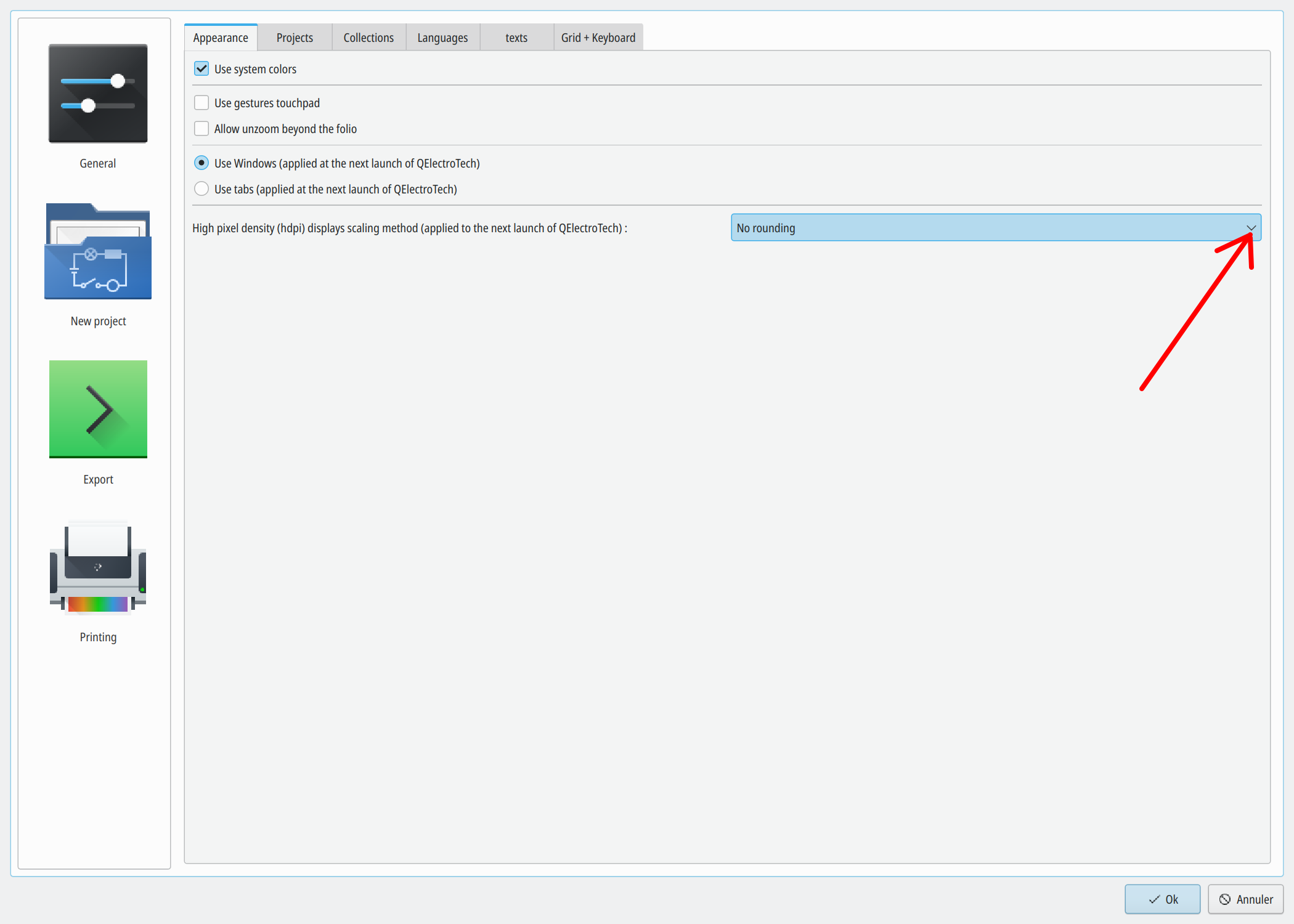
Dans la collection il y a quelques éléments tableau, sinon on peut s'amuser avec l’éditeur de texte et du HTML.
https://qelectrotech.org/forum/viewtopi … 1651#p1651
Hi Gabor,
copy symbol on your personal collection if you want edit this.
Thanks, added, but please remove spaces and also capital letters in filenames.
for i in *; do mv "$i" "$(echo $i | tr " " "-")"; done
for i in *; do mv "$i" "$(echo $i | tr A-Z a-z)"; done
Bonjour Thierry,
sur Windows si installation avec l'installeur le répertoire personnel doit se trouver
C:\Users\user_name\AppData\Roaming\get\ ou "C:\Users\user_name\Application Data\qet" là tu devrais retrouver tes anciens symboles et cartouches, si t'as encore le PC sous la main.
Apres tu peux dans la config choisir l'emplacement de la nouvelle collection, collection officielle, cartouches, etc.
https://download.qelectrotech.org/qet/m … ement.html
Laurent
Edit: petite astuce, si tu n'as malheureusement plus l’accès à ton ancien PC, et que tu as conservés tes anciens projets.
Ouvres un projet avec QET, dans les éléments importés, tu retrouveras tes anciens symboles et cartouches, s'ils sont contenus dans le projet.
Hi, maybe try latest changes :
https://qelectrotech.org/forum/viewtopi … 583#p15583
QElectroTech → Posts by scorpio810
Powered by PunBB, supported by Informer Technologies, Inc.
Generated in 0.094 seconds (31% PHP - 69% DB) with 5 queries