
27 2026-04-09 18:33:34
Re: Introduction: Cable Component Type (10 replies, posted in Code)
Ok, like Ai QET ?
https://qelectrotech.org/forum/viewtopi … 717#p22717
BTW, you can save a lot of work now:
28 2026-04-09 17:47:48
Re: Introduction: Cable Component Type (10 replies, posted in Code)
a macro explorer into QET?
Why, you can explain?
BTW I use a lot of ctrl + F for quickly searching conductors name, element, etc in my projets and of course you could change many things, maybe you don't know it?
29 2026-04-09 17:30:04
Re: Introduction: Cable Component Type (10 replies, posted in Code)
The way I’m doing it now—and the way I had planned to do it—is to use a dedicated component for this. I’ve attached an example image.
Yes I use the same workaround in my project read the entire topic.
https://qelectrotech.org/forum/viewtopi … 141#p17141
https://qelectrotech.org/forum/viewtopi … 158#p17158
C'est juste un symbole ...
30 2026-04-09 16:21:50
Re: Introduction: Cable Component Type (10 replies, posted in Code)
An Joshua idea for cable in diagram, but never finishe to coding, I'm think?
31 2026-04-09 13:12:33
Re: Flatpak packages 0.100-dev (34 replies, posted in News)
Flatpak app version is using old runtimes. See bellow:
https://github.com/qelectrotech/qelectr … issues/446
32 2026-04-09 13:02:19
Re: Automatic Terminal Numbering Tool (1 replies, posted in Code)
Hello Thomas, thank you for your work and your video howto.
Added to QET' YouTube chanel:
33 2026-04-08 17:59:47
Re: Raccourcis clavier (2 replies, posted in FR : Aide, suggestions, discussions, ...)
Bonjour,
Utilise la touche Maj uniquement pour sélectionner, pour retourner la sélection, vous devez la relâcher puis touche espace.
34 2026-04-02 16:18:00
Re: Anzahl Slaveelemnte definieren / Define number of slave elements (8 replies, posted in Code)
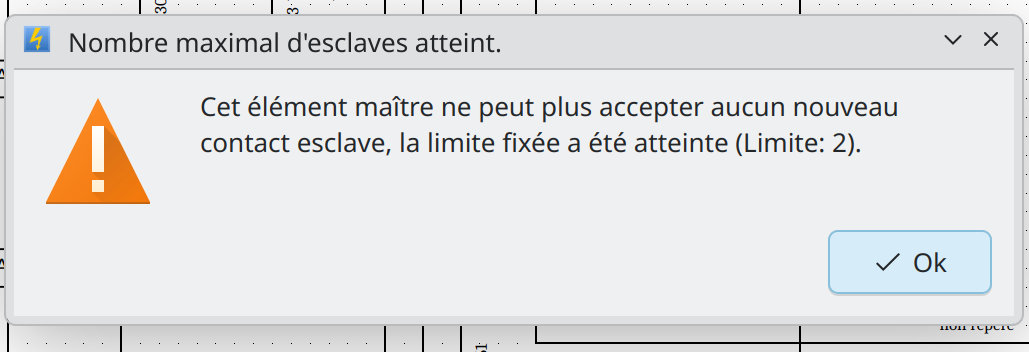
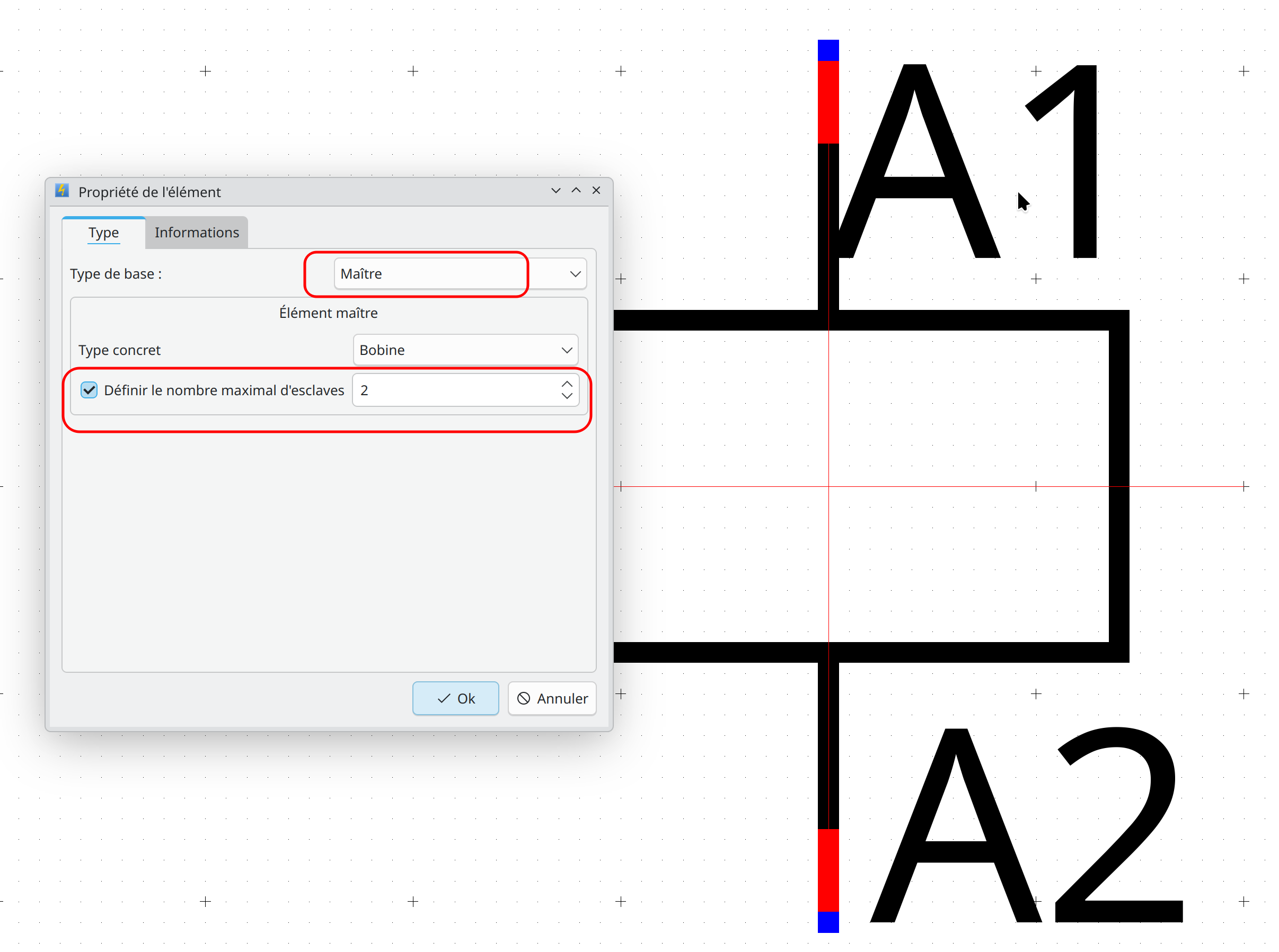
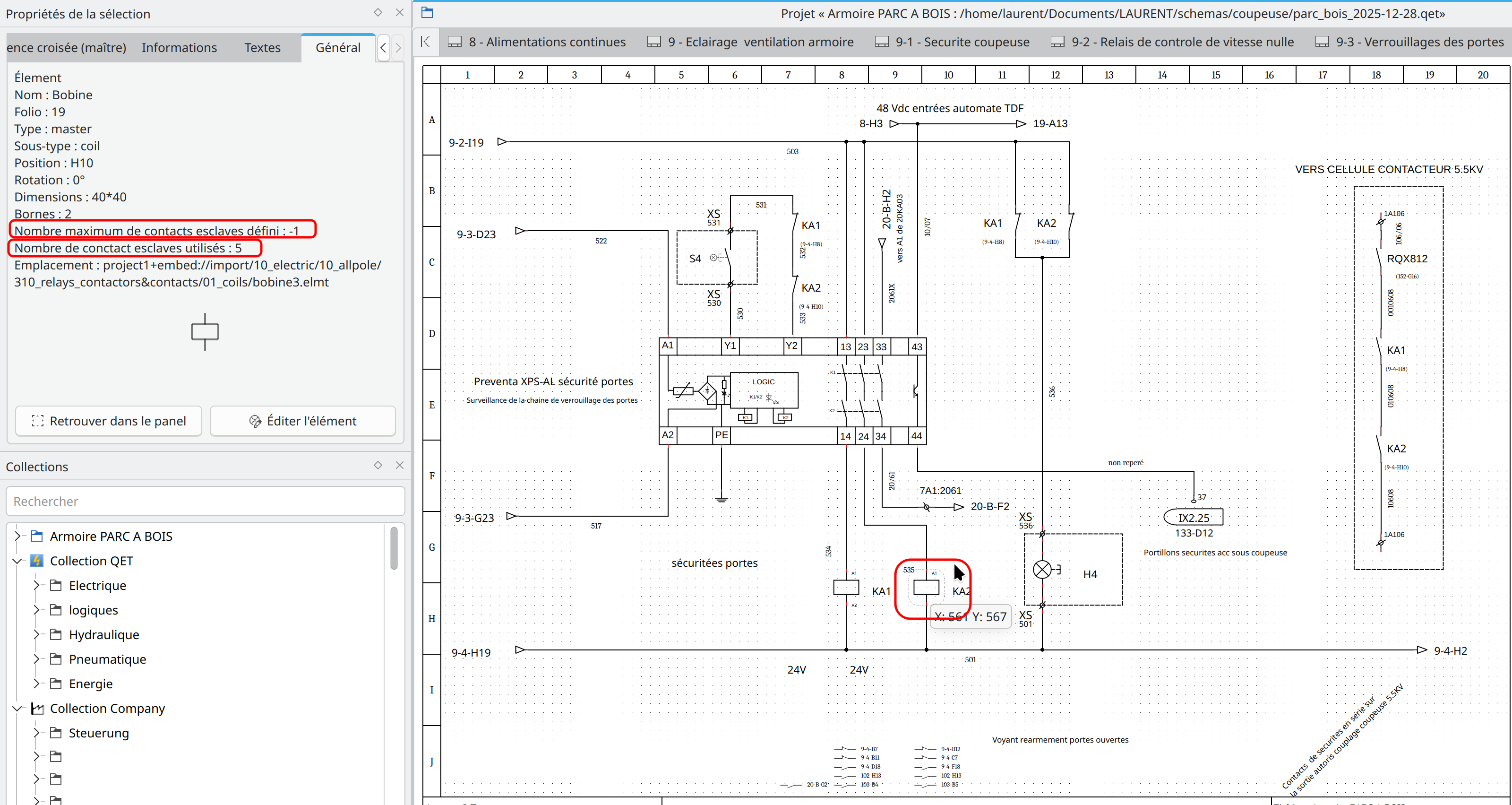
35 2026-04-02 12:19:46
Re: Anzahl Slaveelemnte definieren / Define number of slave elements (8 replies, posted in Code)
is this implemented?
and how to find it?
Pushed and uploaded for Debian deb, Ubuntu ppa and Windows, for now.
36 2026-04-02 11:45:20
Re: Valeurs dynamiques QET (6 replies, posted in FR : Aide, suggestions, discussions, ...)
37 2026-04-01 06:41:13
Re: English videos (9 replies, posted in Videos howto)
38 2026-03-28 13:41:39
Re: Qt 6.0 development and qelectrotech (160 replies, posted in Code)
Hello everyone,
qelectrotech can now be easily build under windows with Qt6 and cmake.
The changes made to do so are also benefit for the build under linux.
Please before merge to master can you test it and report any problem.
The branch is named msys2. I add documentations (in french, but easily understandable for other languages) accessible here :
https://github.com/qelectrotech/qelectr … d_msys2.mdThe documentation is managed by git, feel free to create a new one in English (in a new folder named 'en' please). The readme.md ( https://github.com/qelectrotech/qelectr … /README.md ) have now a link to this documentation under the section development.
Todo:
https://www.msys2.org/docs/ci/
https://github.com/marketplace/actions/setup-msys2
39 2026-03-27 17:12:17
Re: freepascal-code to take a QET- Element and scale the content by a fact (44 replies, posted in Scripts)
Hello,
on last version 0.100.0 be able to flip or mirror a symbol of an electrical component vertically or horizontaly on element editor without need to add plc-user's plug-in.
Installing plug-ins in the element editor in version 0.100.0 is very straightforward: simply click on the File menu, select ‘Resize an element’ or ‘Import a DXF file’. You will be guided through the download and installation process. Just extract the binary maybe rename it, and put it in binary folder asked by widget.

40 2026-03-27 16:55:15
Re: Anzahl Slaveelemnte definieren / Define number of slave elements (8 replies, posted in Code)
I tested and merged this pull request and this code working good, but when I tried to translate the German comments back into English across all these code changes, I noticed that many lines of code had been removed or moved in some commits and the diffs files are very quite large, so I decided to revert them for now, until I can check them in more detail and others users like plc-user, Joshua, Achim, etc, can review new code too.
Like: https://github.com/qelectrotech/qelectr … 740af66904
and
https://github.com/qelectrotech/qelectr … 9ec2476cdd
Why? Because I don’t want to break a feature – a feature that’ll surely be reported by a user here without anyone having noticed or realised anything!
By the way, thanks Thomas for your's work. 
41 2026-03-27 12:45:58
Re: Anzahl Slaveelemnte definieren / Define number of slave elements (8 replies, posted in Code)
This PR implements the functionality to read the 'max_slaves' attribute from master elements. It prevents linking more slave elements than specified, both in the link-single-element dialog and the master properties widget.
https://github.com/qelectrotech/qelectr … r/pull/441
43 2026-03-27 10:30:15
Re: Discussion sur l'export CSV (58 replies, posted in FR : Aide, suggestions, discussions, ...)
<elements>
<element type="embed://import/10_electric/20_manufacturers_articles/abb/abb_pfea112_ip20.elmt" x="650" y="240" z="10" freezeLabel="false" prefix="" uuid="{1bb6adae-b294-47f2-b90a-a1638d3d47b1}" orientation="0">
<terminals>
<terminal x="-49" y="-70" id="0" orientation="3"/>
<terminal x="120" y="-70" id="1" orientation="1"/>
<terminal x="-49" y="-60" id="2" orientation="3"/>
<terminal x="120" y="-50" id="3" orientation="1"/>
<terminal x="-49" y="-40" id="4" orientation="3"/>
<terminal x="-49" y="-30" id="5" orientation="3"/>
<terminal x="120" y="-30" id="6" orientation="1"/>
<terminal x="-49" y="-20" id="7" orientation="3"/>
<terminal x="-49" y="-10" id="8" orientation="3"/>
<terminal x="120" y="0" id="9" orientation="1"/>
<terminal x="120" y="10" id="10" orientation="1"/>
<terminal x="-49" y="20" id="11" orientation="3"/>
<terminal x="-49" y="30" id="12" orientation="3"/>
<terminal x="-49" y="40" id="13" orientation="3"/>
<terminal x="120" y="40" id="14" orientation="1"/>
<terminal x="-49" y="50" id="15" orientation="3"/>
<terminal x="120" y="80" id="16" orientation="1"/>
<terminal x="27" y="100" id="17" orientation="1"/>
</terminals>
<inputs/>
<elementInformations>
<elementInformation name="manufacturer" show="1">ABB</elementInformation>
</elementInformations>
<dynamic_texts>
<dynamic_elmt_text frame="false" Halignment="AlignLeft" x="-80" y="-161" rotation="0" font="Liberation Sans,9,-1,5,50,0,0,0,0,0,Regular" text_width="-1" uuid="{32b586e9-8498-4cc5-84f3-55eb85d33ba3}" keep_visual_rotation="true" text_from="ElementInfo" Valignment="AlignTop">
<text></text>
<info_name>label</info_name>
</dynamic_elmt_text>
</dynamic_texts>
<texts_groups/>
</element>
<element type="embed://import/10_electric/20_manufacturers_articles/abb/abb_pfea112_ip20.elmt" x="170" y="240" z="10" freezeLabel="false" prefix="" uuid="{91b29ac2-9ae7-4dc3-85f7-f28892848f3a}" orientation="0">
<terminals>
<terminal x="-49" y="-70" id="18" orientation="3"/>
<terminal x="120" y="-70" id="19" orientation="1"/>
<terminal x="-49" y="-60" id="20" orientation="3"/>
<terminal x="120" y="-50" id="21" orientation="1"/>
<terminal x="-49" y="-40" id="22" orientation="3"/>
<terminal x="-49" y="-30" id="23" orientation="3"/>
<terminal x="120" y="-30" id="24" orientation="1"/>
<terminal x="-49" y="-20" id="25" orientation="3"/>
<terminal x="-49" y="-10" id="26" orientation="3"/>
<terminal x="120" y="0" id="27" orientation="1"/>
<terminal x="120" y="10" id="28" orientation="1"/>
<terminal x="-49" y="20" id="29" orientation="3"/>
<terminal x="-49" y="30" id="30" orientation="3"/>
<terminal x="-49" y="40" id="31" orientation="3"/>
<terminal x="120" y="40" id="32" orientation="1"/>
<terminal x="-49" y="50" id="33" orientation="3"/>
<terminal x="120" y="80" id="34" orientation="1"/>
<terminal x="27" y="100" id="35" orientation="1"/>
</terminals>
<inputs/>
<elementInformations>
<elementInformation name="manufacturer" show="1">ABB</elementInformation>
</elementInformations>
<dynamic_texts>
<dynamic_elmt_text frame="false" Halignment="AlignLeft" x="-80" y="-161" rotation="0" font="Liberation Sans,9,-1,5,50,0,0,0,0,0,Regular" text_width="-1" uuid="{cebf22e0-635d-4d1f-8902-6358bbd82534}" keep_visual_rotation="true" text_from="ElementInfo" Valignment="AlignTop">
<text></text>
<info_name>label</info_name>
</dynamic_elmt_text>
</dynamic_texts>
<texts_groups/>
</element>
</elements>
44 2026-03-27 10:12:31
Re: Discussion sur l'export CSV (58 replies, posted in FR : Aide, suggestions, discussions, ...)
Bonjour Florient,
Une petite question : quand un élément est mis dans un schéma, a-t-il un ID qui lui est propre et qui le différencie d'un autre symbole identique ?
Oui c'est le but, chaque élément a son propre UUID.
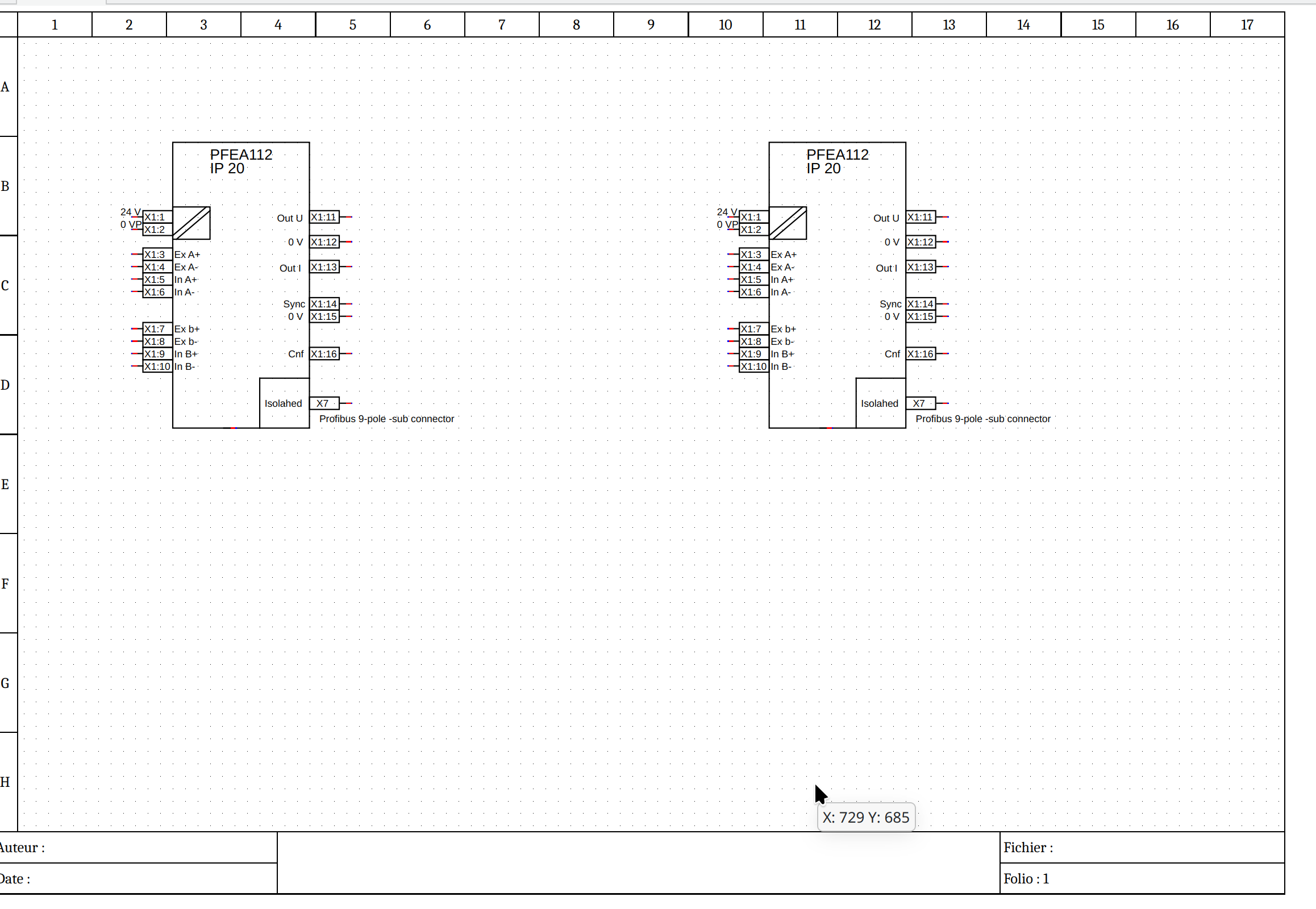
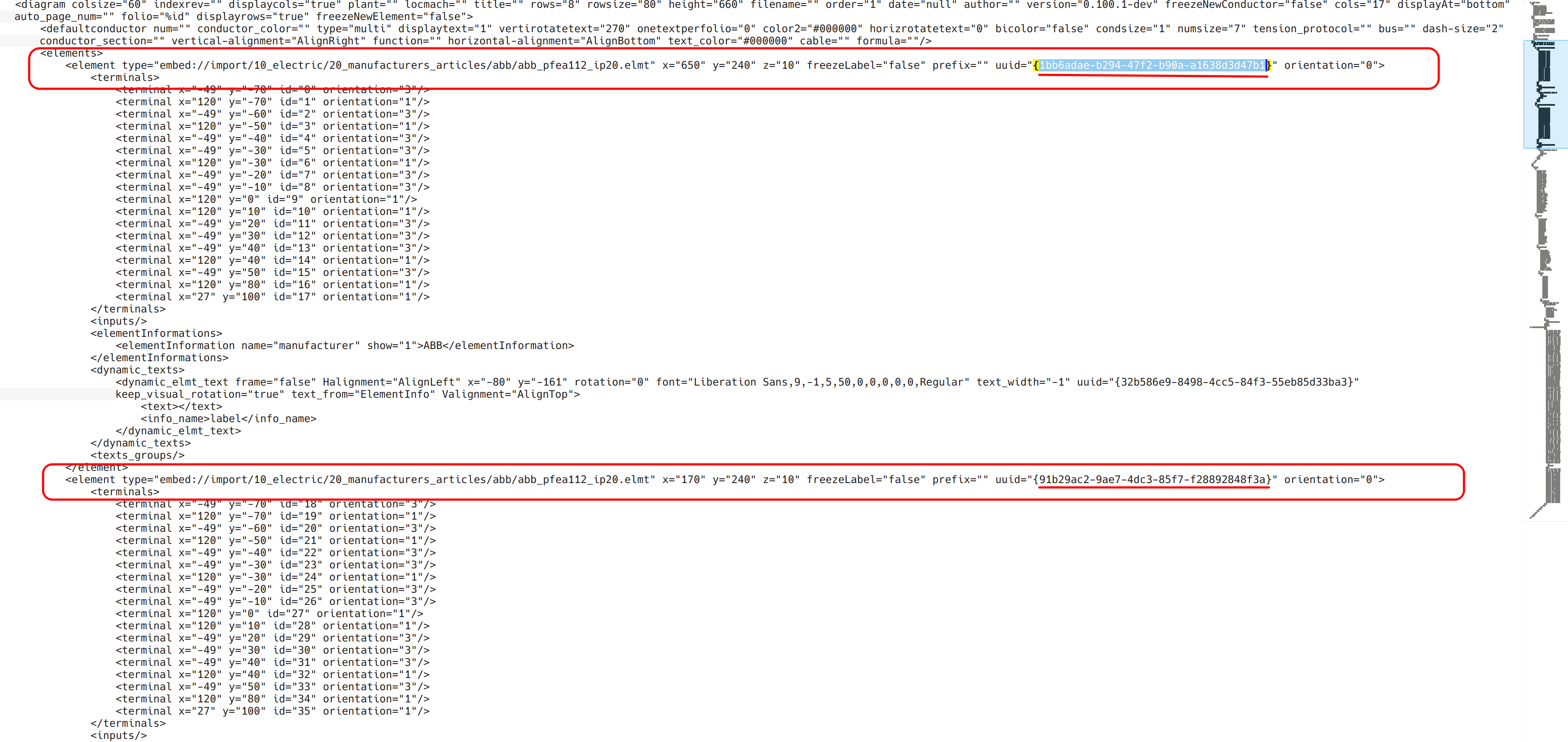
Est-il possible de le faire apparaître lors d'un export CSV ?
Oui voir: https://qelectrotech.org/forum/viewtopi … 256#p16256
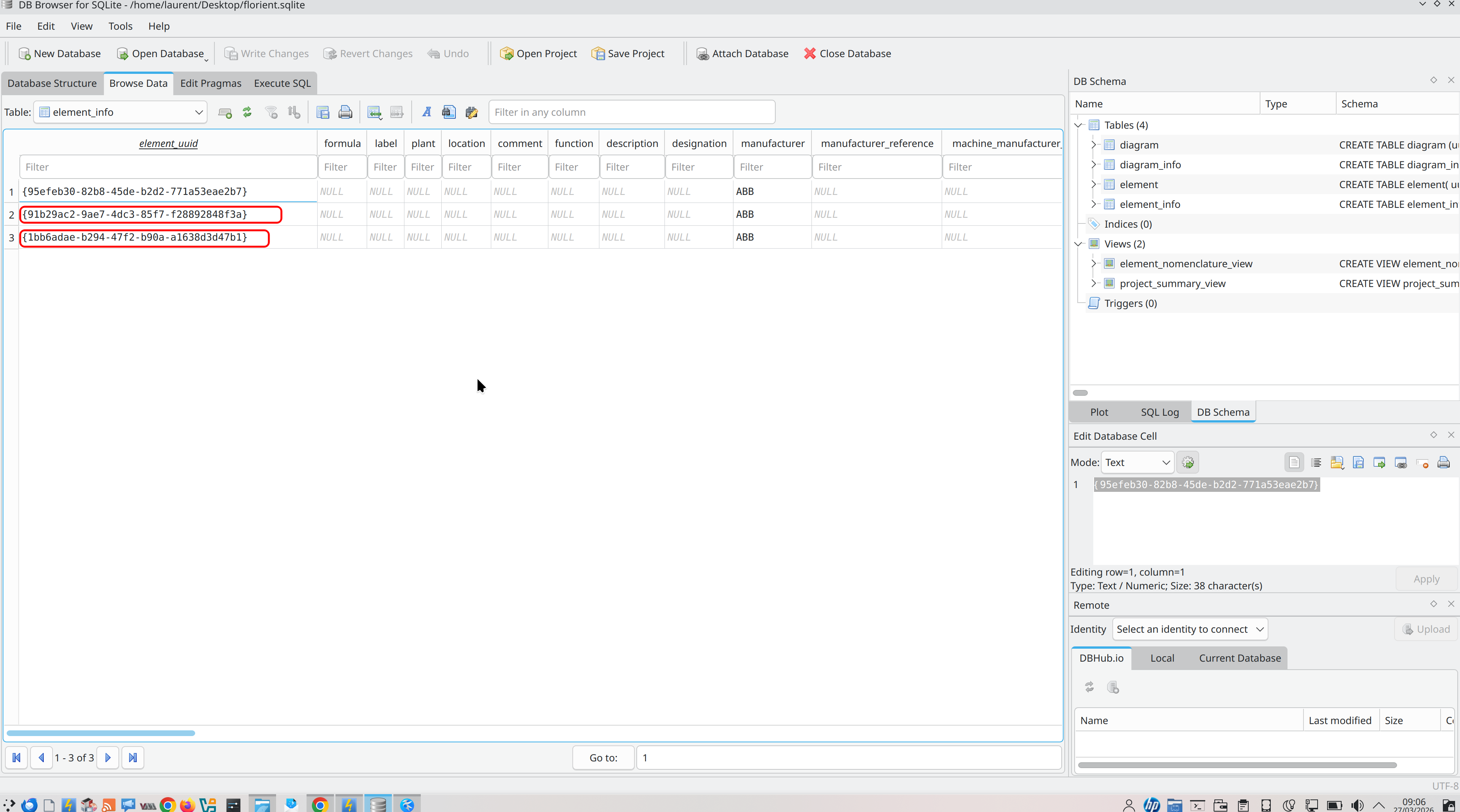
Laurent.
45 2026-03-22 16:12:29
Re: Edit the *.qet project with A.I. tool (4 replies, posted in EN : Help, suggestions, discussions, ...)
Hello friends,
Hi Scorpio
As a help for my colleagues I create companion app for create
electroschematic just with prompt.
I'm using Claude for prompting and app need API from Anthropic. This
version of application will be free. If you are interested, in download
link you can find beta version of my app. Use C++ was not possible so app
running on Electron. In case of question write me.https://drive.google.com/drive/folders/ … sp=sharing
S pozdravom / Kind regards
Ľuboš
https://www.linkedin.com/posts/lubos-ko … BwmbdJPKjs
# SchematicAI — Recommended Prompts
A quick reference of example prompts you can use with SchematicAI.
Click any suggestion chip in the Chat Panel to auto-fill the prompt, or type your own.---
## Add Components
| Prompt | What It Does |
|--------|-------------|
| Add a DOL motor starter circuit on folio 1 with a contactor K1, overload relay F1, and a 3-phase motor M1. Wire them in series. | Creates a complete direct-on-line starter with wiring |
| Add a circuit breaker Q1 at position column 2, row B on folio 1. | Places a single circuit breaker at a grid location |
| Add a normally-open start button S1 and a normally-closed stop button S2 on folio 1, column 3. | Places a start/stop push-button pair |## Modify Schematic
| Prompt | What It Does |
|--------|-------------|
| Rename the label of element K1 to "KM1" on folio 1. | Changes a component label |
| Move element Q1 to column 4, row C on folio 1. | Repositions an element on the grid |
| Connect the output terminal of Q1 to the input terminal of K1 on folio 1. | Draws a conductor between two elements |## Folio Management
| Prompt | What It Does |
|--------|-------------|
| Add a new folio titled "Control Circuit". | Creates a new diagram page |
| Rename folio 1 to "Power Distribution". | Changes a folio title |## Ask Questions
| Prompt | What It Does |
|--------|-------------|
| List all components on folio 1 with their labels and positions. | Gets an inventory of placed elements |
| Are there any unwired terminals on folio 1? | Checks for missing connections |---
## Tips for Writing Prompts
- **Always specify the folio** — e.g. "on folio 1" or "on folio 2".
- **Use standard tag prefixes** — K for contactors, Q for breakers, F for fuses/relays, M for motors, S for switches.
- **Reference grid positions** — use column numbers (0, 1, 2...) and row letters (A, B, C...) for precise placement.
- **Be specific about wiring** — name both elements and terminals you want connected.
- **Use the Element Library** — click "Insert in prompt" on a library element to include its exact path.
- **Multilingual support** — you can write prompts in Slovak, Czech, German, French, Spanish, and other languages.
46 2026-03-19 17:40:05
Re: QElectroTech version 0.100.0 released (2 replies, posted in News)
QElectroTech 0.100.0.8590 is available on Package Manager for Windows chocolatey.org!
47 2026-03-18 18:03:59
Re: Connection lines angled - not straight (7 replies, posted in EN : Help, suggestions, discussions, ...)
I can.
As an example the parts on the top, and also left bottom side, shows additional lines, not needed.
48 2026-03-17 13:34:35
Re: Error on github qet-source-mirror (6 replies, posted in Code)
Hello Achim:
No problem here on Debian Unstable...
git clone --recursive https://github.com/qelectrotech/qelectrotech-source-mirror.git qet_test
Clonage dans 'qet_test'...
remote: Enumerating objects: 153432, done.
remote: Counting objects: 100% (176/176), done.
remote: Compressing objects: 100% (101/101), done.
remote: Total 153432 (delta 105), reused 99 (delta 71), pack-reused 153256 (from 2)
Réception d'objets: 100% (153432/153432), 133.82 MiO | 40.37 MiO/s, fait.
Résolution des deltas: 100% (128379/128379), fait.
Sous-module 'SingleApplication' ([url]https://github.com/itay-grudev/SingleApplication.git[/url]) enregistré pour le chemin 'SingleApplication'
Sous-module 'doxygen-awesome-css' ([url]https://github.com/jothepro/doxygen-awesome-css.git[/url]) enregistré pour le chemin 'doxygen-awesome-css'
Sous-module 'elements' ([url]https://github.com/qelectrotech/qelectrotech-elements.git[/url]) enregistré pour le chemin 'elements'
Sous-module 'pugixml' ([url]https://github.com/zeux/pugixml.git[/url]) enregistré pour le chemin 'pugixml'
Clonage dans '/media/backup6/download/qet_test/SingleApplication'...
remote: Enumerating objects: 1461, done.
remote: Counting objects: 100% (533/533), done.
remote: Compressing objects: 100% (117/117), done.
remote: Total 1461 (delta 463), reused 416 (delta 416), pack-reused 928 (from 1)
Réception d'objets: 100% (1461/1461), 535.08 KiO | 4.18 MiO/s, fait.
Résolution des deltas: 100% (783/783), fait.
Clonage dans '/media/backup6/download/qet_test/doxygen-awesome-css'...
remote: Enumerating objects: 2996, done.
remote: Counting objects: 100% (484/484), done.
remote: Compressing objects: 100% (130/130), done.
remote: Total 2996 (delta 405), reused 354 (delta 354), pack-reused 2512 (from 2)
Réception d'objets: 100% (2996/2996), 8.47 MiO | 32.61 MiO/s, fait.
Résolution des deltas: 100% (2281/2281), fait.
Clonage dans '/media/backup6/download/qet_test/elements'...
remote: Enumerating objects: 59430, done.
remote: Counting objects: 100% (21211/21211), done.
remote: Compressing objects: 100% (8247/8247), done.
remote: Total 59430 (delta 13969), reused 17451 (delta 12926), pack-reused 38219 (from 1)
Réception d'objets: 100% (59430/59430), 48.60 MiO | 37.11 MiO/s, fait.
Résolution des deltas: 100% (45028/45028), fait.
Clonage dans '/media/backup6/download/qet_test/pugixml'...
remote: Enumerating objects: 9869, done.
remote: Counting objects: 100% (2410/2410), done.
remote: Compressing objects: 100% (360/360), done.
remote: Total 9869 (delta 2187), reused 2054 (delta 2050), pack-reused 7459 (from 1)
Réception d'objets: 100% (9869/9869), 6.52 MiO | 23.33 MiO/s, fait.
Résolution des deltas: 100% (6806/6806), fait.
Chemin de sous-module 'SingleApplication' : 'cbe496bc01e6515f9692824bf36d5136e8208c85' extrait
Chemin de sous-module 'doxygen-awesome-css' : '568f56cde6ac78b6dfcc14acd380b2e745c301ea' extrait
Chemin de sous-module 'elements' : '4e7f569dca75ee7ca78fc86b33cd800dfb4951d7' extrait
Chemin de sous-module 'pugixml' : '5a1892b321a38997e3e359069aea3fa35d49a5c6' extrait
[12:33:41] laurent@debian:/media/backup6/download$
49 2026-03-13 15:08:15
Re: Terminal with 2 different wire names (3 replies, posted in EN : Help, suggestions, discussions, ...)
Yes it's a workaround.
50 2026-03-12 17:20:21
Re: Cooldrive and module 4 relays Arduino (2 replies, posted in Elements)
Hello David,
please share them, just edit your post to see file upload.
One is something commonly used and recognizable, a 4-relay module for Arduino.
Like this?
https://qelectrotech.org/forum/viewtopi … 661#p13661