Hallo plc-user,
i just published all packages, please try and check.
I don't publish arm64 macOS at this time. maybe this week...
Thanks,
Laurent

You are not logged in. Please login or register.
QElectroTech → Posts by scorpio810
Hallo plc-user,
i just published all packages, please try and check.
I don't publish arm64 macOS at this time. maybe this week...
Thanks,
Laurent
https://www.kreativekiste.de/schaltplan … lectrotech
The programme has really taken a step forward since version 7. I still don't think the program is as intuitive to use as other programs. BUT, once you get the hang of it, for example with cross-references or text fields, then you won't want to work with any other program. BECAUSE QElectroTech's greatest advantage is its universal user-friendliness, which takes a bit more work at first but once you've got the hang of it, you can really work with it.
A short manual for the transition from old to new locations of config- and data-directories.
In the following blocks you find the changes, that have to be made by the user.
If you are missing any information or have found an error, please let us know!
Hi plc-user and thanks for your little manual for the transition,
I will try to do it for macOS, maybe next week if I have time,
but I have to install a new macOS VM on my mac Mini and install december QET and compare the old locations with new QET version's files PATH . But if someone can do it, I'd be relieved 
Coucou, je suis Pércylès, Automaticien sur du multi-marques (Schneider, Kieback, SOFREL, WAGO, Trend, Distech ...) et je me sers de votre logiciel depuis très très longtemps.
Bonjour Pércylès et bienvenu,
Si je pouvais modifier les intitulés de Label, installation, N°articles et les autres pour les remplacer par ce qui est attendu sur mon logiciel de programmation et ainsi, faciliter pour mes collègues et moi-même les renseignements à fournir et retrouver une certaine correspondance entre qelectrotech et le logiciel de prog schneider.
voir:
https://qelectrotech.org/forum/viewtopi … 256#p16256
SELECT comment AS 'References', COUNT(comment) AS 'Quantités', description, manufacturer FROM element_nomenclature_view WHERE ( element_type = 'simple' OR element_sub_type = 'commutator' OR element_sub_type = 'coil' OR element_sub_type = 'protection') AND comment != '' AND label != '' GROUP BY comment ORDER BY COUNT(comment) DESC
Explications :
Je veux que le titre soit Références et non comment.
comment AS 'References'
Laurent
Strange, again?
see --> Key is stored in legacy trusted.gpg keyring (/etc/apt/trusted.gpg), see the DEPRECATION section in apt-key(8) for details
Bonsoir ,
tu n'as pas de soucis a te faire le logiciel s'adaptera quelque soit la taille de la sortie papier tout comme quand tu veux imprimer une photo, tu sélectionnes le format papier, la marge et fait un aperçu avant l'impression.
Hallo plc-user,
I can't remember, I think it's been from the beginning...
I've always hated DesktopLocation... which saves the default project under Desktop! So I prefer to "save it" to others PATH.
Change can be easy, like this:
--- sources/qetproject.cpp
+++ sources/qetproject.cpp
@@ -369,7 +369,7 @@ QString QETProject::currentDir() const
 {
     QString current_directory;
     if (m_file_path.isEmpty()) {
-        current_directory = QStandardPaths::writableLocation(QStandardPaths::DesktopLocation);
+        current_directory = QStandardPaths::writableLocation(QStandardPaths::DocumentsLocation);
     } else {
         current_directory = QFileInfo(m_file_path).absoluteDir().absolutePath();
     }
Best regards
laurent
Edit :
https://github.com/qelectrotech/qelectr … 4db6af63a1
And
scorpio810 wrote:Only when you connect a 1.5mn² wire, for example, to a large busbar or repartitor but of course your wire is protected downstream by a 10A fuse will you have to cheat with a non-terminal type symbol to connect them together.
Is there a library part for a Series Terminal Block with different Size?
Generic:
https://download.qelectrotech.org/qet/e … index.html
Hallo plc-user,
As expected, things aren't going so well
Um, Maybe I think I made a a little mistake when merging your PR, there are a lot of things to re-set,like elements, ect locations PATH, the location of binary plugin collections, the path in the logs now was wrong, and so on.
DXF2elmt Binary or QETelementScaler offers me this PATH now on my Debian: /home/laurent/.local/share/QElectroTech/QElectroTech/binary/
Sometimes you have to demolish everything in order to rebuild better.
Best regards,
Laurent
Édites ton ancien post, et tu devrais voir choisir un fichier et le joindre.
Bonjour Thomas,
ton projet contient des logos SVG dans les cartouches?
Si tu as un backup fonctionnel de ce projet, regardes si tu peux le partager ici.
Hallo plc-user,
you could add a pull request?
Users just want to know the PATH of stalesfiles:
https://qelectrotech.org/bugtracker/view.php?id=209
When you click on cancel the backup file is deleted (it is the normal behavior).
I can't reproduce your bug on my windows 10 vm.
Can you test :
-when you click on cancel if the file on the folder C:\Users\ your_username\AppData\Local\stalefiles\QElectroTech is still here or not.
-Install the last QElectrotech build
-Test on another pc
BTW, I added new commit since.
https://github.com/qelectrotech/qelectr … 4af8e61d49
Edit:
11:50:34.522 Info: System language: "fr"
11:50:34.523 Info: language Path: "/usr/local/share/qelectrotech/lang/"
11:50:34.523 Info: Common Elements Dir: "/usr/local/share/qelectrotech/elements/"
11:50:34.523 Info: Common TitleBlock Templates Dir: "/usr/local/share/qelectrotech/titleblocks/"
11:50:34.523 Info: Custom Elements Dir: "/home/laurent/.qet/elements/"
11:50:34.523 Info: Custom TitleBlock Templates Dir: "/home/laurent/.qet/titleblocks/"
11:50:34.523 Info: Company Elements Dir: "/home/laurent/.qet/elements-company/"
11:50:34.523 Info: Company TitleBlock Templates Dir: "/home/laurent/.qet/titleblocks-company"
11:50:34.523 Info: User Location: "/home/laurent/.qet/"
11:50:34.523 Info: Config Location : ("/home/laurent/.config/QElectroTech/QElectroTech")
11:50:34.523 Info: Project stalefiles Location: "/home/laurent/.local/share/QElectroTech/QElectroTech"
Hallo plc-user:
Stalefiles was based to #include <KAutoSaveFile> (KCoreAddons)
https://api.kde.org/frameworks/kcoreadd … eFile.html
qetapp.cpp
https://github.com/qelectrotech/qelectr … pp.cpp#L50
https://github.com/qelectrotech/qelectr … .cpp#L2271
qetdiagrameditor.cpp
https://github.com/qelectrotech/qelectr … or.cpp#L51
https://github.com/qelectrotech/qelectr … .cpp#L1898
qetproject.cpp
https://github.com/qelectrotech/qelectr … ct.cpp#L93
qetproject.h
https://github.com/qelectrotech/qelectr … ject.h#L34
https://github.com/qelectrotech/qelectr … ject.h#L83
Laurent
@plc-user:It seems like a lot of work and I don't feel up to it any more.
My health is deteriorating and I find it hard to think and organise myself.
What's more, at work I suffer from not being as fit and clear-headed as I was at 40.
Perhaps this is due to the many medications I'm taking.
scorpio810 wrote:Remember to find KAutoSaveFile::allStaleFiles PATH also.
Where do I find those files, if they exist on the system?
Can I force QET to produce a "StaleFile"?
https://qelectrotech.org/forum/viewtopi … 072#p16072
Btw, backup files is stored on ~.local/share/stalefiles/QElectroTech on Linux.
C:\Users\username\AppData\Local\stalefiles\QElectroTech on Windows
/Users/username/Library/Application Support/stalefiles/QElectroTech/ on macOS
Hallo plc-user
Have not time, but quickly make an little commit: https://github.com/qelectrotech/qelectr … 4dd909284f
OS : linux - x86_64 - Version : Debian GNU/Linux trixie/sid
6:36:00.197 Info: "Compilation : GCC 14.2.0"
16:36:00.197 Info: "Built with Qt 5.15.15 - x86_64 - Date : Jan 23 2025 : 16:35:56"
16:36:00.197 Info: "Run with Qt 5.15.15 using 48 thread(s)"
16:36:00.197 Info: "CPU : model name\t: AMD Ryzen Threadripper 3960X 24-Core Processor\n"
16:36:00.197 Info: "RAM Total : 64 GB"
16:36:00.197 Info: "RAM Available : 57 GB"
16:36:00.197 Info: "GPU : Advanced Micro Devices, Inc. [AMD/ATI] Navi 22 [Radeon RX 6700/6700 XT/6750 XT / 6800M/6850M XT] (rev df)\n"
16:36:00.197 Info: "GPU RAM : Video memory: 10240MB\n Dedicated video memory: 10240 MB\n Currently available dedicated video memory: 8845 MB\n"
16:36:00.197 Info: "OS : linux - x86_64 - Version : Debian GNU/Linux trixie/sid - Kernel : 6.12.10-amd64"
16:36:00.197 Info: System language: "fr"
16:36:00.197 Info: language Path: "/usr/local/share/qelectrotech/lang/"
16:36:00.197 Info: Common Elements Dir: "/usr/local/share/qelectrotech/elements/"
16:36:00.197 Info: Common TitleBlock Templates Dir: "/usr/local/share/qelectrotech/titleblocks/"
16:36:00.197 Info: Custom Elements Dir: "/home/laurent/.qet/elements/"
16:36:00.197 Info: Custom TitleBlock Templates Dir: "/home/laurent/.qet/titleblocks/"
16:36:00.197 Info: Company Elements Dir: "/home/laurent/.qet/elements-company/"
16:36:00.197 Info: Company TitleBlock Templates Dir: "/home/laurent/.qet/titleblocks-company"
16:36:00.197 Info: Standard Location : ("/home/laurent/.config/QElectroTech/QElectroTech")
16:36:00.197 Info: App Data Location: "/home/laurent/.local/share/QElectroTech/QElectroTech"
16:36:00.197 Info: App Local DataLocation: "/home/laurent/.local/share/applications"
16:36:00.197 Info: Home Location: "/home/laurent"
16:36:00.197 Info: Runtime Location: "/run/user/1000"
16:36:00.197 Info: Cache Location: "/home/laurent/.cache/QElectroTech/QElectroTech"
Edit macOS arm64
10:34:19.164 Info: "GitRevision b19fbd25224ab1286e22432fb35bcc10c092eb44"
10:34:19.164 Info: "QElectroTech V 0.100.0-dev"
10:34:19.164 Info: "Compilation : CLANG 14.0.0 (clang-1400.0.29.102)"
10:34:19.164 Info: "Built with Qt 5.15.15 - arm64 - Date : Jan 24 2025 : 10:26:19"
10:34:19.165 Info: "Run with Qt 5.15.15 using 8 thread(s)"
10:34:19.165 Info: "CPU : Apple M2\n"
10:34:19.165 Info: "RAM Total : 8 GB"
10:34:19.165 Info: ""
10:34:19.165 Info: "GPU : "
10:34:19.165 Info: "GPU RAM : "
10:34:19.165 Info: "OS : darwin  - arm64 - Version : macOS 14.7 - Kernel : 23.6.0"
10:34:19.165 Info:  System language: "fr"
10:34:19.165 Info:  language Path: "/Applications/qelectrotech.app/Contents/MacOS/./../Resources/lang/"
10:34:19.165 Info:  Common Elements Dir: "/Applications/qelectrotech.app/Contents/MacOS/./../Resources/elements/"
10:34:19.165 Info:  Common TitleBlock Templates Dir: "/Applications/qelectrotech.app/Contents/MacOS/./../Resources/titleblocks/"
10:34:19.165 Info:  Custom Elements Dir: "/Users/laurent/.qet/elements/"
10:34:19.165 Info:  Custom TitleBlock Templates Dir: "/Users/laurent/.qet/titleblocks/"
10:34:19.165 Info:  Company Elements Dir: "/Users/laurent/.qet/elements-company/"
10:34:19.165 Info:  Company TitleBlock Templates Dir: "/Users/laurent/.qet/titleblocks-company/"
10:34:19.165 Info:  Standard Location : ("/Users/laurent/Library/Preferences/QElectroTech/QElectroTech")
10:34:19.165 Info:  App Data Location: "/Users/laurent/Library/Application Support/QElectroTech/QElectroTech"
10:34:19.165 Info:  App Local DataLocation: "/Users/laurent/Applications"
10:34:19.165 Info:  Home Location: "/Users/laurent"
10:34:19.165 Info:  Runtime Location: "/Users/laurent/Library/Application Support"
10:34:19.165 Info:  Cache Location: "/Users/laurent/Library/Caches/QElectroTech/QElectroTech"
10:34:19.165 Info: *** Qt screens ***
Edit Win10 x86-64:
07:40:19.388 Info: "QElectroTech V 0.100.0-dev"
07:40:19.388 Info: "Compilation: GCC 13.3.0"
07:40:19.389 Info: "Built with Qt 5.15.16 - x86_64 - Date : Jan 23 2025 : 17:39:55"
07:40:19.391 Info: "Run with Qt 5.15.16 using 24 thread(s)"
07:40:19.392 Info: "CPU : NAME                                            \r\r\nAMD RYZEN THREADRIPPER 3960X 24-CORE PROCESSOR  \r\r\n\r\r\n"
07:40:19.392 Info: "RAM Total : 36 GB"
07:40:19.393 Info: "RAM Available : 33 GB"
07:40:19.394 Info: "GPU : VideoProcessor  \r\r\n                \r\r\n\r\r\n"
07:40:19.395 Info: "GPU RAM : RAM Total : AdapterRAM  \r\r\n0           \r\r\n\r\r\n B"
[b]07:40:19.397 Info: "OS : winnt  - x86_64 - Version : Windows 10 Version 2009 - Kernel : 10.0.19045"
07:40:19.397 Info:  System language: "en"
07:40:19.398 Info:  language Path: "C:/Program Files/QElectroTech/lang/"
07:40:19.399 Info:  Common Elements Dir: "C:/Program Files/QElectroTech/elements/"
07:40:19.399 Info:  Common TitleBlock Templates Dir: "C:/Program Files/QElectroTech/titleblocks/"
07:40:19.400 Info:  Custom Elements Dir: "C:/Users/laurent/Application Data/qet/elements/"
07:40:19.401 Info:  Custom TitleBlock Templates Dir: "C:/Users/laurent/Application Data/qet/titleblocks/"
07:40:19.401 Info:  Company Elements Dir: "C:/Users/laurent/Application Data/qet/elements-company/"
07:40:19.403 Info:  Company TitleBlock Templates Dir: "C:/Users/laurent/Application Data/qet/titleblocks-company/"
07:40:19.404 Info:  Standard Location : ("C:/Users/laurent/AppData/Local/QElectroTech/QElectroTech")
07:40:19.405 Info:  App Data Location: "C:/Users/laurent/AppData/Roaming/QElectroTech/QElectroTech"
07:40:19.406 Info:  App Local DataLocation: "C:/Users/laurent/AppData/Roaming/Microsoft/Windows/Start Menu/Programs"
07:40:19.406 Info:  Home Location: "C:/Users/laurent"
07:40:19.408 Info:  Runtime Location: "C:/Users/laurent"
07:40:19.409 Info:  Cache Location: "C:/Users/laurent/AppData/Local/QElectroTech/QElectroTech/cache"
07:40:19.409 Info: *** Qt screens ***
@plc-user: I'm thinking if "we" can add all the data from the config file on the log file,
later it might be useful for troubleshooting users, what do you think?
BTW, on Windows OS our users don't have the config file .... All config 'stored only in registry editor: regedit!! beurk! 
Remember to find KAutoSaveFile::allStaleFiles PATH also.
Hallo plc-user,
this patch send me in log file these informations:
--- sources/machine_info.cpp
+++ sources/machine_info.cpp
@@ -27,6 +27,7 @@
 #include <QStorageInfo>
 #include <QLibraryInfo>
 #include <QStorageInfo>
+#include <QStandardPaths>

 #ifdef Q_OS_WIN
 #include <windows.h>
@@ -144,6 +145,12 @@ void MachineInfo::send_info_to_debug()
           + "  - " + pc.cpu.Architecture
           + " - Version : "+pc.os.name
           + " - Kernel : "+pc.os.kernel;
+    qInfo()<< " Standard Location :"<< QStringList(QStandardPaths::writableLocation(QStandardPaths::AppConfigLocation));
+    qInfo()<< " AppLocal Data Location:"<< QStandardPaths::writableLocation(QStandardPaths::ApplicationsLocation);
+    qInfo()<<" Home Location:"<< QStandardPaths::writableLocation(QStandardPaths::HomeLocation);
+    qInfo()<<" Runtime Location:"<< QStandardPaths::writableLocation(QStandardPaths::RuntimeLocation);
+
+
     qInfo()<< "*** Qt screens ***";

     for (int ii = 0; ii < pc.screen.count; ++ii) {
@@ -411,3 +418,4 @@ QString MachineInfo::compilation_info()
     }
     return compilation_info;
 }
+
11:11:35.986 Info: "Built with Qt 5.15.15 - x86_64 - Date : Jan 23 2025 : 11:11:32"
11:11:35.986 Info: "Run with Qt 5.15.15 using 48 thread(s)"
11:11:35.986 Info: "CPU : model name\t: AMD Ryzen Threadripper 3960X 24-Core Processor\n"
11:11:35.986 Info: "RAM Total : 64 GB"
11:11:35.986 Info: "RAM Available : 56 GB"
11:11:35.986 Info: "GPU : Advanced Micro Devices, Inc. [AMD/ATI] Navi 22 [Radeon RX 6700/6700 XT/6750 XT / 6800M/6850M XT] (rev df)\n"
11:11:35.986 Info: "GPU RAM : Video memory: 10240MB\n Dedicated video memory: 10240 MB\n Currently available dedicated video memory: 7557 MB\n"
11:11:35.986 Info: "OS : linux - x86_64 - Version : Debian GNU/Linux trixie/sid - Kernel : 6.12.10-amd64"
11:11:35.986 Info: Standard Location : ("/home/laurent/.config/QElectroTech/QElectroTech")
11:11:35.986 Info: AppLocal Data Location: "/home/laurent/.local/share/applications"
11:11:35.986 Info: Home Location: "/home/laurent"
11:11:35.986 Info: :Runtime Location: "/run/user/1000"
11:11:35.986 Info: *** Qt screens ***
11:11:35.986 Info: "( 1 : 1920 x 1080 )"
11:11:35.986 Info: "( 2 : 4388 x 2468 )"
11:11:35.987 Info: DISK : /run
11:11:35.987 Info: FileSystemType: "tmpfs"
........................................
couic!
Hallo plc-user: what do you think about this issue? . I'm think that very strange!!!
https://github.com/qelectrotech/qelectr … issues/325
@lanet: in principe the right path is C:\users\your_name\AppData\Roaming\qet\binary\ under Windows.
BTW, if you use last 0.100-dev and my new packages of dxf2elmt of vadoola fork, you can saw a popup error if conversion DXF fail.
https://qelectrotech.org/forum/viewtopi … 828#p20828
Best regards,
laurent
@lanet Edit: maybey ou could share your DXF file, you want convert?
Hello,
This project has been underway for a long time and Joshua, who has been the main developer for over 10 years, has no time to devote to it as he has to look after his seriously ill wife.
See:
https://qelectrotech.org/forum/viewtopic.php?id=1486
New packages build based of Vadoola commit: 4ecce24
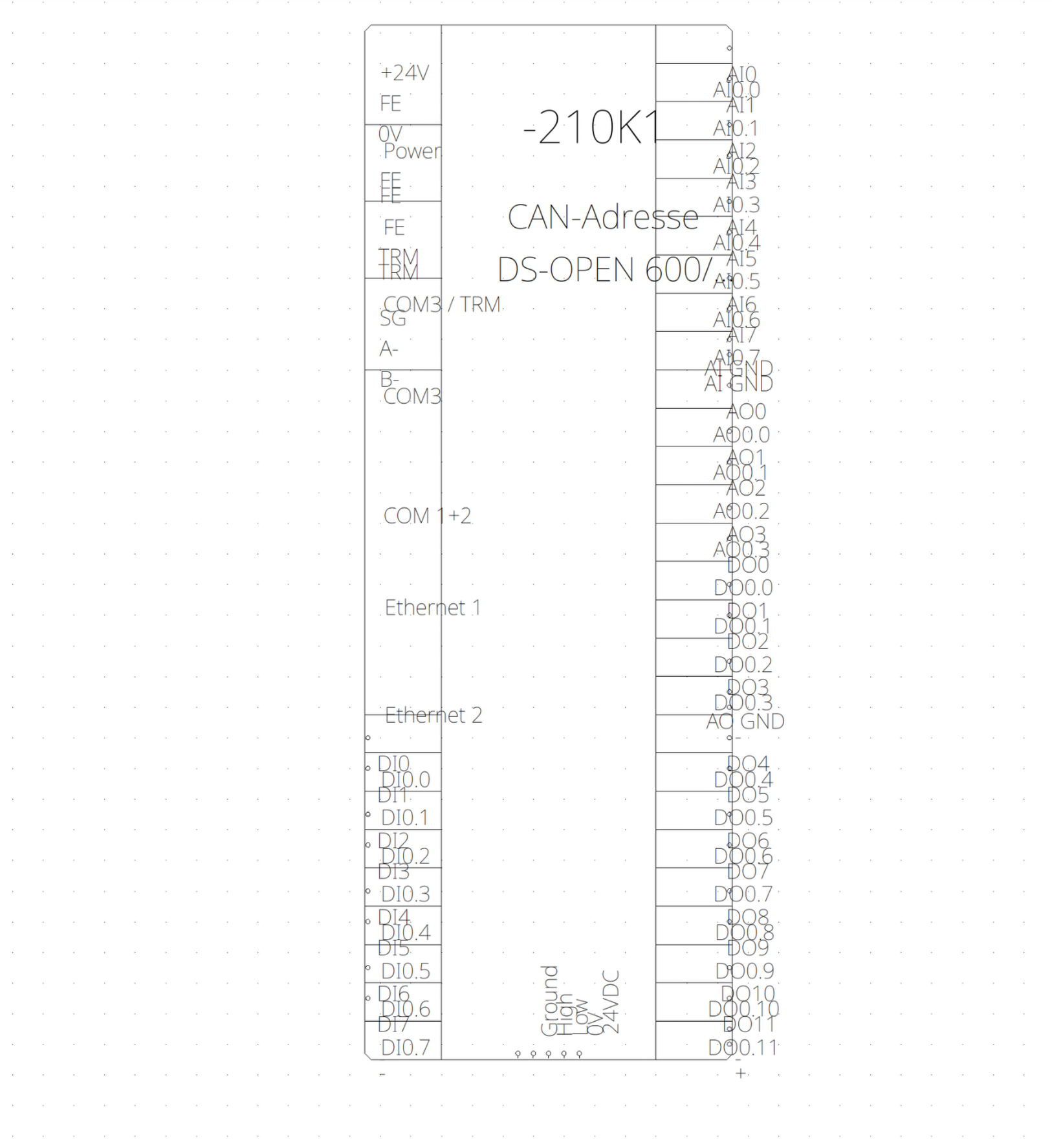
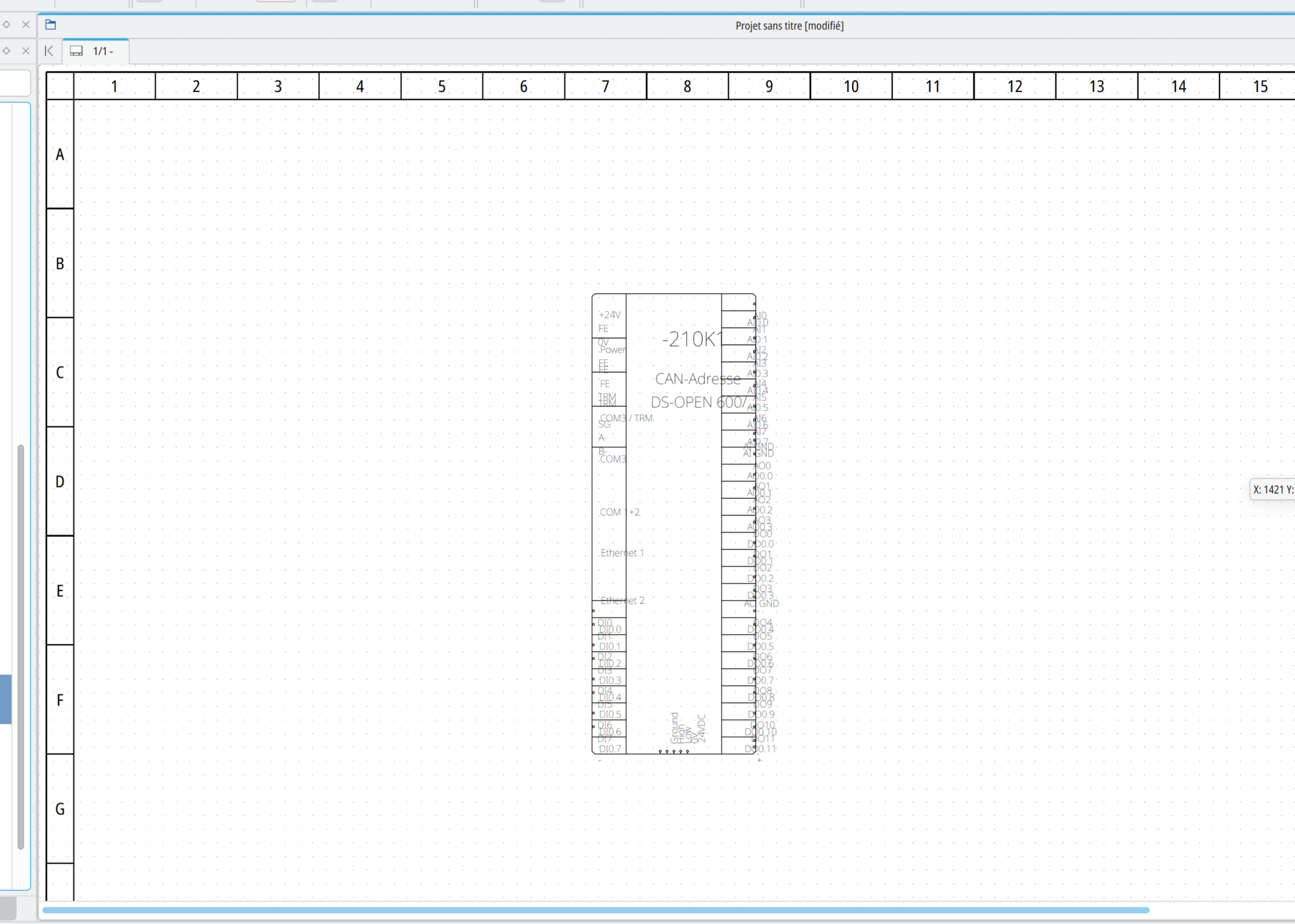
I tried lastest Vadoola commit: 4ecce24
Better improvement for this DXF file.
QElectroTech → Posts by scorpio810
Powered by PunBB, supported by Informer Technologies, Inc.
Generated in 0.103 seconds (26% PHP - 74% DB) with 5 queries