Caramba, ... si tu as suivis mes explications tu dois pouvoir t'en sortir sans l'export CSV ... momentanément cassé.
Cdlt,
Laurent 

You are not logged in. Please login or register.
QElectroTech → Posts by scorpio810
Caramba, ... si tu as suivis mes explications tu dois pouvoir t'en sortir sans l'export CSV ... momentanément cassé.
Cdlt,
Laurent
Personnellement j'exporte la database to SQLITE depuis le menu projet de QET -> "Exporter la base de donnée interne du projet", ensuite je l'ouvre avec DB Browser for Sqlite, je fais ma requête SQL dans ce style puis je l'exporte en CSV.
Dans mon projet la désignation je l'ai mis dans le champ "commentaire" et je veux obtenir la quantité pour chacun des éléments, la requête SQL qui fonctionne aussi dans la nomenclature est de ce type:
SELECT comment AS 'References', COUNT(comment) AS 'Quantités', description, manufacturer FROM element_nomenclature_view WHERE ( element_type = 'simple' OR element_sub_type = 'commutator' OR element_sub_type = 'coil' OR element_sub_type = 'protection') AND comment != '' AND label != '' GROUP BY comment ORDER BY COUNT(comment) DESC
Explications :
comment AS 'References'
Je veux que le titre soit Références et non comment.
COUNT(comment) AS 'Quantités'
On comptabilise la somme d’occurrences contenant la même référence du champ commentaire et on et on renomme le titre en "Quantités".
WHERE ( element_type = 'simple' OR element_sub_type = 'commutator' OR element_sub_type = 'coil' OR element_sub_type = 'protection') AND comment != '' AND label != ''
Je ne veux comptabiliser les Références que pour les éléments de type : simple, et de sous_type: commutator, coil, protection, et dont le label et le commentaire ne sont pas vide.
ORDER BY COUNT(comment) DESC
j’incrémente la somme obtenue de matériels identiques et on les classe par ordre décroissant.
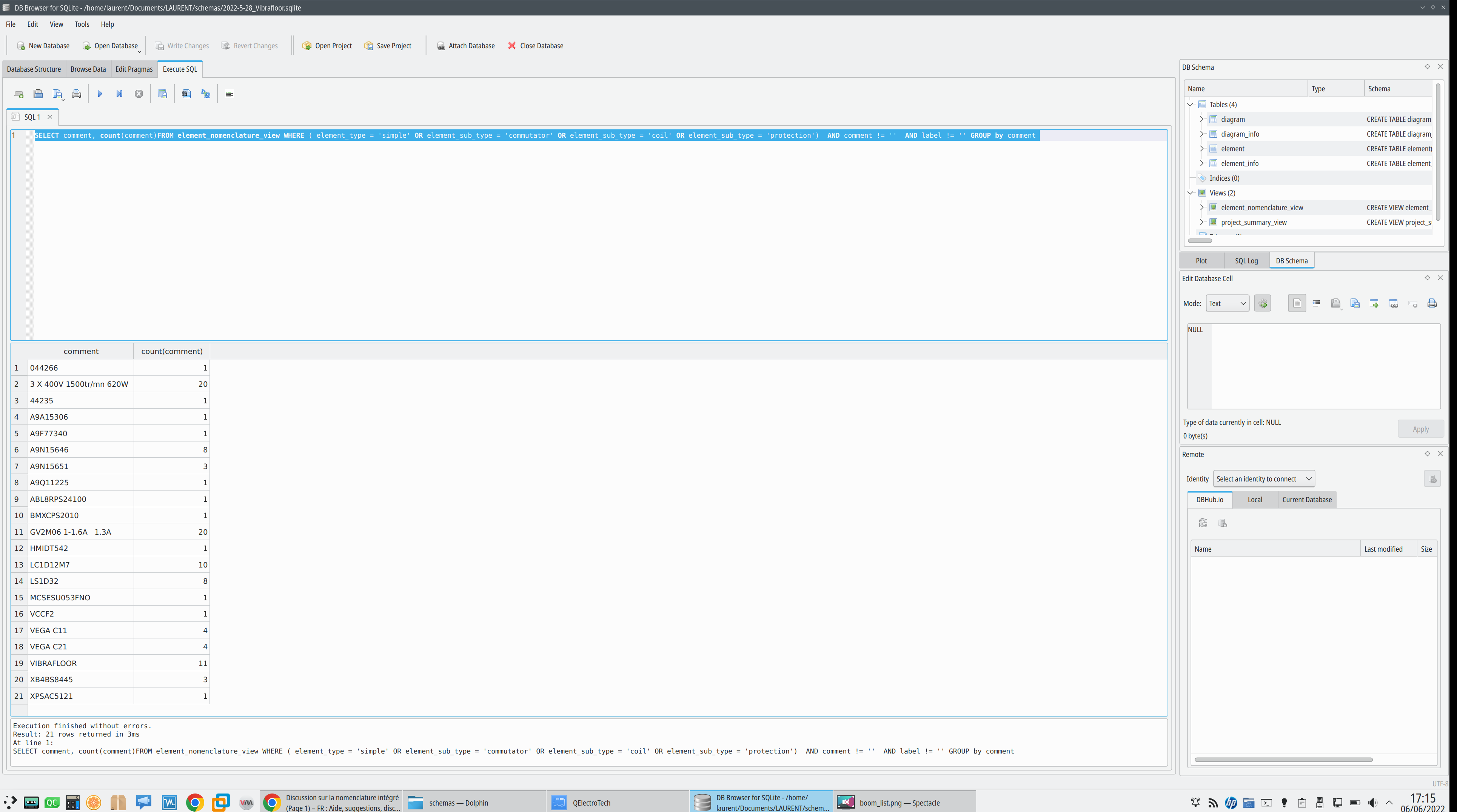
Pour l'export CSV:
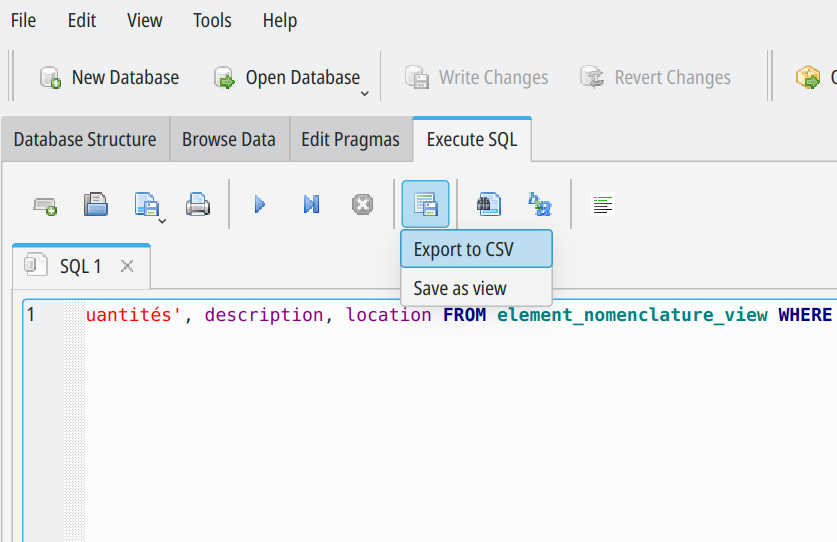
Maintenant si je veux inclure la liste du matériel avec l'outil "ajouter une nomenclature", je recopie la requête SQL dans un nouveau tableau vide :
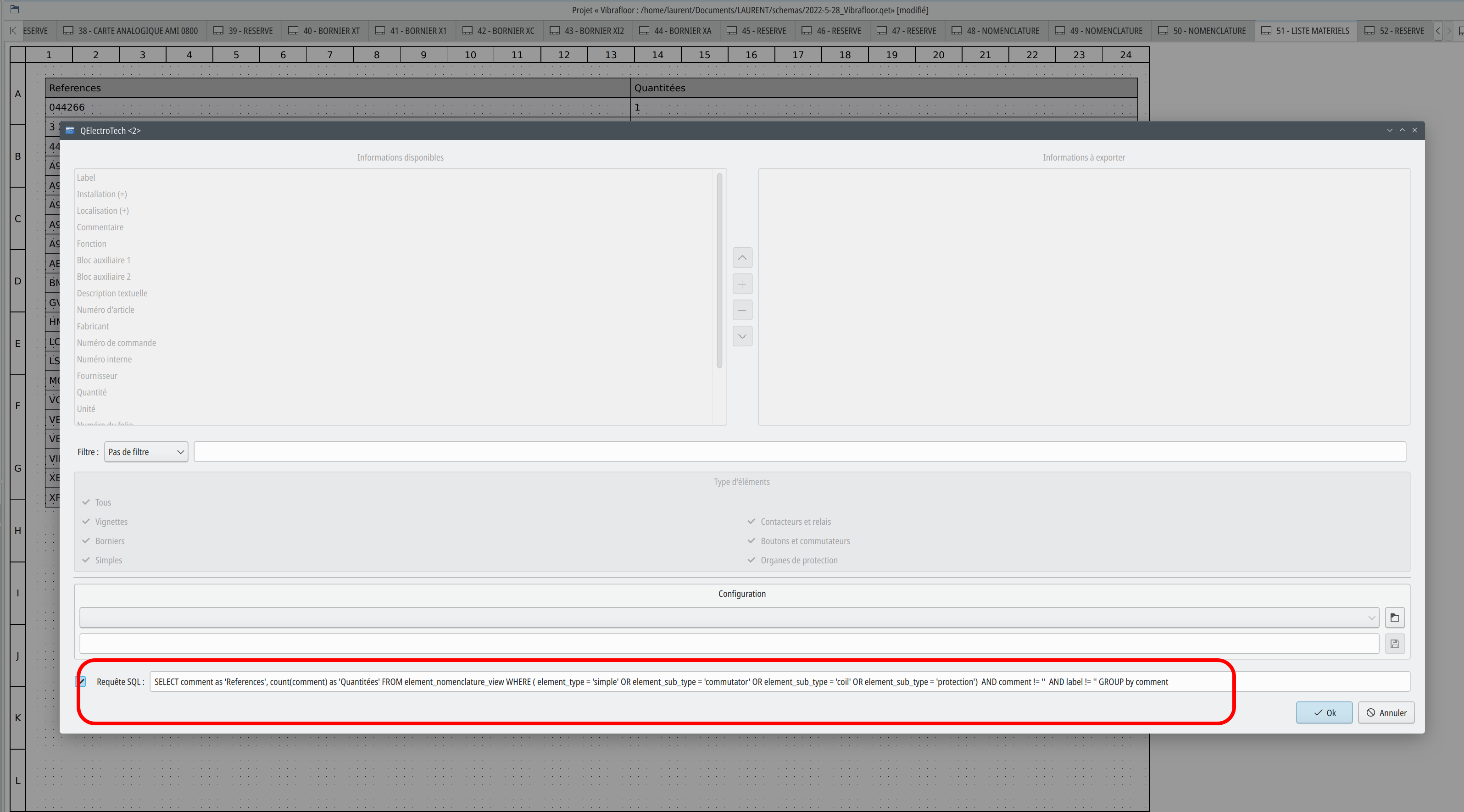
Le résultat :
Python 3.10 on Debian Unstable break qet_tb_generator :
AttributeError: module 'enum' has no attribute '_simple_enum'
qet_tb_generator
Traceback (most recent call last):
  File "/usr/bin/qet_tb_generator", line 33, in <module>
    sys.exit(load_entry_point('qet-tb-generator==1.3.1', 'console_scripts', 'qet_tb_generator')())
  File "/usr/bin/qet_tb_generator", line 25, in importlib_load_entry_point
    return next(matches).load()
  File "/usr/lib/python3.10/importlib/metadata/__init__.py", line 171, in load
    module = import_module(match.group('module'))
  File "/usr/lib/python3.10/importlib/__init__.py", line 126, in import_module
    return _bootstrap._gcd_import(name[level:], package, level)
  File "<frozen importlib._bootstrap>", line 1050, in _gcd_import
  File "<frozen importlib._bootstrap>", line 1027, in _find_and_load
  File "<frozen importlib._bootstrap>", line 1006, in _find_and_load_unlocked
  File "<frozen importlib._bootstrap>", line 688, in _load_unlocked
  File "<frozen importlib._bootstrap_external>", line 883, in exec_module
  File "<frozen importlib._bootstrap>", line 241, in _call_with_frames_removed
  File "/usr/lib/python3/dist-packages/src/main.py", line 98, in <module>
    import src.PySimpleGUI as sg
  File "/usr/lib/python3/dist-packages/src/PySimpleGUI.py", line 95, in <module>
    import tkinter as tk
  File "/usr/lib/python3.10/tkinter/__init__.py", line 147, in <module>
    @enum._simple_enum(enum.StrEnum)
AttributeError: module 'enum' has no attribute '_simple_enum'
Workaround is to remove my package and use standalone python qet_tb_generator package on your ~/.qet directory
https://download.qelectrotech.org/qet/b … .3.0_linux
off course rename it to qet_tb_generator.
Builds done.
The branch, master has been updated
via c58d61594bf3f2ffb46e387504d1ae686024fc36 (commit)
via 3cd3535c181046d39a1b943b0854e045de441915 (commit)
from 97ecd2674943794b4f099ea94c64abc0abb0614d (commit)Those revisions listed above that are new to this repository have
not appeared on any other notification email; so we list those
revisions in full, below.- Log -----------------------------------------------------------------
commit c58d61594bf3f2ffb46e387504d1ae686024fc36
Author: plc-user <74435298+plc-user@users.noreply.github.com>
Date: Mon Jun 6 13:00:58 2022 +0200added some parts from manufacturer "Weidmüller"
commit 3cd3535c181046d39a1b943b0854e045de441915
Author: plc-user <74435298+plc-user@users.noreply.github.com>
Date: Mon Jun 6 12:57:21 2022 +0200changed Front-Views to "thumbnails" and added some parts "2003"
-----------------------------------------------------------------------
Summary of changes:
.../wago_0286-0842-0000-0000.elmt | 16 +-
.../040_digital-in/wago_0750-1400-0000-0000.elmt | 2 +-
.../040_digital-in/wago_0750-1402-0000-0000.elmt | 2 +-
.../060_analog-in/wago_0750-0493-0000-0000.elmt | 85 +++---
.../060_analog-in/wago_0750-0493-0000-0001.elmt | 77 ++---
.../060_analog-in/wago_0750-0494-0000-0000.elmt | 85 +++---
.../060_analog-in/wago_0750-0494-0000-0001.elmt | 73 ++---
.../060_analog-in/wago_0750-0494-0000-0005.elmt | 69 ++---
.../wago_0750-0632-0000-0000.elmt | 8 +-
.../wago_0750-0632-0000-0100.elmt | 8 +-
.../wago_0750-0657-0000-0000.elmt | 12 +-
.../wago_0787-2857-0000-0000.elmt | 53 ++++
.../wago_2789-9023-0000-0000.elmt | 42 +++
.../0857_jumpflex/wago_0857-0955-0000-0000.elmt | 72 +++++
.../0857_jumpflex/wago_0857-1430-0000-0000.elmt | 73 +++++
.../0001_din-rail_ts35_0100mm.elmt | 2 +-
.../0001_din-rail_ts35_0200mm.elmt | 2 +-
.../0001_din-rail_ts35_0220mm.elmt | 2 +-
.../0001_din-rail_ts35_0225mm.elmt | 2 +-
.../0001_din-rail_ts35_0300mm.elmt | 2 +-
.../0001_din-rail_ts35_0400mm.elmt | 2 +-
.../0001_din-rail_ts35_0500mm.elmt | 2 +-
.../0001_din-rail_ts35_0600mm.elmt | 2 +-
.../0001_din-rail_ts35_0700mm.elmt | 2 +-
.../0001_din-rail_ts35_0800mm.elmt | 2 +-
.../0001_din-rail_ts35_0900mm.elmt | 2 +-
.../0001_din-rail_ts35_1000mm.elmt | 2 +-
.../0002_din-rail_ts35_slotted_0100mm.elmt | 2 +-
.../0002_din-rail_ts35_slotted_0200mm.elmt | 2 +-
.../0002_din-rail_ts35_slotted_0220mm.elmt | 2 +-
.../0002_din-rail_ts35_slotted_0225mm.elmt | 2 +-
.../0002_din-rail_ts35_slotted_0300mm.elmt | 2 +-
.../0002_din-rail_ts35_slotted_0400mm.elmt | 2 +-
.../0002_din-rail_ts35_slotted_0500mm.elmt | 2 +-
.../0002_din-rail_ts35_slotted_0600mm.elmt | 2 +-
.../0002_din-rail_ts35_slotted_0700mm.elmt | 2 +-
.../0002_din-rail_ts35_slotted_0800mm.elmt | 2 +-
.../0002_din-rail_ts35_slotted_0900mm.elmt | 2 +-
.../0002_din-rail_ts35_slotted_1000mm.elmt | 2 +-
.../0003_din-rail_ts35_cu_0100mm.elmt | 2 +-
.../0003_din-rail_ts35_cu_0200mm.elmt | 2 +-
.../0003_din-rail_ts35_cu_0220mm.elmt | 2 +-
.../0003_din-rail_ts35_cu_0225mm.elmt | 2 +-
.../0003_din-rail_ts35_cu_0300mm.elmt | 2 +-
.../0003_din-rail_ts35_cu_0400mm.elmt | 2 +-
.../0003_din-rail_ts35_cu_0500mm.elmt | 2 +-
.../0003_din-rail_ts35_cu_0600mm.elmt | 2 +-
.../0003_din-rail_ts35_cu_0700mm.elmt | 2 +-
.../0003_din-rail_ts35_cu_0800mm.elmt | 2 +-
.../0003_din-rail_ts35_cu_0900mm.elmt | 2 +-
.../0003_din-rail_ts35_cu_1000mm.elmt | 2 +-
.../0004_din-rail_ts15_0100mm.elmt | 2 +-
.../0004_din-rail_ts15_0200mm.elmt | 2 +-
.../0004_din-rail_ts15_0220mm.elmt | 2 +-
.../0004_din-rail_ts15_0225mm.elmt | 2 +-
.../0004_din-rail_ts15_0300mm.elmt | 2 +-
.../0004_din-rail_ts15_0400mm.elmt | 2 +-
.../0004_din-rail_ts15_0500mm.elmt | 2 +-
.../0004_din-rail_ts15_0600mm.elmt | 2 +-
.../0004_din-rail_ts15_0700mm.elmt | 2 +-
.../0004_din-rail_ts15_0800mm.elmt | 2 +-
.../0004_din-rail_ts15_0900mm.elmt | 2 +-
.../0004_din-rail_ts15_1000mm.elmt | 2 +-
.../0005_din-rail_ts15_slotted_0100mm.elmt | 2 +-
.../0005_din-rail_ts15_slotted_0200mm.elmt | 2 +-
.../0005_din-rail_ts15_slotted_0220mm.elmt | 2 +-
.../0005_din-rail_ts15_slotted_0225mm.elmt | 2 +-
.../0005_din-rail_ts15_slotted_0300mm.elmt | 2 +-
.../0005_din-rail_ts15_slotted_0400mm.elmt | 2 +-
.../0005_din-rail_ts15_slotted_0500mm.elmt | 2 +-
.../0005_din-rail_ts15_slotted_0600mm.elmt | 2 +-
.../0005_din-rail_ts15_slotted_0700mm.elmt | 2 +-
.../0005_din-rail_ts15_slotted_0800mm.elmt | 2 +-
.../0005_din-rail_ts15_slotted_0900mm.elmt | 2 +-
.../0005_din-rail_ts15_slotted_1000mm.elmt | 2 +-
.../0000_accessories/wago_0249-0116-0000-0000.elmt | 120 ++++----
.../0000_accessories/wago_0249-0117-0000-0000.elmt | 136 ++++-----
.../0000_accessories/wago_0249-0197-0000-0000.elmt | 2 +-
.../0000_terminals/2003_terminals/qet_directory | 14 +
.../2003_terminals/wago_2003-7640-0000-0000.elmt | 54 ++++
.../2003_terminals/wago_2003-7641-0000-0000.elmt | 58 ++++
.../2003_terminals/wago_2003-7642-0000-0000.elmt | 58 ++++
.../2003_terminals/wago_2003-7645-0000-0000.elmt | 62 ++++
.../2003_terminals/wago_2003-7646-0000-0000.elmt | 62 ++++
.../2003_terminals/wago_2003-7649-0000-0000.elmt | 59 ++++
.../2003_terminals/wago_2003-7650-0000-0000.elmt | 54 ++++
.../2003_terminals/wago_2003-7651-0000-0000.elmt | 55 ++++
.../2003_terminals/wago_2003-7659-0000-0000.elmt | 54 ++++
.../2003_terminals/wago_2003-7692-0000-0000.elmt | 22 ++
.../wago_0289-0101-0000-0000.elmt | 2 +-
.../wago_0289-0103-0000-0000.elmt | 2 +-
.../wago_0289-0114-0000-0000.elmt | 2 +-
.../wago_0289-0128-0000-0000.elmt | 2 +-
.../wago_0289-0131-0000-0000.elmt | 2 +-
.../wago_0289-0172-0000-0000.elmt | 2 +-
.../wago_0289-0174-0000-0000.elmt | 2 +-
.../wago_0289-0175-0000-0000.elmt | 2 +-
.../wago_0289-0176-0000-0000.elmt | 2 +-
.../wago_0289-0177-0000-0000.elmt | 2 +-
.../wago_0289-0545-0000-0000.elmt | 2 +-
.../wago_0289-0555-0000-0000.elmt | 2 +-
.../wago_0289-0575-0000-0000.elmt | 2 +-
.../wago_0289-0585-0000-0000.elmt | 2 +-
.../wago_0289-0664-0000-0000.elmt | 2 +-
.../wago_0289-0665-0000-0000.elmt | 2 +-
.../wago_0289-0667-0000-0000.elmt | 2 +-
.../wago_0289-0671-0000-0000.elmt | 2 +-
.../wago_0289-0720-0000-0000.elmt | 2 +-
.../wago_0289-0725-0000-0000.elmt | 2 +-
.../010_pfc/wago_0750-8100-0000-0000.elmt | 2 +-
.../010_pfc/wago_0750-8101-0000-0000.elmt | 2 +-
.../010_pfc/wago_0750-8102-0000-0000.elmt | 2 +-
.../010_pfc/wago_0750-8202-0000-0000.elmt | 2 +-
.../010_pfc/wago_0750-8203-0000-0000.elmt | 2 +-
.../010_pfc/wago_0750-8204-0000-0000.elmt | 2 +-
.../010_pfc/wago_0750-8206-0000-0000.elmt | 2 +-
.../010_pfc/wago_0750-8207-0000-0000.elmt | 2 +-
.../010_pfc/wago_0750-8208-0000-0000.elmt | 2 +-
.../010_pfc/wago_0750-8210-0000-0000.elmt | 2 +-
.../010_pfc/wago_0750-8211-0000-0000.elmt | 2 +-
.../010_pfc/wago_0750-8212-0000-0000.elmt | 2 +-
.../010_pfc/wago_0750-8213-0000-0000.elmt | 316 ++++++++++-----------
.../010_pfc/wago_0750-8214-0000-0000.elmt | 2 +-
.../010_pfc/wago_0750-8215-0000-0000.elmt | 2 +-
.../010_pfc/wago_0750-8216-0000-0000.elmt | 2 +-
.../010_pfc/wago_0750-8216-0025-0000.elmt | 2 +-
.../010_pfc/wago_0750-8216-0025-0001.elmt | 2 +-
.../010_pfc/wago_0750-8217-0000-0000.elmt | 2 +-
.../010_pfc/wago_0750-8217-0025-0000.elmt | 2 +-
.../020_controller/wago_0750-0812-0000-0000.elmt | 2 +-
.../020_controller/wago_0750-0814-0000-0000.elmt | 2 +-
.../020_controller/wago_0750-0815-0000-0000.elmt | 2 +-
.../020_controller/wago_0750-0815-0300-0000.elmt | 2 +-
.../020_controller/wago_0750-0816-0000-0000.elmt | 2 +-
.../020_controller/wago_0750-0816-0300-0000.elmt | 2 +-
.../020_controller/wago_0750-0823-0000-0000.elmt | 2 +-
.../020_controller/wago_0750-0833-0000-0000.elmt | 2 +-
.../020_controller/wago_0750-0837-0000-0000.elmt | 2 +-
.../020_controller/wago_0750-0838-0000-0000.elmt | 2 +-
.../020_controller/wago_0750-0841-0000-0000.elmt | 2 +-
.../020_controller/wago_0750-0842-0000-0000.elmt | 2 +-
.../020_controller/wago_0750-0843-0000-0000.elmt | 2 +-
.../020_controller/wago_0750-0849-0000-0000.elmt | 2 +-
.../020_controller/wago_0750-0852-0000-0000.elmt | 2 +-
.../020_controller/wago_0750-0862-0000-0000.elmt | 2 +-
.../020_controller/wago_0750-0871-0000-0000.elmt | 2 +-
.../020_controller/wago_0750-0880-0000-0000.elmt | 2 +-
.../020_controller/wago_0750-0881-0000-0000.elmt | 2 +-
.../020_controller/wago_0750-0882-0000-0000.elmt | 2 +-
.../020_controller/wago_0750-0885-0000-0000.elmt | 2 +-
.../020_controller/wago_0750-0889-0000-0000.elmt | 2 +-
.../020_controller/wago_0750-0890-0000-0000.elmt | 2 +-
.../020_controller/wago_0750-0891-0000-0000.elmt | 2 +-
.../020_controller/wago_0750-0893-0000-0000.elmt | 2 +-
.../030_coupler/wago_0750-0307-0000-0000.elmt | 2 +-
.../030_coupler/wago_0750-0312-0300-0000.elmt | 2 +-
.../030_coupler/wago_0750-0314-0000-0000.elmt | 2 +-
.../030_coupler/wago_0750-0314-0300-0000.elmt | 2 +-
.../030_coupler/wago_0750-0315-0000-0000.elmt | 2 +-
.../030_coupler/wago_0750-0315-0300-0000.elmt | 2 +-
.../030_coupler/wago_0750-0316-0000-0000.elmt | 2 +-
.../030_coupler/wago_0750-0316-0300-0000.elmt | 2 +-
.../030_coupler/wago_0750-0333-0000-0000.elmt | 2 +-
.../030_coupler/wago_0750-0337-0000-0000.elmt | 2 +-
.../030_coupler/wago_0750-0338-0000-0000.elmt | 2 +-
.../030_coupler/wago_0750-0340-0000-0000.elmt | 2 +-
.../030_coupler/wago_0750-0342-0000-0000.elmt | 2 +-
.../030_coupler/wago_0750-0343-0000-0000.elmt | 2 +-
.../030_coupler/wago_0750-0347-0000-0000.elmt | 2 +-
.../030_coupler/wago_0750-0348-0000-0000.elmt | 2 +-
.../030_coupler/wago_0750-0350-0000-0000.elmt | 2 +-
.../030_coupler/wago_0750-0352-0000-0000.elmt | 2 +-
.../030_coupler/wago_0750-0354-0000-0000.elmt | 2 +-
.../030_coupler/wago_0750-0354-0000-0001.elmt | 2 +-
.../030_coupler/wago_0750-0354-0000-0002.elmt | 2 +-
.../030_coupler/wago_0750-0362-0000-0000.elmt | 2 +-
.../030_coupler/wago_0750-0363-0000-0000.elmt | 2 +-
.../030_coupler/wago_0750-0366-0000-0000.elmt | 2 +-
.../030_coupler/wago_0750-0370-0000-0000.elmt | 2 +-
.../030_coupler/wago_0750-0375-0000-0000.elmt | 2 +-
.../030_coupler/wago_0750-0377-0000-0000.elmt | 2 +-
.../040_digital-in/wago_0750-0400-0000-0000.elmt | 2 +-
.../040_digital-in/wago_0750-0401-0000-0000.elmt | 2 +-
.../040_digital-in/wago_0750-0402-0000-0000.elmt | 2 +-
.../040_digital-in/wago_0750-0403-0000-0000.elmt | 2 +-
.../040_digital-in/wago_0750-0405-0000-0000.elmt | 2 +-
.../040_digital-in/wago_0750-0410-0000-0000.elmt | 2 +-
.../040_digital-in/wago_0750-0411-0000-0000.elmt | 2 +-
.../040_digital-in/wago_0750-0430-0000-0000.elmt | 2 +-
.../040_digital-in/wago_0750-0431-0000-0000.elmt | 2 +-
.../040_digital-in/wago_0750-0432-0000-0000.elmt | 2 +-
.../040_digital-in/wago_0750-0433-0000-0000.elmt | 2 +-
.../040_digital-in/wago_0750-1400-0000-0000.elmt | 2 +-
.../040_digital-in/wago_0750-1402-0000-0000.elmt | 2 +-
.../040_digital-in/wago_0750-1405-0000-0000.elmt | 2 +-
.../040_digital-in/wago_0750-1406-0000-0000.elmt | 2 +-
.../040_digital-in/wago_0750-1407-0000-0000.elmt | 2 +-
.../040_digital-in/wago_0750-1415-0000-0000.elmt | 2 +-
.../040_digital-in/wago_0750-1416-0000-0000.elmt | 2 +-
.../040_digital-in/wago_0750-1417-0000-0000.elmt | 2 +-
.../040_digital-in/wago_0750-1418-0000-0000.elmt | 2 +-
.../050_digital-out/wago_0750-0501-0000-0000.elmt | 2 +-
.../050_digital-out/wago_0750-0504-0000-0000.elmt | 2 +-
.../050_digital-out/wago_0750-0512-0000-0000.elmt | 2 +-
.../050_digital-out/wago_0750-0513-0000-0000.elmt | 2 +-
.../050_digital-out/wago_0750-0514-0000-0000.elmt | 2 +-
.../050_digital-out/wago_0750-0515-0000-0000.elmt | 2 +-
.../050_digital-out/wago_0750-0517-0000-0000.elmt | 2 +-
.../050_digital-out/wago_0750-0523-0000-0000.elmt | 2 +-
.../050_digital-out/wago_0750-0530-0000-0000.elmt | 2 +-
.../050_digital-out/wago_0750-0534-0000-0000.elmt | 2 +-
.../050_digital-out/wago_0750-0537-0000-0000.elmt | 2 +-
.../050_digital-out/wago_0750-1500-0000-0000.elmt | 2 +-
.../050_digital-out/wago_0750-1501-0000-0000.elmt | 2 +-
.../050_digital-out/wago_0750-1502-0000-0000.elmt | 2 +-
.../050_digital-out/wago_0750-1504-0000-0000.elmt | 2 +-
.../050_digital-out/wago_0750-1505-0000-0000.elmt | 2 +-
.../050_digital-out/wago_0750-1506-0000-0000.elmt | 2 +-
.../050_digital-out/wago_0750-1515-0000-0000.elmt | 2 +-
.../050_digital-out/wago_0750-1516-0000-0000.elmt | 2 +-
.../060_analog-in/wago_0750-0450-0000-0000.elmt | 2 +-
.../060_analog-in/wago_0750-0451-0000-0000.elmt | 2 +-
.../060_analog-in/wago_0750-0452-0000-0000.elmt | 2 +-
.../060_analog-in/wago_0750-0453-0000-0000.elmt | 2 +-
.../060_analog-in/wago_0750-0454-0000-0000.elmt | 2 +-
.../060_analog-in/wago_0750-0455-0000-0000.elmt | 2 +-
.../060_analog-in/wago_0750-0457-0000-0000.elmt | 2 +-
.../060_analog-in/wago_0750-0458-0000-0000.elmt | 2 +-
.../060_analog-in/wago_0750-0459-0000-0000.elmt | 2 +-
.../060_analog-in/wago_0750-0460-0000-0000.elmt | 2 +-
.../060_analog-in/wago_0750-0460-0000-0003.elmt | 2 +-
.../060_analog-in/wago_0750-0460-0000-0005.elmt | 2 +-
.../060_analog-in/wago_0750-0461-0000-0000.elmt | 2 +-
.../060_analog-in/wago_0750-0462-0000-0000.elmt | 2 +-
.../060_analog-in/wago_0750-0464-0000-0000.elmt | 2 +-
.../060_analog-in/wago_0750-0464-0020-0000.elmt | 2 +-
.../060_analog-in/wago_0750-0468-0000-0000.elmt | 2 +-
.../060_analog-in/wago_0750-0469-0000-0000.elmt | 2 +-
.../060_analog-in/wago_0750-0471-0000-0000.elmt | 10 +-
.../060_analog-in/wago_0750-0472-0000-0000.elmt | 2 +-
.../060_analog-in/wago_0750-0474-0000-0000.elmt | 2 +-
.../060_analog-in/wago_0750-0493-0000-0000.elmt | 2 +-
.../060_analog-in/wago_0750-0493-0000-0001.elmt | 2 +-
.../060_analog-in/wago_0750-0494-0000-0000.elmt | 2 +-
.../060_analog-in/wago_0750-0494-0000-0001.elmt | 2 +-
.../060_analog-in/wago_0750-0494-0000-0005.elmt | 2 +-
.../060_analog-in/wago_0750-0495-0000-0000.elmt | 2 +-
.../060_analog-in/wago_0750-0495-0000-0001.elmt | 2 +-
.../060_analog-in/wago_0750-0495-0000-0002.elmt | 2 +-
.../060_analog-in/wago_0750-0496-0000-0000.elmt | 2 +-
.../060_analog-in/wago_0750-0497-0000-0000.elmt | 2 +-
.../060_analog-in/wago_0750-0498-0000-0000.elmt | 2 +-
.../070_analog-out/wago_0750-0552-0000-0000.elmt | 2 +-
.../070_analog-out/wago_0750-0553-0000-0000.elmt | 2 +-
.../070_analog-out/wago_0750-0554-0000-0000.elmt | 2 +-
.../070_analog-out/wago_0750-0555-0000-0000.elmt | 2 +-
.../070_analog-out/wago_0750-0557-0000-0000.elmt | 2 +-
.../070_analog-out/wago_0750-0559-0000-0000.elmt | 2 +-
.../070_analog-out/wago_0750-0564-0000-0000.elmt | 2 +-
.../070_analog-out/wago_0750-0597-0000-0000.elmt | 2 +-
.../wago_0750-0404-0000-0000.elmt | 2 +-
.../wago_0750-0511-0000-0000.elmt | 2 +-
.../wago_0750-0630-0000-0000.elmt | 2 +-
.../wago_0750-0632-0000-0000.elmt | 2 +-
.../wago_0750-0632-0000-0100.elmt | 2 +-
.../wago_0750-0636-0000-0000.elmt | 2 +-
.../wago_0750-0636-0000-0700.elmt | 2 +-
.../wago_0750-0636-0000-0800.elmt | 2 +-
.../wago_0750-0641-0000-0000.elmt | 2 +-
.../wago_0750-0642-0000-0000.elmt | 2 +-
.../wago_0750-0644-0000-0000.elmt | 2 +-
.../wago_0750-0670-0000-0000.elmt | 2 +-
.../wago_0750-0671-0000-0000.elmt | 2 +-
.../wago_0750-0672-0000-0000.elmt | 2 +-
.../wago_0750-0673-0000-0000.elmt | 2 +-
.../wago_0750-0651-0000-0000.elmt | 2 +-
.../wago_0750-0652-0000-0000.elmt | 2 +-
.../wago_0750-0655-0000-0000.elmt | 2 +-
.../wago_0750-0657-0000-0000.elmt | 2 +-
.../wago_0750-0658-0000-0000.elmt | 2 +-
.../wago_0750-0660-0000-0001.elmt | 2 +-
.../wago_0750-0661-0000-0003.elmt | 2 +-
.../wago_0750-0669-0000-0003.elmt | 22 +-
.../wago_0750-0435-0000-0000.elmt | 2 +-
.../wago_0750-0438-0000-0000.elmt | 2 +-
.../wago_0750-0439-0000-0000.elmt | 2 +-
.../wago_0750-0489-0000-0000.elmt | 2 +-
.../wago_0750-0535-0000-0000.elmt | 2 +-
.../wago_0750-0606-0000-0000.elmt | 2 +-
.../wago_0750-0625-0000-0001.elmt | 2 +-
.../wago_0750-0633-0000-0000.elmt | 2 +-
.../wago_0750-0663-0000-0003.elmt | 2 +-
.../120_system/wago_0750-0600-0000-0000.elmt | 2 +-
.../120_system/wago_0750-0601-0000-0000.elmt | 2 +-
.../120_system/wago_0750-0602-0000-0000.elmt | 2 +-
.../120_system/wago_0750-0603-0000-0000.elmt | 2 +-
.../120_system/wago_0750-0604-0000-0000.elmt | 2 +-
.../120_system/wago_0750-0609-0000-0000.elmt | 2 +-
.../120_system/wago_0750-0610-0000-0000.elmt | 2 +-
.../120_system/wago_0750-0611-0000-0000.elmt | 2 +-
.../120_system/wago_0750-0612-0000-0000.elmt | 2 +-
.../120_system/wago_0750-0613-0000-0000.elmt | 2 +-
.../120_system/wago_0750-0614-0000-0000.elmt | 2 +-
.../120_system/wago_0750-0615-0000-0000.elmt | 2 +-
.../120_system/wago_0750-0616-0000-0000.elmt | 2 +-
.../120_system/wago_0750-0617-0000-0000.elmt | 2 +-
.../120_system/wago_0750-0621-0000-0000.elmt | 2 +-
.../120_system/wago_0750-0622-0000-0000.elmt | 2 +-
.../120_system/wago_0750-0623-0000-0000.elmt | 2 +-
.../120_system/wago_0750-0626-0000-0000.elmt | 2 +-
.../120_system/wago_0750-0626-0020-0000.elmt | 2 +-
.../120_system/wago_0750-0626-0020-0002.elmt | 2 +-
.../120_system/wago_0750-0627-0000-0000.elmt | 2 +-
.../120_system/wago_0750-0628-0000-0000.elmt | 2 +-
.../120_system/wago_0750-1605-0000-0000.elmt | 2 +-
.../120_system/wago_0750-1606-0000-0000.elmt | 2 +-
.../120_system/wago_0750-1607-0000-0000.elmt | 2 +-
.../0001_8-pole_led/0001_di_2_led.elmt | 2 +-
.../0001_8-pole_led/0002_di_4_led.elmt | 2 +-
.../0001_8-pole_led/0003_do_2_led.elmt | 2 +-
.../0001_8-pole_led/0004_do_4_led.elmt | 2 +-
.../0001_8-pole_led/0005_ai_2_led.elmt | 2 +-
.../0001_8-pole_led/0006_ai_4_led.elmt | 2 +-
.../0001_8-pole_led/0007_ao_2_led.elmt | 2 +-
.../0001_8-pole_led/0008_ao_4_led.elmt | 2 +-
.../0001_8-pole_led/0009_special_4_led.elmt | 2 +-
.../0001_8-pole_lightconductor.elmt | 2 +-
.../0002_double_8-pole_lightconductor.elmt | 2 +-
.../zzz_templates/0003_16-pole/0001_di.elmt | 2 +-
.../zzz_templates/0003_16-pole/0002_do.elmt | 2 +-
.../zzz_templates/0003_16-pole/0003_ai.elmt | 2 +-
.../zzz_templates/0003_16-pole/0004_ao.elmt | 2 +-
.../zzz_templates/0003_16-pole/0005_special.elmt | 2 +-
.../0001_8-pole_lightconductor.elmt | 2 +-
.../0002_double_8-pole_lightconductor.elmt | 2 +-
.../0001_8-pole_lightconductor.elmt | 2 +-
.../0002_double_8-pole_lightconductor.elmt | 2 +-
.../010_pfc/wago_0750-8202-0040-0000.elmt | 2 +-
.../010_pfc/wago_0750-8206-0040-0000.elmt | 2 +-
.../010_pfc/wago_0750-8210-0040-0000.elmt | 2 +-
.../010_pfc/wago_0750-8211-0040-0000.elmt | 2 +-
.../010_pfc/wago_0750-8211-0040-0001.elmt | 2 +-
.../010_pfc/wago_0750-8212-0040-0010.elmt | 2 +-
.../010_pfc/wago_0750-8213-0040-0010.elmt | 2 +-
.../020_controller/wago_0750-0838-0040-0000.elmt | 2 +-
.../020_controller/wago_0750-0880-0040-0000.elmt | 2 +-
.../020_controller/wago_0750-0890-0040-0000.elmt | 2 +-
.../030_coupler/wago_0750-0333-0040-0000.elmt | 2 +-
.../030_coupler/wago_0750-0338-0040-0000.elmt | 2 +-
.../030_coupler/wago_0750-0352-0040-0000.elmt | 2 +-
.../030_coupler/wago_0750-0364-0040-0010.elmt | 2 +-
.../030_coupler/wago_0750-0365-0040-0010.elmt | 2 +-
.../040_digital-in/wago_0750-0430-0040-0000.elmt | 2 +-
.../040_digital-in/wago_0750-0431-0040-0000.elmt | 2 +-
.../040_digital-in/wago_0750-1405-0040-0000.elmt | 2 +-
.../040_digital-in/wago_0750-1415-0040-0000.elmt | 2 +-
.../040_digital-in/wago_0750-1416-0040-0000.elmt | 2 +-
.../050_digital-out/wago_0750-0517-0040-0000.elmt | 2 +-
.../050_digital-out/wago_0750-0530-0040-0000.elmt | 2 +-
.../050_digital-out/wago_0750-0537-0040-0000.elmt | 2 +-
.../050_digital-out/wago_0750-1515-0040-0000.elmt | 2 +-
.../060_analog-in/wago_0750-0457-0040-0000.elmt | 2 +-
.../060_analog-in/wago_0750-0468-0040-0000.elmt | 2 +-
.../060_analog-in/wago_0750-0495-0040-0000.elmt | 2 +-
.../060_analog-in/wago_0750-0495-0040-0001.elmt | 2 +-
.../060_analog-in/wago_0750-0495-0040-0002.elmt | 2 +-
.../070_analog-out/wago_0750-0557-0040-0000.elmt | 2 +-
.../070_analog-out/wago_0750-0559-0040-0000.elmt | 2 +-
.../wago_0750-0652-0040-0000.elmt | 2 +-
.../wago_0750-0658-0040-0000.elmt | 2 +-
.../wago_0750-0439-0040-0000.elmt | 2 +-
.../wago_0750-0535-0040-0000.elmt | 2 +-
.../wago_0750-0606-0040-0000.elmt | 2 +-
.../wago_0750-0633-0040-0000.elmt | 2 +-
.../120_system/wago_0750-0600-0040-0000.elmt | 2 +-
.../120_system/wago_0750-0601-0040-0000.elmt | 2 +-
.../120_system/wago_0750-0602-0040-0000.elmt | 2 +-
.../120_system/wago_0750-0612-0040-0000.elmt | 2 +-
.../120_system/wago_0750-0616-0040-0000.elmt | 2 +-
.../120_system/wago_0750-1605-0040-0000.elmt | 2 +-
.../120_system/wago_0750-1606-0040-0000.elmt | 2 +-
.../050_8-pole/0001_8-pole_lightconductor.elmt | 2 +-
.../0002_double_8-pole_lightconductor.elmt | 2 +-
.../060_16-pole/wago_0750-xxxx-0040-0000.elmt | 2 +-
.../040_digital-in/wago_0753-0400-0000-0000.elmt | 2 +-
.../040_digital-in/wago_0753-0401-0000-0000.elmt | 2 +-
.../040_digital-in/wago_0753-0402-0000-0000.elmt | 2 +-
.../040_digital-in/wago_0753-0403-0000-0000.elmt | 2 +-
.../040_digital-in/wago_0753-0430-0000-0000.elmt | 2 +-
.../040_digital-in/wago_0753-0431-0000-0000.elmt | 2 +-
.../040_digital-in/wago_0753-0432-0000-0000.elmt | 2 +-
.../040_digital-in/wago_0753-0433-0000-0000.elmt | 2 +-
.../040_digital-in/wago_0753-0434-0000-0000.elmt | 2 +-
.../050_digital-out/wago_0753-0501-0000-0000.elmt | 2 +-
.../050_digital-out/wago_0753-0504-0000-0000.elmt | 2 +-
.../050_digital-out/wago_0753-0512-0000-0000.elmt | 2 +-
.../050_digital-out/wago_0753-0513-0000-0000.elmt | 2 +-
.../050_digital-out/wago_0753-0514-0000-0000.elmt | 2 +-
.../050_digital-out/wago_0753-0517-0000-0000.elmt | 2 +-
.../050_digital-out/wago_0753-0530-0000-0000.elmt | 2 +-
.../060_analog-in/wago_0753-0452-0000-0000.elmt | 2 +-
.../060_analog-in/wago_0753-0454-0000-0000.elmt | 2 +-
.../060_analog-in/wago_0753-0472-0000-0000.elmt | 2 +-
.../060_analog-in/wago_0753-0474-0000-0000.elmt | 2 +-
.../070_analog-out/wago_0753-0552-0000-0000.elmt | 2 +-
.../070_analog-out/wago_0753-0553-0000-0000.elmt | 2 +-
.../070_analog-out/wago_0753-0554-0000-0000.elmt | 2 +-
.../070_analog-out/wago_0753-0555-0000-0000.elmt | 2 +-
.../070_analog-out/wago_0753-0557-0000-0000.elmt | 2 +-
.../070_analog-out/wago_0753-0559-0000-0000.elmt | 2 +-
.../wago_0753-0404-0000-0000.elmt | 2 +-
.../wago_0753-0511-0000-0000.elmt | 2 +-
.../wago_0753-0620-0000-0000.elmt | 2 +-
.../wago_0753-0646-0000-0000.elmt | 2 +-
.../wago_0753-0647-0000-0000.elmt | 2 +-
.../wago_0753-0655-0000-0000.elmt | 2 +-
.../wago_0753-0661-0000-0003.elmt | 2 +-
.../wago_0753-0662-0000-0002.elmt | 2 +-
.../wago_0753-0662-0000-0003.elmt | 2 +-
.../wago_0753-0666-0000-0003.elmt | 2 +-
.../wago_0753-0667-0000-0002.elmt | 2 +-
.../wago_0753-0667-0000-0003.elmt | 2 +-
.../wago_0753-0668-0000-0004.elmt | 2 +-
.../120_system/wago_0753-0602-0000-0000.elmt | 2 +-
.../120_system/wago_0753-0603-0000-0000.elmt | 2 +-
.../120_system/wago_0753-0604-0000-0000.elmt | 2 +-
.../120_system/wago_0753-0612-0000-0000.elmt | 2 +-
.../120_system/wago_0753-0614-0000-0000.elmt | 2 +-
.../0001_8-pole_led/0001_di_2_led.elmt | 2 +-
.../0001_8-pole_led/0002_di_4_led.elmt | 2 +-
.../0001_8-pole_led/0003_do_2_led.elmt | 2 +-
.../0001_8-pole_led/0004_do_4_led.elmt | 2 +-
.../0001_8-pole_led/0005_ai_2_led.elmt | 2 +-
.../0001_8-pole_led/0006_ai_4_led.elmt | 2 +-
.../0001_8-pole_led/0007_ao_2_led.elmt | 2 +-
.../0001_8-pole_led/0008_ao_4_led.elmt | 2 +-
.../0001_8-pole_led/0009_special_2_led.elmt | 2 +-
.../0001_8-pole_led/0010_special_4_led.elmt | 2 +-
.../0001_8-pole_lightconductor (white).elmt | 2 +-
.../0001_8-pole_lightconductor (yellow).elmt | 2 +-
.../0002_8-pole_lightconductor (yellow).elmt | 2 +-
.../wago_0787-2857-0000-0000.elmt | 98 +++++++
.../wago_2789-9023-0000-0000.elmt | 56 ++++
.../wago_0788-0303-0000-0000.elmt | 2 +-
.../wago_0788-0304-0000-0000.elmt | 2 +-
.../wago_0788-0305-0000-0000.elmt | 2 +-
.../wago_0788-0306-0000-0000.elmt | 2 +-
.../wago_0788-0307-0000-0000.elmt | 2 +-
.../wago_0788-0391-0000-0000.elmt | 2 +-
.../wago_0788-0506-0000-0000.elmt | 2 +-
.../wago_0788-0507-0000-0000.elmt | 2 +-
.../wago_0788-0508-0000-0000.elmt | 2 +-
.../wago_0788-0701-0000-0000.elmt | 2 +-
.../wago_0788-0720-0000-0000.elmt | 2 +-
.../wago_0788-0721-0000-0000.elmt | 2 +-
.../wago_0789-0352-0000-0000.elmt | 2 +-
.../wago_0789-0551-0000-0000.elmt | 2 +-
.../wago_0789-0552-0000-0000.elmt | 2 +-
.../wago_0789-0571-0000-0000.elmt | 2 +-
.../wago_0789-0601-0000-0000.elmt | 2 +-
.../wago_0789-0602-0000-0000.elmt | 2 +-
.../wago_0789-0620-0000-0000.elmt | 2 +-
.../wago_0789-0621-0000-0000.elmt | 2 +-
.../wago_0789-0622-0000-0000.elmt | 2 +-
.../wago_0789-0652-0000-0000.elmt | 2 +-
.../wago_0789-0654-0000-0000.elmt | 2 +-
.../wago_0789-0800-0000-0000.elmt | 2 +-
.../wago_0789-0801-0000-0000.elmt | 2 +-
.../wago_0789-0802-0000-0000.elmt | 2 +-
.../wago_0789-0803-0000-0000.elmt | 2 +-
.../wago_0789-0804-0000-0000.elmt | 2 +-
.../0852_network/wago_0852-0101-0000-0000.elmt | 2 +-
.../0852_network/wago_0852-0102-0000-0000.elmt | 2 +-
.../0852_network/wago_0852-0103-0000-0000.elmt | 2 +-
.../0852_network/wago_0852-1106-0000-0000.elmt | 2 +-
.../wago_0855-030x-xxxx-xxxx.elmt | 2 +-
.../wago_0855-040x-xxxx-xxxx.elmt | 2 +-
.../wago_0855-050x-xxxx-xxxx.elmt | 2 +-
.../wago_0855-060x-xxxx-xxxx.elmt | 2 +-
.../wago_0855-080x-xxxx-xxxx.elmt | 2 +-
.../wago_0855-100x-xxxx-xxxx.elmt | 2 +-
.../wago_0855-1700-0032-0000.elmt | 2 +-
.../wago_0855-2701-00xx-0001.elmt | 2 +-
.../0857_jumpflex/wago_0857-0303-0000-0000.elmt | 13 +-
.../0857_jumpflex/wago_0857-0304-0000-0000.elmt | 13 +-
.../0857_jumpflex/wago_0857-0305-0000-0000.elmt | 13 +-
.../0857_jumpflex/wago_0857-0357-0000-0000.elmt | 13 +-
.../0857_jumpflex/wago_0857-0358-0000-0000.elmt | 13 +-
.../0857_jumpflex/wago_0857-0359-0000-0000.elmt | 13 +-
.../0857_jumpflex/wago_0857-0401-0000-0000.elmt | 15 +-
.../0857_jumpflex/wago_0857-0402-0000-0000.elmt | 15 +-
.../0857_jumpflex/wago_0857-0403-0000-0000.elmt | 15 +-
.../0857_jumpflex/wago_0857-0411-0000-0000.elmt | 15 +-
.../0857_jumpflex/wago_0857-0412-0000-0000.elmt | 15 +-
.../0857_jumpflex/wago_0857-0413-0000-0000.elmt | 15 +-
.../0857_jumpflex/wago_0857-0414-0000-0000.elmt | 15 +-
.../0857_jumpflex/wago_0857-0415-0000-0000.elmt | 15 +-
.../0857_jumpflex/wago_0857-0416-0000-0000.elmt | 15 +-
.../0857_jumpflex/wago_0857-0423-0000-0000.elmt | 15 +-
.../0857_jumpflex/wago_0857-0424-0000-0000.elmt | 15 +-
.../0857_jumpflex/wago_0857-0531-0000-0000.elmt | 15 +-
.../0857_jumpflex/wago_0857-0640-0000-0000.elmt | 15 +-
.../0857_jumpflex/wago_0857-0642-0000-0000.elmt | 15 +-
.../0857_jumpflex/wago_0857-0714-0000-0000.elmt | 2 +-
.../0857_jumpflex/wago_0857-0717-0000-0000.elmt | 2 +-
.../0857_jumpflex/wago_0857-0718-0000-0000.elmt | 2 +-
.../0857_jumpflex/wago_0857-0724-0000-0000.elmt | 13 +-
.../0857_jumpflex/wago_0857-0727-0000-0000.elmt | 13 +-
.../0857_jumpflex/wago_0857-0728-0000-0000.elmt | 13 +-
.../0857_jumpflex/wago_0857-0734-0000-0000.elmt | 13 +-
.../0857_jumpflex/wago_0857-0800-0000-0000.elmt | 15 +-
.../0857_jumpflex/wago_0857-0801-0000-0000.elmt | 15 +-
.../0857_jumpflex/wago_0857-0808-0000-0000.elmt | 15 +-
.../0857_jumpflex/wago_0857-0810-0000-0000.elmt | 15 +-
.../0857_jumpflex/wago_0857-0811-0000-0000.elmt | 15 +-
.../0857_jumpflex/wago_0857-0812-0000-0000.elmt | 15 +-
.../0857_jumpflex/wago_0857-0818-0000-0000.elmt | 15 +-
.../0857_jumpflex/wago_0857-0820-0000-0000.elmt | 15 +-
.../0857_jumpflex/wago_0857-0979-0000-0000.elmt | 15 +-
.../0857_jumpflex/wago_0857-1430-0000-0000.elmt | 15 +-
.../0857_jumpflex/wago_0857-1432-0000-0000.elmt | 15 +-
.../0857_jumpflex/wago_0857-1494-0000-0000.elmt | 15 +-
.../wago_0858-0304-0000-0000.elmt | 2 +-
.../wago_0858-0314-0000-0000.elmt | 2 +-
.../wago_0858-0390-0000-0000.elmt | 2 +-
.../wago_0858-0391-0000-0000.elmt | 2 +-
.../wago_0858-0392-0000-0000.elmt | 2 +-
.../wago_0858-0508-0000-0000.elmt | 2 +-
.../wago_0858-0518-0000-0000.elmt | 2 +-
.../wago_0859-0302-0000-0000.elmt | 2 +-
.../wago_0859-0303-0000-0000.elmt | 2 +-
.../wago_0859-0304-0000-0000.elmt | 2 +-
.../wago_0859-0305-0000-0000.elmt | 2 +-
.../wago_0859-0307-0000-0000.elmt | 2 +-
.../wago_0859-0308-0000-0000.elmt | 2 +-
.../wago_0859-0312-0000-0000.elmt | 2 +-
.../wago_0859-0314-0000-0000.elmt | 2 +-
.../wago_0859-0318-0000-0000.elmt | 2 +-
.../wago_0859-0353-0000-0000.elmt | 2 +-
.../wago_0859-0354-0000-0000.elmt | 2 +-
.../wago_0859-0355-0000-0000.elmt | 2 +-
.../wago_0859-0357-0000-0000.elmt | 2 +-
.../wago_0859-0358-0000-0000.elmt | 2 +-
.../wago_0859-0525-0000-0000.elmt | 2 +-
.../wago_0859-0738-0000-0000.elmt | 2 +-
.../wago_0859-0791-0000-0000.elmt | 2 +-
.../wago_0859-0793-0000-0000.elmt | 2 +-
.../wago_0859-0794-0000-0000.elmt | 2 +-
.../wago_0859-0795-0000-0000.elmt | 2 +-
.../wago_0859-0796-0000-0000.elmt | 2 +-
.../wago_0859-0798-0000-0000.elmt | 2 +-
.../wago_0859-0902-0000-0000.elmt | 2 +-
.../0879_energy/wago_0879-3000-0000-0000.elmt | 2 +-
.../0879_energy/wago_0879-3020-0000-0000.elmt | 2 +-
.../0879_energy/wago_0879-3040-0000-0000.elmt | 14 +-
.../2857_jumpflex/wago_2857-0401-0000-0000.elmt | 2 +-
.../2857_jumpflex/wago_2857-0533-0000-0000.elmt | 2 +-
.../2857_jumpflex/wago_2857-0534-0000-0000.elmt | 2 +-
.../2857_jumpflex/wago_2857-0535-0000-0000.elmt | 2 +-
.../2857_jumpflex/wago_2857-0535-0000-0001.elmt | 2 +-
.../2857_jumpflex/wago_2857-0550-0000-0000.elmt | 2 +-
.../2857_jumpflex/wago_2857-0570-0024-0000.elmt | 2 +-
.../2857_jumpflex/wago_2857-0570-0024-0001.elmt | 2 +-
.../2857_jumpflex/wago_2857-0570-0024-0005.elmt | 2 +-
.../01_schematic/qet_directory | 0
.../weidmuller/01_schematic/uremote/qet_directory | 8 +
.../01_schematic/uremote/uc20-sl2000-ec-can.elmt | 101 +++++++
.../01_schematic/uremote/uc20-wl2000-ac.elmt | 89 ++++++
.../01_schematic/uremote/uc20-wl2000-iot.elmt | 89 ++++++
.../01_schematic/uremote/ur20-16aux-fe.elmt | 116 ++++++++
.../01_schematic/uremote/ur20-16aux-gnd-i.elmt | 111 ++++++++
.../01_schematic/uremote/ur20-16aux-gnd-o.elmt | 111 ++++++++
.../01_schematic/uremote/ur20-16aux-i.elmt | 111 ++++++++
.../01_schematic/uremote/ur20-16aux-o.elmt | 111 ++++++++
.../01_schematic/uremote/ur20-16di-p.elmt | 101 +++++++
.../01_schematic/uremote/ur20-16do-p.elmt | 101 +++++++
.../01_schematic/uremote/ur20-fbc-can.elmt | 81 ++++++
.../01_schematic/uremote/ur20-fbc-cc.elmt | 96 +++++++
.../01_schematic/uremote/ur20-fbc-pb-dp.elmt | 81 ++++++
.../weidmuller/01_schematic/uremote/ur20-pf-i.elmt | 54 ++++
.../weidmuller/01_schematic/uremote/ur20-pf-o.elmt | 54 ++++
.../{wago => weidmuller}/02_front/qet_directory | 0
.../weidmuller/02_front/uremote/qet_directory | 8 +
.../02_front/uremote/uc20-sl2000-ec-can.elmt | 126 ++++++++
.../02_front/uremote/uc20-wl2000-ac.elmt | 103 +++++++
.../02_front/uremote/uc20-wl2000-iot.elmt | 103 +++++++
.../weidmuller/02_front/uremote/ur20-16aux-fe.elmt | 102 +++++++
.../02_front/uremote/ur20-16aux-gnd-i.elmt | 102 +++++++
.../02_front/uremote/ur20-16aux-gnd-o.elmt | 102 +++++++
.../weidmuller/02_front/uremote/ur20-16aux-i.elmt | 102 +++++++
.../weidmuller/02_front/uremote/ur20-16aux-o.elmt | 102 +++++++
.../weidmuller/02_front/uremote/ur20-16di-p.elmt | 102 +++++++
.../weidmuller/02_front/uremote/ur20-16do-p.elmt | 102 +++++++
.../02_front/uremote/ur20-1Sm-50w-6di2do-p.elmt | 146 ++++++++++
.../weidmuller/02_front/uremote/ur20-2di-p-ts.elmt | 68 +++++
.../02_front/uremote/ur20-3em-230v-ac.elmt | 90 ++++++
.../02_front/uremote/ur20-4ai-rtd-diag.elmt | 102 +++++++
.../02_front/uremote/ur20-4ai-tc-diag.elmt | 102 +++++++
.../02_front/uremote/ur20-4di-2w-230v-ac.elmt | 106 +++++++
.../weidmuller/02_front/uremote/ur20-4di-p.elmt | 102 +++++++
.../weidmuller/02_front/uremote/ur20-8di-p-3w.elmt | 102 +++++++
.../02_front/uremote/ur20-8di-pn-fsoe.elmt | 106 +++++++
.../02_front/uremote/ur20-8dio-p-3w-diag.elmt | 101 +++++++
.../weidmuller/02_front/uremote/ur20-8do-p.elmt | 102 +++++++
.../weidmuller/02_front/uremote/ur20-es.elmt | 34 +++
.../weidmuller/02_front/uremote/ur20-fbc-can.elmt | 99 +++++++
.../weidmuller/02_front/uremote/ur20-fbc-cc.elmt | 109 +++++++
.../02_front/uremote/ur20-fbc-ec-eco.elmt | 79 ++++++
.../02_front/uremote/ur20-fbc-mod-tcp.elmt | 103 +++++++
.../02_front/uremote/ur20-fbc-pb-dp.elmt | 99 +++++++
.../weidmuller/02_front/uremote/ur20-pf-i.elmt | 52 ++++
.../weidmuller/02_front/uremote/ur20-pf-o.elmt | 52 ++++
.../02_front/uremote/ur20_end-cap_l.elmt | 24 ++
.../02_front/uremote/ur20_end-cap_r.elmt | 24 ++
.../weidmuller/qet_directory | 5 +-
615 files changed, 6522 insertions(+), 1263 deletions(-)
create mode 100644 elements/10_electric/20_manufacturers_articles/wago/01_schematic/0787_power-supplies/wago_0787-2857-0000-0000.elmt
create mode 100644 elements/10_electric/20_manufacturers_articles/wago/01_schematic/0787_power-supplies/wago_2789-9023-0000-0000.elmt
create mode 100644 elements/10_electric/20_manufacturers_articles/wago/01_schematic/0857_jumpflex/wago_0857-0955-0000-0000.elmt
create mode 100644 elements/10_electric/20_manufacturers_articles/wago/01_schematic/0857_jumpflex/wago_0857-1430-0000-0000.elmt
create mode 100644 elements/10_electric/20_manufacturers_articles/wago/02_front/0000_terminals/2003_terminals/qet_directory
create mode 100644 elements/10_electric/20_manufacturers_articles/wago/02_front/0000_terminals/2003_terminals/wago_2003-7640-0000-0000.elmt
create mode 100644 elements/10_electric/20_manufacturers_articles/wago/02_front/0000_terminals/2003_terminals/wago_2003-7641-0000-0000.elmt
create mode 100644 elements/10_electric/20_manufacturers_articles/wago/02_front/0000_terminals/2003_terminals/wago_2003-7642-0000-0000.elmt
create mode 100644 elements/10_electric/20_manufacturers_articles/wago/02_front/0000_terminals/2003_terminals/wago_2003-7645-0000-0000.elmt
create mode 100644 elements/10_electric/20_manufacturers_articles/wago/02_front/0000_terminals/2003_terminals/wago_2003-7646-0000-0000.elmt
create mode 100644 elements/10_electric/20_manufacturers_articles/wago/02_front/0000_terminals/2003_terminals/wago_2003-7649-0000-0000.elmt
create mode 100644 elements/10_electric/20_manufacturers_articles/wago/02_front/0000_terminals/2003_terminals/wago_2003-7650-0000-0000.elmt
create mode 100644 elements/10_electric/20_manufacturers_articles/wago/02_front/0000_terminals/2003_terminals/wago_2003-7651-0000-0000.elmt
create mode 100644 elements/10_electric/20_manufacturers_articles/wago/02_front/0000_terminals/2003_terminals/wago_2003-7659-0000-0000.elmt
create mode 100644 elements/10_electric/20_manufacturers_articles/wago/02_front/0000_terminals/2003_terminals/wago_2003-7692-0000-0000.elmt
create mode 100644 elements/10_electric/20_manufacturers_articles/wago/02_front/0787_power-supplies/wago_0787-2857-0000-0000.elmt
create mode 100644 elements/10_electric/20_manufacturers_articles/wago/02_front/0787_power-supplies/wago_2789-9023-0000-0000.elmt
copy elements/10_electric/20_manufacturers_articles/{wago => weidmuller}/01_schematic/qet_directory (100%)
create mode 100644 elements/10_electric/20_manufacturers_articles/weidmuller/01_schematic/uremote/qet_directory
create mode 100644 elements/10_electric/20_manufacturers_articles/weidmuller/01_schematic/uremote/uc20-sl2000-ec-can.elmt
create mode 100644 elements/10_electric/20_manufacturers_articles/weidmuller/01_schematic/uremote/uc20-wl2000-ac.elmt
create mode 100644 elements/10_electric/20_manufacturers_articles/weidmuller/01_schematic/uremote/uc20-wl2000-iot.elmt
create mode 100644 elements/10_electric/20_manufacturers_articles/weidmuller/01_schematic/uremote/ur20-16aux-fe.elmt
create mode 100644 elements/10_electric/20_manufacturers_articles/weidmuller/01_schematic/uremote/ur20-16aux-gnd-i.elmt
create mode 100644 elements/10_electric/20_manufacturers_articles/weidmuller/01_schematic/uremote/ur20-16aux-gnd-o.elmt
create mode 100644 elements/10_electric/20_manufacturers_articles/weidmuller/01_schematic/uremote/ur20-16aux-i.elmt
create mode 100644 elements/10_electric/20_manufacturers_articles/weidmuller/01_schematic/uremote/ur20-16aux-o.elmt
create mode 100644 elements/10_electric/20_manufacturers_articles/weidmuller/01_schematic/uremote/ur20-16di-p.elmt
create mode 100644 elements/10_electric/20_manufacturers_articles/weidmuller/01_schematic/uremote/ur20-16do-p.elmt
create mode 100644 elements/10_electric/20_manufacturers_articles/weidmuller/01_schematic/uremote/ur20-fbc-can.elmt
create mode 100644 elements/10_electric/20_manufacturers_articles/weidmuller/01_schematic/uremote/ur20-fbc-cc.elmt
create mode 100644 elements/10_electric/20_manufacturers_articles/weidmuller/01_schematic/uremote/ur20-fbc-pb-dp.elmt
create mode 100644 elements/10_electric/20_manufacturers_articles/weidmuller/01_schematic/uremote/ur20-pf-i.elmt
create mode 100644 elements/10_electric/20_manufacturers_articles/weidmuller/01_schematic/uremote/ur20-pf-o.elmt
copy elements/10_electric/20_manufacturers_articles/{wago => weidmuller}/02_front/qet_directory (100%)
create mode 100644 elements/10_electric/20_manufacturers_articles/weidmuller/02_front/uremote/qet_directory
create mode 100644 elements/10_electric/20_manufacturers_articles/weidmuller/02_front/uremote/uc20-sl2000-ec-can.elmt
create mode 100644 elements/10_electric/20_manufacturers_articles/weidmuller/02_front/uremote/uc20-wl2000-ac.elmt
create mode 100644 elements/10_electric/20_manufacturers_articles/weidmuller/02_front/uremote/uc20-wl2000-iot.elmt
create mode 100644 elements/10_electric/20_manufacturers_articles/weidmuller/02_front/uremote/ur20-16aux-fe.elmt
create mode 100644 elements/10_electric/20_manufacturers_articles/weidmuller/02_front/uremote/ur20-16aux-gnd-i.elmt
create mode 100644 elements/10_electric/20_manufacturers_articles/weidmuller/02_front/uremote/ur20-16aux-gnd-o.elmt
create mode 100644 elements/10_electric/20_manufacturers_articles/weidmuller/02_front/uremote/ur20-16aux-i.elmt
create mode 100644 elements/10_electric/20_manufacturers_articles/weidmuller/02_front/uremote/ur20-16aux-o.elmt
create mode 100644 elements/10_electric/20_manufacturers_articles/weidmuller/02_front/uremote/ur20-16di-p.elmt
create mode 100644 elements/10_electric/20_manufacturers_articles/weidmuller/02_front/uremote/ur20-16do-p.elmt
create mode 100644 elements/10_electric/20_manufacturers_articles/weidmuller/02_front/uremote/ur20-1Sm-50w-6di2do-p.elmt
create mode 100644 elements/10_electric/20_manufacturers_articles/weidmuller/02_front/uremote/ur20-2di-p-ts.elmt
create mode 100644 elements/10_electric/20_manufacturers_articles/weidmuller/02_front/uremote/ur20-3em-230v-ac.elmt
create mode 100644 elements/10_electric/20_manufacturers_articles/weidmuller/02_front/uremote/ur20-4ai-rtd-diag.elmt
create mode 100644 elements/10_electric/20_manufacturers_articles/weidmuller/02_front/uremote/ur20-4ai-tc-diag.elmt
create mode 100644 elements/10_electric/20_manufacturers_articles/weidmuller/02_front/uremote/ur20-4di-2w-230v-ac.elmt
create mode 100644 elements/10_electric/20_manufacturers_articles/weidmuller/02_front/uremote/ur20-4di-p.elmt
create mode 100644 elements/10_electric/20_manufacturers_articles/weidmuller/02_front/uremote/ur20-8di-p-3w.elmt
create mode 100644 elements/10_electric/20_manufacturers_articles/weidmuller/02_front/uremote/ur20-8di-pn-fsoe.elmt
create mode 100644 elements/10_electric/20_manufacturers_articles/weidmuller/02_front/uremote/ur20-8dio-p-3w-diag.elmt
create mode 100644 elements/10_electric/20_manufacturers_articles/weidmuller/02_front/uremote/ur20-8do-p.elmt
create mode 100644 elements/10_electric/20_manufacturers_articles/weidmuller/02_front/uremote/ur20-es.elmt
create mode 100644 elements/10_electric/20_manufacturers_articles/weidmuller/02_front/uremote/ur20-fbc-can.elmt
create mode 100644 elements/10_electric/20_manufacturers_articles/weidmuller/02_front/uremote/ur20-fbc-cc.elmt
create mode 100644 elements/10_electric/20_manufacturers_articles/weidmuller/02_front/uremote/ur20-fbc-ec-eco.elmt
create mode 100644 elements/10_electric/20_manufacturers_articles/weidmuller/02_front/uremote/ur20-fbc-mod-tcp.elmt
create mode 100644 elements/10_electric/20_manufacturers_articles/weidmuller/02_front/uremote/ur20-fbc-pb-dp.elmt
create mode 100644 elements/10_electric/20_manufacturers_articles/weidmuller/02_front/uremote/ur20-pf-i.elmt
create mode 100644 elements/10_electric/20_manufacturers_articles/weidmuller/02_front/uremote/ur20-pf-o.elmt
create mode 100644 elements/10_electric/20_manufacturers_articles/weidmuller/02_front/uremote/ur20_end-cap_l.elmt
create mode 100644 elements/10_electric/20_manufacturers_articles/weidmuller/02_front/uremote/ur20_end-cap_r.elmt
Bonjour et merci pour les félicitations,
effectivement l'export au format CSV semble cassé et ne plus fonctionner correctement.
Merci du retour.
Online manual translation tip:
https://qelectrotech.org/forum/viewtopi … 244#p16244
Edit: here are some online translations of the manual in PDF:
https://download.qelectrotech.org/qet/m … ation_pdf/
Hallo,
use Google translate for German translation
https://download-tuxfamily-org.translat … r_pto=wapp
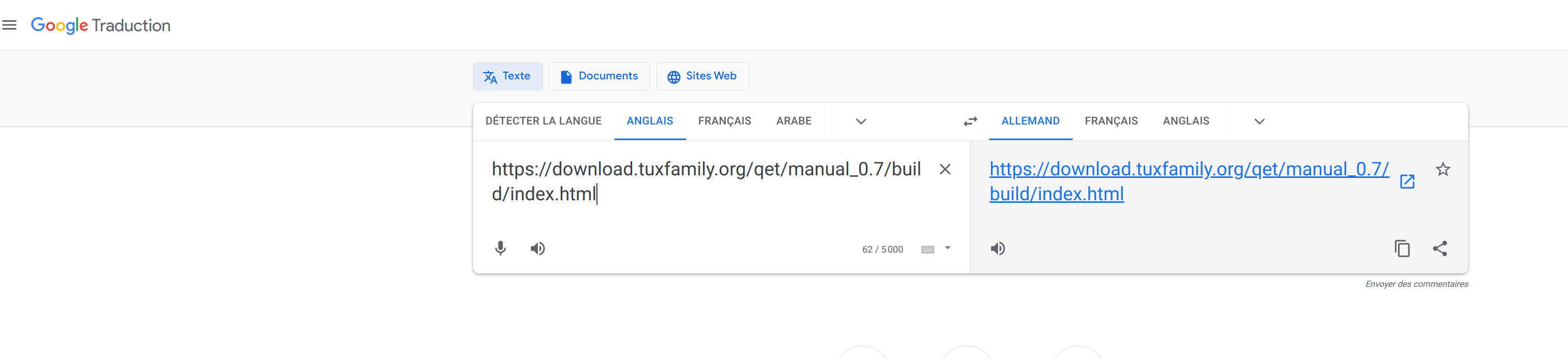
Edit add PDF online German translation
I use this workaround -> print all pages to PDF to make it.
Google translate für die deutsche Übersetzung verwenden
Bearbeiten hinzufügen PDF online deutsche Übersetzung
Ich benutze diesen Workaround -> drucke alle Seiten in PDF um es zu machen.
Bonjour Arnaud,
avec le raccourci Ctrl + F tu peux éditer et changer la date de tous tes folios.
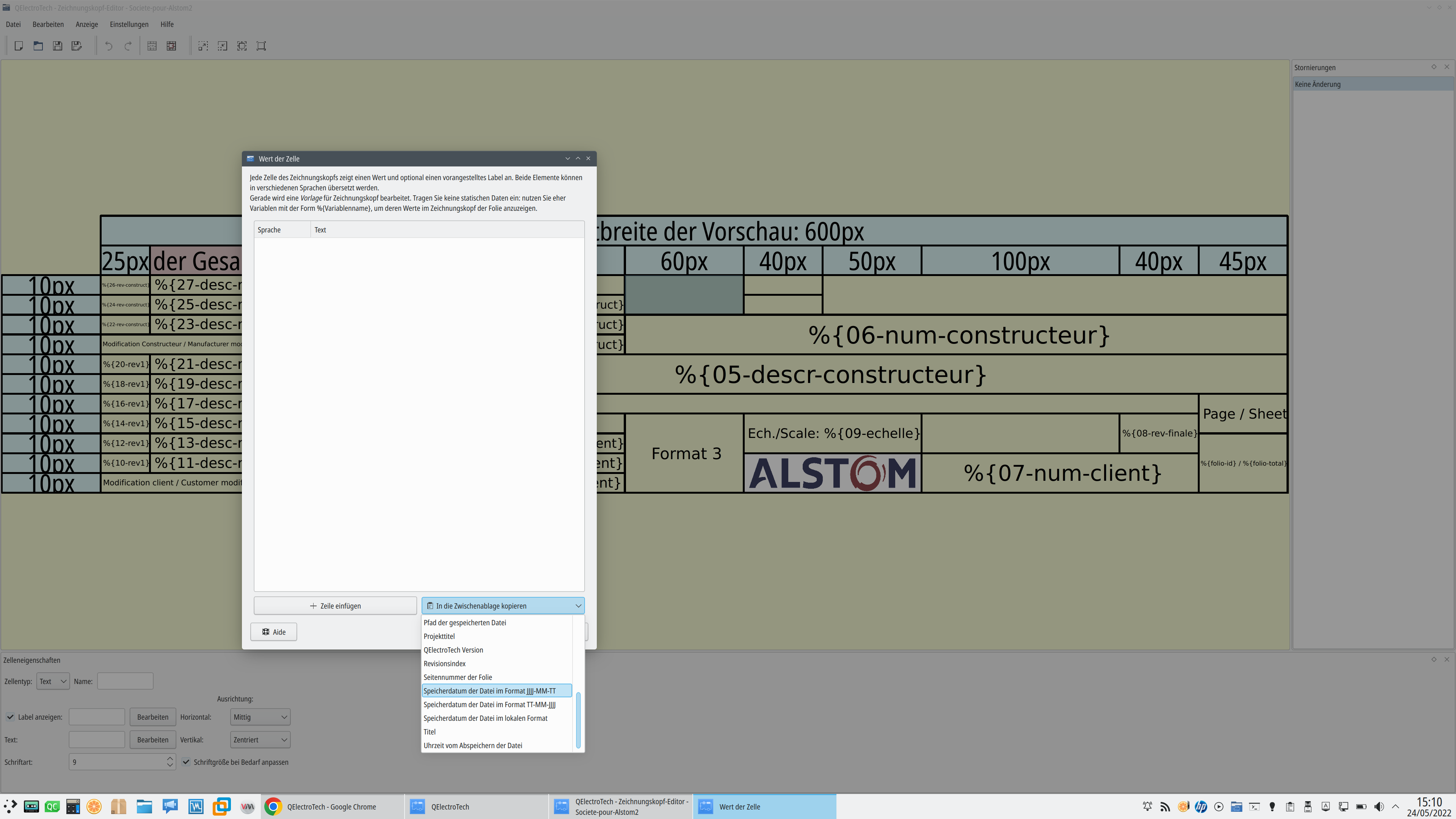
Ou remplacer %date dans ton cartouche par une autre variable:
% {saveddate}: File saving date
% {savedtime}: File saving time
Hello Gabor,
BTW on Linux you could use
sudo chattr +a your_project.qetUser can navigate on project, use link with folio reports, XRefs.., etc, but can't modify it without root password system.
https://www.unixmen.com/secure-and-prev … th-chattr/
Hi,
not for now, abandoned feature:
https://qelectrotech.org/forum/viewtopic.php?id=997
We believe as part of the free software movement that if you need to encrypt your projects, there is plenty of libre software or not to do so, it is not up to us to deal with the decryption problems that might arise.
BTW, on linux you can use The chattr command.
Otherwise a possible solution :
https://wiki.qt.io/Simple_encryption_with_SimpleCrypt
https://github.com/bricke/Qt-AES
https://forum.qt.io/topic/111294/encryp … -in-qt-how
You're welcome, Jarek!
Laurent
https://git.tuxfamily.org/qet/qet.git/c … 7b3cda1381
Edit:
https://git.tuxfamily.org/qet/qet.git/c … 4f3f9248de
In order to be efficient and save a lot of time in the creation of elements:
Now the shortcut for the rotate action is key_space and use key_R to
rotate terminal on the fly before placing it in the drawing.
because in older versions you could not rotate items without going through the appropriate widget for primitives, now you can also through the space keyboard shortcut and keyPressEvent which creates a conflict with space key used in two part of code.Tthat why I create 2 commands..
Bonjour,
j'ai aussi remarqué ce comportement étrange hélas que sur certains de mes champs textes sur l’édition tabulaire de la nomenclature, trop pris par le projet en cours d’étude et de dessin, j'ai juste penser le noter mentalement afin de m'y pencher dessus la prochaine fois et mieux repérer d'ou vient le problème.
Tu fais bien de faire remonter le soucis, c'étais déjà effacé de ma mémoire ...
Le projet étant resté au boulot je ne peut y jeter un œil pour le moment, je verrai quand je reprendrai ma semaine de travail ... ce W.E.
As I say rotation didn't work with ctrl + space here.
Hallo,
Sie müssen eine benutzerdefinierte Cartridge erstellen und diese Variable hinzufügen, um sie verwenden zu können.
Hallo,
Sie sind Master, um Slave-Kontakte zu verknüpfen: Unterbrechen, Auslösen, Durchbrennen von Sicherungen.
Workaround fixed, you can continue to use space key to rotate the terminal.
well almost ... because once the terminal is placed on the drawing the rotation does not work anymore with the space key ..
Strange behaviour with Qt::key_space or maybe a Qt bug..
The branch, master has been updated
via 89d03e55031a2ebe8818fd31dbe97e0f5630dfb0 (commit)
from 9a6e1d2a6108c7262016504f73af71d533128e72 (commit)
Those revisions listed above that are new to this repository have
not appeared on any other notification email; so we list those
revisions in full, below.
- Log -----------------------------------------------------------------
commit 89d03e55031a2ebe8818fd31dbe97e0f5630dfb0
Author: Laurent Trinques <scorpio@qelectrotech.org>
Date: Sat May 21 23:28:44 2022 +0200
Element editor : Workaround for Qt::Key_Space event not working
Use of ALT key as a replacement to rotate terminal on the fly before
placing it in the drawing.
Fix bug #262
https://qelectrotech.org/bugtracker/view.php?id=262
-----------------------------------------------------------------------
i.e.: use ALT key for rotate terminal on the fly and SPACE key when the terminal is placed in the drawing ...
scorpio810 wrote:Pour vous faire patienter, des nouveautés sont déjà en préparation .... pour la future 0.6-dev :
Exemple : la gestion des câbles.Ce n'était que visuel, mais cette possibilité de dessiner les câbles me parait intéressante. Le code existe quelques part ? Ce serait possible de l'ajouter à QET en attendant les évolutions futur ?
Tiens!, Pascal le développeur du logiciel WinRelais vient d'ajouter la fonction management des câbles, l'outil au début ressemble à ce que Joshua avait imaginé.
Logiciel que j'avais essayé de faire fonctionner avec Wine à l'époque sur Ubuntu KDE "Dapper Drake" en 2007 avec succès, avant de découvrir les balbutiements du projet QET en 2007 m'y investir totalement, et finir par m’impliquer dans son développement et son management. Vous connaissez la suite.
https://forum.ubuntu-fr.org/viewtopic.php?id=61832
Non ça ne s'applique qu'aux nouveaux conducteurs que tu vas poser, pour les anciens un double click sur le conducteur t'affiche le widget propriété du conducteur, c'est ici qu'on peut changer la couleur, la taille, le label, etc du conducteur.
Exemple:
QElectroTech → Posts by scorpio810
Powered by PunBB, supported by Informer Technologies, Inc.
Generated in 0.095 seconds (27% PHP - 73% DB) with 5 queries