2,076

(16 replies, posted in Elements)

Hello Vbxier,

wow, great tool,
and thanks for your contribution. ;-)


The translations are retrieved from
‚Google Translate’ and entered in
the third column.

Maybe you could use https://www.deepl.com/ for translate principal languages, I think is better than Google :
https://translatepress.com/deepl-vs-goo … omparison/

If you publish source code maybe someone can port it directly to QET?

Best regards,
Laurent

Non, la doc n'est disponible qu'en Anglais ou en Tchèque, mais oui elle est disponible en PDF.
La documentation étant basé sur le logiciel Sphinx il est difficile de trouver des traducteurs connaissant ce logiciel.
https://qelectrotech.org/forum/viewtopi … 771#p15771
Çà ne serait que des fichiers .Po à traduire, mais la génération n'est pas simple.

https://download.qelectrotech.org/qet/m … oc-0.8.pdf

De mon coté c'est moi qui fait les paquets Debian (Stable et Unstable) j'envoie aussi les tarballs.origin + dsc pour être compilés par les serveurs Ubuntu pour mon PPA qui distribue pour plusieurs distibs Ubuntu, je fais aussi les paquets Windows i386, X86-64, et aussi ReadyToUse, les bundles macOS.
On rajoute aussi les AppImages, les Flatpak, par contre pour les paquets Snap les builds sont automatisés sur Github grâce au travail de Max.  https://github.com/qelectrotech/qelectr … or/actions

Certes avec un AMD ThreadRipper 3960x 24C/48T + 64 GB RAM (encore merci à ceux qui ont participé pour acheter les pièces Hardware) la tache de faire toutes ces builds ne me prend qu'une bonne trentaine de minutes environ. Tout est scripté et ou sur plusieurs KVM/Qemu, hyperviseur de type 1.
https://static.cinay.eu/2020/09/12/KVM- … linux.html


Le plus long étant de mettre à jours les environnements de cross-compilation MXE, AppImage, à chaque update des frameworks Qt et KF5.

Bonjour W-T,

Pour la partie QET on à recensés quelques vidéos classées par langues dans ce topic, elles pourront t'aider à appréhender et utiliser le logiciel:
https://qelectrotech.org/forum/viewforum.php?id=19

En ce moment sur la chaîne YouTube de Georges Tsukaimah tu as quelques vidéos très intéressantes précisément pour ton cas.
https://www.youtube.com/channel/UCopmiC … jMFc_C85oA

Pour la partie elec, il faut mieux être du métier ou bien se renseigner chez un professionnel.

Quelques schémas :
https://download.qelectrotech.org/qet/s … egrand.pdf
https://download.qelectrotech.org/qet/s … ilaire.pdf
https://download.qelectrotech.org/qet/s … otique.pdf
https://download.qelectrotech.org/qet/s … loppes.pdf

PS : Étant dev je prévois quand j'aurais le temps de faire de l'intégration continue avec qelectrotec, on a également un mac pour compiler sur cette plateforme.

Tu es le bienvenue, le GitHub se trouve là :
https://github.com/qelectrotech/qelectr … rce-mirror

L’intégration continue m’intéresse grandement (Jenkis, Travis) ça m’éviterais beaucoup de travail régulier de packaging.

Pour la version de QET: je te conseilles plutôt la 0.9-dev, certes elle n'est pas finie, mais elle est plus rapide et moins buggée que la 0.8.
https://git.tuxfamily.org/qet/qet.git/log/?h=0.8.1

2,079

(53 replies, posted in Videos howto)

https://ubunlog.com/qelectrotech-aplica … lectricos/

https://www.oscaro-power.com/guide/fr_F … al-consuel
https://www.oscaro-power.com/guide/fr_F … e-batterie
https://forum-photovoltaique.fr/viewtopic.php?t=36989

Bonjour,
il y a des panneaux thermiques mais on peux les câbler en photovoltaïque :
https://qelectrotech.org/gallery/photos/rafael4.png


Edit :
https://download.qelectrotech.org/qet/forum_img_2/panneaux_voltaiques.png
https://download.qelectrotech.org/qet/forum_img_2/panneaux.png

2,082

(53 replies, posted in Videos howto)

2,083

(14 replies, posted in Code)

Qt6.2.4 + KF5 5.93 errors log:

https://download.qelectrotech.org/qet/s … .error.txt

Bonjour et merci pour les compliments,

quand on édite un élément il ne faut surtout pas modifier les bornes sinon c'est mort, le nouveau symbole ne pourra remplacer les anciens éléments et donc les éléments identiques auront disparus...

2,085

(236 replies, posted in News)

FYI, I updated macOS bundle packages to :


Qt 5.15.2 -> Qt 5.15.3
KF5 5.77 -> KF5 5.92

2,086

(33 replies, posted in DE : Hilfe, Vorschläge, Unterhaltungen...)

Hallo Pierre
Ich baue eine neue macOS-Würfel-Demo-Anwendung:
https://download.qelectrotech.org/qet/s … er.app.zip

2,087

(33 replies, posted in DE : Hilfe, Vorschläge, Unterhaltungen...)

https://download.qelectrotech.org/qet/s … test_3.zip

Fix typo to _SpaceMouseWireless_Receiver:

static const int _3DCONNEXION_SpaceMouseWireless_Receiver = 0xc62f;

2,088

(33 replies, posted in DE : Hilfe, Vorschläge, Unterhaltungen...)

pierre.branitzki wrote:

Bonjour Laurent,

j'ai testé avec 2 appareils (SpaceMouse wireless et SpaceMouse Enterprise) sous MacOSX 12.3 et Windows10 Pro (20H2) - sans succès. Dans les deux cas, il était impossible de déplacer le cube. Même un clic dans la fenêtre du programme n'a pas donné de résultat...

Meilleures salutations,
Pierre


Hallo Laurent,

ich habe es mit 2 Geräten (SpaceMouse wireless und SpaceMouse Enterprise) unter MacOSX 12.3 und Windows10 Pro (20H2) getestet - ohne Erfolg. In beiden Fällen ließ sich der Würfel nicht bewegen. Auch ein Klick ins Programmfenster brachte keinen Erfolg...

Beste Grüße,
Pierre

Hallo Pierre,

j'ai ajouté les souris SpaceMouse wireless et SpaceMouse Enterprise dans le code du cube.
habe ich die SpaceMouse wireless und die SpaceMouse Enterprise in den Würfelcode eingefügt.


https://download.qelectrotech.org/qet/s … test_2.zip


// from Virtual Reality Peripheral Network - vrpn_3DConnexion.C
// and https://www.3dconnexion.com/forum/viewt … p;start=15
static const int _3DCONNEXION_VENDOR_LOGITECH = 0x046d;            // 1133 // Logitech (3Dconnexion is made by Logitech)
static const int _3DCONNEXION_VENDOR_3DCONNECTION = 0x256F;        // 9583 // 3Dconnexion
static const int _3DCONNEXION_TRAVELER = 0xC623;                // 50723
static const int _3DCONNEXION_NAVIGATOR = 0xC626;                // 50726
static const int _3DCONNEXION_NAVIGATOR_FOR_NOTEBOOKS = 0xc628;    // 50728
static const int _3DCONNEXION_SPACEEXPLORER = 0xc627;            // 50727
static const int _3DCONNEXION_SPACEMOUSE = 0xC603;                // 50691
static const int _3DCONNEXION_SPACEMOUSEPRO = 0xC62B;            // 50731
static const int _3DCONNEXION_SPACEBALL5000 = 0xc621;            // 50721
static const int _3DCONNEXION_SPACEPILOT = 0xc625;                // 50725
static const int _3DCONNEXION_SPACEPILOTPRO = 0xc629;            // 50729
static const int _3DCONNEXION_SpaceMouseWireless_usb = 0xc62e;
static const int _3DCONNEXION_SpaceMouseWireless_Receiver = 0xc631;
static const int _3DCONNEXION_SpaceMouse_Enterprise = 0xc633;


bool SpaceMouseController::initialize()
{
    struct hid_device_info * devs;

    unsigned short current_vendor_id = 0x0;
    unsigned short current_product_id = 0x0;

    devs = hid_enumerate(0x0, 0x0);
    m_cur_dev = devs;

    while (m_cur_dev)
    {

        if ((m_cur_dev->vendor_id == _3DCONNEXION_VENDOR_LOGITECH ||
                m_cur_dev->vendor_id == _3DCONNEXION_VENDOR_3DCONNECTION)
                && (m_cur_dev->product_id == _3DCONNEXION_TRAVELER ||
                    m_cur_dev->product_id == _3DCONNEXION_NAVIGATOR ||
                    m_cur_dev->product_id == _3DCONNEXION_NAVIGATOR_FOR_NOTEBOOKS ||
                    m_cur_dev->product_id == _3DCONNEXION_SPACEEXPLORER ||
                    m_cur_dev->product_id == _3DCONNEXION_SPACEMOUSE ||
                    m_cur_dev->product_id == _3DCONNEXION_SPACEMOUSEPRO ||
                    m_cur_dev->product_id == _3DCONNEXION_SPACEBALL5000 ||
                    m_cur_dev->product_id == _3DCONNEXION_SPACEPILOT ||
                    m_cur_dev->product_id == _3DCONNEXION_SPACEPILOTPRO ||
                    m_cur_dev->product_id == _3DCONNEXION_SpaceMouseWireless_usb ||
                    m_cur_dev->product_id == _3DCONNEXION_SpaceMouseWireless_Receiver ||
                    m_cur_dev->product_id == _3DCONNEXION_SpaceMouse_Enterprise))     


        {
            //setup the values with the founded vendor id.s
            current_vendor_id = m_cur_dev->vendor_id;
            current_product_id = m_cur_dev->product_id;

            break; //break when first comaptaible device is found.
        }

        m_cur_dev = m_cur_dev->next;
    }


Beste Grüße,
Laurent

https://qelectrotech.org/forum/viewtopi … 7809#p7809

https://qelectrotech.org/forum/viewtopi … 858#p13858

Hello, try to add more space after 500, like this :
220 V AC 500      mA min.

2,092

(33 replies, posted in DE : Hilfe, Vorschläge, Unterhaltungen...)

https://github.com/koenieee/Crossplatfo … roller.cpp
Der Code des berühmten Würfels, die unterstützten Mäuse sind eingeschränkt.

#include "SpaceMouseController.h"


// from Virtual Reality Peripheral Network - vrpn_3DConnexion.C
// and https://www.3dconnexion.com/forum/viewt … p;start=15
static const int _3DCONNEXION_VENDOR_LOGITECH = 0x046d;            // 1133 // Logitech (3Dconnexion is made by Logitech)
static const int _3DCONNEXION_VENDOR_3DCONNECTION = 0x256F;        // 9583 // 3Dconnexion
static const int _3DCONNEXION_TRAVELER = 0xC623;                // 50723
static const int _3DCONNEXION_NAVIGATOR = 0xC626;                // 50726
static const int _3DCONNEXION_NAVIGATOR_FOR_NOTEBOOKS = 0xc628;    // 50728
static const int _3DCONNEXION_SPACEEXPLORER = 0xc627;            // 50727
static const int _3DCONNEXION_SPACEMOUSE = 0xC603;                // 50691
static const int _3DCONNEXION_SPACEMOUSEPRO = 0xC62B;            // 50731
static const int _3DCONNEXION_SPACEBALL5000 = 0xc621;            // 50721
static const int _3DCONNEXION_SPACEPILOT = 0xc625;                // 50725
static const int _3DCONNEXION_SPACEPILOTPRO = 0xc629;            // 50729


if ((m_cur_dev->vendor_id == _3DCONNEXION_VENDOR_LOGITECH ||
                m_cur_dev->vendor_id == _3DCONNEXION_VENDOR_3DCONNECTION)
                && (m_cur_dev->product_id == _3DCONNEXION_TRAVELER ||
                    m_cur_dev->product_id == _3DCONNEXION_NAVIGATOR ||
                    m_cur_dev->product_id == _3DCONNEXION_NAVIGATOR_FOR_NOTEBOOKS ||
                    m_cur_dev->product_id == _3DCONNEXION_SPACEEXPLORER ||
                    m_cur_dev->product_id == _3DCONNEXION_SPACEMOUSE ||
                    m_cur_dev->product_id == _3DCONNEXION_SPACEMOUSEPRO ||
                    m_cur_dev->product_id == _3DCONNEXION_SPACEBALL5000 ||
                    m_cur_dev->product_id == _3DCONNEXION_SPACEPILOT ||
                    m_cur_dev->product_id == _3DCONNEXION_SPACEPILOTPRO))
        {
            //setup the values with the founded vendor id.s
            current_vendor_id = m_cur_dev->vendor_id;
            current_product_id = m_cur_dev->product_id;

            break; //break when first comaptaible device is found.

https://github.com/FreeCAD/FreeCAD/blob … 32.cpp#L85

/*
    List of all devices
    https://www.3dconnexion.com/nc/service/ … ndows.html
    Supported:
    SpacePilot: USB\0x046d:0xc625
    SpaceExplorer: USB\0x046d:0xc627
    SpaceMouse Wireless (cabled): USB\0x256f:0xc62e
    SpaceMouse Wireless Receiver: USB\0x256f:0xc62f
    SpaceMouse Pro Wireless (cabled): USB\0x256d:0xc631
    SpaceMouse Pro Wireless Receiver: USB\0x256f:0xc632
    Supported (but works differently):
    SpaceMouse Plus USB: USB\0x046d:0xc603
    SpaceMouse Plus XT USB: USB\0x046d:0xc603
    Unknown status:
    SpaceNavigator: USB\0x046d:0xc626
    SpaceNavigator for Notebooks: USB\0x046d:0xc628
    SpacePilot Pro: USB\0x046d:0xc629
    SpaceMouse Enterprise: USB\0x256f:0xc633
    Not yet supported:
    SpaceMouse Compact: USB\0x256f:0xc635
    Not supported:
    CadMan: USB\0x046d:0xc605
    SpaceMouse Classic USB: USB\0x046d:0xc606
    SpaceBall 5000 USB: USB\0x046d:0xc621
    SpaceTraveler: USB\0x046d:0xc623
    SpaceMouse Pro: USB\0x046d:0xc62b
    CadMouse: USB\0x256f:0xc650
    CadMouse Pro Wireless: USB\0x256f:0xc654
    CadMouse Pro Wireless Left: USB\0x256f:0xc657
    CadMouse Wireless: USB\0x256f:0xc651
    Universal Receiver: USB\0x256f:0xc652
*/

enum e3dconnexion_pid {
   eSpaceMousePlusXT = 0xc603,
   eSpacePilot = 0xc625,
   eSpaceNavigator = 0xc626,
   eSpaceExplorer = 0xc627,
   eSpaceNavigatorForNotebooks = 0xc628,
   eSpacePilotPRO = 0xc629,
   eSpaceMouseWireless = 0xc62e,
   eSpaceMouseWirelessReceiver = 0xc62f,
   eSpaceMousePROWireless = 0xc631,
   eSpaceMousePROWirelessReceiver = 0xc632,
   eSpaceMouseEnterprise = 0xc633,
   eSpaceMouseCompact = 0xc635

2,093

(33 replies, posted in DE : Hilfe, Vorschläge, Unterhaltungen...)

Hallo Pierre,

c'est juste cette demo que j'ai envoyé le fameux cube :
https://qelectrotech.org/forum/viewtopi … 945#p15945

es ist nur diese Demo, dass ich den berühmten Würfel geschickt habe:

Beste Grüße,
Laurent

2,094

(26 replies, posted in Import DXF)

You don't need choose DB to proces, only if you want to edit and hack the DB to do batch processing.
Like changing color parameter, typo, some text, etc and create different elements without redraw some thing.

2,095

(30 replies, posted in Elements)

a.funke wrote:

PS:
Das sieht schon echt Professionell aus, dafür das es "nur" V 0.5 war..

https://download.qelectrotech.org/qet/s … roject.pdf

Software ist nichts ohne talentierte Menschen, die sie nutzen und ihre Lücken mit genialen Tricks füllen.
Und das Ergebnis wird auf der anderen Seite mittelmäßig sein, wenn man als Anfänger nicht allzu geschickt mit einer sehr umfassenden, leistungsstarken Software umgeht, die ein wenig zu komplex ist und oft ein kleines Vermögen kostet ......

Software is nothing without talented people who exploit it and fill its gaps with brilliant tricks.
And the result will be on the other hand mediocre with a beginner user not too skilful on a very complete software, powerful, a little too complex and also often costing a small fortune .....

nomicons/wink

2,096

(26 replies, posted in Import DXF)

For such a simple design, it's easier to do it yourself in the Elements editor.

2,097

(26 replies, posted in Import DXF)

Voila.

2,098

(26 replies, posted in Import DXF)

You could send your DXF?

2,099

(33 replies, posted in DE : Hilfe, Vorschläge, Unterhaltungen...)

J'ai essayé FreeCad et Calligra (old Koffice) qui ont deux façons différentes de gérer la souris 3D. D'abord sur ma machine Debian puis sur mon Laptop sur la session Windows 10 (21H2).

Sous Linux avec FreeCad c'est la librairie Spacenav, sous Windows ils se servent des driver's de 3DxWare, le support est mieux aboutit sous Windows, gestion de l’écran (driver's Logitech), menus, etc, je trouve que la souris est plus facile à prendre en main que sous Linux.

Sous Calligra (sheets) programme 2D, sous Linux la souris 3D permet le zoom et le déplacement, meme si on est vite perdu, quand sous Windows je n'ai pas remarqué grand chose à part le scroll de la page.


Ich habe FreeCad und Calligra (old Koffice) ausprobiert, die zwei verschiedene Möglichkeiten haben, die 3D-Maus zu verwalten. Zuerst auf meinem Debian-Rechner und dann auf meinem Laptop in der Windows 10-Sitzung (21H2).

Unter Linux mit FreeCad ist es die Spacenav Bibliothek, unter Windows verwenden sie die 3DxWare Treiber, die Unterstützung ist unter Windows besser, Bildschirmverwaltung (Logitech Treiber), Menüs, etc, ich finde, dass die Maus einfacher zu erlernen ist als unter Linux.

Unter Calligra (sheets) ist das Programm 2D, unter Linux ermöglicht die 3D-Maus das Zoomen und Verschieben, auch wenn man sich schnell verirrt, während ich unter Windows nicht viel bemerkt habe, außer dem Scrollen der Seite.


https://github.com/FreeCAD/FreeCAD/tree … Dconnexion
https://github.com/KDE/calligra/tree/ma … enavigator

https://habr-com.translate.goog/ru/comp … _tr_pto=sc

2,100

(26 replies, posted in Import DXF)

Hello,

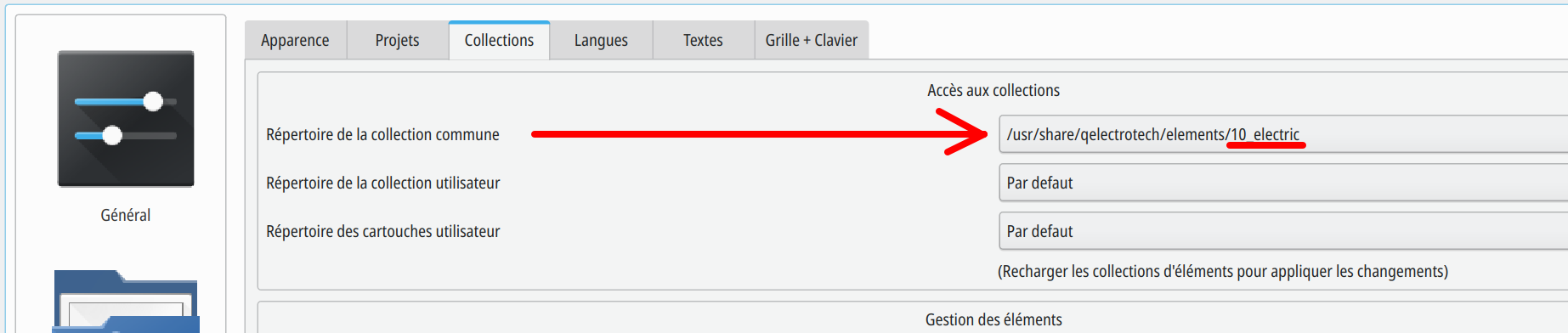
Path to custom collection need to be C:\Users\eangel\AppData\Roaming\qet\elements\
If you have installed QET by installer.