
Great, thanks a lot.
2,026 2022-07-18 20:27:16
Re: New .dxf to .elmt Conversion Program (210 replies, posted in Import DXF)
2,027 2022-07-18 17:47:36
Re: New .dxf to .elmt Conversion Program (210 replies, posted in Import DXF)
Maybe a little bug?
laurent@debian:/media/backup6/download$ ./dxf2elmt_2 4_inlet.dxf
4_inlet.dxf loaded...
4_inlet.elmt was created...
Now converting 4_inlet.dxf...
Conversion complete!

STATS
~~~~~~~~~~~~~~~
Circles: 40
Lines: 268
Arcs: 46
Texts: 306
Ellipses: 0
Polylines: 204
Currently Unsupported: 0

Time Elapsed: 154 ms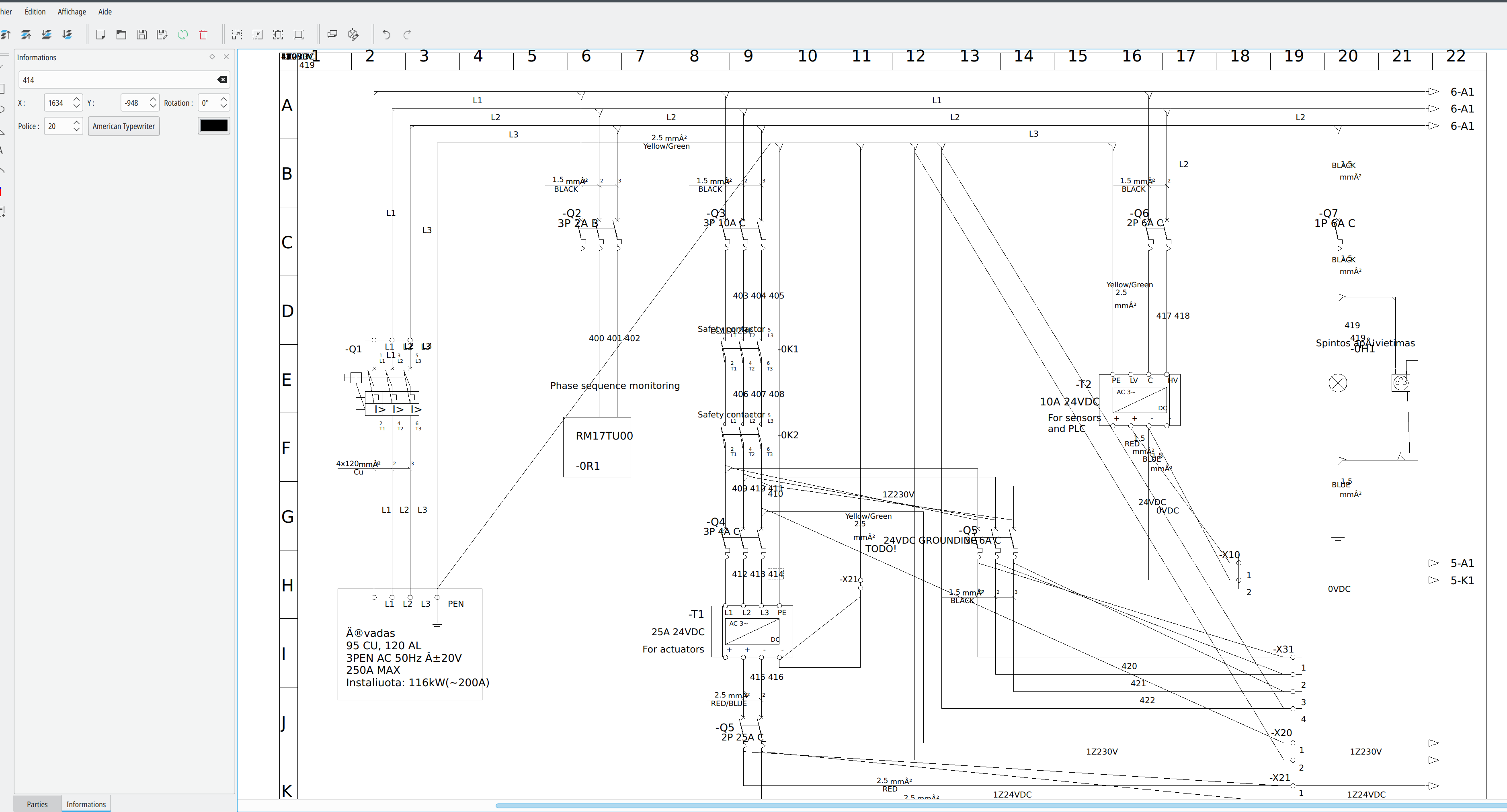
2,028 2022-07-18 17:36:31
Re: New .dxf to .elmt Conversion Program (210 replies, posted in Import DXF)
antonioaja wrote:
I have executables for windows and mac on the github page. I'll add a linux binary later today.
I also noticed issued with the text font I used. I'll change this as well.
https://github.com/antonioaja/dxf2elmt
macOS arm64 :
https://github.com/antonioaja/dxf2elmt/ … v0.1.0.zip
Windows 64 :
https://github.com/antonioaja/dxf2elmt/ … v0.1.0.zip
2,029 2022-07-18 16:24:05
Re: New .dxf to .elmt Conversion Program (210 replies, posted in Import DXF)
2,030 2022-07-18 16:15:26
Re: New .dxf to .elmt Conversion Program (210 replies, posted in Import DXF)
I don't know rust and how to cross-compile it for Windows I'use MXE for Windows builds.
Hmm https://stackoverflow.com/questions/314 … to-windows
rustup isn't Debian packaged yet...
2,031 2022-07-18 16:00:02
Re: New .dxf to .elmt Conversion Program (210 replies, posted in Import DXF)
Linux 64 binary:
https://download.qelectrotech.org/qet/b … 4/dxf2elmt
2,032 2022-07-18 14:18:04
Re: New .dxf to .elmt Conversion Program (210 replies, posted in Import DXF)
WoW ^^ very impressive, thanks.
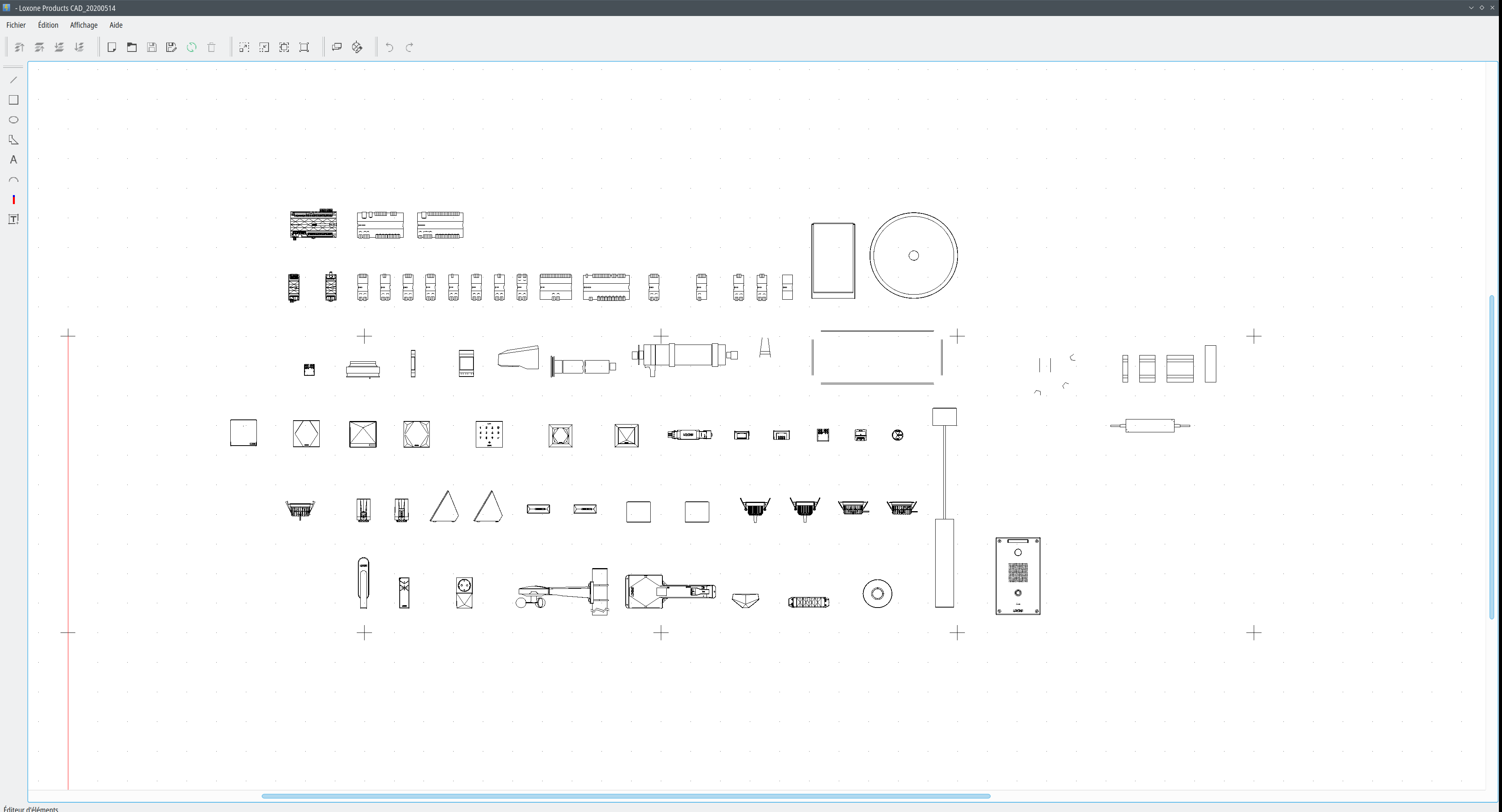
Loxone\ Products\ CAD_20200514.dxf is a big DXF ~ 23,0 Mio (24149756)
./dxf2elmt Loxone\ Products\ CAD_20200514.dxf
Loxone Products CAD_20200514.dxf loaded...
Loxone Products CAD_20200514.elmt was created...
Now converting Loxone Products CAD_20200514.dxf...
Conversion complete!

STATS
~~~~~~~~~~~~~~~
Circles: 2
Lines: 91303
Arcs: 521
Texts: 0
Ellipses: 65
Polylines: 0
Currently Unsupported: 2310

Time Elapsed: 18771 ms
Loxone Products CAD_20200514.elmt ~ 21,3 Mio (22287391)
2,033 2022-07-18 13:52:23
Re: New .dxf to .elmt Conversion Program (210 replies, posted in Import DXF)
Hello antonioaja,
you are welcome. ;-)
laurent@debian:/media/backup6/download/dxf2elmt$ cargo build
error: failed to parse manifest at `/media/backup6/download/dxf2elmt/Cargo.toml`

Caused by:
  feature `strip` is required

  The package requires the Cargo feature called `strip`, but that feature is not stabilized in this version of Cargo (1.56.0).
  Consider adding `cargo-features = ["strip"]` to the top of Cargo.toml (above the [package] table) to tell Cargo you are opting in to use this unstable feature.
  See https://doc.rust-lang.org/nightly/cargo/reference/unstable.html#profile-strip-option for more information about the status of this feature.
diff --git a/Cargo.toml b/Cargo.toml
index 17ad53d..ac82116 100644
--- a/Cargo.toml
+++ b/Cargo.toml
@@ -1,3 +1,4 @@
+cargo-features = ["strip"]
 [package]
 name = "dxf2elmt"
 version = "0.1.0"
@@ -11,4 +12,4 @@ lto = true

 [dependencies]
 dxf = "0.5.0"
-simple-xml-builder = "1.1.0"
\ No newline at end of file
+simple-xml-builder = "1.1.0"
laurent@debian:/media/backup6/downl
Fixed:
laurent@debian:/media/backup6/download/dxf2elmt$ cargo build
    Updating crates.io index
  Downloaded hashbrown v0.12.2
  Downloaded memoffset v0.6.5
  Downloaded num-traits v0.1.43
  Downloaded image v0.23.14
  Downloaded num-rational v0.3.2
  Downloaded xml-rs v0.7.0
  Downloaded xmltree v0.8.0
  Downloaded enum_primitive v0.1.1
  Downloaded deflate v0.8.6
  Downloaded bytemuck v1.10.0
  Downloaded num-bigint v0.3.3
  Downloaded crossbeam-epoch v0.9.9
  Downloaded jpeg-decoder v0.1.22
  Downloaded png v0.16.8
  Downloaded adler32 v1.2.0
  Downloaded adler v1.0.2
  Downloaded cfg-if v1.0.0
  Downloaded num-iter v0.1.43
  Downloaded color_quant v1.1.0
  Downloaded autocfg v1.1.0
  Downloaded bitflags v1.3.2
  Downloaded crossbeam-utils v0.8.10
  Downloaded crc32fast v1.3.2
  Downloaded num-integer v0.1.45
  Downloaded itertools v0.10.3
  Downloaded num-traits v0.2.15
  Downloaded uuid v0.8.2
  Downloaded num v0.3.1
  Downloaded num-complex v0.3.1
  Downloaded chrono v0.4.19
  Downloaded miniz_oxide v0.3.7
  Downloaded weezl v0.1.7
  Downloaded time v0.1.44
  Downloaded scopeguard v1.1.0
  Downloaded rayon v1.5.3
  Downloaded num_cpus v1.13.1
  Downloaded getrandom v0.2.7
  Downloaded simple-xml-builder v1.1.0
  Downloaded either v1.7.0
  Downloaded scoped_threadpool v0.1.9
  Downloaded once_cell v1.13.0
  Downloaded serde v1.0.139
  Downloaded indexmap v1.9.1
  Downloaded rayon-core v1.9.3
  Downloaded miniz_oxide v0.4.4
  Downloaded dxf v0.5.0
  Downloaded crossbeam-channel v0.5.5
  Downloaded libc v0.2.126
  Downloaded crossbeam-deque v0.8.1
  Downloaded gif v0.11.4
  Downloaded byteorder v1.4.3
  Downloaded encoding_rs v0.8.31
  Downloaded tiff v0.6.1
  Downloaded 53 crates (6.4 MB) in 0.73s (largest was `tiff` at 1.4 MB)
   Compiling autocfg v1.1.0
   Compiling cfg-if v1.0.0
   Compiling libc v0.2.126
   Compiling crossbeam-utils v0.8.10
   Compiling once_cell v1.13.0
   Compiling rayon-core v1.9.3
   Compiling scopeguard v1.1.0
   Compiling bitflags v1.3.2
   Compiling either v1.7.0
   Compiling serde v1.0.139
   Compiling crc32fast v1.3.2
   Compiling adler32 v1.2.0
   Compiling byteorder v1.4.3
   Compiling weezl v0.1.7
   Compiling adler v1.0.2
   Compiling encoding_rs v0.8.31
   Compiling color_quant v1.1.0
   Compiling bytemuck v1.10.0
   Compiling scoped_threadpool v0.1.9
   Compiling hashbrown v0.12.2
   Compiling xml-rs v0.7.0
   Compiling miniz_oxide v0.3.7
   Compiling itertools v0.10.3
   Compiling deflate v0.8.6
   Compiling gif v0.11.4
   Compiling num-traits v0.2.15
   Compiling memoffset v0.6.5
   Compiling num-integer v0.1.45
   Compiling crossbeam-epoch v0.9.9
   Compiling num-bigint v0.3.3
   Compiling rayon v1.5.3
   Compiling miniz_oxide v0.4.4
   Compiling num-rational v0.3.2
   Compiling num-iter v0.1.43
   Compiling indexmap v1.9.1
   Compiling crossbeam-channel v0.5.5
   Compiling png v0.16.8
   Compiling xmltree v0.8.0
   Compiling crossbeam-deque v0.8.1
   Compiling dxf v0.5.0
   Compiling num_cpus v1.13.1
   Compiling time v0.1.44
   Compiling getrandom v0.2.7
   Compiling simple-xml-builder v1.1.0
   Compiling num-traits v0.1.43
   Compiling num-complex v0.3.1
   Compiling enum_primitive v0.1.1
   Compiling uuid v0.8.2
   Compiling chrono v0.4.19
   Compiling num v0.3.1
   Compiling jpeg-decoder v0.1.22
   Compiling tiff v0.6.1
   Compiling image v0.23.14
   Compiling dxf2elmt v0.1.0 (/media/backup6/download/dxf2elmt)
    Finished dev [unoptimized + debuginfo] target(s) in 30.17s
2,034 2022-07-17 14:57:49
Re: Nouveautés de la version de développement 0.9 and 0.100.0 -0.100.1 (277 replies, posted in News)
The branch, master has been updated
via ab724377c0b74c36db7048615ccfa03fb3c22b5c (commit)
from 4c5d27e9af7381e36aff2038935fba24022d7e6d (commit)
Those revisions listed above that are new to this repository have
not appeared on any other notification email; so we list those
revisions in full, below.
- Log -----------------------------------------------------------------
commit ab724377c0b74c36db7048615ccfa03fb3c22b5c
Author: Laurent Trinques <scorpio@>
Date: Sat Jul 16 12:58:35 2022 +0200
Fixed a bug with many slaves of type Other, whose XREFs overlap in list
mode
-----------------------------------------------------------------------
Summary of changes:
sources/qetgraphicsitem/crossrefitem.cpp | 8 ++++++++
1 file changed, 8 insertions(+)
2,035 2022-07-16 19:31:07
Re: Esclave neutre (32 replies, posted in FR : Aide, suggestions, discussions, ...)
papat wrote:
Je ne suis pas programmeur (juste un peu bidouilleur sur arduino) et je ne sais malheureusement pas tester cette possibilité dans un projet aussi complexe (pour moi) que QET.
Au plaisir,
Thierry.
Moi aussi je bidouille ..., mais plutôt sur RPI3/ ESP8266 et home-assistant (domotique):
https://qelectrotech.org/forum/viewtopi … 661#p13661
https://qelectrotech.org/forum/viewtopi … 048#p14048
2,036 2022-07-16 15:05:35
Re: Esclave neutre (32 replies, posted in FR : Aide, suggestions, discussions, ...)
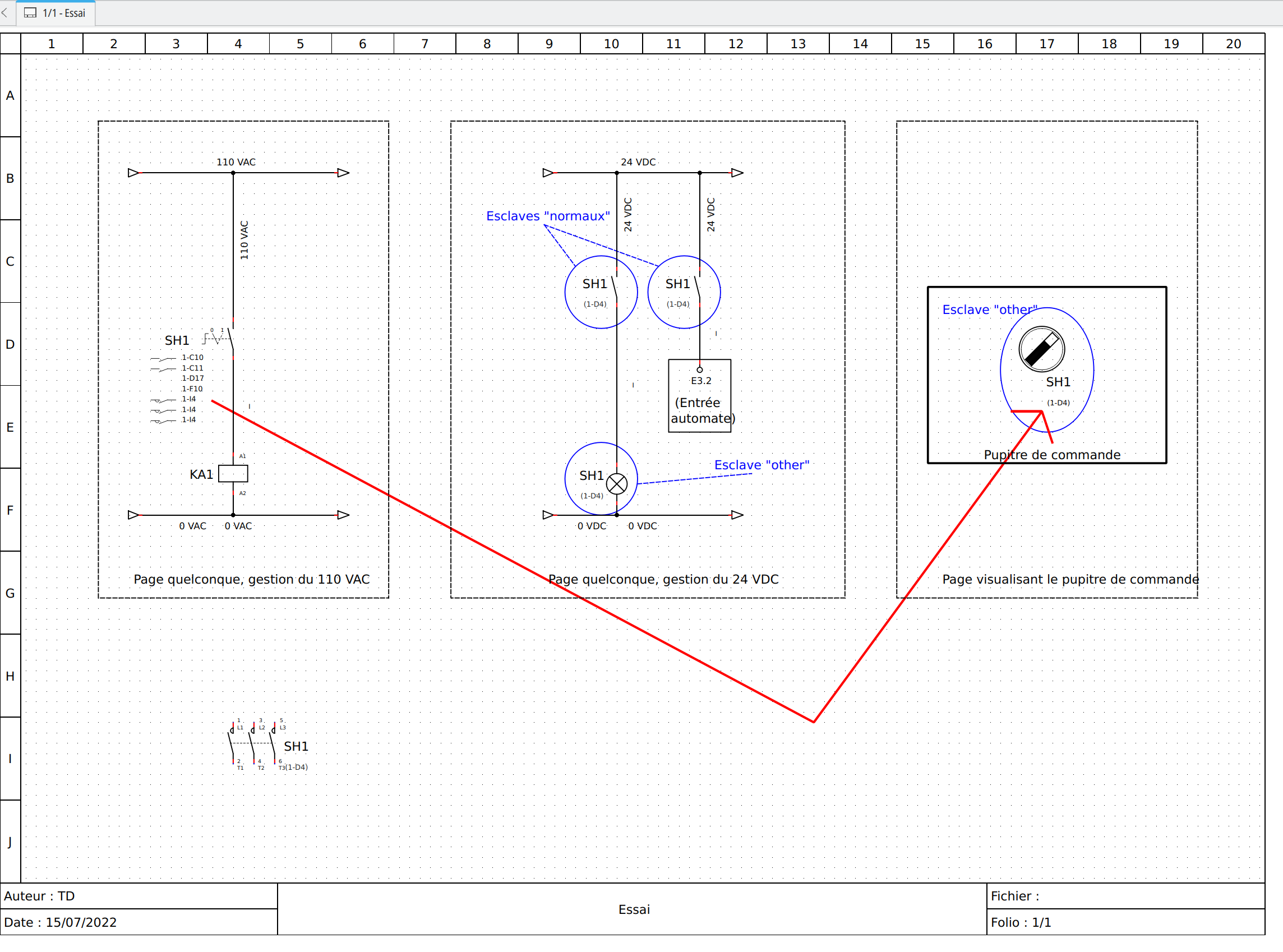
Pour les entrées PLC un workaround et oui encore un ... et de l'époque antique de QET ...en détournant un renvoi de folio:
2,037 2022-07-16 13:00:12
Re: Esclave neutre (32 replies, posted in FR : Aide, suggestions, discussions, ...)
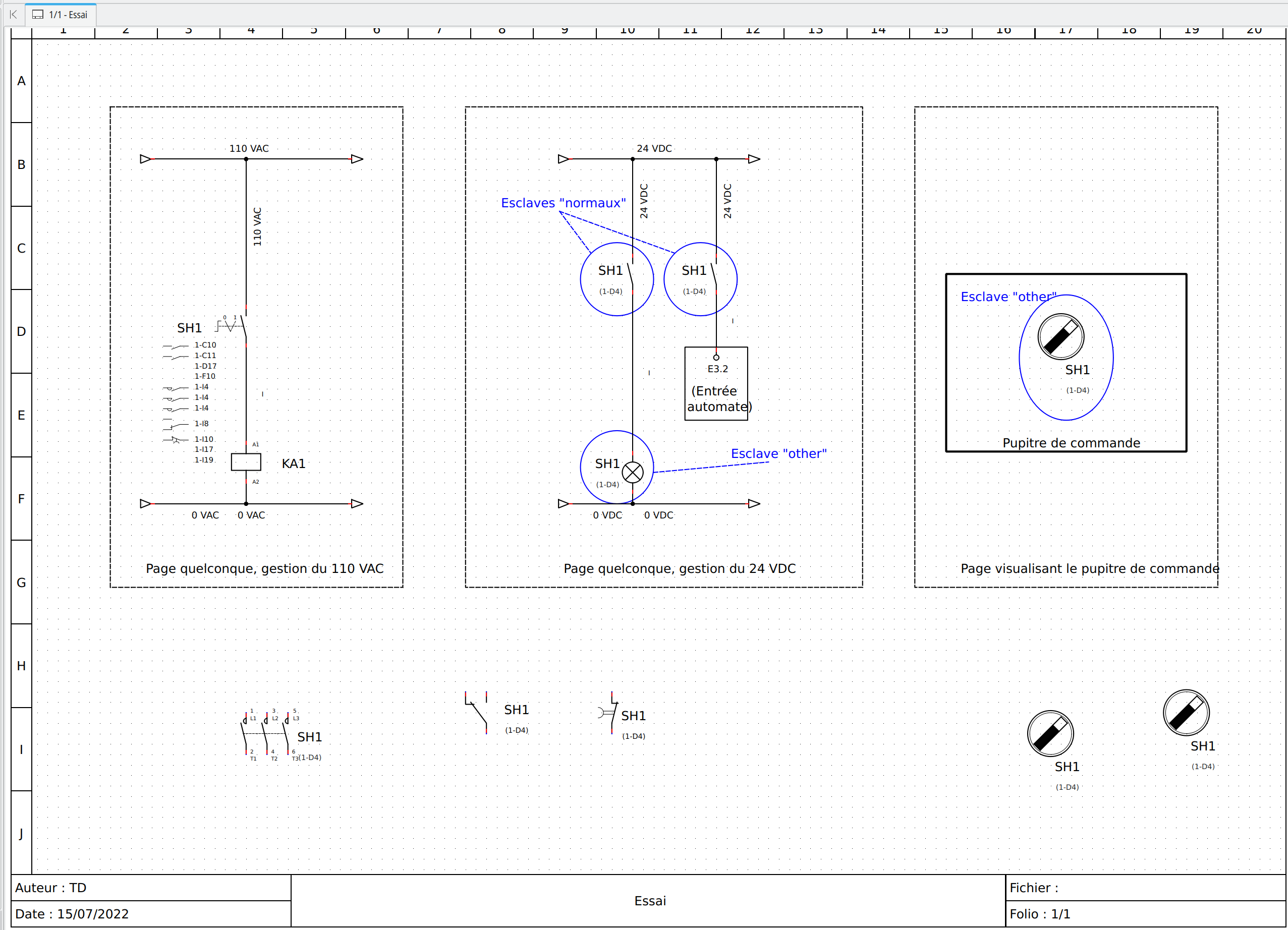
Fixed:
https://git.tuxfamily.org/qet/qet.git/c … 3fb3c22b5c
https://github.com/qelectrotech/qelectr … 3fb3c22b5c
Je vais préparer de nouveaux builds.
https://git.tuxfamily.org/qet/qet.git/c … 7f3d9b4224
Pour aller sur l'esclave dans la liste il faut faire un double clik sur la représentation du symbole de l'esclave, comme Other n'en a pas !
Il faut cliquer dans le vide devant sa XREF.
2,038 2022-07-16 05:46:49
Re: Esclave neutre (32 replies, posted in FR : Aide, suggestions, discussions, ...)
Un petit workaround pour palier ... je sais on me cite ici souvent comme "le champion incontesté des hacks et workaround en tout genre" 

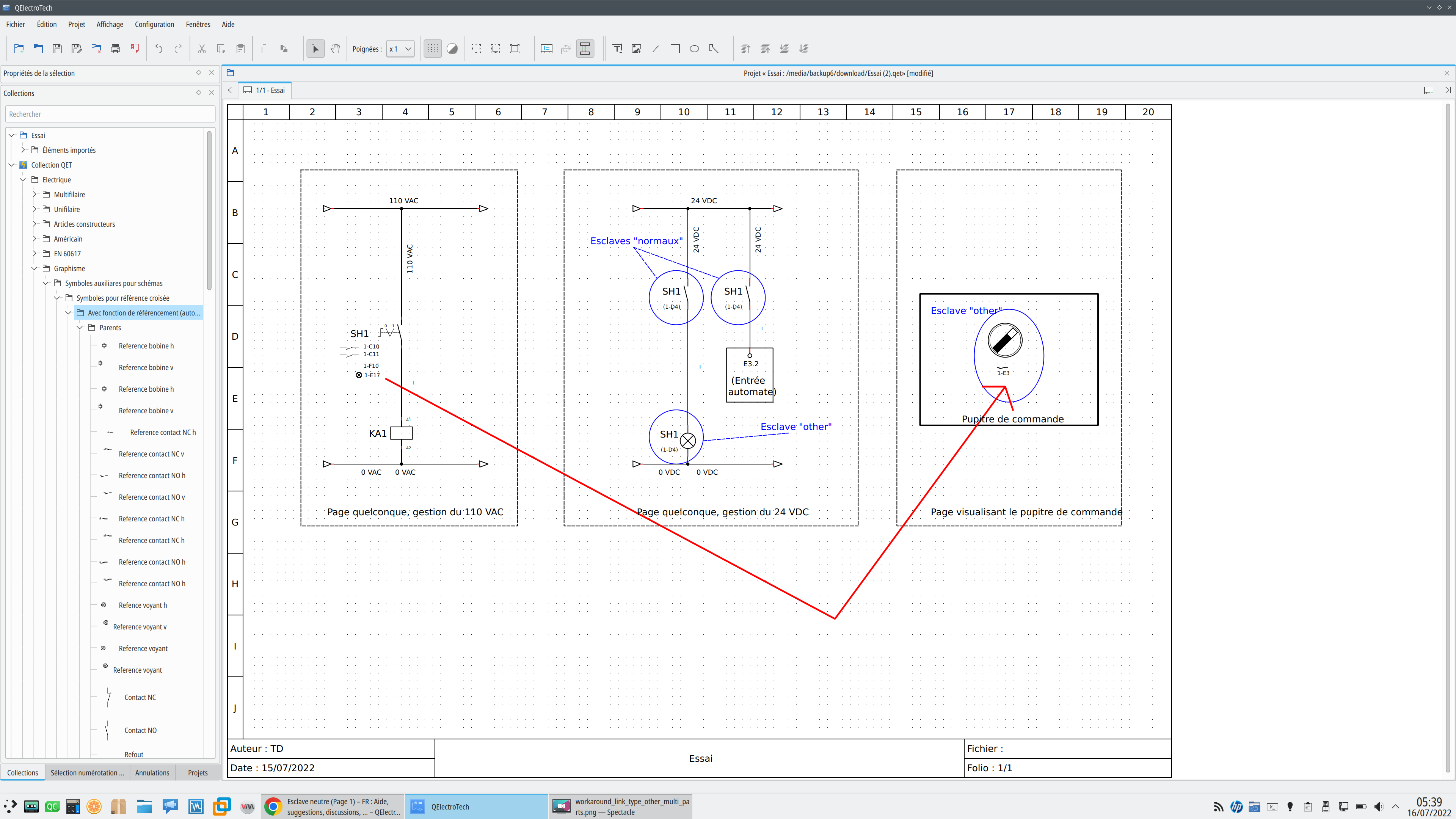
C'est d'utiliser les symboles pour XREFs ( c'est des renvois de folios entre deux parties graphiques) qui existent depuis des années pour palier certains manques de QET.
Il suffit de mettre un xref de type parent par exemple contact NO et ensuite un enfant de type voyant ...
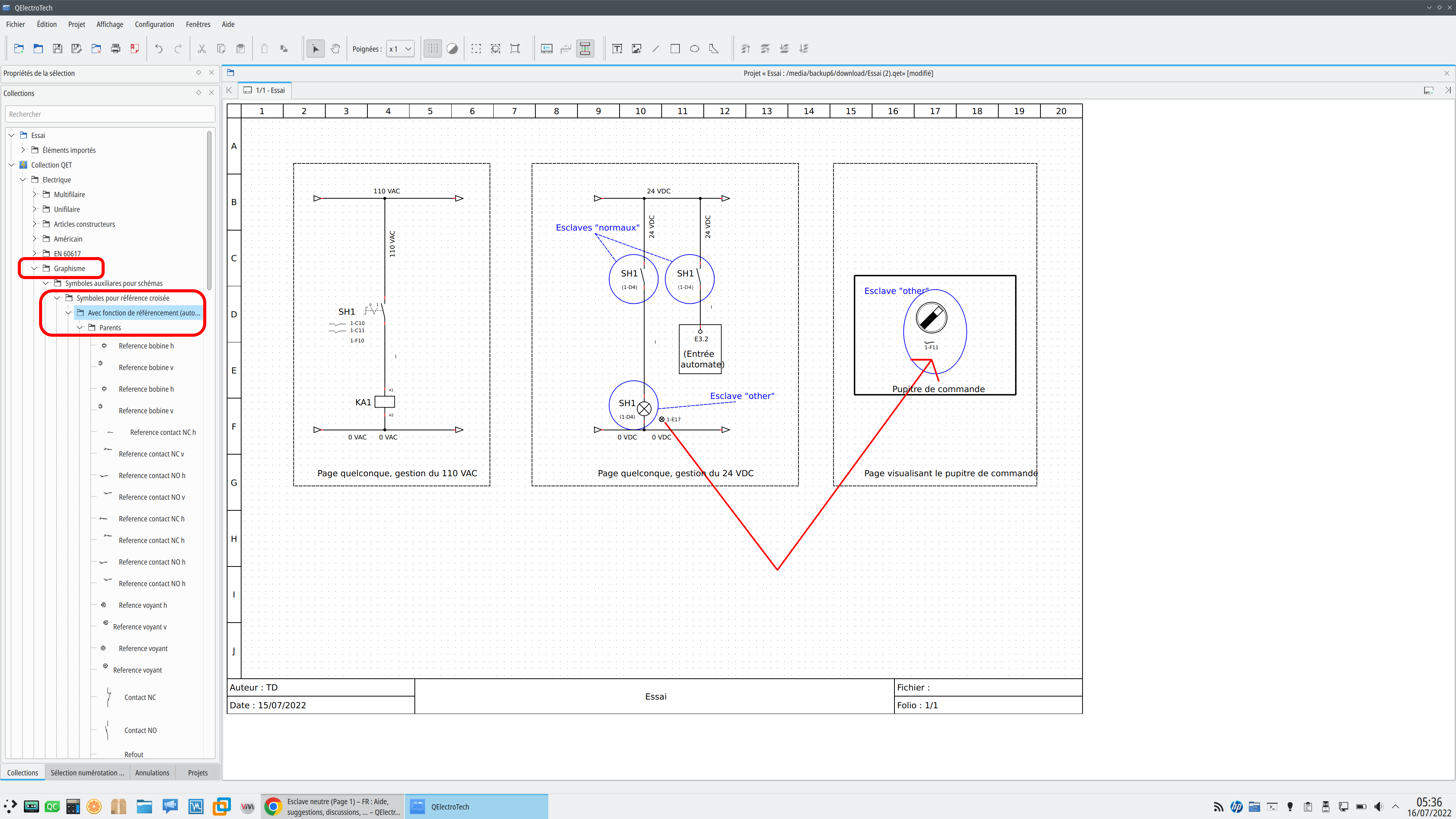
Tu peux aussi le mettre le parent (maître) en dessous de la liste ou en le déplaçant manuellement comme dans l'exemple ci-dessous:
2,039 2022-07-16 05:21:20
Re: Esclave neutre (32 replies, posted in FR : Aide, suggestions, discussions, ...)
Merci d'avoir attaché le machin, comme tu le cites, là on voit clairement qu'il y a un petit bug et un usage non prévu:
on ne crée pas la nouvelle xref sur une nouvelle ligne !
Elle est donc superposée sur la xref du voyant.
Je ne pense pas que l'auteur du patch avait prévu cette utilisation.
De plus le bouton graphique pour moi n'est pas un esclave réel mais sa représentation graphique pour une "vue implantation" ce qui n'est pas pareil et devrait être vu plutôt une xref de type : thumbnail (vignette) et donc être un esclave à part de type : thumbnail "vignette en Français" dans la liste, pour l'instant ce n'est pas encore codé, mais c'est prévu.
Voir ces discussions qui en parlent : https://qelectrotech.org/forum/search.p … =434055866
2,040 2022-07-15 19:31:16
Re: Esclave neutre (32 replies, posted in FR : Aide, suggestions, discussions, ...)
Mets ton mini projet en download dans ton message, merci. Çà nous sera plus rapide pour essayer de corriger ton exemple.
Laurent
2,041 2022-07-15 15:06:16
Re: Esclave neutre (32 replies, posted in FR : Aide, suggestions, discussions, ...)
2,042 2022-07-15 14:28:43
Re: Esclave neutre (32 replies, posted in FR : Aide, suggestions, discussions, ...)
Je te laisse chercher, ça a été posé maintes fois sur le forum, tu devrais trouver facilement avec le moteur de recherche du forum, c'est juste un réglage à faire au niveau de la config.
2,043 2022-07-15 14:03:33
Re: Esclave neutre (32 replies, posted in FR : Aide, suggestions, discussions, ...)
Clair, il est plus logique d'avoir les références des relais en bas de pages pour les maîtres, et sous l’élément maître si c'est un bouton par exemple.
Pour les renvois de folios cette petite vidéo devrait te faire découvrir quelques astuces avec les renvois de folios et suivant le type de schéma avoir un gain d'efficacité non négligeable:
2,044 2022-07-15 12:54:39
Re: help Terminal block generator bug (2 replies, posted in Terminal block generator)
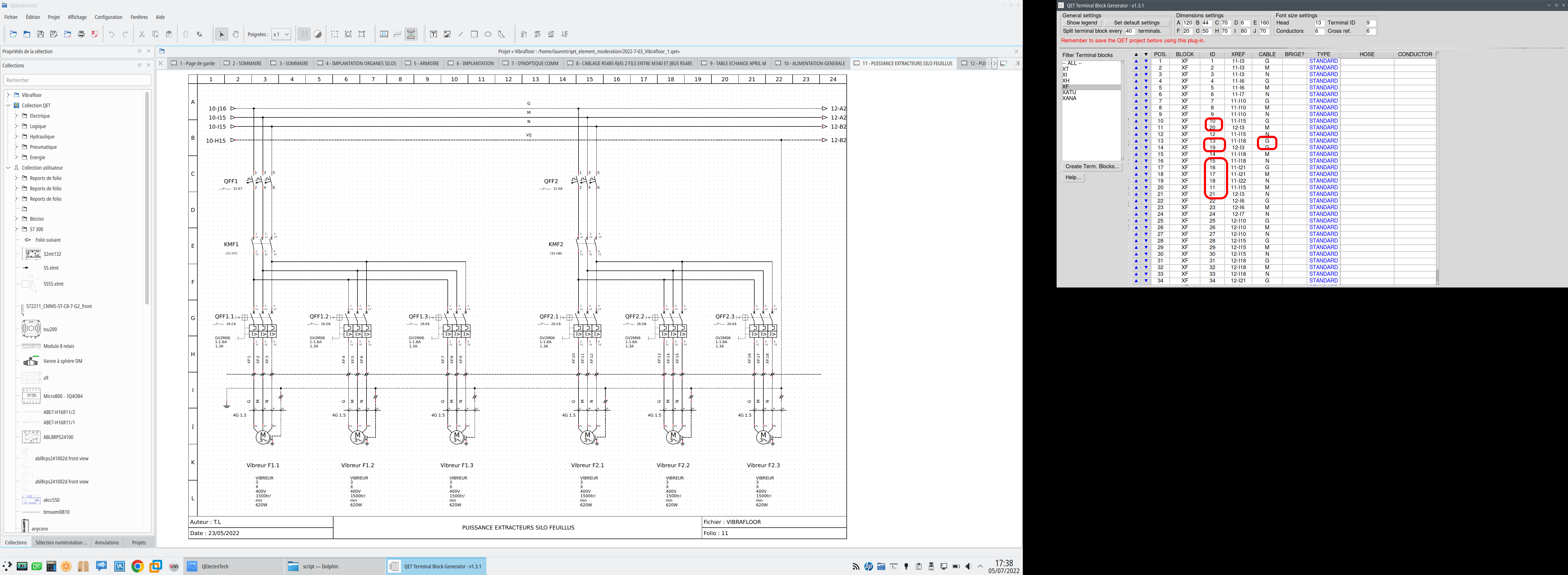
J'ai moi aussi un bug avec le générateur de bornier, je me demande si ça ne vient pas de la dernière version de python en 3.10?
2,045 2022-07-15 12:47:28
Re: Esclave neutre (32 replies, posted in FR : Aide, suggestions, discussions, ...)
papat wrote:
Reste une petite requête "cosmétique" : si le renvoi de folio pouvait être entre parenthèses au niveau de l'élément maître, comme le sont les autres renvois, ce serait vraiment top ! ;-)
Encore merci pour cette réponse ultra-rapide !
Thierry.
Cette feature ne s’utilise pas avec le mode vue en croix mais en mode liste.
2,046 2022-07-15 12:45:25
Re: Esclave neutre (32 replies, posted in FR : Aide, suggestions, discussions, ...)
La 0.9-dev est plus stable que la 0.8, d’ailleurs ont a poussé beaucoup de fix dans une branche 0.8.1 mais je ne sais pas encore si on la publiera, manque de temps etc.
Laurent
2,047 2022-07-15 11:33:24
Re: Esclave neutre (32 replies, posted in FR : Aide, suggestions, discussions, ...)
Bonjour,
ça a été ajouté voir le PR : https://github.com/qelectrotech/qelectr … r/pull/222
Les questions de galexis :
https://qelectrotech.org/forum/viewtopic.php?id=2251
Dispo dans les dernieres 0.9-dev.
https://qelectrotech.org/forum/viewtopi … 080#p16080
scorpio810 wrote:
anthos1984 wrote:Hello,
I see qet is very useful and I been used for several years. So I now ask for 2 more features:
1. Slave item also have marker other than switch. This useful for module like illuminated switch; The lamp should not marked as switch. But still shown on master.
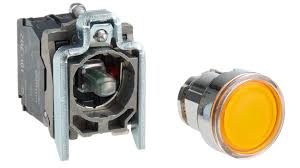
Also good for marking panel image which shown on other folio and linked to the master component, yet not counted as additional contact.Thanks.
Hi,
If you your ask is about this
The light is not a slave of the button, but of a PLC output or a relay, it is not the fact of mechanically activating the push button that makes the light change its state.So I don't agree with your request.
2,048 2022-07-13 14:57:18
Re: Pb avec Bornier (7 replies, posted in FR : Aide, suggestions, discussions, ...)
SELECT label, designation, description, manufacturer, diagram_position, POSITION FROM element_nomenclature_view WHERE ( element_type = 'Terminale' OR element_type = 'Simple' OR element_sub_type = 'commutator' OR element_sub_type = 'coil' OR element_sub_type = 'protection') AND designation != '' ORDER BY label, designation, description, manufacturer, diagram_position, POSITION
2,049 2022-07-13 14:51:23
Re: Pb avec Bornier (7 replies, posted in FR : Aide, suggestions, discussions, ...)
Si tu remplaces
IS NOT NULLpar
!= ' exemple
comment != '' AND label != ''
WHERE ( element_type = 'simple' OR element_sub_type = 'commutator' OR element_sub_type = 'coil' OR element_sub_type = 'protection') AND comment != '' AND label != ''
Je ne veux comptabiliser les Références que pour les éléments de type : simple, et de sous_type: commutator, coil, protection, et dont le label et le commentaire ne sont pas vide.
Çà devrait fonctionner sur ta 0.9-dev.
2,050 2022-07-13 14:24:03
Re: Pb avec Bornier (7 replies, posted in FR : Aide, suggestions, discussions, ...)
Qu'a t'elle de particulier ta requête de nomenclature?
https://qelectrotech.org/forum/viewtopi … 256#p16256