Re: Nouveautés de la version de développement 0.9> 0.200.1

Fill missing element names for 29 languages with machine translation
https://github.com/qelectrotech/qelectr … ts/pull/82
https://qelectrotech.org/wiki_new/doc/t … ion_status

Fix bugtracker #340: Windows texts in 'MS Shell Dlg 2' render as Arial
https://github.com/qelectrotech/qelectr … /pull/1012

Remember the sheet background colour between runs
https://github.com/qelectrotech/qelectr … /pull/1011

Fix green fragments left behind when moving or zooming an element
https://github.com/qelectrotech/qelectr … /pull/1009

Fix #1004: element preview stays stale after editing until the collection reloads
https://github.com/qelectrotech/qelectr … /pull/1008

Fix warning about reading XML without explicit file opening
https://github.com/qelectrotech/qelectr … /pull/1014

Add translation suggestions for the interface to 29 phrase books
https://github.com/qelectrotech/qelectr … /pull/1006

Fix #1002: conductor colour toolbar swatch only recolours one wire segment
https://github.com/qelectrotech/qelectr … /pull/1005

"Le jour où tu découvres le Libre, tu sais que tu ne pourras jamais plus revenir en arrière..."Questions regarding QET belong in this forum and will NOT be answered via PM! – Les questions concernant QET doivent être posées sur ce forum et ne seront pas traitées par MP !


Re: Nouveautés de la version de développement 0.9> 0.200.1

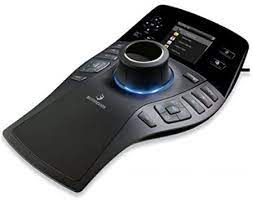
3D Mouse Support (SpaceMouse / SpacePilot) — Cross-Platform Now!

Great news for everyone running a 3Dconnexion device alongside QET — pan/zoom support via libspnav or Hidapi See cmake option (discussion #599, PR #635) has landed and matured fast across all three platforms:

  • Linux — enabled first, shipped in the Snap build and in my Debian packages. Note: flatpak sandboxing may prevent libspnav from working there.

  • Windows 11 — tested working (even without 3DxWare installed).Hidapi

  • macOS — works out of the box once any old 3DxWare driver is removed (reboot required) Hidapi. Shane (ispyisail) then contributed additional code so testers with 3DxWare installed can use it too — fixed in PR #1032 ("Fix 3D mouse doing nothing on macOS when 3DxWare is installed").

Nice bit of rapid cross-platform iteration — Linux → Windows → macOS in just a couple of days, with community testing (thanks Shane!) closing the last gap.

If you've got a SpaceMouse/SpacePilot gathering dust, now's the time to plug it in and try panning/zooming your schematics with it!

https://download.qelectrotech.org/qet/forum_img_2/space_pilot.jpeg

Thanks Pierre to send me this mouse 5 years ago.

Also merged in the same batch: PR #1021 — fixes bugtracker #217, QET now suggests element information already used in the project. Small but handy quality-of-life improvement.

"Le jour où tu découvres le Libre, tu sais que tu ne pourras jamais plus revenir en arrière..."Questions regarding QET belong in this forum and will NOT be answered via PM! – Les questions concernant QET doivent être posées sur ce forum et ne seront pas traitées par MP !
Re: Nouveautés de la version de développement 0.9> 0.200.1

ispyisail
yesterday
Collaborator
Author
No terminal? SpaceMouse Check now exists for all three systems. Download, double-click, press Start, then attach the file it saves here:
https://github.com/ispyisail/qelectrote … e-check-v1

Mac: SpaceMouseCheck.zip
Windows: SpaceMouseCheck-Windows.exe (if Windows warns, click More info → Run anyway)
Linux: SpaceMouseCheck-Linux-x86_64.tar.gz (it asks for your password to read the device)
The page has the steps for each system.

"Le jour où tu découvres le Libre, tu sais que tu ne pourras jamais plus revenir en arrière..."Questions regarding QET belong in this forum and will NOT be answered via PM! – Les questions concernant QET doivent être posées sur ce forum et ne seront pas traitées par MP !

Re: Nouveautés de la version de développement 0.9> 0.200.1

Drawing workflow (SolidWorks-style: keyboard and mouse) (ispyisail) - discussion #1033
Add double-click placement from the collection, and A to repeat it - #1042
Add placing the last element and folio references to the folio menu - #1050
Show collection search results as a ranked list - #1051
Add an element picker that opens at the cursor with Insert - #1052
Add a shortcut bar that opens at the cursor with S - #1053
Add customising the shortcut bar in place - #1054
Add pinned elements to the shortcut bar, with a width you can set - #1060
Add a command bar beside the selection after a click - #1055
Add repeating the last drawing or placing command with Enter - #1056
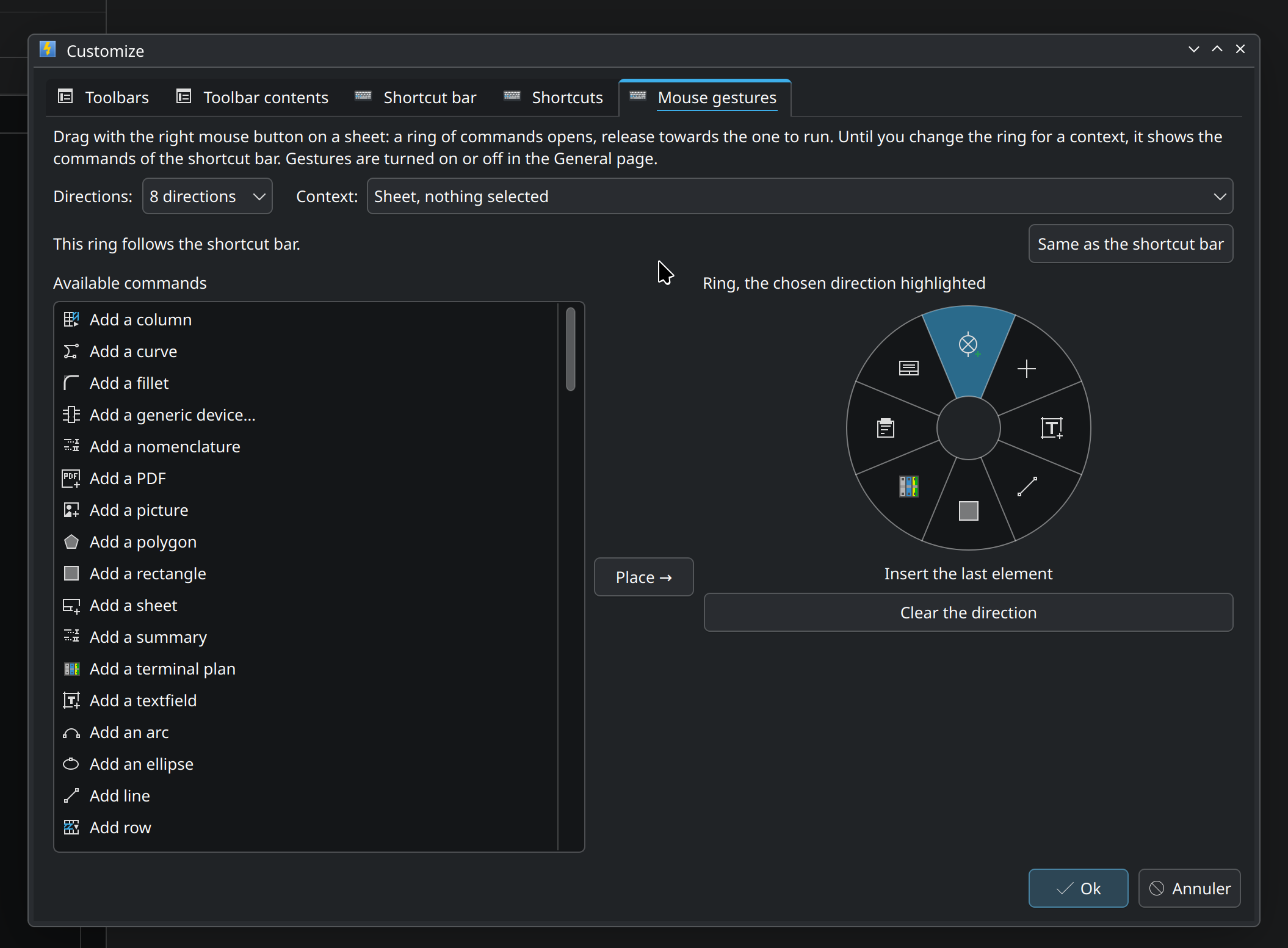
Add right-drag mouse gestures to run commands - #1057
Fix the folio staying in pan mode after Ctrl+Shift+M - #1059

Stability fixes
Fix #1045: crash on clicking an element with online-installer Qt - #1046 (ispyisail)
Fix undo lost after a text drag that snaps back to its start - #1039 (ispyisail)

Build
Remove Qt5 (README and INSTALL now Qt6/CMake, vestigial Qt5 code removed) - #880 (arummler)
Fix the build on Qt older than 6.5 (#1080) - #1085 (ispyisail)
Fix the build without KDE Frameworks (conductor properties panel) - #1086 (ispyisail)

Images
Speed up saving projects that contain pictures - #1067 (ispyisail)
Add a label to pictures (#349) - #1068 (ispyisail)

MCP server (misc/qet-mcp) (ispyisail)
Add misc/qet-mcp: a Model Context Protocol server over QET projects - #969
Fix qet_diff reporting untouched symbols as changed after a re-save - #1090
Fix qet_edit giving no clue when a folio number is off by one - #1091
Add exact-answer tests for the MCP read tools and qet_diff - #1095
Fix qet_diff not reporting a rotated symbol - #1096
Fix qet_diff counting a symbol's own texts as free texts - #1097
Match conductors, folios, text fields and tables by uuid in qet_diff - #1099
Let qet_edit address tables and symbol text fields by uuid - #1101

Translations
Complete Spanish translations (1,383 entries in qet_es.ts) - #1104 (Alfmat01)

"Le jour où tu découvres le Libre, tu sais que tu ne pourras jamais plus revenir en arrière..."Questions regarding QET belong in this forum and will NOT be answered via PM! – Les questions concernant QET doivent être posées sur ce forum et ne seront pas traitées par MP !
Re: Nouveautés de la version de développement 0.9> 0.200.1

https://github.com/qelectrotech/qelectr … ssues/1112

"Le jour où tu découvres le Libre, tu sais que tu ne pourras jamais plus revenir en arrière..."Questions regarding QET belong in this forum and will NOT be answered via PM! – Les questions concernant QET doivent être posées sur ce forum et ne seront pas traitées par MP !

Re: Nouveautés de la version de développement 0.9> 0.200.1

Wow, there's so much coming up. Even when I look through the press releases, I can't find every feature.
Are there any videos here about the features, like the ones I often create?

Re: Nouveautés de la version de développement 0.9> 0.200.1

Kellermorph wrote:

Wow, there's so much coming up. Even when I look through the press releases, I can't find every feature.
Are there any videos here about the features, like the ones I often create?

Unfortunately, no – all that’s needed is for someone to have some spare time to sort it out and send me the videos; I’d be happy to upload them to the channel.

"Le jour où tu découvres le Libre, tu sais que tu ne pourras jamais plus revenir en arrière..."Questions regarding QET belong in this forum and will NOT be answered via PM! – Les questions concernant QET doivent être posées sur ce forum et ne seront pas traitées par MP !

Re: Nouveautés de la version de développement 0.9> 0.200.1

Okay, that's too bad. As an outsider who didn't create the features, it's hard to keep up, let alone take over the task of making the videos.

Re: Nouveautés de la version de développement 0.9> 0.200.1

50 new features on master, April 2022 – July 2026
https://github.com/qelectrotech/qelectr … sions/1196

50 new features on master, 1 August – 19 September 2026
https://github.com/qelectrotech/qelectr … sions/1195

50 new features on master, 19–30 September 2026
https://github.com/qelectrotech/qelectr … sions/1193

"Le jour où tu découvres le Libre, tu sais que tu ne pourras jamais plus revenir en arrière..."Questions regarding QET belong in this forum and will NOT be answered via PM! – Les questions concernant QET doivent être posées sur ce forum et ne seront pas traitées par MP !
Re: Nouveautés de la version de développement 0.9> 0.200.1

Draw curved wires for lighting layouts with the new Arc tool
https://github.com/qelectrotech/qelectr … sions/1203
https://raw.githubusercontent.com/ispyisail/qelectrotech-source-mirror/pr-assets/arc-408/arc-toolbar.png


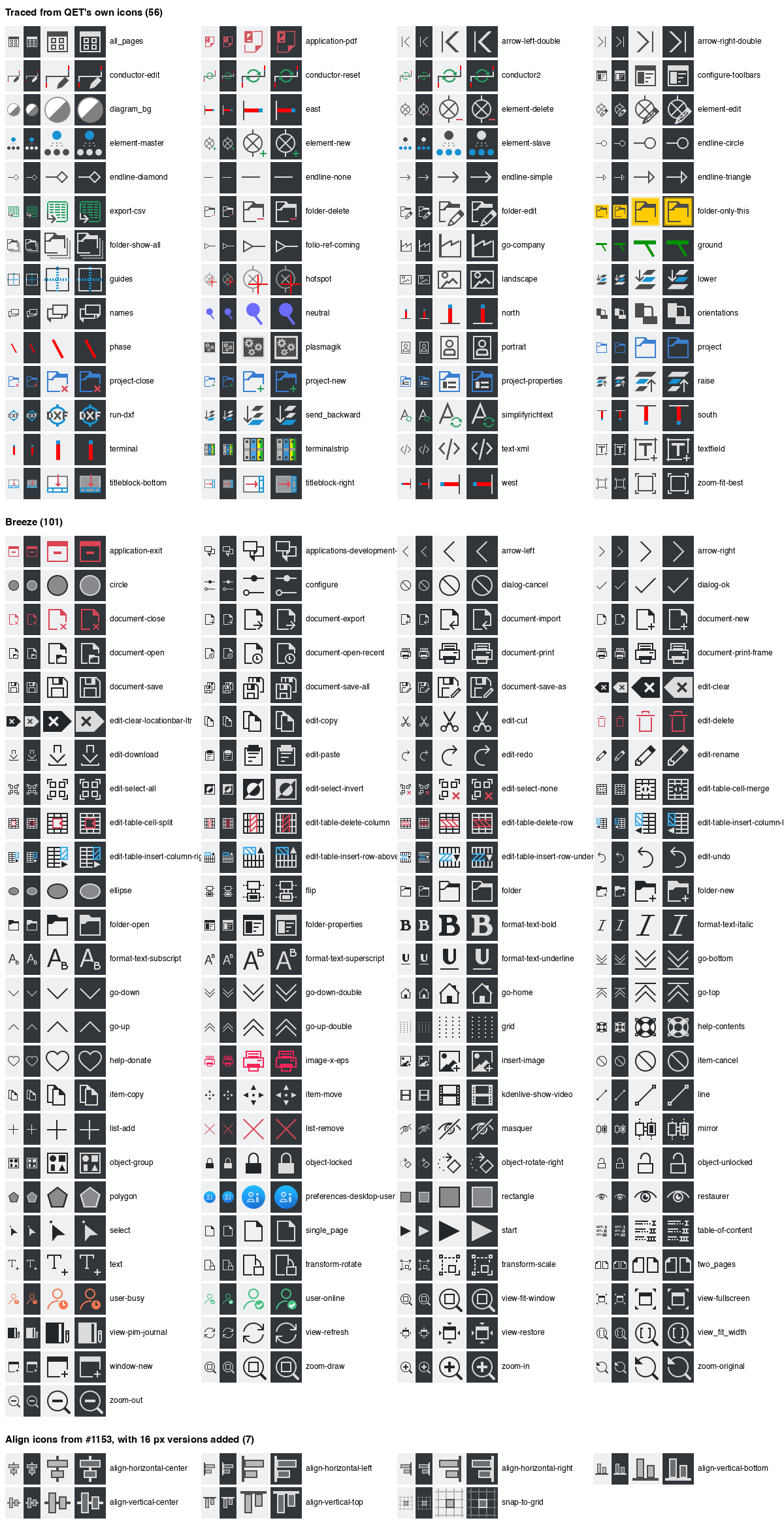
Convert the toolbar and menu icons to SVG (#1063)- #1207
#1207

https://github.com/qelectrotech/qelectr … /pull/1207


https://raw.githubusercontent.com/jp2images/qelectrotech-source-mirror/9ecbed79d22859b60aea6574f0b744f65fb70027/1063-svg-icons/progress-en.png

"Le jour où tu découvres le Libre, tu sais que tu ne pourras jamais plus revenir en arrière..."Questions regarding QET belong in this forum and will NOT be answered via PM! – Les questions concernant QET doivent être posées sur ce forum et ne seront pas traitées par MP !
Re: Nouveautés de la version de développement 0.9> 0.200.1

IEC-Normen als Standard in QElectroTech? / Normes IEC par défaut dans QET ? / IEC standards by default in QET?

Deutsch

Hallo zusammen,

auf GitHub gibt es einen Vorschlag, QElectroTech schrittweise so auszubauen, dass Schaltpläne standardmäßig nach den IEC-Normen gezeichnet werden können (Betriebsmittelkennzeichnung nach IEC 81346, Dokumentationsregeln nach IEC 61082, Aderfarben nach IEC 60445 usw.):

https://github.com/qelectrotech/qelectr … sions/1267

Ich möchte ehrlich sein: Diese Normen betreffen vor allem Anwender und Entwickler in Deutschland und in osteuropäischen Ländern, die sie seit langem benutzen. Ich selbst wende IEC 81346 in meinen eigenen Projekten noch nicht an und kann daher die fachlichen Details nicht gut beurteilen. Ich kann nur einschätzen, was es für den Code, das Dateiformat und die Veröffentlichung bedeutet.

Deshalb brauche ich Eure Erfahrung:

  • Stimmt die Übersicht in der Diskussion (was QET heute kann und was fehlt) mit Eurer täglichen Praxis überein?

  • Welche Buchstabentabelle nach 81346-2 verwendet Ihr in der Praxis, die ältere oder die von 2019?

  • Wer hat Zugang zu den Normtexten, damit die Regeln am echten Text überprüft werden können?

  • Was würdet Ihr zuerst brauchen (zum Beispiel Aderfarben inklusive Grün-Gelb, oder die Kennzeichnungsstruktur)?

Wichtig: Es ist noch nichts entschieden, und vor der stabilen Version 0.200.2 wird dafür kein Code eingebaut. Bestehende Projekte sollen sich nicht verändern. Antworten bitte gern direkt in der GitHub-Diskussion oder hier im Forum, auf Deutsch, Französisch oder Englisch.

----------------------------------------

Français

Bonjour à tous,

il y a sur GitHub une proposition pour faire évoluer QElectroTech progressivement afin que les schémas puissent être dessinés par défaut selon les normes IEC (désignation des matériels selon IEC 81346, règles de documentation selon IEC 61082, couleurs de fils selon IEC 60445, etc.) :

https://github.com/qelectrotech/qelectr … sions/1267

Je veux être honnête : ces normes concernent surtout des utilisateurs et développeurs en Allemagne et dans des pays d'Europe de l'Est, qui les utilisent depuis longtemps. Je n'applique pas encore IEC 81346 dans mes propres projets et je ne peux donc pas bien juger les détails techniques. Je peux seulement évaluer l'impact sur le code, le format de fichier et la publication.

J'ai donc besoin de votre expérience :

  • Le tableau de la discussion (ce que QET sait faire aujourd'hui et ce qui manque) correspond-il à votre pratique quotidienne ?

  • Quelle table de lettres 81346-2 utilisez-vous, l'ancienne ou celle de 2019 ?

  • Qui a accès aux textes des normes, afin de vérifier les règles sur le texte réel ?

  • Que vous faudrait-il en premier (par exemple les couleurs de fils, vert-jaune compris, ou la structure de désignation) ?

Important : rien n'est décidé, et aucun code ne sera intégré avant la version stable 0.200.2. Les projets existants ne doivent pas changer. Vous pouvez répondre dans la discussion GitHub ou ici sur le forum, en allemand, français ou anglais.

----------------------------------------

English

Hello everyone,

there is a proposal on GitHub to gradually extend QElectroTech so that diagrams can be drawn to the IEC standards by default (device tags per IEC 81346, documentation rules per IEC 61082, wire colours per IEC 60445, etc.):

https://github.com/qelectrotech/qelectr … sions/1267

To be transparent: these standards mainly concern users and developers in Germany and in Eastern European countries, who have used them for a long time. I don't apply IEC 81346 in my own projects yet, so I'm not well placed to judge the technical details. I can only assess the impact on the code, the file format and the release process.

So I need your experience:

  • Does the overview in the discussion (what QET does today and what is missing) match your daily practice?

  • Which 81346-2 letter table do you actually use, the older one or the 2019 one?

  • Who has access to the standards texts, so rules can be checked against the real text?

  • What would you need first (for example wire colours including green-yellow, or the tag structure)?

Important: nothing is decided, and no code will be added for this before the stable 0.200.2 release. Existing projects must not change. Please reply in the GitHub discussion or here on the forum, in German, French or English.

Best regards,
Laurent

"Le jour où tu découvres le Libre, tu sais que tu ne pourras jamais plus revenir en arrière..."Questions regarding QET belong in this forum and will NOT be answered via PM! – Les questions concernant QET doivent être posées sur ce forum et ne seront pas traitées par MP !
Re: Nouveautés de la version de développement 0.9> 0.200.1

Improve terminal_strip
https://github.com/qelectrotech/qelectr … sions/1423

scorpio810 wrote:

https://private-user-images.githubusercontent.com/19955399/670401990-df5cca07-6a9a-471c-aaae-66148aa5eca4.png?jwt=eyJ0eXAiOiJKV1QiLCJhbGciOiJIUzI1NiJ9.eyJpc3MiOiJnaXRodWIuY29tIiwiYXVkIjoicmF3LmdpdGh1YnVzZXJjb250ZW50LmNvbSIsImtleSI6ImtleTUiLCJleHAiOjE3OTE3MjExOTIsIm5iZiI6MTc5MTcyMDg5MiwicGF0aCI6Ii8xOTk1NTM5OS82NzA0MDE5OTAtZGY1Y2NhMDctNmE5YS00NzFjLWFhYWUtNjYxNDhhYTVlY2E0LnBuZz9YLUFtei1BbGdvcml0aG09QVdTNC1ITUFDLVNIQTI1NiZYLUFtei1DcmVkZW50aWFsPUFLSUFWQ09EWUxTQTUzUFFLNFpBJTJGMjAyNjEwMTElMkZ1cy1lYXN0LTElMkZzMyUyRmF3czRfcmVxdWVzdCZYLUFtei1EYXRlPTIwMjYxMDExVDEyMTQ1MlomWC1BbXotRXhwaXJlcz0zMDAmWC1BbXotU2lnbmF0dXJlPTRiM2Q3MDYxN2ZjODQ5ODhkOGIwNDUwMzU1YzU2NTA2YmNhNmRhY2UyZjg2NjAxMjU5ZjZkZGRjYTkyY2JkNmQmWC1BbXotU2lnbmVkSGVhZGVycz1ob3N0JnJlc3BvbnNlLWNvbnRlbnQtdHlwZT1pbWFnZSUyRnBuZyJ9.JOLzsIbCK4jI1RQlkqRu8kpneZKjS1bhl7vkNPOJpog
https://private-user-images.githubusercontent.com/19955399/670402331-ea435e8d-9ea9-4499-af59-6b923cbe3475.png?jwt=eyJ0eXAiOiJKV1QiLCJhbGciOiJIUzI1NiJ9.eyJpc3MiOiJnaXRodWIuY29tIiwiYXVkIjoicmF3LmdpdGh1YnVzZXJjb250ZW50LmNvbSIsImtleSI6ImtleTUiLCJleHAiOjE3OTE3MjExOTIsIm5iZiI6MTc5MTcyMDg5MiwicGF0aCI6Ii8xOTk1NTM5OS82NzA0MDIzMzEtZWE0MzVlOGQtOWVhOS00NDk5LWFmNTktNmI5MjNjYmUzNDc1LnBuZz9YLUFtei1BbGdvcml0aG09QVdTNC1ITUFDLVNIQTI1NiZYLUFtei1DcmVkZW50aWFsPUFLSUFWQ09EWUxTQTUzUFFLNFpBJTJGMjAyNjEwMTElMkZ1cy1lYXN0LTElMkZzMyUyRmF3czRfcmVxdWVzdCZYLUFtei1EYXRlPTIwMjYxMDExVDEyMTQ1MlomWC1BbXotRXhwaXJlcz0zMDAmWC1BbXotU2lnbmF0dXJlPThmNTFhMjAxZDk5OTYzNDI1MTExMDMwMTdkYmUwMTllOTU4MTAzMzNhZDA4MWU5MTNkOGU5ZmFlYWFkMDM1NzAmWC1BbXotU2lnbmVkSGVhZGVycz1ob3N0JnJlc3BvbnNlLWNvbnRlbnQtdHlwZT1pbWFnZSUyRnBuZyJ9.kcW4Ne0ZKVE6DDlxaIKzQMOYYoXOmbYE7TuS_FRyFl4

"Le jour où tu découvres le Libre, tu sais que tu ne pourras jamais plus revenir en arrière..."Questions regarding QET belong in this forum and will NOT be answered via PM! – Les questions concernant QET doivent être posées sur ce forum et ne seront pas traitées par MP !

Re: Nouveautés de la version de développement 0.9> 0.200.1

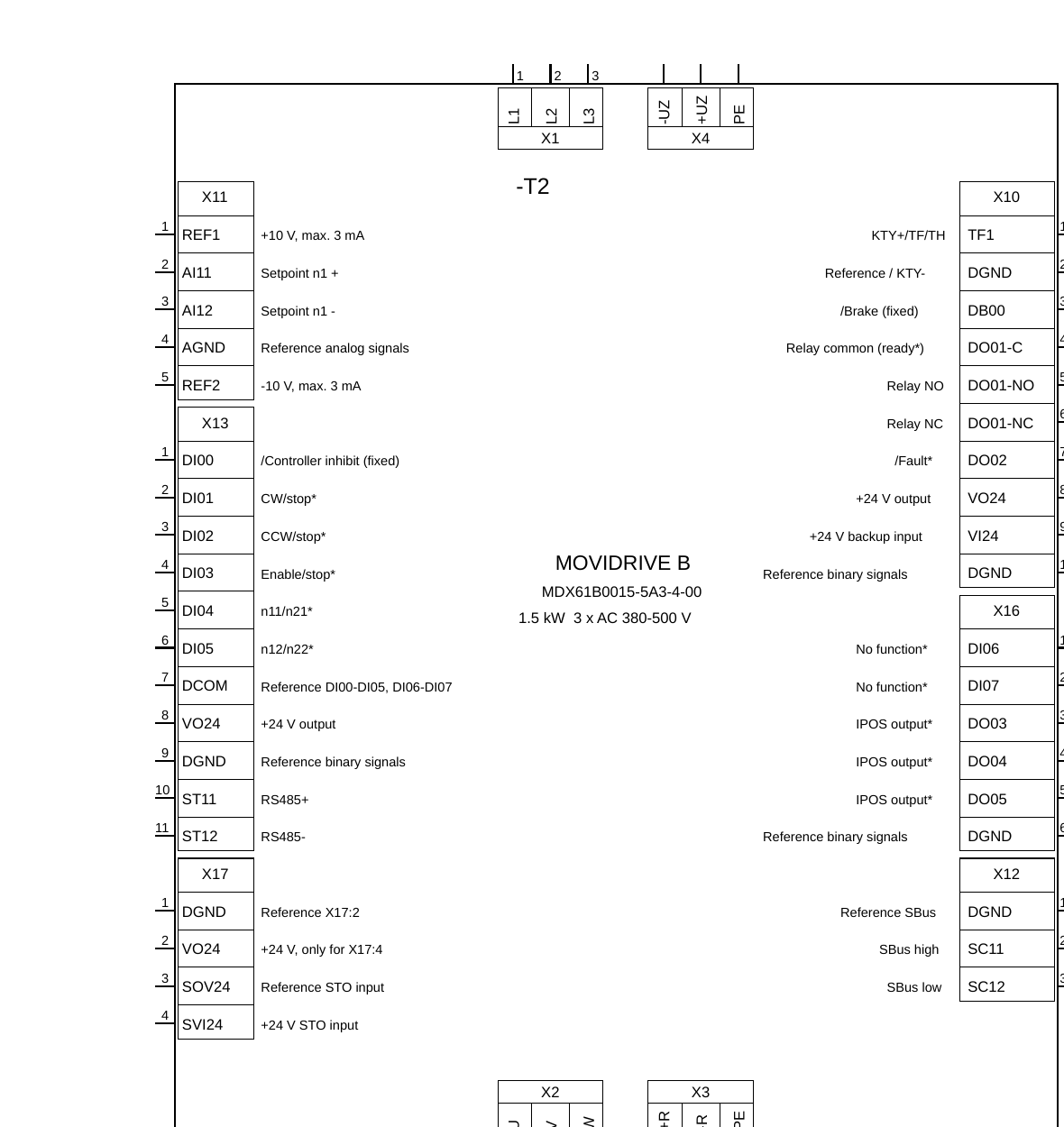
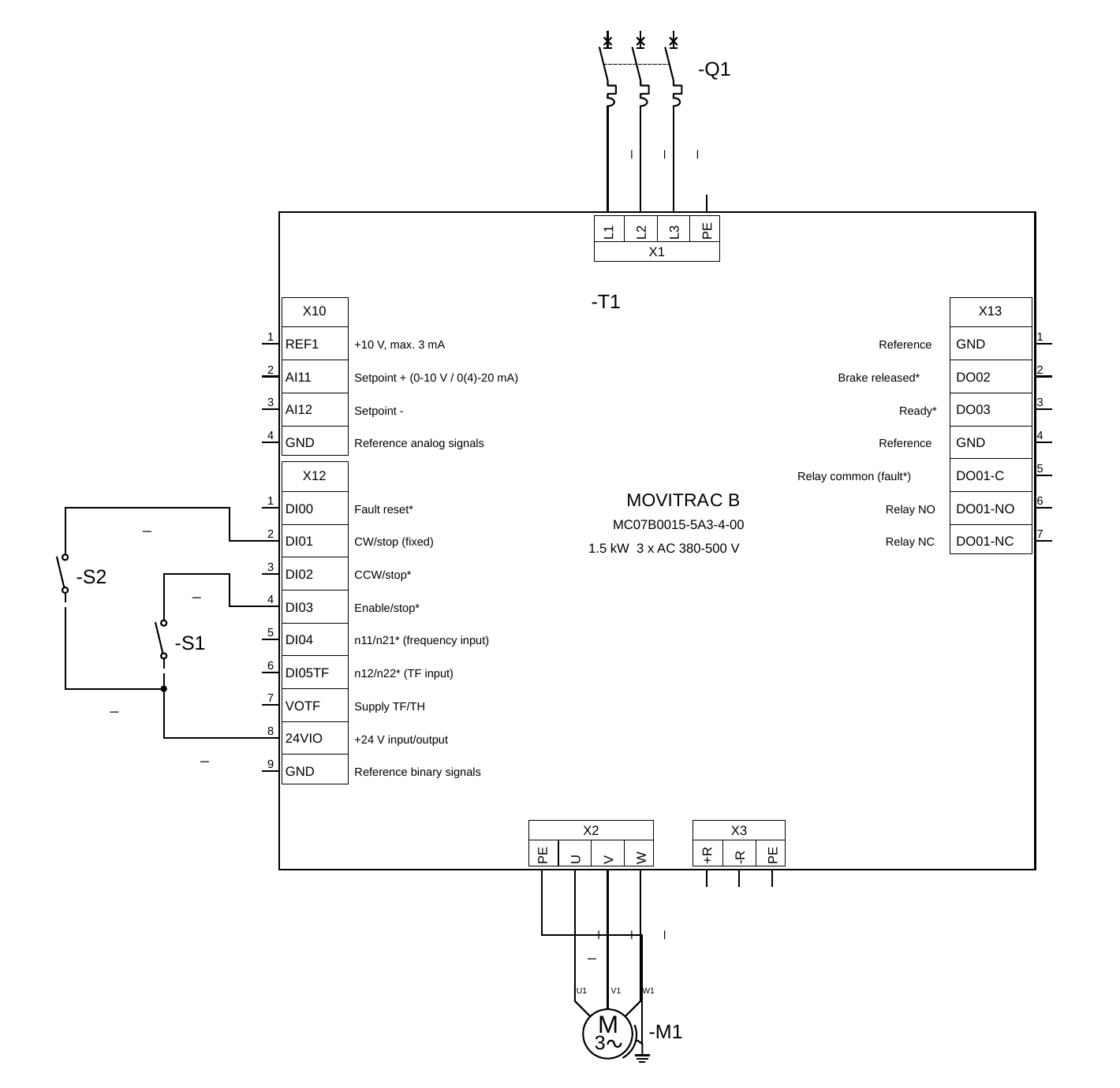
A new tool for converting DXF and DWG files to elmt format:

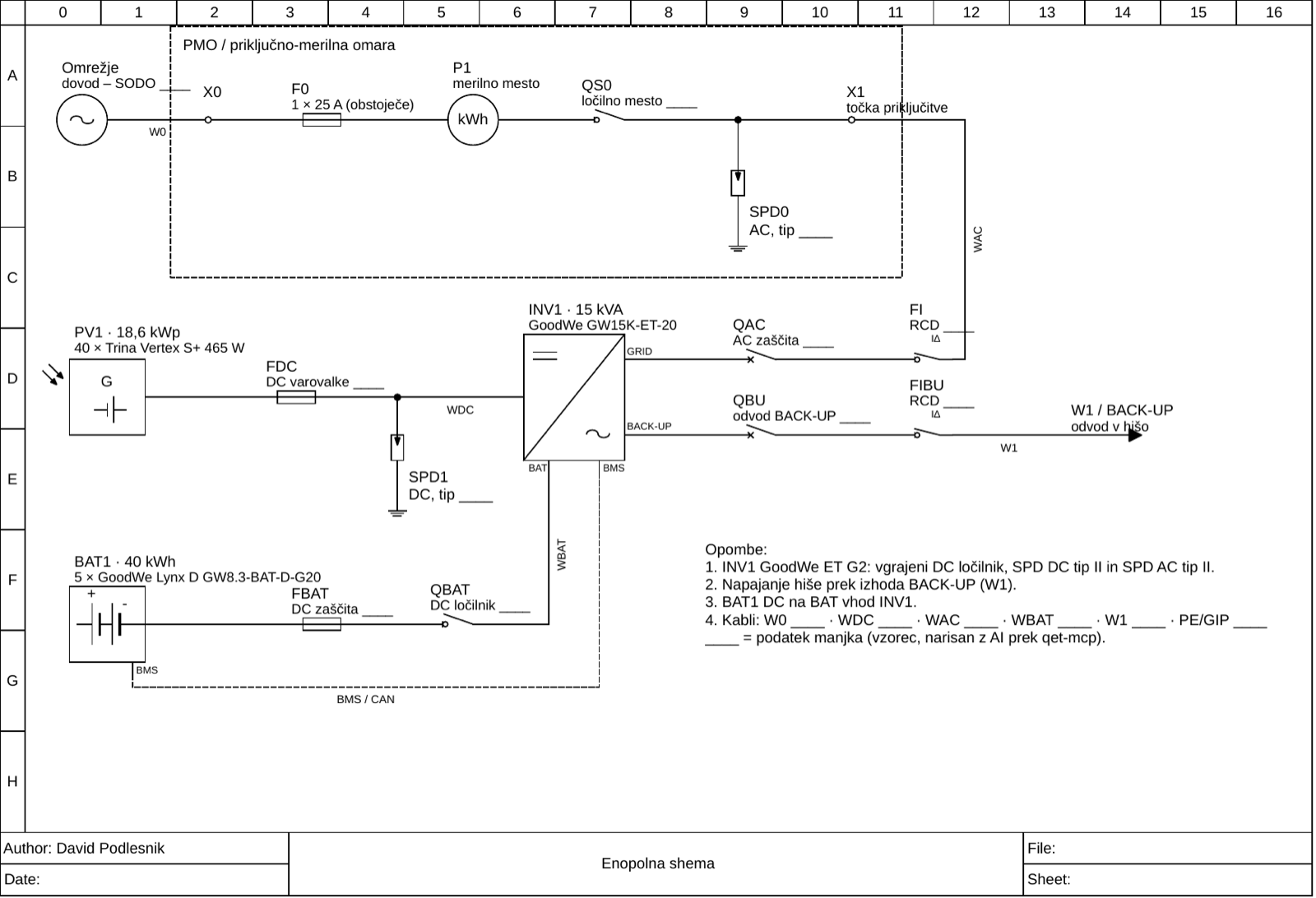
dwg2qet: DWG/DXF → ready-to-wire QElectroTech elements (terminals on the grid, BOM data, cabinet front views, batch libraries)
https://github.com/qelectrotech/qelectr … sions/1452

https://raw.githubusercontent.com/DP5000/dwg2qet/main/docs/pv-single-line.png

https://raw.githubusercontent.com/DP5000/dwg2qet/main/docs/terminals2qet-movidrive-b.png
https://raw.githubusercontent.com/DP5000/dwg2qet/main/docs/terminals2qet-movitrac-b-wired.png

"Le jour où tu découvres le Libre, tu sais que tu ne pourras jamais plus revenir en arrière..."Questions regarding QET belong in this forum and will NOT be answered via PM! – Les questions concernant QET doivent être posées sur ce forum et ne seront pas traitées par MP !
Re: Nouveautés de la version de développement 0.9> 0.200.1

André has compiled a new changelog with the help of Ai, which lists the updates since version 0.100.0 in a format suitable for human readers.
https://github.com/qelectrotech/qelectr … _master.md


Add cable management: drawing, cores, numbering, cross-references and cable list
https://github.com/qelectrotech/qelectr … /pull/1438

https://private-user-images.githubusercontent.com/202847493/670037966-fcba9fd5-b0c6-4fb4-974a-700435a16ae4.png?jwt=eyJ0eXAiOiJKV1QiLCJhbGciOiJIUzI1NiJ9.eyJpc3MiOiJnaXRodWIuY29tIiwiYXVkIjoicmF3LmdpdGh1YnVzZXJjb250ZW50LmNvbSIsImtleSI6ImtleTUiLCJleHAiOjE3OTE3MTk2MjUsIm5iZiI6MTc5MTcxOTMyNSwicGF0aCI6Ii8yMDI4NDc0OTMvNjcwMDM3OTY2LWZjYmE5ZmQ1LWIwYzYtNGZiNC05NzRhLTcwMDQzNWExNmFlNC5wbmc_WC1BbXotQWxnb3JpdGhtPUFXUzQtSE1BQy1TSEEyNTYmWC1BbXotQ3JlZGVudGlhbD1BS0lBVkNPRFlMU0E1M1BRSzRaQSUyRjIwMjYxMDExJTJGdXMtZWFzdC0xJTJGczMlMkZhd3M0X3JlcXVlc3QmWC1BbXotRGF0ZT0yMDI2MTAxMVQxMTQ4NDVaJlgtQW16LUV4cGlyZXM9MzAwJlgtQW16LVNpZ25hdHVyZT1lYjQ0YmZjNzNlZDIxMmYzZjAwZjc4YzMzZmU0YzU5MzQ0ZWNmZWNkYzI5ZGUzYmJiOTFjNDZmYWNhMWUwYjA0JlgtQW16LVNpZ25lZEhlYWRlcnM9aG9zdCZyZXNwb25zZS1jb250ZW50LXR5cGU9aW1hZ2UlMkZwbmcifQ.Jdnzc0seJz1A0il350uYzDKVOhPNaBBPd8vkC8KzKgA

"Le jour où tu découvres le Libre, tu sais que tu ne pourras jamais plus revenir en arrière..."Questions regarding QET belong in this forum and will NOT be answered via PM! – Les questions concernant QET doivent être posées sur ce forum et ne seront pas traitées par MP !
Re: Nouveautés de la version de développement 0.9> 0.200.1

FYI, following PR #1438, the terminal block commands have been moved from the Project menu to a new ‘Lists’ menu.

The Lists menu contains the table of contents, the materials list, the terminal strip manager, the terminal generator plug-in and the new cable list.
The Numbering menu, next to the Project menu, contains terminal numbering and the new cable numbering dialogue box.
The Project menu now only retains the CSV export of the cable list, in addition to its usual entries.

"Le jour où tu découvres le Libre, tu sais que tu ne pourras jamais plus revenir en arrière..."Questions regarding QET belong in this forum and will NOT be answered via PM! – Les questions concernant QET doivent être posées sur ce forum et ne seront pas traitées par MP !
Re: Nouveautés de la version de développement 0.9> 0.200.1

AI-Assisted Development: An Interesting Open-Source Project Worth Exploring #1474
https://github.com/qelectrotech/qelectr … sions/1474

"Le jour où tu découvres le Libre, tu sais que tu ne pourras jamais plus revenir en arrière..."Questions regarding QET belong in this forum and will NOT be answered via PM! – Les questions concernant QET doivent être posées sur ce forum et ne seront pas traitées par MP !
Re: Nouveautés de la version de développement 0.9> 0.200.1

52 new features on master, 1–15 October 2026 #1485
https://github.com/qelectrotech/qelectr … sions/1485

"Le jour où tu découvres le Libre, tu sais que tu ne pourras jamais plus revenir en arrière..."Questions regarding QET belong in this forum and will NOT be answered via PM! – Les questions concernant QET doivent être posées sur ce forum et ne seront pas traitées par MP !

Re: Nouveautés de la version de développement 0.9> 0.200.1

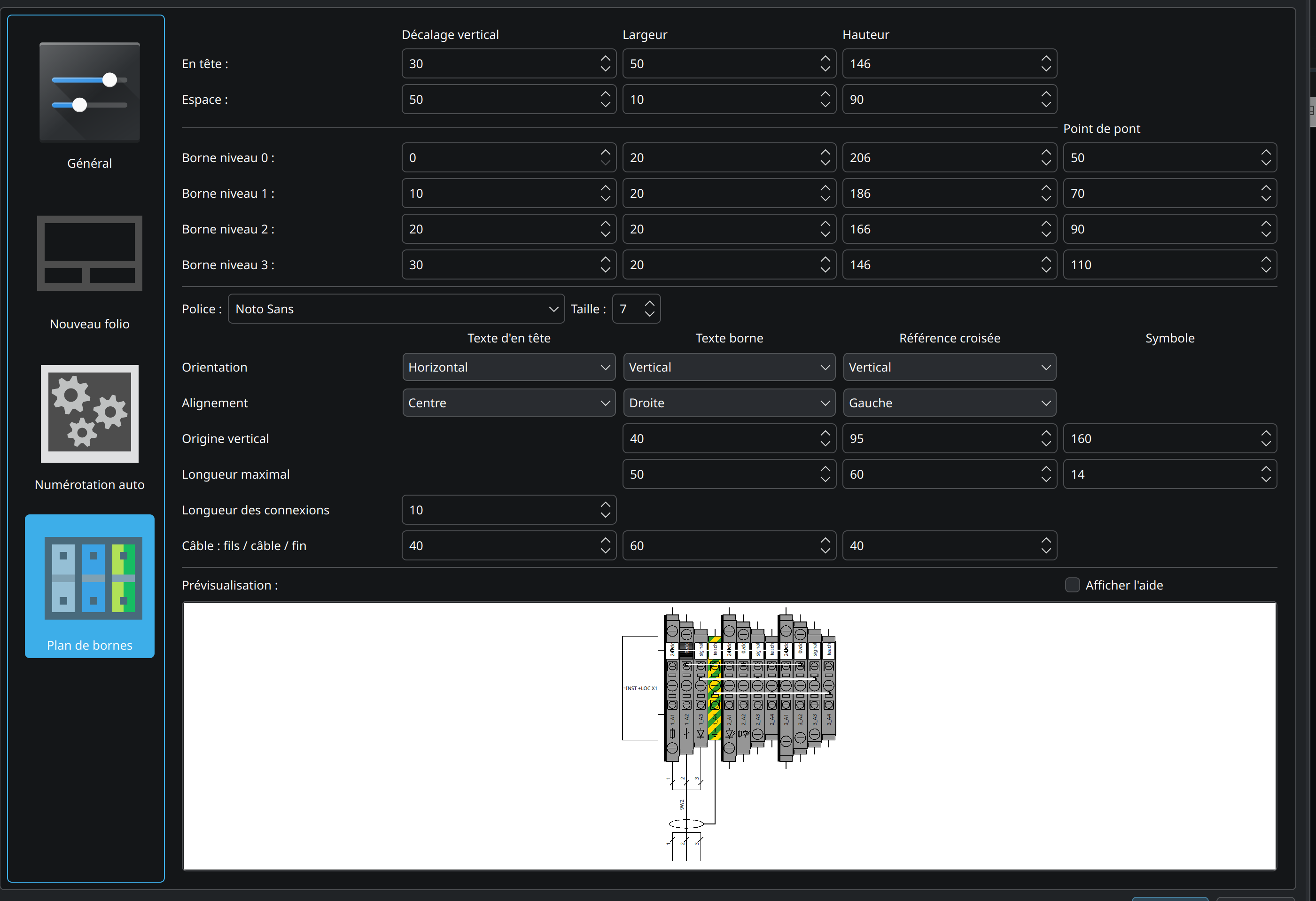
https://download.qelectrotech.org/qet/forum_img_2/terminal_strip20.png
https://download.qelectrotech.org/qet/forum_img_2/terminal_strip201png.png
https://download.qelectrotech.org/qet/forum_img_2/terminal_strip22.png
https://download.qelectrotech.org/qet/forum_img_2/terminal_strip23.png

"Le jour où tu découvres le Libre, tu sais que tu ne pourras jamais plus revenir en arrière..."Questions regarding QET belong in this forum and will NOT be answered via PM! – Les questions concernant QET doivent être posées sur ce forum et ne seront pas traitées par MP !

Re: Nouveautés de la version de développement 0.9> 0.200.1

Hi Laurent,

Thank you so much for your work on the terminal manager – you have already implemented a large part of what I had planned myself: the terminal colors with the palette (green/yellow stripes included), the cross-section and manufacturer width catalog, the realistic terminal block drawing, the natural sorting, the drag & drop of free terminals, and the layout saved in the project. This is a huge step forward.

Here is what I had in mind for the remaining part, for discussion:

1. Fully automatic creation of the strips When the terminal manager is opened (or on a trigger), free terminals should be grouped automatically by their label prefix. In my projects the labels look like X1:1, X1:2 (colon as separator), so X1:1 and X1:2 belong to strip X1, X2:1 to strip X2, and so on. A strip should be created for each group, with the terminals added in natural order. Ideally the import should be idempotent: only add new terminals and never re-order or touch what the user changed manually (re-ordering, bridge colors, etc.).

2. Automatic cable assignment The cable column should be filled automatically: which cable and which core belongs to which terminal. The information is already in the project (a conductor stores the terminal name on the cable side), so the manager could resolve the core per terminal and display it in the usual notation, for example 15W1:bl (cable 15W1, core color blue). The cable type could be shown as well.

3. Automatic bridge creation An automatic bridge detection would be great. From my understanding it could work in two ways: either the two terminals are directly connected by a line in the schematic, or they share the same entry in the potential/function field of the conductors. It would need to be clarified which of the two (or which combination) is the desired procedure.

4. Stacked terminals ("Etagenklemme") and terminal Bauart A field on the terminal element for the physical type (pass-through 2/3/4-pole, stacked terminal 2/3/4 levels, measuring terminal, grounding terminal…), preferably pre-filled as a default by the symbol in the element editor and overridable per instance. With such a field, the automatic strip creation could build the levels itself instead of setting the level spinbox by hand (currently max. 4 levels in the drawing, but the spinbox allows 6 – probably worth aligning).

5. Editing color / section / width in the schematic editor Could the three new fields (color, section, width) also appear in the element properties widget in normal schematic mode, not only in the element editor and in the terminal manager? And also for free terminals in the free-terminal table? The important point for me: both directions must stay in sync – they already write to the same element data, so changing it in the schematic must show up in the terminal manager and vice versa. Having both edit points would be great to fix copy/paste mistakes wherever I notice them.

6. Small extras (low priority)

A warning when the wire section of an attached core is bigger than the rated section of the terminal.
Optionally showing the internal target as a line like the cables, with color and section, if that's not too heavy for the drawing.
No pressure at all – I just wanted to write down where I'd like to go, and I'm happy to help testing or discussing the design. If some of this is already being worked on, even better.

Thanks again for your great work!

Best regards

Re: Nouveautés de la version de développement 0.9> 0.200.1

Hallo Thomas,

Thank you for your kind words, I’m glad the terminal manager is moving in the direction you had in mind.

I’ve done the part I wanted to do: colours, sections and widths, the realistic drawing, natural sorting and the saved layout. Your roadmap is a very good next step, and you know the practical use of terminal strips far better than I do, so I’m happy to leave the rest in your hands. Feel free to take it from here and open PRs for these points whenever you like. I’ll review and test them as usual.

Just one thing: the level spinbox allows 6 levels while the drawing stops at 4. That’s a quick fix you could start with.

Thanks again, and have fun with it!

Best regards,
Laurent

"Le jour où tu découvres le Libre, tu sais que tu ne pourras jamais plus revenir en arrière..."Questions regarding QET belong in this forum and will NOT be answered via PM! – Les questions concernant QET doivent être posées sur ce forum et ne seront pas traitées par MP !

Re: Nouveautés de la version de développement 0.9> 0.200.1

Hallo Thomas,

A small addition: to help you start with point 2 (automatic cable column), here is a patch on current master: terminal_strip_cable_auto.patch
The cores of your cable management (PR #1438) are already stored on the conductors, so RealTerminal::cable() / cableWire() now read them and the manager and the drawing show e.g. 15W1 / bl automatically (the core number when the cable type has no colours). Without a wired cable, the hand-typed values are kept. Cells filled from a cable are read-only and are not written into the element.

Not compiled on my side yet, and it doesn’t distinguish the cable side from the internal wiring side. Take it, change it or rewrite it as you like.

Laurent

Post's attachments

Attachment icon terminal_strip_cable_auto.patch 6.62 kb, 24 downloads since 2026-10-17 
"Le jour où tu découvres le Libre, tu sais que tu ne pourras jamais plus revenir en arrière..."Questions regarding QET belong in this forum and will NOT be answered via PM! – Les questions concernant QET doivent être posées sur ce forum et ne seront pas traitées par MP !

Re: Nouveautés de la version de développement 0.9> 0.200.1

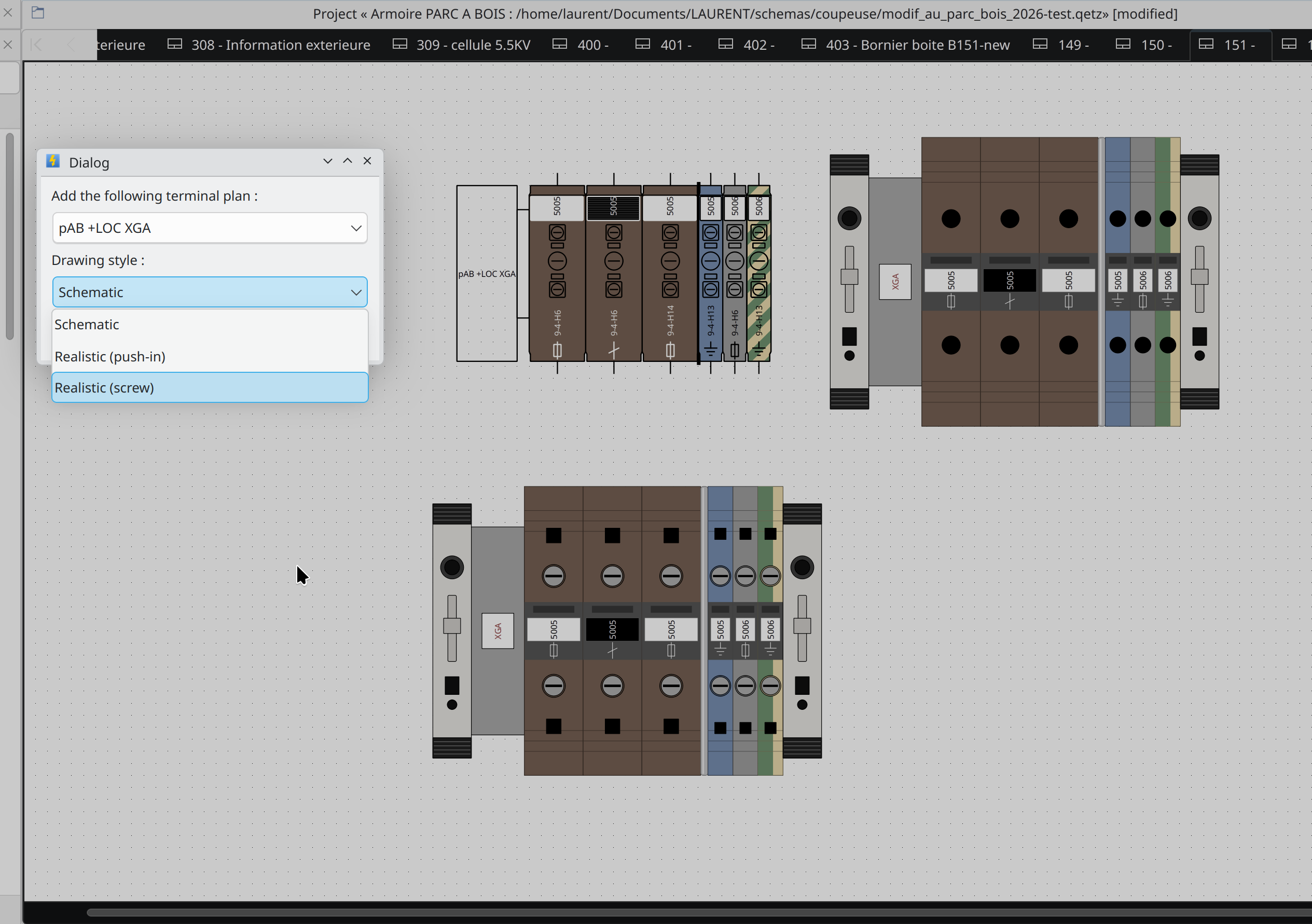
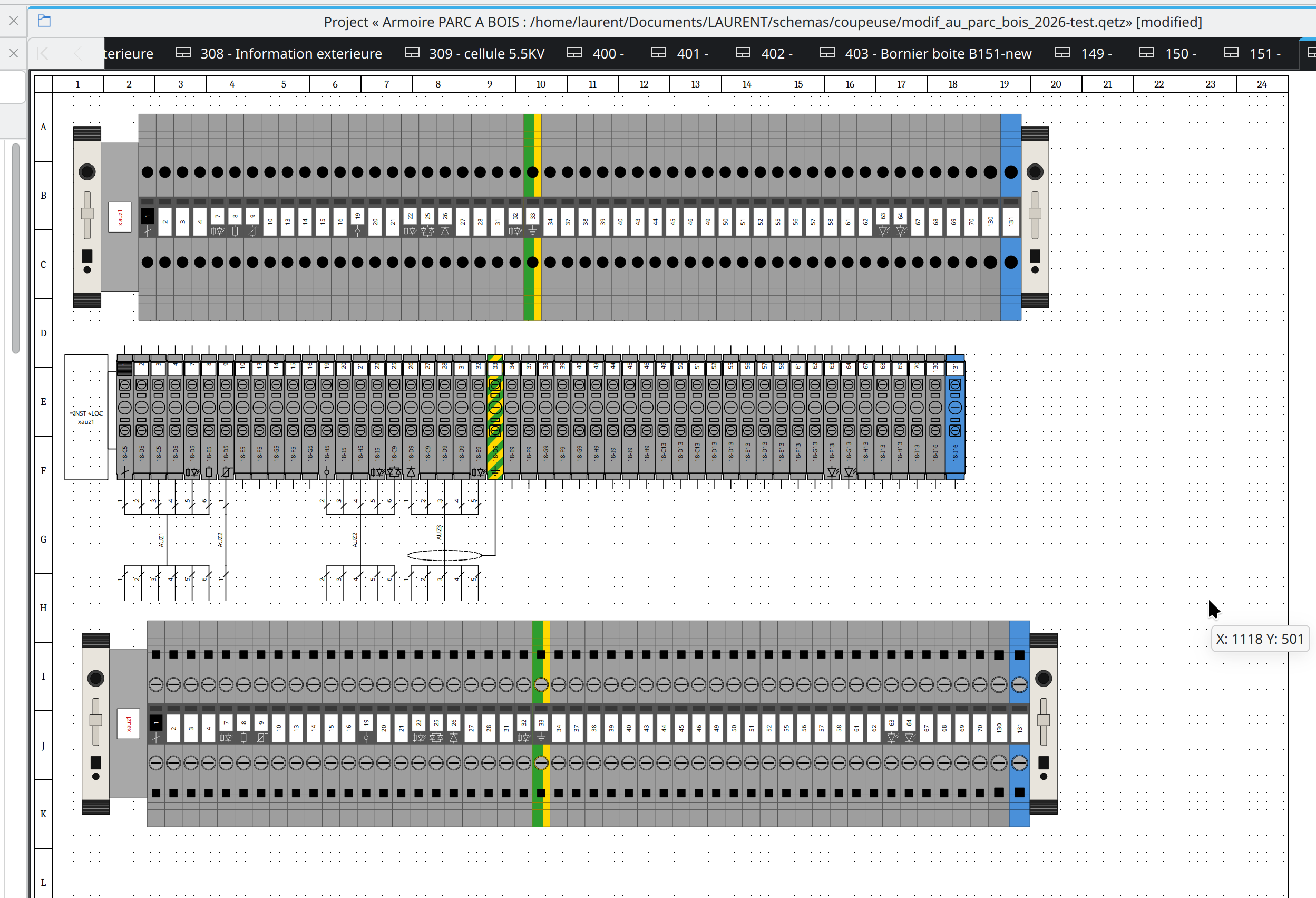
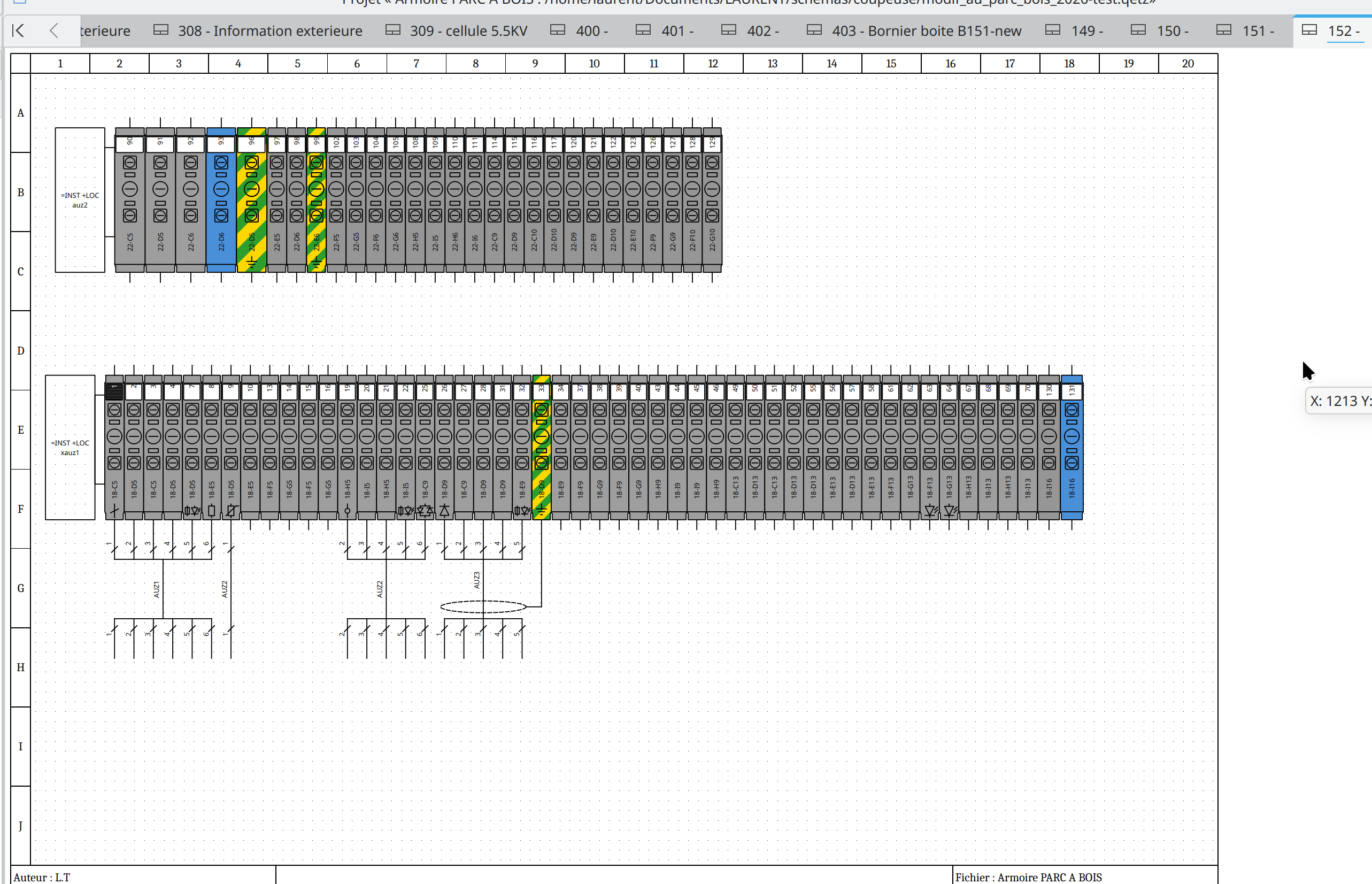
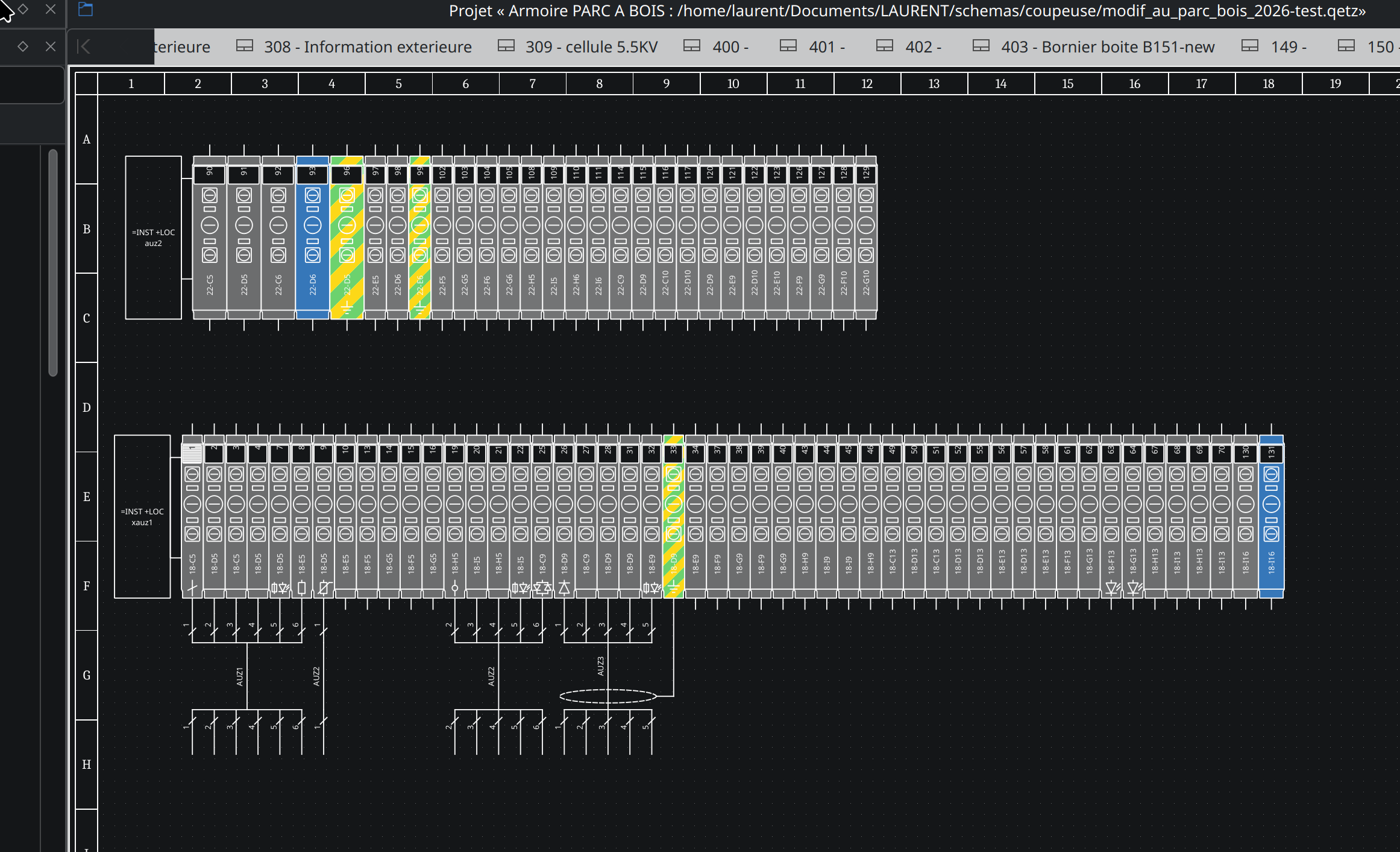
Terminal strip: realistic drawing styles and separator plates
Add two realistic drawing styles for the terminal strip plan, besides
the existing schematic one:
- Realistic (push-in) and Realistic (screw): the strip seen from above,
  at scale (real width of each terminal), like a cabinet mounting
  drawing: end stops, group marker carrier with the strip name, one row
  of wire entries per level, bridge channels with red bridges, marker
  tags with the terminal number, type symbol (fuse, LED, diode,
  sectional, ground...), green/yellow PE and terminal color.


The style is chosen for each plan in the "Add terminal strip plan"
dialog and saved with the item (attribute draw_style of
terminal_strip_item). Items saved before keep the schematic style.
Several plans of the same strip can use different styles.

The values used by the realistic styles are in the layout (scale in
px/mm, terminal length in mm, end stops, group marker) and can be set
in the layout editor, whose style combo box only changes the preview.

Separator plates: a new "Separator plate after" check box column in
the terminal strip editor, stored in the terminal element informations
(key terminal_separator). Drawn as a plate at scale in the realistic
styles and as a thick line in the schematic style.

New files: realisticterminalstripdrawer.{h,cpp} (realistic drawing) and
terminalstripdrawerhelpers.h (helpers shared with the schematic drawer).


https://download.qelectrotech.org/qet/forum_img_2/terminal_strip30.png
https://download.qelectrotech.org/qet/forum_img_2/terminal_strip31.png

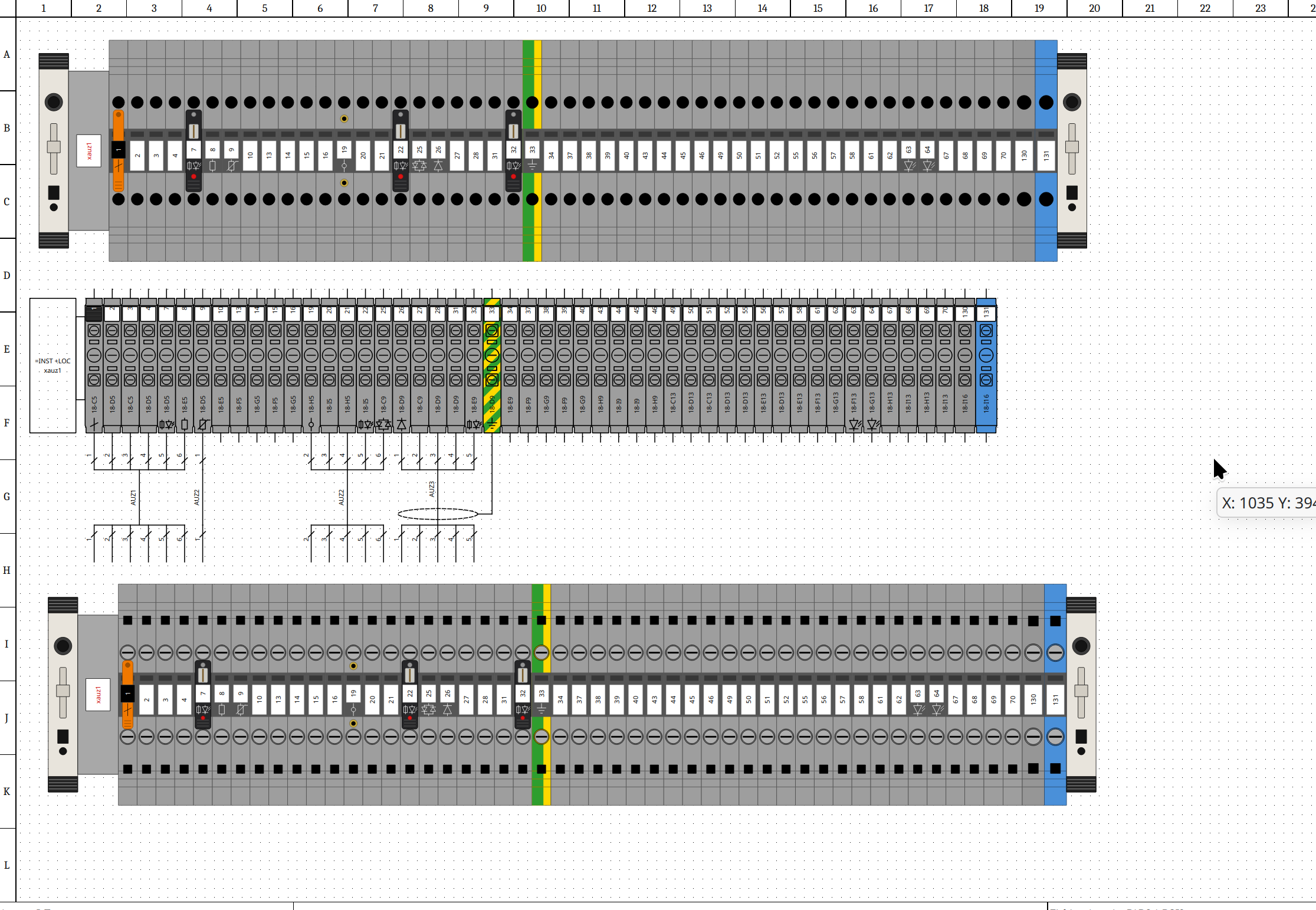
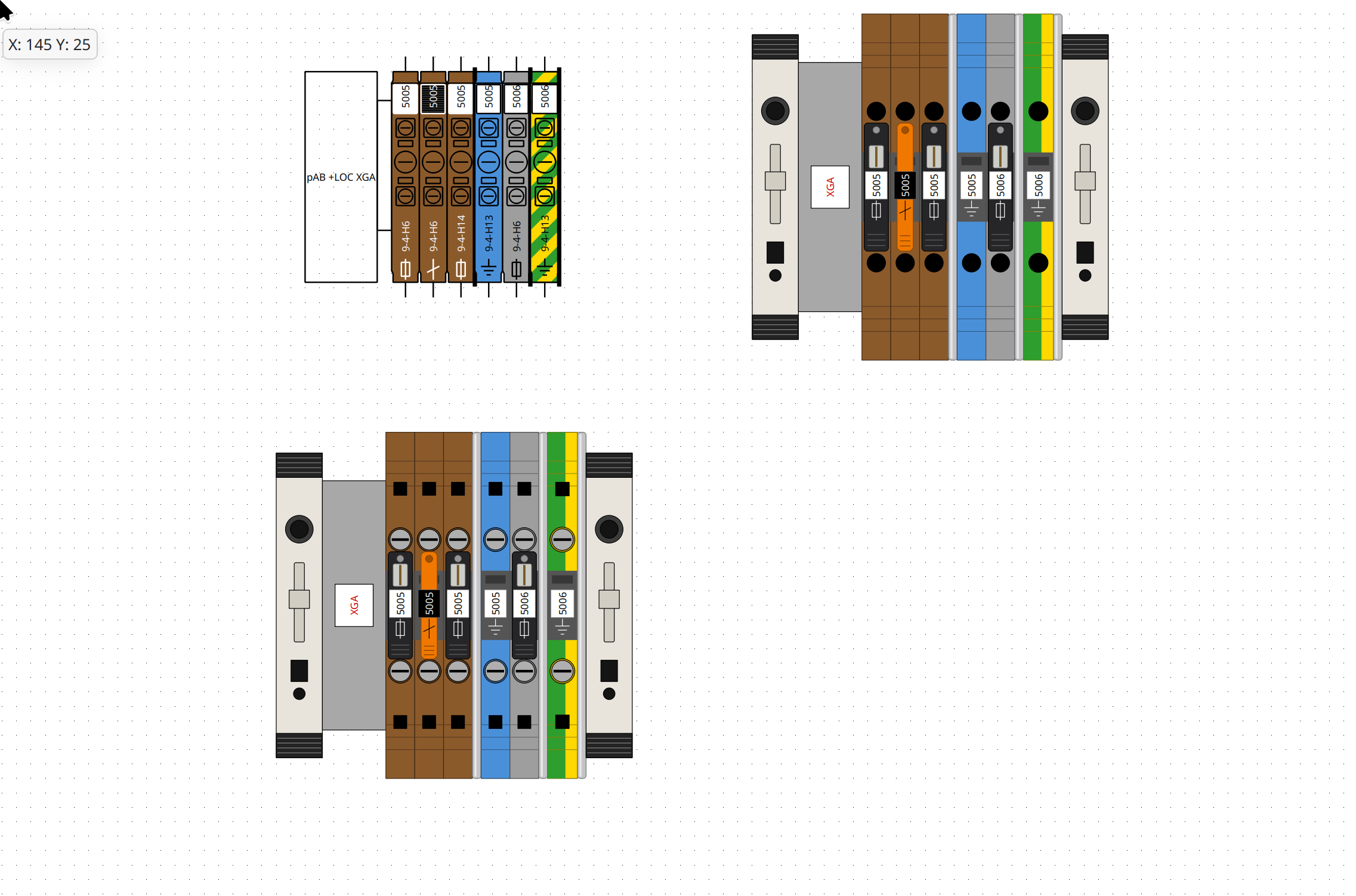
Terminal strip: specific drawings of fuse, disconnect and test terminals

In the realistic styles, some types of terminal get the parts seen on
the real products:
- fuse terminal: black hinged fuse holder on the middle of the terminal,
  with its hinge pin, a window on the fuse, a ribbed grip and, for a
  fuse terminal with led, a red led
- sectional (disconnect) terminal: orange knife with its hinge and grip
- test terminal: two brass test sockets between the wire entries and
  the middle band (in the middle band for a terminal with levels)

The marker tag and the type symbol are drawn on the lever. The lever is
shorter with screw clamps and stays on the middle band for a terminal
with levels.
https://download.qelectrotech.org/qet/forum_img_2/terminal_strip32.png
https://download.qelectrotech.org/qet/forum_img_2/terminal_strip33.png

Terminal strip: clickable terminals in the realistic styles
The realistic styles don't write the xrefs, so each terminal becomes a
clickable zone, like the xref text of the schematic style:
- double-click on a terminal goes to its element on the folio
- the terminal under the mouse is outlined in blue, and a tool tip
  shows its label and its xref
- the zones are exported as clickable links in the PDF

A terminal with one level is clickable on its whole body; a terminal
with levels is clickable on the rows of wire entries of each level.
Only the terminals with an xref (element placed on a folio) are
clickable. The zones use the same physical / real indexes as the
schematic style, so the double-click and the PDF export need no
other change.

Post's attachments

bornes-specifiques.png, 267.73 kb, 1882 x 2500
bornes-specifiques.png 267.73 kb, 10 downloads since 2026-10-17 

styles-bornier.png, 329.71 kb, 2452 x 2838
styles-bornier.png 329.71 kb, 13 downloads since 2026-10-17 

"Le jour où tu découvres le Libre, tu sais que tu ne pourras jamais plus revenir en arrière..."Questions regarding QET belong in this forum and will NOT be answered via PM! – Les questions concernant QET doivent être posées sur ce forum et ne seront pas traitées par MP !

Re: Nouveautés de la version de développement 0.9> 0.200.1

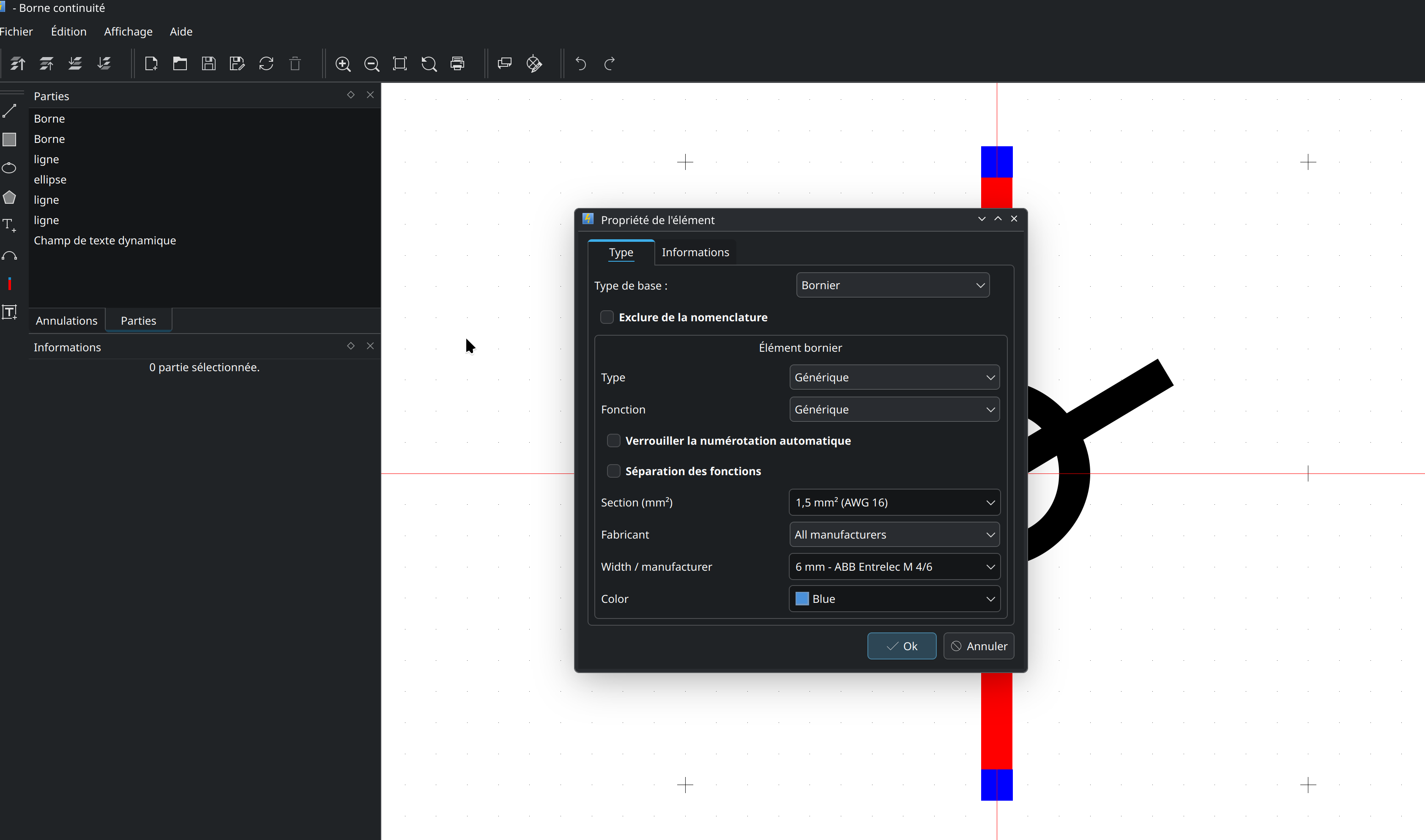
Terminal strips: what's new in the development version

Several improvements to terminal strips have just been added to the development version (nightly builds). Here is how to use them.

1. The chosen terminal is now remembered

When you pick a terminal from the catalog (Width column of the terminal strip editor, or Width / Manufacturer in the element editor), QElectroTech now stores which terminal it is, not only its width.
Before, several terminals with the same width (for example Phoenix Contact UT 4 and ST 4, both 6.2 mm) could not be told apart: on reopening, the first one of the list was shown.

  • The Width column now shows the terminal, for example: 6,2 - Phoenix Contact ST 4

  • The manufacturer and manufacturer reference information of the terminal are filled automatically (useful for the bill of materials).

  • A value you typed yourself in these fields is never overwritten.

  • Copy / paste of the Width column keeps the chosen terminal.

2. Manufacturer filter in the terminal strip editor

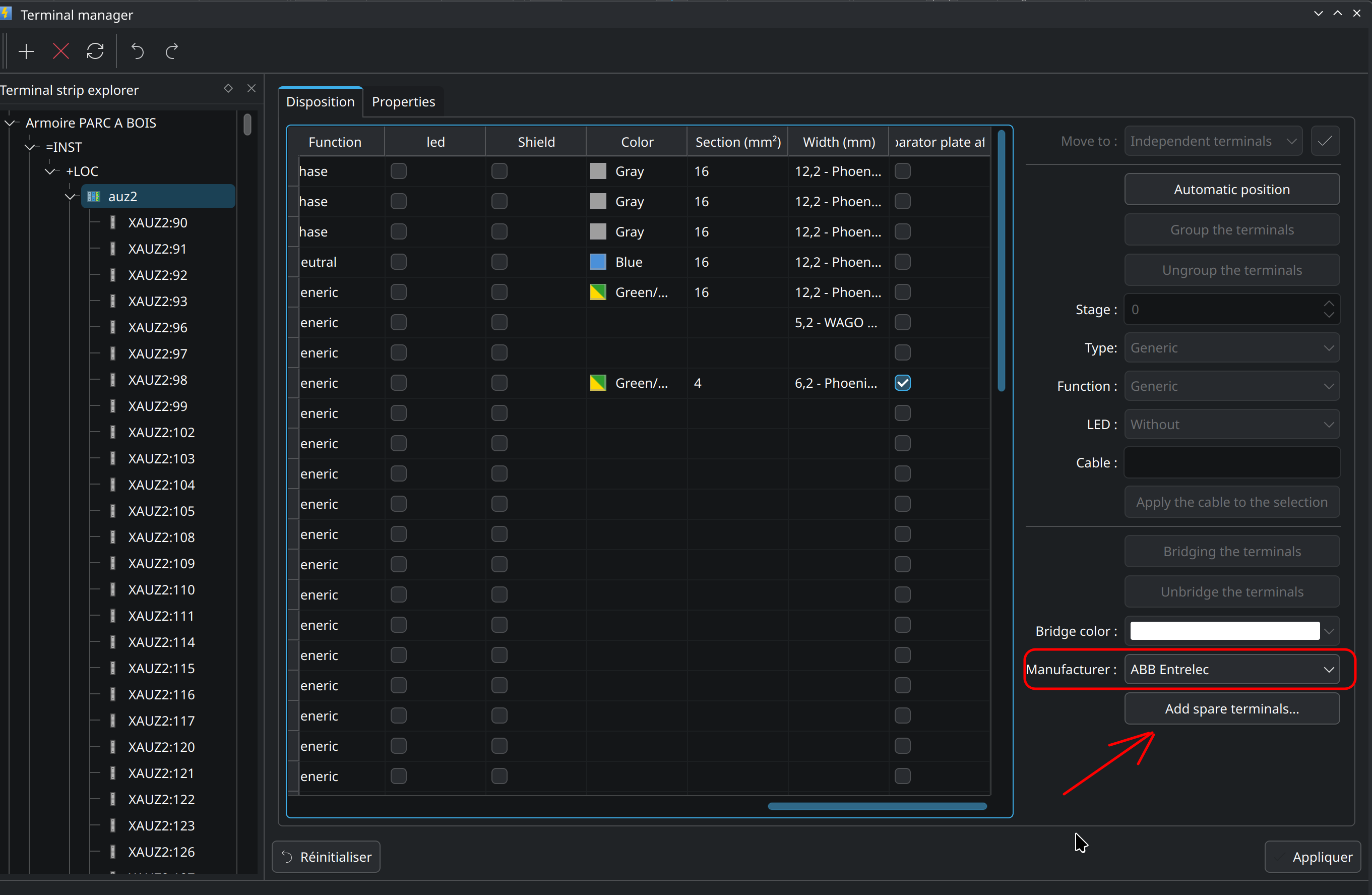
In the Layout tab of the terminal strip editor, a new Manufacturer list is available in the right panel.
Choose a manufacturer, and the Width column only proposes its terminals, compatible with the section of the row.
Each terminal strip remembers its own manufacturer (saved with the project when you click Apply): X1 can use Phoenix Contact and X2 WAGO.

3. Realistic drawing: screw, spring or push-in

In the realistic styles, a terminal chosen from the catalog is now drawn with its own clamp:

  • Screw: Phoenix Contact UT, Weidmüller WDU, ABB Entrelec M, Legrand Viking 3

  • Spring / push-in: Phoenix Contact ST, WAGO TOPJOB S

A strip mixing screw and spring terminals is drawn as it really is. Terminals without a catalog reference keep the style of the layout.

4. Terminal strip views are refreshed immediately

The terminal strips drawn on the folios are now redrawn as soon as you click Apply in the terminal strip editor, and also on Undo / Redo. No more need to scroll or zoom to see the change.

5. Spare terminals

You can now add spare (reserved) terminals to a strip: terminals which are not drawn on any folio, but are part of the strip and of the bill of materials.

  1. Open the terminal strip editor and select the terminal after which the spare terminals must be inserted (if nothing is selected, they are added at the end of the strip).

  2. Click Add spare terminals...

  3. Choose:
    - the number of terminals,
    - the numbering: prefix and first number are proposed from the selected terminal (after X1:12 you get X1:13, X1:14..., leading zeros are kept: X1:05 → X1:06). Untick Number the terminals to leave them without label,
    - Same terminal as...: copies type, function, LED, section, width, catalog terminal, color, manufacturer, reference, designation, plant and location of the selected terminal (not its label nor its cable).

  4. Click OK.

Then:

  • The labels can be changed or erased in the table, like any other cell (then click Apply).

  • The Xref column shows Spare for these terminals.

  • To delete spare terminals, move them to Independent terminals with the Move to button.

  • They appear in the bill of materials (CSV export and nomenclature tables), after the elements of the folios. Set exclude_from_bom if you don't want them there.

  • Everything can be undone (Ctrl+Z).

Compatibility note
Spare terminals are saved inside the terminal strip in the .qet file. An older version of QElectroTech ignores them, and loses them if it saves the project. Keep a backup if you share projects with users of older versions.

Feedback and bug reports are welcome here or on GitHub. Thanks!


Edit:
6. Opening the terminal block manager
On a big project, (in ‘lazzy’ mode ->.qetz – it’s worth noting, incidentally, that a large project opens in 3 seconds, compared with 35 seconds previously, but navigating through the folio can be slow and open terminal strip generator need to read all sheets) so opening the terminal block manager can take a while (the folios not loaded yet are read). A window now shows Reading folio n of N... with a progress bar, and QElectroTech stays responsive meanwhile.

Fix: a terminal strip just added to a folio is now refreshed immediately too, like the ones already saved in the project.

https://download.qelectrotech.org/qet/forum_img_2/terminal_strip34.png

"Le jour où tu découvres le Libre, tu sais que tu ne pourras jamais plus revenir en arrière..."Questions regarding QET belong in this forum and will NOT be answered via PM! – Les questions concernant QET doivent être posées sur ce forum et ne seront pas traitées par MP !

Re: Nouveautés de la version de développement 0.9> 0.200.1

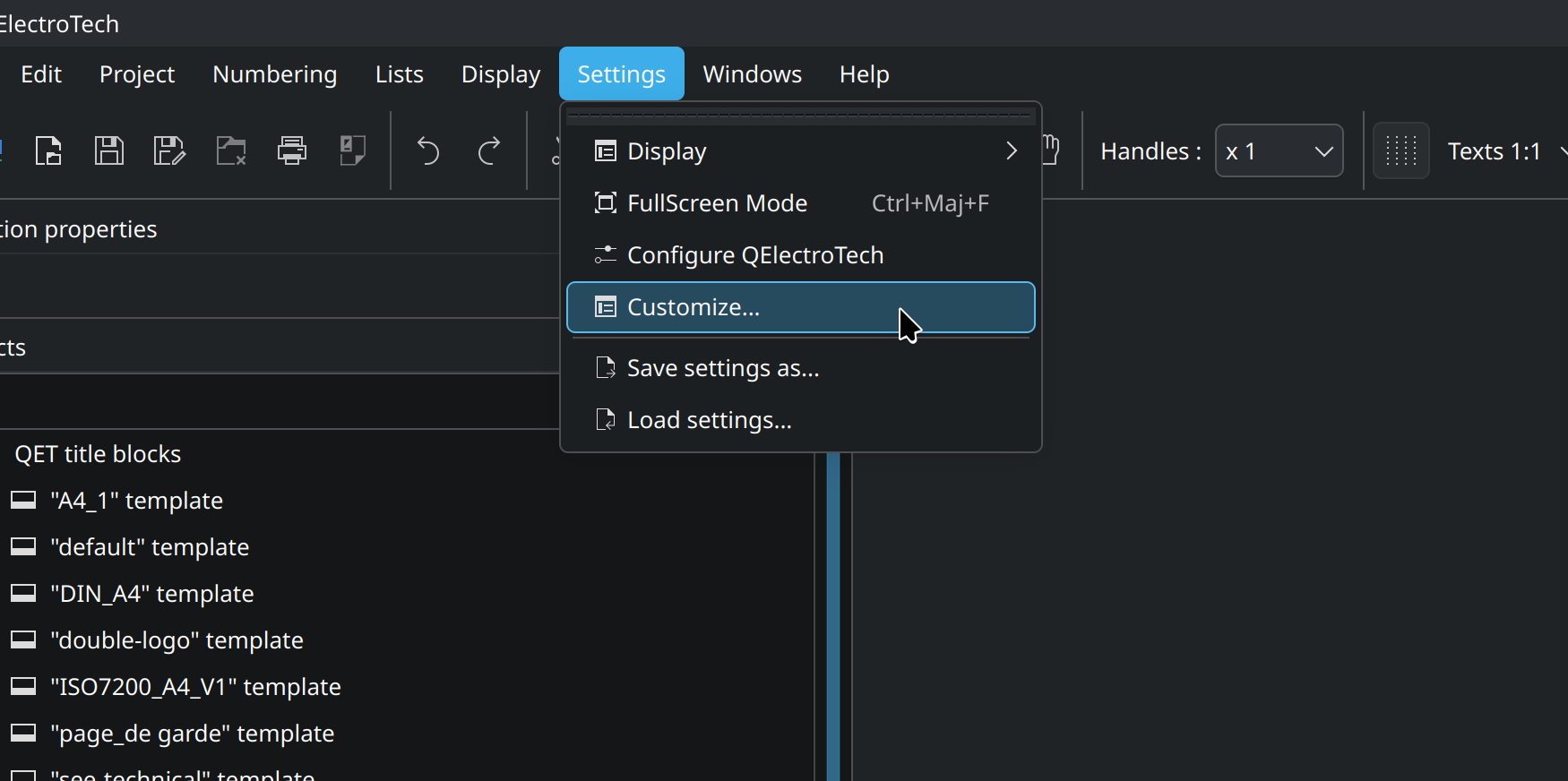
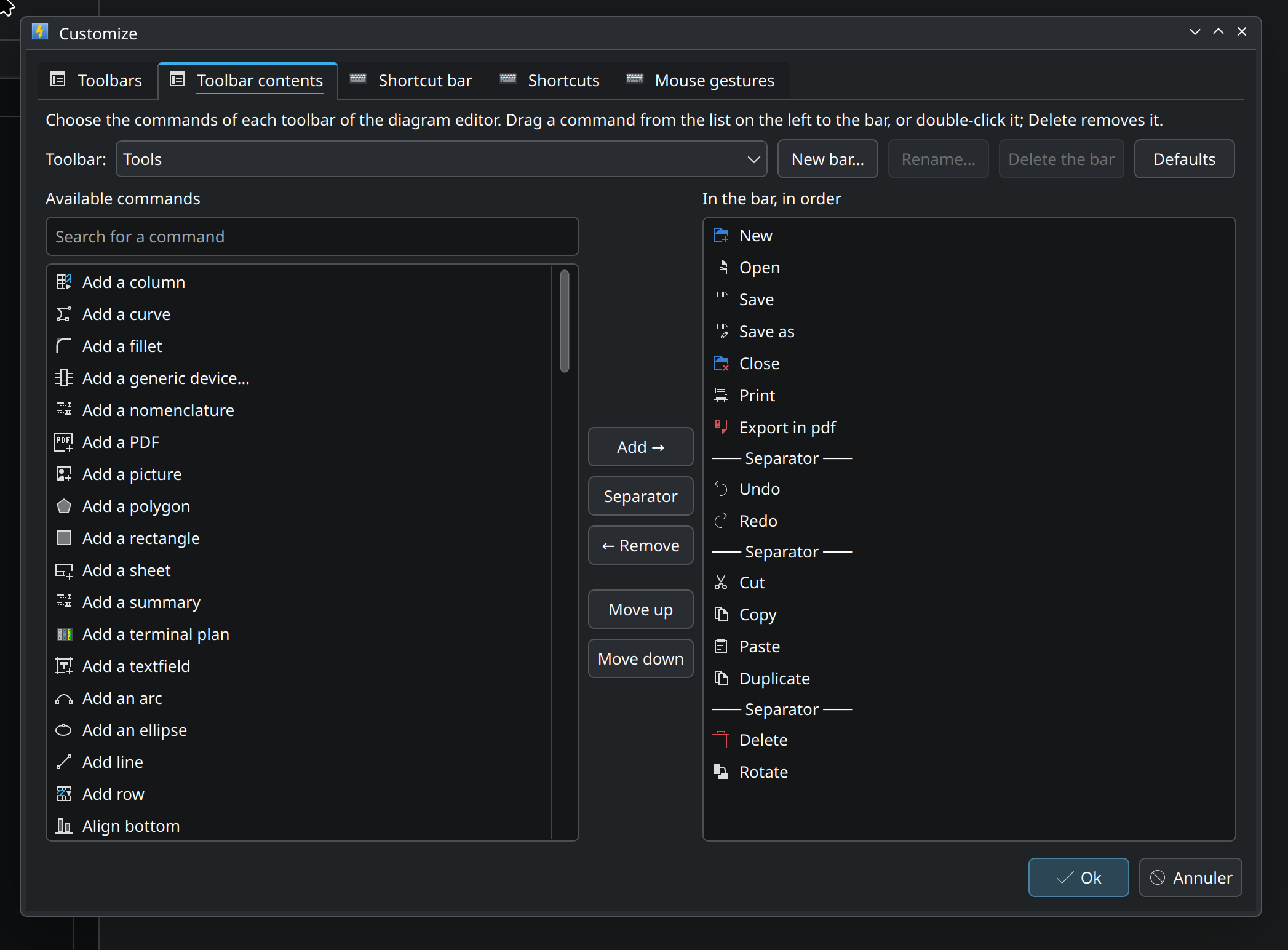
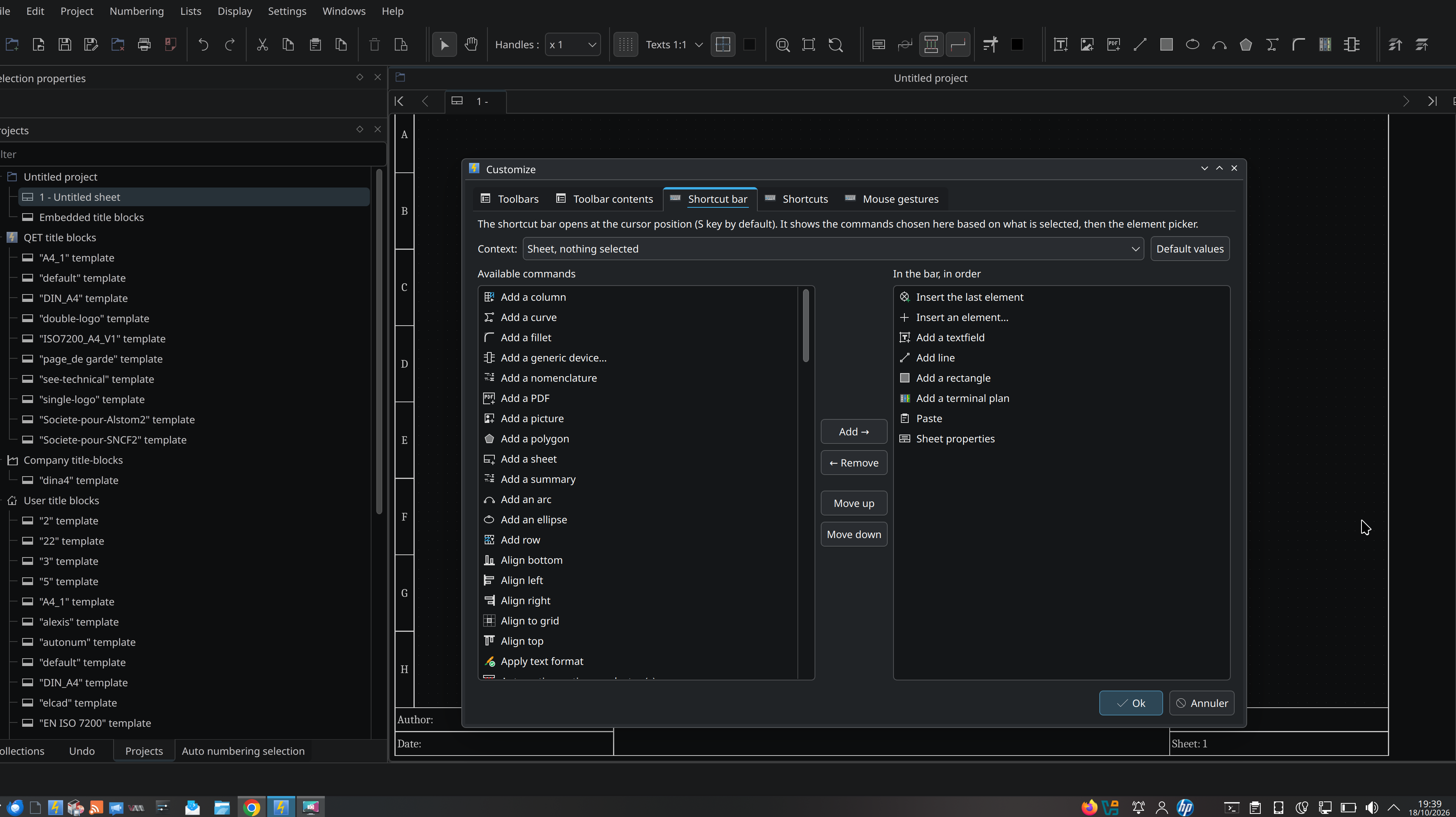
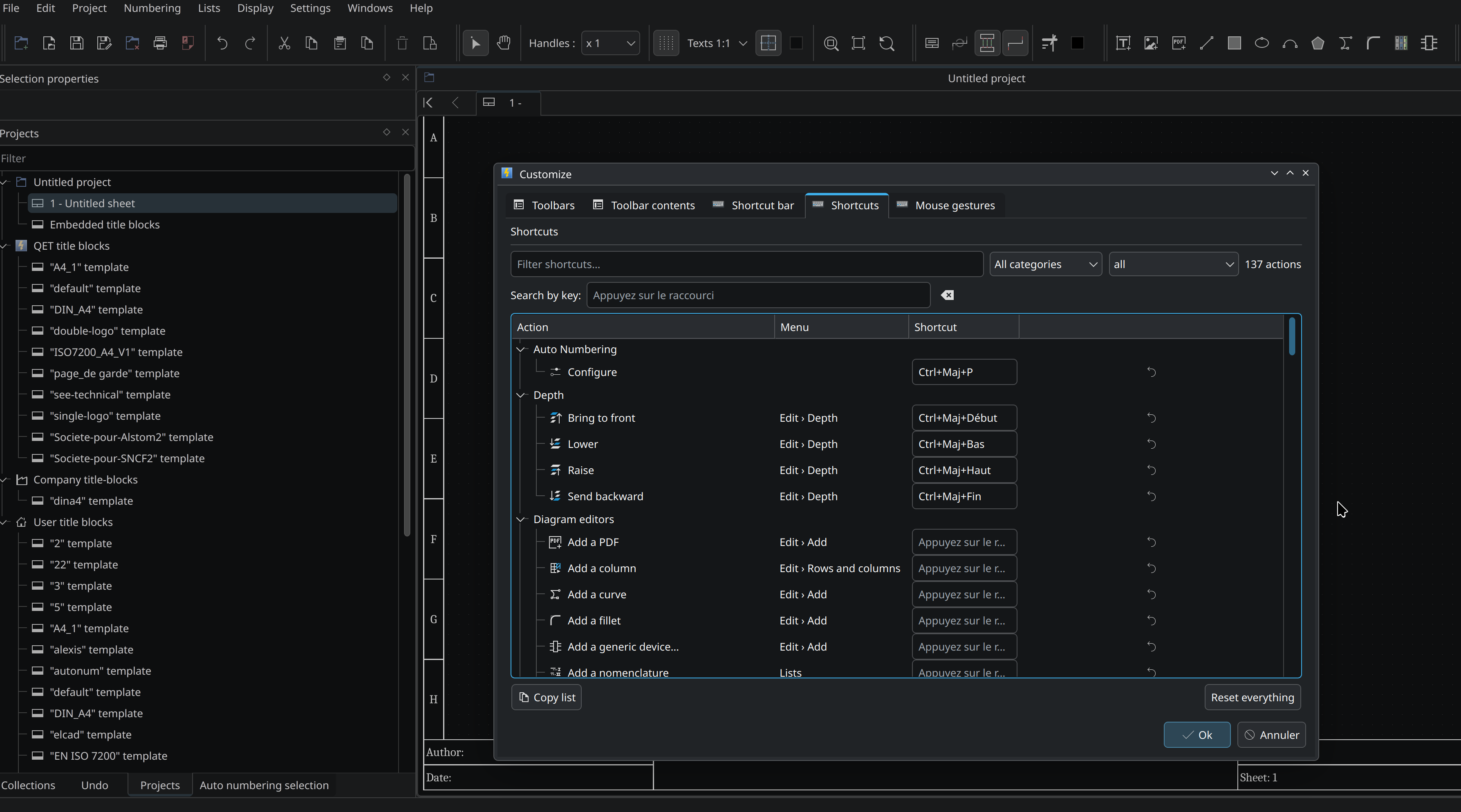
https://download.qelectrotech.org/qet/forum_img_2/toolbar5.png
https://download.qelectrotech.org/qet/forum_img_2/toolbar1.png
https://download.qelectrotech.org/qet/forum_img_2/toolbar2.png
https://download.qelectrotech.org/qet/forum_img_2/toolbar3.png
https://download.qelectrotech.org/qet/forum_img_2/toolbar4.png

"Le jour où tu découvres le Libre, tu sais que tu ne pourras jamais plus revenir en arrière..."Questions regarding QET belong in this forum and will NOT be answered via PM! – Les questions concernant QET doivent être posées sur ce forum et ne seront pas traitées par MP !

Re: Nouveautés de la version de développement 0.9> 0.200.1

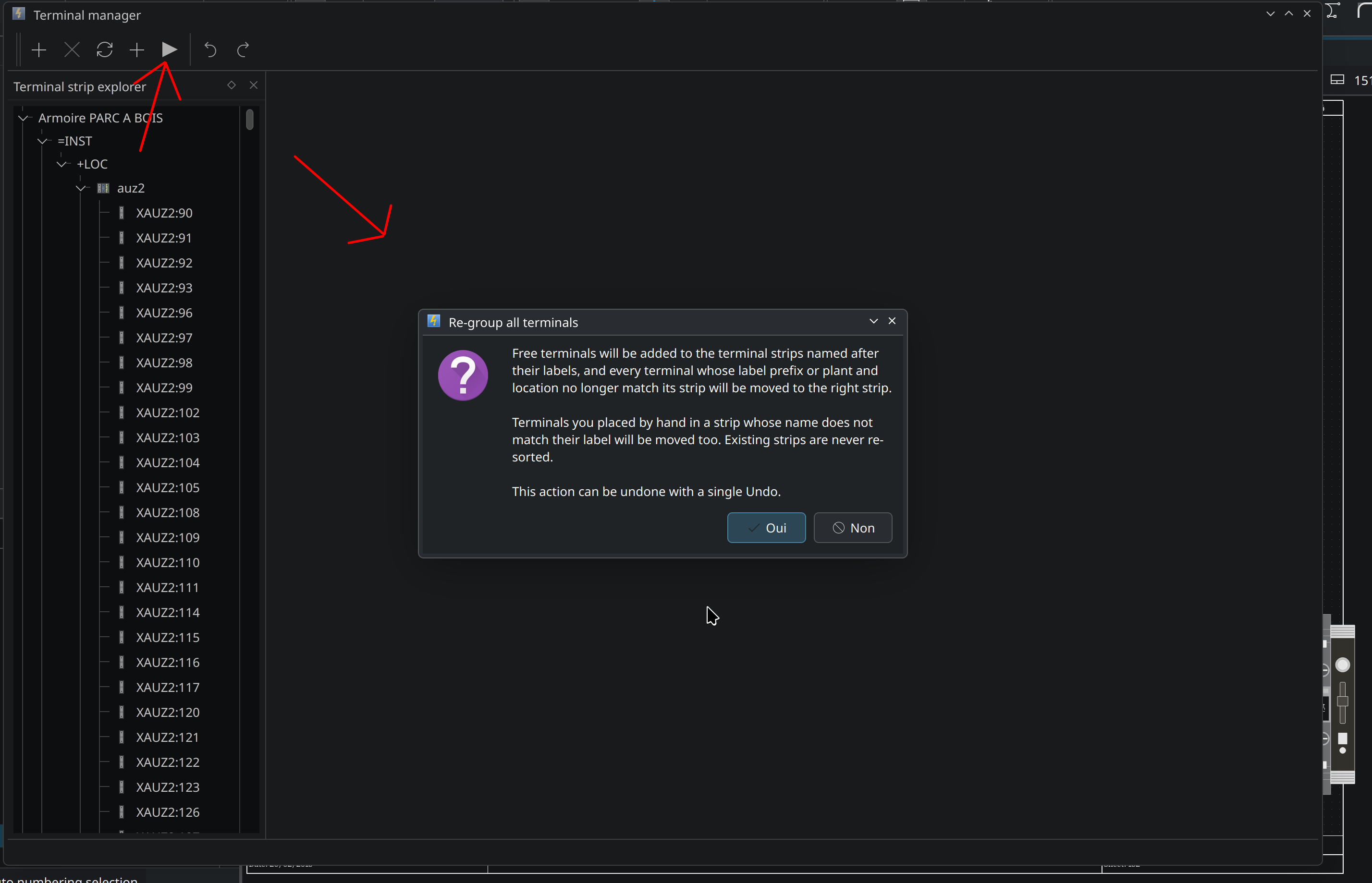
Terminal strip: create the strips from the free terminals' labels- #1550
https://github.com/qelectrotech/qelectr … /pull/1550
https://download.qelectrotech.org/qet/forum_img_2/terminal_strip35.png

"Le jour où tu découvres le Libre, tu sais que tu ne pourras jamais plus revenir en arrière..."Questions regarding QET belong in this forum and will NOT be answered via PM! – Les questions concernant QET doivent être posées sur ce forum et ne seront pas traitées par MP !