You are not logged in. Please login or register.
Active topics Unanswered topics
Search options (Page 171 of 302)
galexis wrote:Quel est le programme pour la 0.8 ?
On ne le sait pas encore, mais Joshua aimerai faire une refonte du code en profondeur, ce serait un nouveau logiciel avec des éléments au format SVG, et qui serait incompatible avec vos anciens projets.
You didn't try latest 0.7-dev?
galexis wrote:Dans le xml du projet, j'ai viré dans les sections "comment" les 
 et le ";" qui trainait. Mais j'ai toujours le même problème...
à l'export.
Tu peux aussi recopier le texte "comment" extrait du cvs et le remplacer dans le champ commentaire de tes deux éléments fautifs, régénérer l'export, ça évite de bidouiller le fichier XML de ton projet, ce qui peut faire un peu peur aux novices.
Pas trop compris a quoi servait tes valeurs sur les bornes dans le champ fonction :
%p%tSTANDARD6W204%nBleu%b
Hum ! why saving a empty project ! .... 
Non, je ne pense pas qu'on puisse re convertir du PDF en .qet, par contre je n'aurai pas trop confiance dans ta machine, win10?
Pour les gros projets tu ne fais pas des backups à coté?
Ou activer les backups automatiques sur la 0.7.
Étrange, t'as déjà eu des fichiers corrompus sur cette machine?
Bonjour,
que c'est -il passé ?
Le fichier que tu as mis en ligne ne contient que des caractères NUL, donc est irrécupérable.
[font=monospace]^@^@^@^@^@^@^@^@^@^@^@^@^@^@^@^@^@^@^@^@^@^@^@^@^@^@^@^@^@^@^@^@^@^@^@^@^@^@^@^@^@^@^@^@^@^@^@^@^@^@^@^@^@^@^@^@^@^@^@^@^@^@^@^@^@^@^@^@^@^@^@^@^@^@^@^@^@^@^@^@^@^@^@^@^@^@^@^@^@^@^@^@^@^@^@^@^@^@^@^@^@^@^@^@^@^@^@^@^@^@^@^@^@^@^@^@^@^@^@^@^@^@^@^@^@^@^@^@^@^@^@^@^@^@^@^@^@^@^@^@^@^@^@^@^@^@^@^@^@^@^@^@^@^@^@^@^@^@^@^@^@^@^@^@^@^@^@^@^@^@^@^@^@^@^@^@^@^@^@^@^@^@^@^@^@^@^@^@^@^@^@^@^@^@
^@^@^@^@^@^@^@^@^@^@^@^@^@^@^@^@^@^@^@^@^@^@^@^@^@^@^@^@^@^@^@^@^@^@^@^@^@^@^@^@^@^@^@^@^@^@^@^@^@^@^@^@^@^@^@^@^@^@^@^@^@^@^@^@^@^@^@^@^@^@^@^@^@^@^@^@^@^@^@^@^@^@^@^@^@^@^@^@^@^@^@^@^@^@^@^@^@^@^@^@^@^@^@^@^@^@^@^@^@^@^@^@^@^@^@^@^@^@^@^@^@^@^@^@^@^@^@^@^@^@^@^@^@^@^@^@^@^@^@^@^@^@^@^@^@^@^@^@^@^@^@^@^@^@^@^@^@^@^@^@^@^@^@^@^@^@^@^@^@^@^@^@^@^@^@^@^@^@^@^@^@^@^@^@^@^@^@^@^@^@^@^@^@^@
^@^@^@^@^@^@^@^@^@^@^@^@^@^@^@^@^@^@^@^@^@^@^@^@^@^@^@^@^@^@^@^@^@^@^@^@^@^@^@^@^@^@^@^@^@^@^@^@^@^@^@^@^@^@^@^@^@^@^@^@^@^@^@^@^@^@^@^@^@^@^@^@^@^@^@^@^@^@^@^@^@^@^@^@^@^@^@^@^@^@^@^@^@^@^@^@^@^@^@^@^@^@^@^@^@^@^@^@^@^@^@^@^@^@^@^@^@^@^@^@^@^@^@^@^@^@^@^@^@^@^@^@^@^@^@^@^@^@^@^@^@^@^@^@^@^@^@^@^@^@^@^@^@^@^@^@^@^@^@^@^@^@^@^@^@^@^@^@^@^@^@^@^@^@^@^@^@^@^@^@^@^@^@^@^@^@^@^@^@^@^@^@^@^@
^@^@^@^@^@^@^@^@^@^@^@^@^@^@^@^@^@^@^@^@^@^@^@^@^@^@^@^@^@^@^@^@^@^@^@^@^@^@^@^@^@^@^@^@^@^@^@^@^@^@^@^@^@^@^@^@^@^@^@^@^@^@^@^@^@^@^@^@^@^@^@^@^@^@^@^@^@^@^@^@^@^@^@^@^@^@^@^@^@^@^@^@^@^@^@^@^@^@^@^@^@^@^@^@^@^@^@^@^@^@^@^@^@^@^@^@^@^@^@^@^@^@^@^@^@^@^@^@^@^@^@^@^@^@^@^@^@^@^@^@^@^@^@^@^@^@^@^@^@^@^@^@^@^@^@^@^@^@^@^@^@^@^@^@^@^@^@^@^@^@^@^@^@^@^@^@^@^@^@^@^@^@^@^@^@^@^@^@^@^@^@^@^@^@
^@^@^@^@^@^@^@^@^@^@^@^@^@^@^@^@^@^@^@^@^@^@^@^@^@^@^@^@^@^@^@^@^@^@^@^@^@^@^@^@^@^@^@^@^@^@^@^@^@^@^@^@^@^@^@^@^@^@^@^@^@^@^@^@^@^@^@^@^@^@^@^@^@^@^@^@^@^@^@^@^@^@^@^@^@^@^@^@^@^@^@^@^@^@^@^@^@^@^@^@^@^@^@^@^@^@^@^@^@^@^@^@^@^@^@^@^@^@^@^@^@^@^@^@^@^@^@^@^@^@^@^@^@^@^@^@^@^@^@^@^@^@^@^@^@^@^@^@^@^@^@^@^@^@^@^@^@^@^@^@^@^@^@^@^@^@^@^@^@^@^@^@^@^@^@^@^@^@^@^@^@^@^@^@^@^@^@^@^@^@^@^@^@^@
^@^@^@^@^@^@^@^@^@^@^@^@^@^@^@^@^@^@^@^@^@^@^@^@^@^@^@^@^@^@^@^@^@^@^@^@^@^@^@^@^@^@^@^@^@^@^@^@^@^@^@^@^@^@^@^@^@^@^@^@^@^@^@^@^@^@^@^@^@^@^@^@^@^@^@^@^@^@^@^@^@^@^@^@^@^@^@^@^@^@^@^@^@^@^@^@^@^@^@^@^@^@^@^@^@^@^@^@^@^@^@^@^@^@^@^@^@^@^@^@^@^@^@^@^@^@^@^@^@^@^@^@^@^@^@^@^@^@^@^@^@^@^@^@^@^@^@^@^@^@^@^@^@^@^@^@^@^@^@^@^@^@^@^@^@^@^@^@^@^@^@^@^@^@^@^@^@^@^@^@^@^@^@^@^@^@^@^@^@^@^@^@^@^@
^@^@^@^@^@^@^@^@^@^@^@^@^@^@^@^@^@^@^@^@^@^@^@^@^@^@^@^@^@^@^@^@^@^@^@^@^@^@^@^@^@^@^@^@^@^@^@^@^@^@^@^@^@^@^@^@^@^@^@^@^@^@^@^@^@^@^@^@^@^@^@^@^@^@^@^@^@^@^@^@^@^@^@^@^@^@^@^@^@^@^@^@^@^@^@^@^@^@^@^@^@^@^@^@^@^@^@^@^@^@^@^@^@^@^@^@^@^@^@^@^@^@^@^@^@^@^@^@^@^@^@^@^@^@^@^@^@^@^@^@^@^@^@^@^@^@^@^@^@^@^@^@^@^@^@^@^@^@^@^@^@^@^@^@^@^@^@^@^@^@^@^@^@^@^@^@^@^@^@^@^@^@^@^@^@^@^@^@^@^@^@^@^@^@
^@^@^@^@^@^@^@^@^@^@^@^@^@^@^@^@^@^@^@^@^@^@^@^@^@^@^@^@^@^@^@^@^@^@^@^@^@^@^@^@^@^@^@^@^@^@^@^@^@^@^@^@^@^@^@^@^@^@^@^@^@^@^@^@^@^@^@^@^@^@^@^@^@^@^@^@^@^@^@^@^@^@^@^@^@^@^@^@^@^@^@^@^@^@^@^@^@^@^@^@^@^@^@^@^@^@^@^@^@^@^@^@^@^@^@^@^@^@^@^@^@^@^@^@^@^@^@^@^@^@^@^@^@^@^@^@^@^@^@^@^@^@^@^@^@^@^@^@^@^@^@^@^@^@^@^@^@^@^@^@^@^@^@^@^@^@^@^@^@^@^@^@^@^@^@^@^@^@^@^@^@^@^@^@^@^@^@^@^@^@^@^@^@^@
^@^@^@^@^@^@^@^@^@^@^@^@^@^@^@^@^@^@^@^@^@^@^@^@^@^@^@^@^@^@^@^@^@^@^@^@^@^@^@^@^[/font]
nuri wrote:if you are starting a new project, then take the very last version of QET. So in the case the 0.7 dev (with the last svn number).
There are already big differences between the last stable (0.61) and the development version, especially when it comes to the administration of texts.
A project created with 0.61 is not upgraded to 0.7 in 5 minutes. You have to adapt some texts and it can actually be time consuming.
One big feature added on 0.7 is dynamic texts, you can add and or edit elements texts withan return to element editor, change size, policy, color, grouping, placing, etc. or add informations directly on your element.
Off course upgrade old project and adapt it need some hours working...but after you can do everything with dynamic texts.
Pingumann wrote:1. An annoying issue is that by activating the secondary colour in a new projects settings, it cannot be deactivated later in the project. The secondary colour has to be deactivated with every connection made between elements. Is there a way to change the setting in an existing project that disables the secondary colour?
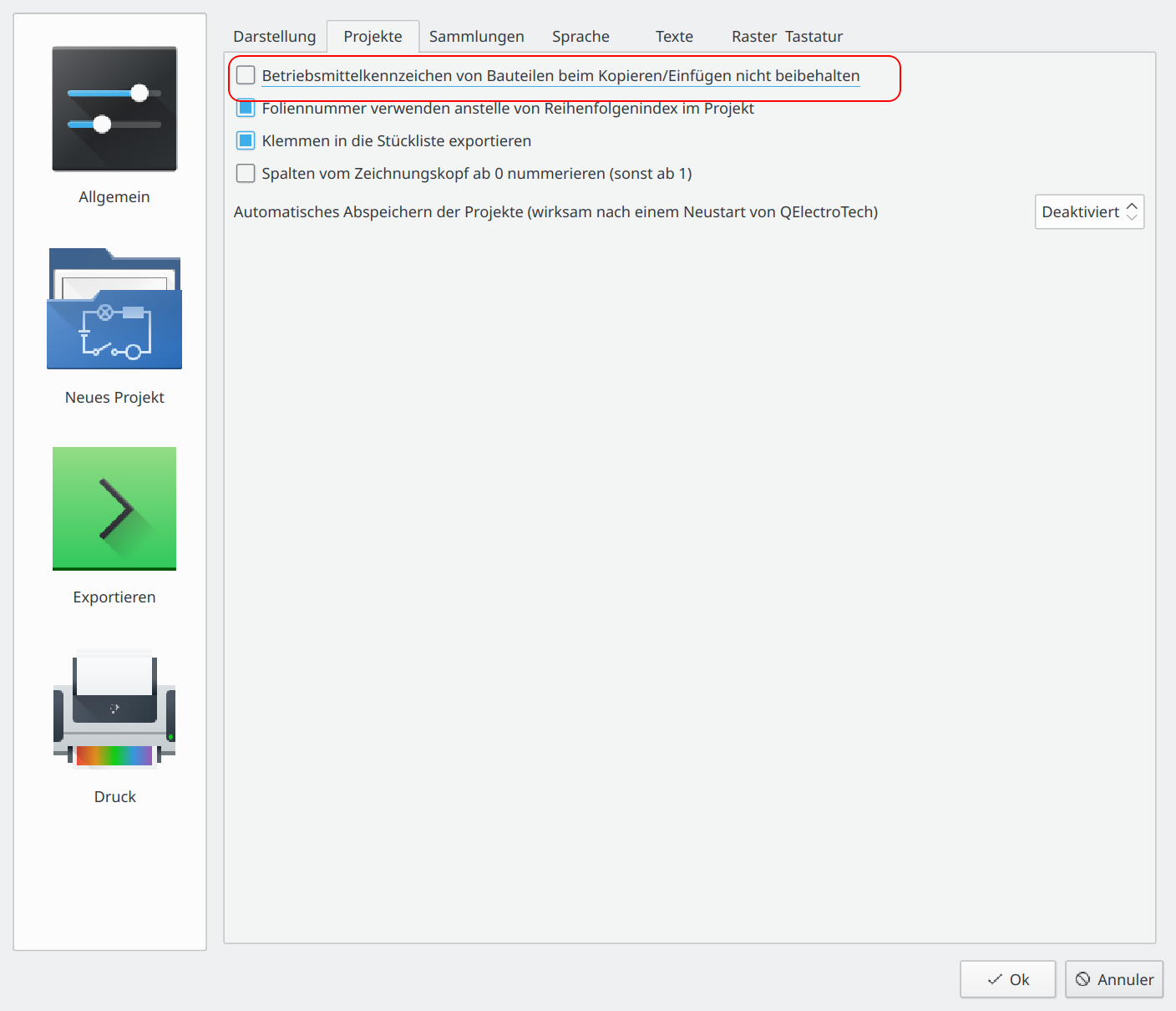
If you add this in QET settings config pages also bi-colors conductors is enabled for all new projects you create after.
How to restore annotations when upgrade old projects to 0.7 version with dynamic texts :
polygon13 wrote:opened the project from 0.6 to 0.7. All the annotations were lost, I did not immediately notice (((((((((It's good that there was a backup copy. I delete from the laptop 0.7, I will continue to work at 0.6.
In 0.7 dev annotations "comment" are not displayed automatically on the diagram like 0.6 version.
polygon13 wrote:i do that
Check if elements in your conf/elements directory isn't in read only mode with Windows explorer.
polygon13 wrote:I launched the portable version 0.7, loaded my elements created earlier. Now I can not change them, do not save(
W10.
similar to version conflict?
In ReadyToUse version : User elements need to have placed in conf/elements/ directory.
Hello,
why not upgrade old project in 0.7-dev version?
Old version QET does not have code to read new features added on 0.7, and editing XML will do nothing...
Hello Polygon,
thanks.
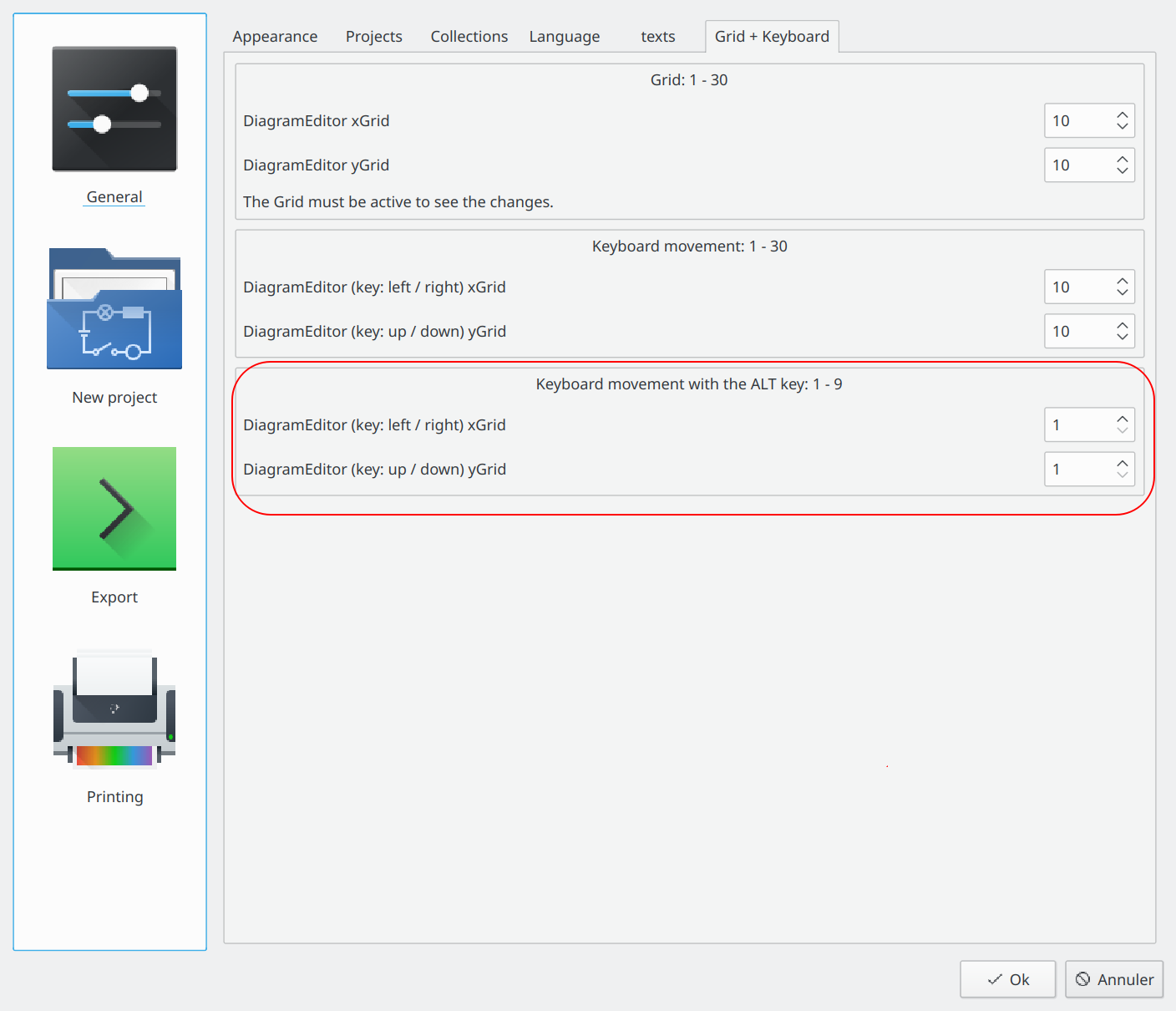
See latest 0.7-dev and settings page for configure this feature added by Erik.
https://qelectrotech.org/forum/viewtopi … 9170#p9170
ALT + arrows key for step moving 1px.
Clair, il y a bien plus puissant et bien moins cher du coté des rouges.
Thanks.
I don't see any problem here on my Debian machine with your project.
Perhaps a Windows graphic driver's problem or machine so old?
Hello,
strange, perhaps hotpost element wrong?
Does this happen only on a specific element?
What your OS and QET version?
Could you provide this project?
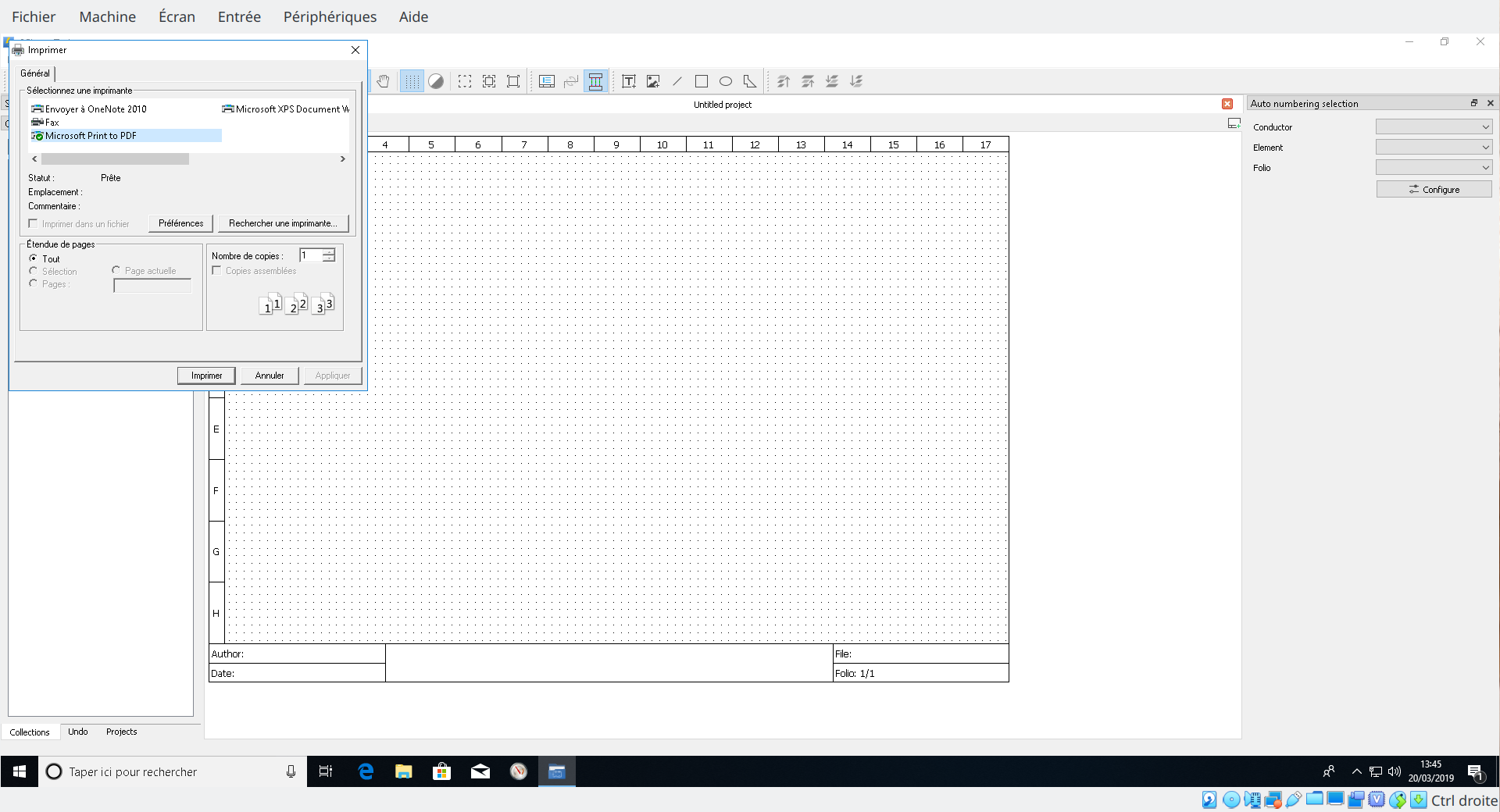
Note, however, a limitation for Windows PDF / PS printing: the Page Setup dialog, which allows you to specify the paper size and margins, is not available.
Edit :
And for fix HiDPi print render on Windows if I remember :
see commit rev 5242
Windows?
Use "stampa su carta" function and choose "Microsoft Print to PDF" printer like this :
Posts found: 4,251 to 4,275 of 7,530
Generated in 0.064 seconds (32% PHP - 68% DB) with 5 queries