Re: Nouveautés de la version de développement 0.9> 0.200.1
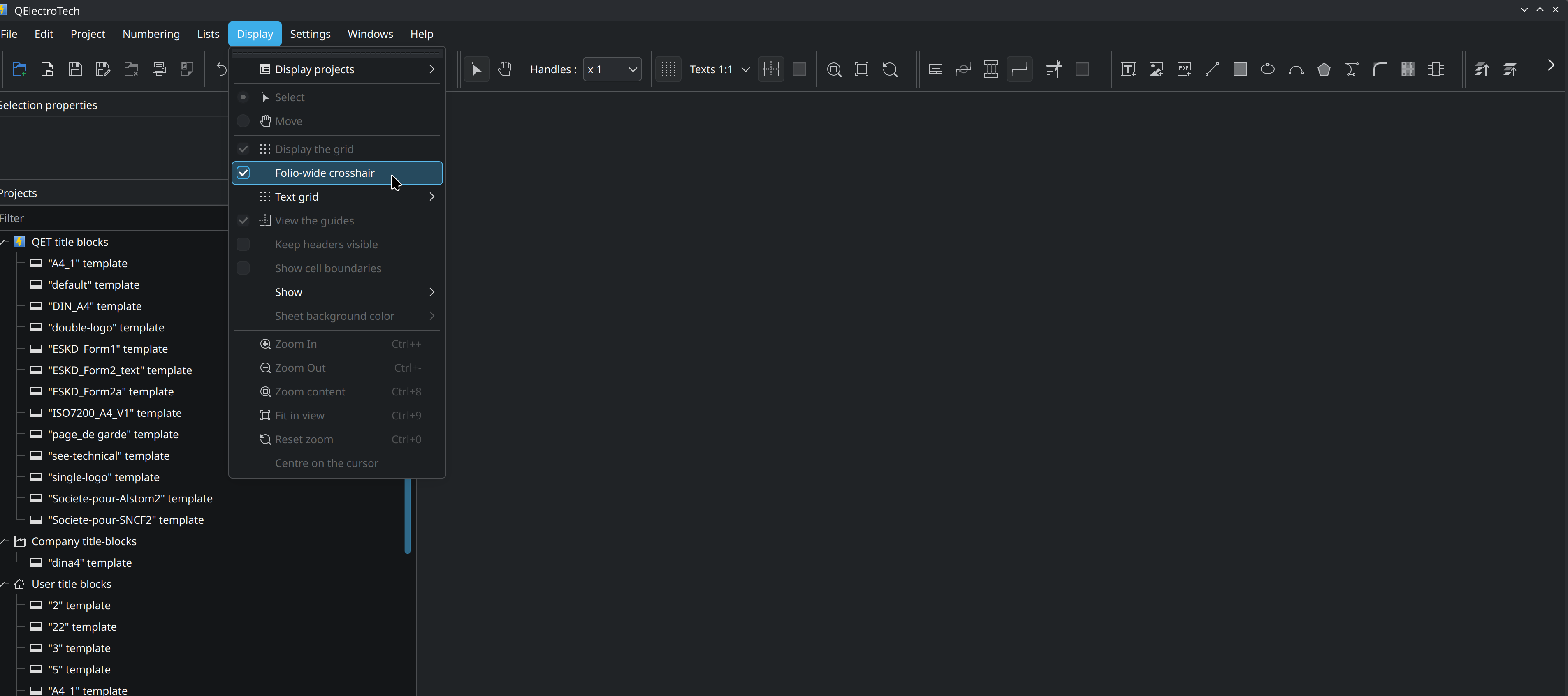
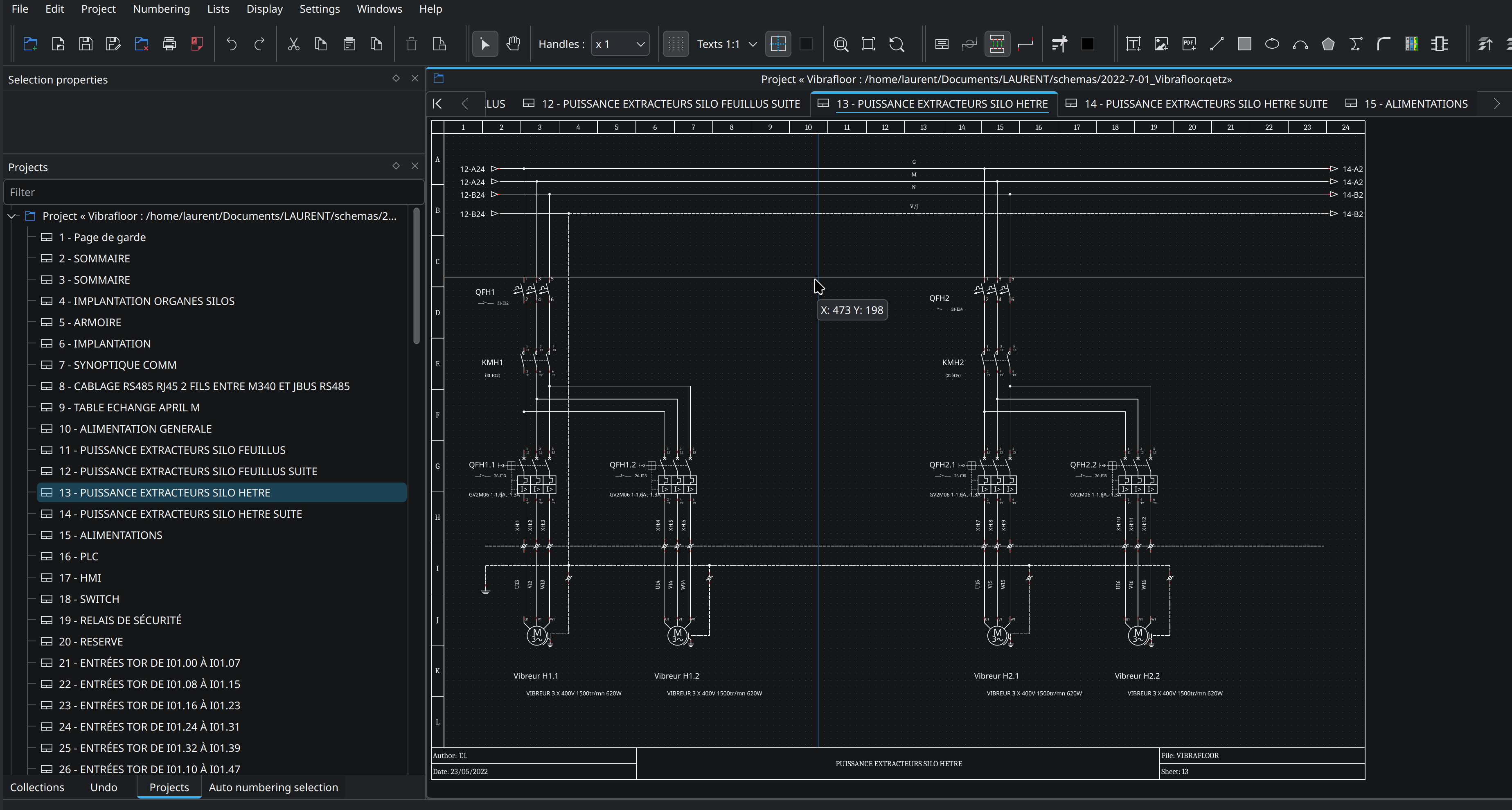
Folio-wide crosshair under the mouse (Display menu)- #1559
https://github.com/qelectrotech/qelectr … /pull/1559
You are not logged in. Please login or register.
QElectroTech → News → Nouveautés de la version de développement 0.9> 0.200.1
Folio-wide crosshair under the mouse (Display menu)- #1559
https://github.com/qelectrotech/qelectr … /pull/1559
Hi all,
A new Linux AppImage of QElectroTech is available for testing: QElectroTech_0.200.1-r11275-x86_64.AppImage (~73 MB).
Built from current master with Qt 6.11.2 and KDE Frameworks 6
Built on Ubuntu 24.04, so it needs glibc 2.39 or newer: Ubuntu 24.04+, Debian 13+, Fedora 40+, Arch, openSUSE Tumbleweed. It will not run on Ubuntu 22.04 or Debian 12.
No libfuse2 required
Includes the project database export, PDF links, etc..
Download: https://download.qelectrotech.org/qet/b … .0/X86_64/
Usage:
chmod +x QElectroTech_*.AppImage
./QElectroTech_*.AppImagePlease report any problem here (distribution, desktop, X11 or Wayland). Thanks for testing!
Laurent
Now added AppImages to GitHub CI/CD:
https://qelectrotech.github.io/qelectro … ce-mirror/
Where .qetdb stands: what works, what's next, and testers wanted
https://github.com/qelectrotech/qelectr … sions/1648
Add a history of saves inside a .qetdb, off by default
https://github.com/qelectrotech/qelectr … /pull/1659
macOS arm64: new build with Qt 6.12 — fonts and collections fixed
Hello everyone,
A new macOS arm64 (Apple Silicon) build is available: qelectrotech-0.200.x-rXXXX-arm64.dmg
Download page
What changed
Fonts: the fonts shipped with QET (Liberation Sans/Serif/Mono and osifont) were missing from the font chooser in Settings > Texts on macOS, so they could only be picked after installing them by hand from the .app bundle. QET now uses Qt's own font dialog everywhere, which lists them directly. If you installed these fonts manually as a workaround, you can remove them from Font Book.
Qt 6.12: the bundle is now built with Qt 6.12 (Homebrew).
Packaging: the build script now stops on any missing file instead of producing an incomplete bundle (elements collection, title blocks, icon, Info.plist).
If you downloaded a macOS build earlier today and QET does not find the elements collection or the title blocks, please download the new one: that build was incomplete.
As this is the first build with Qt 6.12, feedback is welcome, especially on:
the font dialogs (Settings > Texts, element editor, tables, cross references);
opening and saving projects, including .qetdb files;
translations of the standard buttons (OK/Cancel...) in your language.
Thanks for your reports!
Laurent
Feature/dimensioning- #1666
https://github.com/qelectrotech/qelectr … /pull/1666
47 new features on master, 15 October – 1 November 2026
https://github.com/qelectrotech/qelectr … sions/1701
16 new features on master, 1–7 November 2026
https://github.com/qelectrotech/qelectr … sions/1771
New QET fork : https://fasecad.com/
https://lnkd.in/p/eq4Pf2rP
Hi Brandon,
Thanks for the kind words about QElectroTech, and good luck with FaseCAD! I had a look at your fasecad branch, and there are some really good ideas in it:
- caching the title block on screen (recorded once in a QPicture and played back), a nice speed gain for every repaint;
- working out the terminal marks once the drag is over instead of at every step;
- the terminal diagram drawing style, multi-level terminals and up to two bridges per terminal;
- the parts database with the bill of materials, and the cable checks and plans;
- and tests for each of them, which we appreciate a lot.What I find a pity is that we are working on the same subjects in parallel. Just yesterday I worked on the terminal strip drawing in QElectroTech, with multi-level terminals drawn as steps, and on a redesign of the settings dialog. Cable management and a device list have landed in the last few weeks too. Each of us doing the same work on our own side is time lost for everyone, and the gap between the two code bases grows fast (about 150 commits on our master since your fork).
Of course, you are completely free to take FaseCAD where you want, that's the whole point of free software. But if you'd like some of your work to come back to QElectroTech, as your README says, small separate PRs based on our current master would be very welcome, starting with the two speed improvements. We'd be glad to review them.
Best regards,
Laurent, QElectroTech maintainer
38 new features on master, 7–13 November 2026
https://github.com/qelectrotech/qelectr … sions/1876
New: universal macOS nightly DMG (Apple Silicon + Intel), Qt 6
Hello everyone,
A macOS DMG is now built automatically by our GitHub CI, alongside the Windows MSI installer and the Linux AppImage, each time a maintainer or I trigger the Windows build run.
It is not built on every commit: new nightly builds appear on the download page after each of these runs.
Universal binary: one DMG for Apple Silicon (arm64) and Intel (x86_64) Macs
Qt 6.11 with KF6, built from the current master branch
macOS 14 (Sonoma) or newer
I have tested it on my Mac mini, natively on Apple Silicon and the Intel version through Rosetta 2: everything works, including the project database export, PDF import, etc.
How to test it yourself (in the Terminal, after copying QElectroTech to Applications):
Check that the binary is universal (should print x86_64 arm64):
lipo -archs /Applications/qelectrotech.app/Contents/MacOS/qelectrotechOn an Apple Silicon Mac, you can also run the Intel version. Install Rosetta 2 first if it is not already installed:
softwareupdate --install-rosetta --agree-to-licensethen start QElectroTech in Intel mode:
arch -x86_64 /Applications/qelectrotech.app/Contents/MacOS/qelectrotechNote: type these commands rather than copy them from a web page if you get a "usage" error: some browsers or editors turn the double dash -- into a long dash.
You can download it from the nightly page:
https://qelectrotech.github.io/qelectro … ce-mirror/
Important: this nightly DMG is not signed with our Apple Developer ID (no certificate is stored in the CI, for security reasons). macOS will block it at first launch. To open it, after copying QElectroTech to your Applications folder, either:
go to System Settings > Privacy & Security and click Open Anyway, or
run this command in the Terminal:
xattr -dr com.apple.quarantine /Applications/qelectrotech.appSigned and notarized DMGs are still available on the QElectroTech download page, as before:
https://download.qelectrotech.org/qet/builds/MAC_OS_X/
I keep building these signed and notarized Apple Silicon (aarch64) DMGs myself, on my new Mac mini. If you do not want to deal with the step above, or for production use, please keep using those.
A big thank you to all our donors: this new Mac mini was bought with your donations to QElectroTech. It is used to build, sign, notarize and test QElectroTech on macOS. Your support makes this possible!
These nightly builds are for testing. Feedback is welcome, especially from Intel Mac users: please report any problem here or on GitHub.
Thanks!
Laurent
New look for qelectrotech.org
Hello everyone,
The main website qelectrotech.org has been redesigned:
a modern, lighter look that also works on phones and tablets, with an automatic dark mode;
a single download page with Windows, GNU/Linux and macOS tabs, stable and development versions side by side;
an updated team & contact page, with the technical choices and the three project formats (.qet, .qetz, .qetdb);
the site is now available in 6 languages: English, French, German, Spanish, Italian and Brazilian Portuguese (language button at the top right).
Still plain HTML, CSS and a little PHP: no JavaScript, no framework, nothing to track you.
Native speakers wanted! The German, Spanish, Italian and Brazilian Portuguese texts are new. If you spot a wrong or clumsy word (title block, terminal strip, folio…), please tell us in this topic.
Broken link, missing page or display problem? Report it here too.
Thanks to Nuri for this great works, us195 and Carlos for their earlier proposals and mock-ups, which inspired this redesign.
Laurent
QElectroTech → News → Nouveautés de la version de développement 0.9> 0.200.1
Powered by PunBB, supported by Informer Technologies, Inc.
Generated in 0.023 seconds (34% PHP - 66% DB) with 11 queries