Topic: Question about Ready-To-Use - version

Salut Laurent !

On QET download-page for win it says:

Ready-to-use versions are PORTABLE versions: they don't need to be installed!

But when using it, it creates it's configuration in registry ... hmm ...  not really portable!
To be really portable it would be necessary to write the config to a file in sub-dir "conf" in the Ready-To-Use - folder.

Then it would be possible to carry the whole Ready-To-Use - folder to another system and have everything like before. Especially when we think about the near future, when we also ship some fonts with QET.

What do you think, Laurent?
Would it be a big effort to have the configuration in a file for the win Ready-To-Use - version?

Fragen zu QET gehören in dieses Forum und werden nicht per PM beantwortet! – Questions regarding QET belong in this forum and will NOT be answered via PM! – Les questions concernant QET doivent être posées sur ce forum et ne seront pas traitées par MP !

Re: Question about Ready-To-Use - version

Hallo plc-user,

I would have to compile the binary twice, which is not a problem on this machine, about 30 seconds to compile it in x86_64 and adapt my packaging script.
https://github.com/qelectrotech/qelectr … Windows.sh

An effort I'll be able to make when I'm much better...not these months!

It could be more annoying if we later need to package Windows versions in arm64, powerful machines with lots of cores and memory in arm64 are very expensive...
I don't know if my mac mini M2 or my raspberry pi 5 (8GB) can help me for that!

Btw, on this Raspberry PI 5 with BookWorm  (Raspberry Pi OS) I saw that QET 0.9 was very fast to launch (~0.30 seconds) and seems as fluid as my workstation even on large projects, in the short time I tested it. Only with official sd card!

18:40:18.873 Info: Count All Elements in collections = 8483 Elements 
18:40:19.157 Info: Elements collection reload 
18:40:19.604 Info: Elements collection finished to be loaded in 0.446 seconds 

Edit: 10 mn to compile QET on my raspberry pi 5 (8GB).

Time make -j4

r/lib/aarch64-linux-gnu/libQt5Gui.so /usr/lib/aarch64-linux-gnu/libQt5Network.so /usr/lib/aarch64-linux-gnu/libQt5Xml.so /usr/lib/aarch64-linux-gnu/libQt5Sql.so /usr/lib/aarch64-linux-gnu/libQt5Concurrent.so /usr/lib/aarch64-linux-gnu/qt5/mkspecs/modules/../../../../../lib/aarch64-linux-gnu/libKF5CoreAddons.so /usr/lib/aarch64-linux-gnu/libQt5Core.so -lGL   
make[1] : on quitte le répertoire « /home/laurent/qet/build »

real    10m44,487s

"Le jour où tu découvres le Libre, tu sais que tu ne pourras jamais plus revenir en arrière..."Questions regarding QET belong in this forum and will NOT be answered via PM! – Les questions concernant QET doivent être posées sur ce forum et ne seront pas traitées par MP !

Re: Question about Ready-To-Use - version

No need to hurry: health comes first!

Fragen zu QET gehören in dieses Forum und werden nicht per PM beantwortet! – Questions regarding QET belong in this forum and will NOT be answered via PM! – Les questions concernant QET doivent être posées sur ce forum et ne seront pas traitées par MP !

Re: Question about Ready-To-Use - version

Salut Laurent !
Hello everybody!

I still can't shake the idea of creating a truly portable version of QET for Windows that also stores its configuration in a local file instead of the registry. Only then it would be truly portable!

I’ve done some searching and keep finding hints that this could be done with relatively little effort:

diff --git a/sources/main.cpp b/sources/main.cpp
index b0f32a237..fcf85f99c 100644
--- a/sources/main.cpp
+++ b/sources/main.cpp
@@ -96,6 +96,11 @@ int main(int argc, char **argv)
        QCoreApplication::setOrganizationDomain("qelectrotech.org");
        QCoreApplication::setApplicationName("QElectroTech");
 
+#ifdef QET_Build_WinReadyToUse
+       // use local config-file with "ReadyToUse" - Version to be really portable
+       QSettings settings("../conf/QETconf.ini", QSettings::IniFormat);
+#endif
+
        // Refuse invalid data when building QDom documents instead of
        // serializing malformed XML (CVE-2026-15037). This is the default
        // from Qt 6.12 on; opt in explicitly for older Qt 5/6.

Since I don’t have a machine of my own to compile for win, I’d be happy if someone would give it a try.
Maybe the lines to be inserted need to go above the lines that start with `QCoreApplication`, but that would have to be tested.
Of course, the specified directory would also have to be correct for the test:
Here, I’ve assumed the directory structure of the ReadyToUse version, where the binary is located under /bin.
(The conditional compilation could be omitted for a one-time test.)

Maybe someone out there would be willing to give this a try?

Thanks in advance!
  plc-user

Fragen zu QET gehören in dieses Forum und werden nicht per PM beantwortet! – Questions regarding QET belong in this forum and will NOT be answered via PM! – Les questions concernant QET doivent être posées sur ce forum et ne seront pas traitées par MP !

Re: Question about Ready-To-Use - version

I tried compiling it as a standard Windows version yesterday, but had no success.

I took a look at the Qt documentation and tested `QSettings::setDefaultFormat(QSettings::IniFormat);`.
QElectroTech didn't behave correctly after startup—it stopped reading properties from the Registry.
However, an INI file wasn't created. I'm also not sure if that command sets the INI format globally for
the entire application.
The storage location still needs to be defined somehow; perhaps `QSettings::UserScope` would help.
As I said, I only skimmed the documentation, but maybe it could help.

Re: Question about Ready-To-Use - version

Hallo Achim,

thanks for giving it a try!
But it seems like there's some more work involved than I'd hoped.
Maybe I should look into how I can cross-compile on my Debian for win...
Does anyone happen to have a good guide for that?

Fragen zu QET gehören in dieses Forum und werden nicht per PM beantwortet! – Questions regarding QET belong in this forum and will NOT be answered via PM! – Les questions concernant QET doivent être posées sur ce forum et ne seront pas traitées par MP !

Re: Question about Ready-To-Use - version

Addendum:
In this case, it's actually intended that no settings are read from the registry!
Have you tried creating the INI file mentioned manually to see if it's then used?

Fragen zu QET gehören in dieses Forum und werden nicht per PM beantwortet! – Questions regarding QET belong in this forum and will NOT be answered via PM! – Les questions concernant QET doivent être posées sur ce forum et ne seront pas traitées par MP !

Re: Question about Ready-To-Use - version

I can also imagine something like this — something that is compiled for win and, if an INI file exists in a specific directory, populates it with data without using the registry.

diff --git a/sources/main.cpp b/sources/main.cpp
index b0f32a237..ee5693e76 100644
--- a/sources/main.cpp
+++ b/sources/main.cpp
@@ -96,6 +96,14 @@ int main(int argc, char **argv)
        QCoreApplication::setOrganizationDomain("qelectrotech.org");
        QCoreApplication::setApplicationName("QElectroTech");
 
+#ifdef Q_OS_WINDOWS
+       // use local config-file with "ReadyToUse" - Version to be really portable
+       // In this case we need to deliver a basic file to activate this feature.
+       static const QString confFile = "../conf/QETconf.ini";
+       if (QFile::exists(confFile))
+               QSettings settings(confFile, QSettings::IniFormat);
+#endif
+
        // Refuse invalid data when building QDom documents instead of
        // serializing malformed XML (CVE-2026-15037). This is the default
        // from Qt 6.12 on; opt in explicitly for older Qt 5/6.

Basically, it seems to work, at least parts of it:
Achim confirmed on the first try that the existing registry values were ignored.
We “just” need to figure out why no INI file was created. Does the sub-directory have to exist, or does there even have to be a file with the correct name? As already said: I can’t compile that myself on/for win (at least not right now).

Fragen zu QET gehören in dieses Forum und werden nicht per PM beantwortet! – Questions regarding QET belong in this forum and will NOT be answered via PM! – Les questions concernant QET doivent être posées sur ce forum et ne seront pas traitées par MP !

Re: Question about Ready-To-Use - version

I just tested it again at my leisure, and it works, no idea what went wrong this morning.

// global settings
    QCoreApplication::setOrganizationName("MeineFirma");
    QCoreApplication::setApplicationName("MeineAnwendung");

// global setting of  INI-Format
    QSettings::setDefaultFormat(QSettings::IniFormat);
   
// testvalue
    QSettings settings;
    settings.setValue("TestKey", "TestValue");
   
    qDebug() << settings.fileName();
        output ->  "C:/Users/Achim/AppData/Roaming/MeineFirma/MeineAnwendung.ini"

The INI file was written to "C:/Users/Achim/AppData/Roaming/MeineFirma/" and is named "MeineAnwendung.ini". The test value and a modified QElectroTech setting were entered into the INI file.

Now you just need to ensure that the INI file is created within the "ReadyToUse" folder.
I can't create a "ReadyToUse" version because I don't know how to do it.

Why are you so keen on changing the current setup?
Sure, a portable version manages its own data and doesn't rely on the operating system's built-in mechanisms.
I’m perfectly happy with the current version; it really only has advantages. For instance, I download almost every new "ReadyToUse" release, which means I either have to reconfigure everything from scratch each time or use the .ini file from an older version. Another advantage is that, if both, the "ReadyToUse" and a standard versions are installed, they access the same data and settings.

10 (edited by plc-user 2026-08-26 19:09:28)

Re: Question about Ready-To-Use - version

Hallo Achim!

Danke für's Testen!
Für unsere internationalen Leser mache ich lieber auf Englisch weiter...


achim wrote:

I download almost every new "ReadyToUse" release, which means I either have to reconfigure everything from scratch each time or use the .ini file from an older version.

No! It is neither intended nor desirable to have to recreate the configuration when updating to a new QET version!

achim wrote:

(...) if both, the "ReadyToUse" and a standard versions are installed, they access the same data and settings.

This is not intended to change either, at least according to the latest considerations!

Regarding the question of why the configuration may/should be written to a file:
In some companies, “regular” users are not allowed to install programs.
So that these users can still enjoy QET, they simply extract the ReadyToUse version into any directory and can get started right away.
To avoid cluttering the registry with “unwanted” configurations, the configuration may be saved to a file so that the software can be completely removed even using the simplest file-manager.
This also allows the configuration to be copied or moved to another system using any file-manager.

A config-file also makes it easier to use different configurations to test specific features:
If something doesn’t work as expected, the backup of a working configuration can be restored quite easily.

Besides all that:
The subdirectories in the user directory are created anyway, at the latest when QET is used:
So why should we use a different or additional location for the general configuration?


It looks like we probably won't be able to get the configuration “alongside” the QET binary without putting in a lot of effort...
BUT:
We can check when the program starts whether there's a corresponding entry in registry or user's directory.
Then we could use that as a basis:
    QStandardPaths::AppDataLocation  <--  already used by QET for log-files, elements-cache, user-collection, ...

This location is available in QET as "QETApp::dataDir()".

I can imagine a small function that checks at startup whether there are already registry entries for QElectroTech.
If “Yes,” then the registry is used for the existing installation without further prompting.
If “No,” then check whether there is a config directory.
If “Yes,” use the config directory without further prompting.
If “No” again, then it’s a completely new installation, and the user can decide what they want: registry or local configuration with registry as default-choice.

This way, we wouldn’t change anything to existing installations in any way!
Regardless of whether the registry or a config file is used!

Once implemented, it might look something like this:

diff --git a/sources/main.cpp b/sources/main.cpp
index b0f32a237..b93c8bfd0 100644
--- a/sources/main.cpp
+++ b/sources/main.cpp
@@ -173,6 +173,35 @@ QGuiApplication::setHighDpiScaleFactorRoundingPolicy(QetSettings::hdpiScaleFacto
                return 0;
        }

+/******************************************************************************/
+#ifdef Q_OS_WINDOWS
+    QSettings confCheck(QSettings::NativeFormat);
+    if (confCheck.contains("HKEY_CURRENT_USER\\Software\\QElectroTech\\QElectroTech")) {
+        QSettings::setDefaultFormat(QSettings::NativeFormat);
+        qInfo() << "using Windows-Registry to save configuration";
+    } else if (QDir::exists(QETApp::dataDir())) {
+        QSettings::setDefaultFormat(QSettings::IniFormat);
+        qInfo() << "using directory" << QETApp::dataDir() << "to save configuration";
+    } else {
+        QMessageBox::StandardButton configReply;
+        configReply = QMessageBox::question(NULL,
+                          QObject::tr("QElectroTech-Config"),
+                          QObject::tr("Save the configuration to registry?\n\nYes -> use Windows-Registry\nNo -> use INI-file in user-dir"),
+                          QMessageBox::Yes | QMessageBox::No,
+                          QMessageBox::Yes);
+        if (configReply == QMessageBox::Yes) {
+            // Config in Registry:
+            QSettings::setDefaultFormat(QSettings::NativeFormat);
+            qInfo() << "using Windows-Registry to save configuration";
+        } else {
+            // Config in User-Dir:
+            QSettings::setDefaultFormat(QSettings::IniFormat);
+            qInfo() << "using directory" << QETApp::dataDir() << "to save configuration";
+        }
+    }
+#endif
+/******************************************************************************/
+
        QETApp qetapp;
        QETApp::instance()->installEventFilter(&qetapp);
 #ifdef Q_OS_MACOS

You may have noticed: These lines need to be inserted a little further down in main.cpp, otherwise the QMessageBox won’t work.

With such an addition both win-versions would behave the same:
Use the registry or config-file, when there is an existing config or ask the user (only once!) where to store the config at the very first start of QET on that machine.

But all of this needs to be tested on a real win-system, ...

There seems to be one tiny flaw:
Since the language couldn't be read from the configuration at that point, the texts in the MessageBox are the hard-coded texts from source code...

Post's attachments
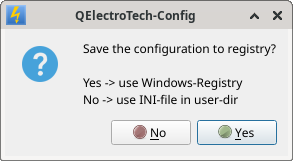
QET-Config.png, 13.63 kb, 293 x 161
QET-Config.png 13.63 kb, 11 downloads since 2026-08-26 

Fragen zu QET gehören in dieses Forum und werden nicht per PM beantwortet! – Questions regarding QET belong in this forum and will NOT be answered via PM! – Les questions concernant QET doivent être posées sur ce forum et ne seront pas traitées par MP !


Re: Question about Ready-To-Use - version

You're right, I hadn't even thought about companies.
Fortunately, at my company, things aren't handled quite that strictly yet.

Re: Question about Ready-To-Use - version

I took another look at it, and I think I’ve found a solution now.

I had ruled out `QSettings::setPath(...)` when reading the documentation yesterday, but it turns out it is the right approach after all. Here is the code:

//Some setup, notably to use with QSetting.
// Definition wie vorher in der main.cpp
QCoreApplication::setOrganizationName("QElectroTech");
QCoreApplication::setOrganizationDomain("qelectrotech.org");
QCoreApplication::setApplicationName("QElectroTech");

//#ifdef QET_Build_WinReadyToUse

// OrganizationName und ApplicationName passend
// für die ReadyToUse überschreiben
            // das wird der Ordnername für die .ini
QCoreApplication::setOrganizationName("settings");
        // das wird der Dateiname
QCoreApplication::setApplicationName("QElectro");

// INI System setzen
QSettings::setDefaultFormat(QSettings::IniFormat);

// den Pfad für alle zukünftigen QSettings-Instanzen im IniFormat setzen
// (Gilt für QSettings::UserScope)
QSettings::setPath(QSettings::IniFormat, QSettings::UserScope, QCoreApplication::applicationDirPath());

// Test QSettings
QSettings settings;
settings.setValue("key","value");

//#endif

I moved the code to `qetapp.cpp`, starting at line 120.
This was necessary so I could use `QCoreApplication::applicationDirPath()`.

A new folder named "settings" is created in the same directory as `qelectrotech.exe`, and the `QElectro.ini` file is created inside that "settings" folder. The test "key, value" settings were written to the INI file, and when a setting was changed in the QElectroTech preferences, that change was also recorded in the INI file.

Do you know how to create a "readyToUse" version? If you could show me how, I’d like to give that a try as well.

The message box idea is a good one. You’re right, by the way—language translations aren't available at that stage yet. But I think English should suffice for this purpose.

13 (edited by plc-user 2026-08-28 15:15:11)

Re: Question about Ready-To-Use - version

Just to clarify:
With this addition, I am not trying to encourage people to do anything that violates their employer's company policies, nor am I advocating any illegal actions! The goal is to keep the user's computer as “clean” as possible without making any changes to system components (the registry).

By the way:
Does the installer actually remove QET’s registry entries, file associations etc. when uninstalling? Many software packages don’t do that and end up leaving behind “zombies” that unnecessarily clutter up the system!

achim wrote:

Do you know how to create a "readyToUse" version?

As far as I know the install-version and ReadyToUse are exactly the same. They're just called differently in the batch files?
That's why I don't want to burden Laurent with the task of having to create a second win version just for this extension, including the changes to the install scripts! There’s really no need for us to introduce conditional compilation just for the ReadyToUse version and force someone to take on extra work!

If we pool our knowledge and add a check of the registry and/or the conf directory on the very first time QET is launched on this machine, we can use either the registry or a conf directory next to (!) the bin directory for configuration, as it has been existing with QET before.

Why not a sub-dir inside of /bin?
The configuration is no binary!

That's why I suggest this implementation:

diff --git a/sources/main.cpp b/sources/main.cpp
index b0f32a237..b5682428a 100644
--- a/sources/main.cpp
+++ b/sources/main.cpp
@@ -173,6 +173,39 @@ QGuiApplication::setHighDpiScaleFactorRoundingPolicy(QetSettings::hdpiScaleFacto
                return 0;
        }

+/******************************************************************************/
+#ifdef Q_OS_WINDOWS
+    const QString confPath = QDir::cleanPath(QCoreApplication::applicationDirPath() % "/../conf/");
+    QSettings regCheck("HKEY_CURRENT_USER\\Software\\" % QCoreApplication::organizationName(),
+                       QSettings::NativeFormat);
+    if (regCheck.childGroups().contains(QCoreApplication::applicationName())) {
+        QSettings::setDefaultFormat(QSettings::NativeFormat);
+        qInfo() << "using Windows-Registry to save configuration";
+    } else if (QDir(confPath).exists()) {  // [EDIT] corrected QDir - call
+        QSettings::setPath(QSettings::IniFormat, QSettings::UserScope, confPath);
+        QSettings::setDefaultFormat(QSettings::IniFormat);
+        qInfo() << "using directory" << confPath << "to save configuration";
+    } else {
+        QMessageBox::StandardButton configReply;
+        configReply = QMessageBox::question(NULL,
+                          QObject::tr("QElectroTech-Config"),
+                          QObject::tr("Save the configuration to registry?\n\nYes -> use Windows-Registry (default)\nNo -> use INI-file in conf-dir"),
+                          QMessageBox::Yes | QMessageBox::No,
+                          QMessageBox::Yes);
+        if (configReply == QMessageBox::Yes) {
+            // Config in Registry:
+            QSettings::setDefaultFormat(QSettings::NativeFormat);
+            qInfo() << "using Windows-Registry to save configuration";
+        } else {
+            // Config in User-Dir:
+            QSettings::setPath(QSettings::IniFormat, QSettings::UserScope, confPath);
+            QSettings::setDefaultFormat(QSettings::IniFormat);
+            qInfo() << "using directory" << confPath << "to save configuration";
+        }
+    }
+#endif
+/******************************************************************************/
+
        QETApp qetapp;
        QETApp::instance()->installEventFilter(&qetapp);
 #ifdef Q_OS_MACOS

The process is as described in an earlier post:

plc-user wrote:

(...) that checks at startup whether there are already registry entries for QElectroTech.
If “Yes,” then the registry is used for the existing installation without further prompting.
If “No,” then check whether there is a config directory.
If “Yes,” use the config directory without further prompting.
If “No” again, then it’s a completely new installation, and the user can decide what they want: registry or local configuration with registry as default-choice.

This way, we wouldn’t change anything to existing installations in any way!
Regardless of whether the registry or a config file is used!

Absolutely no change for existing installations and no additional work or compilations for Laurent!
There is only one question to the user once in the lifetime of user's win-installation!

@Achim:
You’d be doing me a big favor if you could compile the posted code and share the result: Then I could see if it works at all and test the different scenarios.
I can’t say yet whether it’d be enough to attach the compressed EXE file and use that with the "official" rest of the bin-directory, but it would be worth a try. Compressed with 7z or xz, it would be relatively small.
We could delete the attachment afterwards so it doesn’t take up too much space here...

Fragen zu QET gehören in dieses Forum und werden nicht per PM beantwortet! – Questions regarding QET belong in this forum and will NOT be answered via PM! – Les questions concernant QET doivent être posées sur ce forum et ne seront pas traitées par MP !

Re: Question about Ready-To-Use - version

Sorry there was an error in QDir - call above: corrected that.

Here a new / revised version with added comments and some clean-up:
The calls to set Registry or Config-file are now only once in the code to avoid doubles.
And I added a function to check, if the directory where to create conf-dir is writable for the user. If it isn't writable, we do not need to check or ask whether to write the config there: no unnecessary bothering of users!

It looks bigger than before, but that's mostly comments!

diff --git a/sources/main.cpp b/sources/main.cpp
index b0f32a237..aadf16fa1 100644
--- a/sources/main.cpp
+++ b/sources/main.cpp
@@ -173,6 +173,59 @@ QGuiApplication::setHighDpiScaleFactorRoundingPolicy(QetSettings::hdpiScaleFacto
                return 0;
        }

+/******************************************************************************/
+#ifdef Q_OS_WINDOWS
+       // install-version of QET normally resides in "C:\Program Files\QElectroTech"
+       // "normal" users are usually not allowed to create files or directories
+       // there, so if we are not allowed to write there, it is most likely that
+       // QET is installed. ReadyToUse-versions should reside in other directory
+       // like C:\Tools\QElectroTech, where it is allowed to create sub-dirs.
+       // Check if up-dir of QET-binary is writable for us:
+       const QFileInfo fi(QDir::cleanPath(QCoreApplication::applicationDirPath() % "/../"));
+       const bool pathIsWritable(fi.isDir() && fi.isWritable());
+       bool useRegistry(false);
+       // set name of path for configuration
+       QString confPath = QDir::cleanPath(QCoreApplication::applicationDirPath() % "/../conf/");
+       // check registry, if QET is already using it
+       QSettings regCheck("HKEY_CURRENT_USER\\Software\\" % QCoreApplication::organizationName(),
+                                               QSettings::NativeFormat);
+       if (regCheck.childGroups().contains(QCoreApplication::applicationName())) {
+               // registry-key already exists? --> use registry!
+               useRegistry = true;
+       } else if (QDir(confPath).exists() && (pathIsWritable == true)) {
+               // config-dir already exists? --> use it!
+               useRegistry = false;
+       } else if (pathIsWritable == true) {
+               // only ask user what to do, if we are allowed to create conf-dir
+               QMessageBox::StandardButton configReply;
+               configReply = QMessageBox::question(NULL,
+                                                       QObject::tr("QElectroTech-Config", "title of QMessageBox: Choose location of configuration"),
+                                                       QObject::tr("Save the configuration to registry?\n\nYes -> use Windows-Registry (default)\nNo -> use INI-file in conf-dir"),
+                                                       QMessageBox::Yes | QMessageBox::No,
+                                                       QMessageBox::Yes);
+               if (configReply == QMessageBox::Yes) {
+                       // Config in Registry:
+                       useRegistry = true;
+               } else {
+                       // Config in User-Dir:
+                       useRegistry = false;
+               }
+       } else {
+               // fallback
+               useRegistry = true;
+       }
+       // set chosen way of saving config:
+       if (useRegistry == true) {
+               QSettings::setDefaultFormat(QSettings::NativeFormat);
+               qInfo() << "using Windows-Registry to save configuration";
+       } else {
+               QSettings::setPath(QSettings::IniFormat, QSettings::UserScope, confPath);
+               QSettings::setDefaultFormat(QSettings::IniFormat);
+               qInfo() << "using directory" << confPath << "to save configuration";
+       }
+#endif
+/******************************************************************************/
+
        QETApp qetapp;
        QETApp::instance()->installEventFilter(&qetapp);
 #ifdef Q_OS_MACOS

As before in my suggestions:
- No changes to the compile or install scripts are required!
- Users with updated QElectroTech - versions are not bothered by unnecessary prompts.

It would be very kind, if someone could compile and run the code on win to see if it works as intended, or post the packed binary here.
(My win-machines are still not powerful or big enough for Qt and the compiler right now.)

Fragen zu QET gehören in dieses Forum und werden nicht per PM beantwortet! – Questions regarding QET belong in this forum and will NOT be answered via PM! – Les questions concernant QET doivent être posées sur ce forum et ne seront pas traitées par MP !

15 (edited by achim 2026-08-28 22:37:13)

Re: Question about Ready-To-Use - version

Hier die gewünschte .exe. Erstellt mit QT6 unter Windows.
Patch Datei beachten

Post's attachments

Attachment icon 0001.zip 7.78 mb, 10 downloads since 2026-08-28 

16 (edited by plc-user 2026-08-29 11:18:39)

Re: Question about Ready-To-Use - version

Danke dafür!

Den fehlerhaften QDir-Aufruf hatte ich heute schon behoben...

zu den QCoreApplication::set... - Aufrufen:
Stimmt, die müssen verschoben werden!

Da ich in meiner Funktion die Registry abfrage, meint Qt, die Daten dort setzen zu müssen, was in dem Moment aber falsch ist.
Da die Aufrufe aber weiter unten wohl funktionieren und in allen drei Fällen gleich gesetzt werden, sollten wir besser die bedingte Kompilierung unterbrechen und dort die Daten setzen: Das muss auch funktionieren! Dann gilt sie für alle Systeme und wir haben keine Code-Doppelung bzw. in diesem Fall sogar Verdreifachung.

Diese Überlegungen habe ich in die letzte Version des gemeinsamen Codes eingearbeitet und der Patch sieht nun so aus:

diff --git a/sources/main.cpp b/sources/main.cpp
index b0f32a237..efa0b46b4 100644
--- a/sources/main.cpp
+++ b/sources/main.cpp
@@ -91,10 +91,6 @@ int main(int argc, char **argv)
        // export environment-variable "QT_HASH_SEED" with value "0" to
        // disable radomisation for hashes in order to obtain "clean" XML-diffs:
        qputenv("QT_HASH_SEED", "0");
-       //Some setup, notably to use with QSetting.
-       QCoreApplication::setOrganizationName("QElectroTech");
-       QCoreApplication::setOrganizationDomain("qelectrotech.org");
-       QCoreApplication::setApplicationName("QElectroTech");
 
        // Refuse invalid data when building QDom documents instead of
        // serializing malformed XML (CVE-2026-15037). This is the default
@@ -173,6 +169,65 @@ QGuiApplication::setHighDpiScaleFactorRoundingPolicy(QetSettings::hdpiScaleFacto
                return 0;
        }
 
+/******************************************************************************/
+#ifdef Q_OS_WINDOWS
+       // install-version of QET normally resides in "C:\Program Files\QElectroTech"
+       // "normal" users are usually not allowed to create files or directories
+       // there, so if we are not allowed to write there, it is most likely that
+       // QET is installed. ReadyToUse-versions should reside in other directory
+       // like C:\Tools\QElectroTech, where it is allowed to create sub-dirs.
+       // Check if up-dir of QET-binary is writable for us:
+       const QFileInfo fi(QDir::cleanPath(QCoreApplication::applicationDirPath() % "/../"));
+       const bool pathIsWritable(fi.isDir() && fi.isWritable());
+       bool useRegistry(false);
+       // set name of path for configuration
+       QString confPath = QDir::cleanPath(QCoreApplication::applicationDirPath() % "/../conf/");
+       // check registry, if QET is already using it
+       QSettings regCheck("HKEY_CURRENT_USER\\Software\\" % QCoreApplication::organizationName(),
+                                               QSettings::NativeFormat);
+       if (regCheck.childGroups().contains(QCoreApplication::applicationName())) {
+               // registry-key already exists? --> use registry!
+               useRegistry = true;
+       } else if (QDir(confPath).exists() && (pathIsWritable == true)) {
+               // config-dir already exists? --> use it!
+               useRegistry = false;
+       } else if (pathIsWritable == true) {
+               // only ask user what to do, if we are allowed to create conf-dir
+               QMessageBox::StandardButton configReply;
+               configReply = QMessageBox::question(NULL,
+                                                       QObject::tr("QElectroTech-Config", "title of QMessageBox: Choose location of configuration"),
+                                                       QObject::tr("Save the configuration to registry?\n\nYes -> use Windows-Registry (default)\nNo -> use INI-file in conf-dir"),
+                                                       QMessageBox::Yes | QMessageBox::No,
+                                                       QMessageBox::Yes);
+               if (configReply == QMessageBox::Yes) {
+                       // Config in Registry:
+                       useRegistry = true;
+               } else {
+                       // Config in User-Dir:
+                       useRegistry = false;
+               }
+       } else {
+               // fallback
+               useRegistry = true;
+       }
+#endif
+       //Some setup, notably to use with QSetting ... with every system!
+       QCoreApplication::setOrganizationName("QElectroTech");
+       QCoreApplication::setOrganizationDomain("qelectrotech.org");
+       QCoreApplication::setApplicationName("QElectroTech");
+#ifdef Q_OS_WINDOWS
+       // set chosen way of saving config for win:
+       if (useRegistry == true) {
+               QSettings::setDefaultFormat(QSettings::NativeFormat);
+               qInfo() << "using Windows-Registry to save configuration";
+       } else {
+               QSettings::setPath(QSettings::IniFormat, QSettings::UserScope, confPath);
+               QSettings::setDefaultFormat(QSettings::IniFormat);
+               qInfo() << "using directory" << confPath << "to save configuration";
+       }
+#endif
+/******************************************************************************/
+
        QETApp qetapp;
        QETApp::instance()->installEventFilter(&qetapp);
 #ifdef Q_OS_MACOS

Das Ausprobieren der EXE spare ich mir für morgen auf...  nomicons/wink

EDIT:
Use the provided file at your own risk!
Using the modified binary may result in changes to the file system that will need to be manually reversed!
This also applies to the patches and the binary from previous posts.

Post's attachments

Attachment icon win-conf-file.patch 3.64 kb, 8 downloads since 2026-08-28 

Fragen zu QET gehören in dieses Forum und werden nicht per PM beantwortet! – Questions regarding QET belong in this forum and will NOT be answered via PM! – Les questions concernant QET doivent être posées sur ce forum et ne seront pas traitées par MP !

Re: Question about Ready-To-Use - version

Die bisherigen Änderungen haben leider mindestens einen schlechten Nebeneffekt:
Die Funktion QETApp::dataDir() bestimmt nicht das richtige Verzeichnis, weil die Eigenschaften, die mit QCoreApplication::set... gesetzt werden, in dieser Form zu spät gesetzt werden. Daher passen einige grundlegende Dinge nicht mehr! Unter anderem betroffen sind die log-Dateien, die aus der GUI nicht angezeigt werden.
Um das sinnvoll beheben zu können, muss ich mir wohl doch ein Qt-System unter win einrichten. Das wird dauern...

English translation:

Unfortunately, the changes made so far have at least one undesirable side effect:
The QETApp::dataDir() function does not identify the correct directory because the properties set using QCoreApplication::set... are set too late in this context. As a result, some basic things no longer work properly! Among other things, this affects the log files, which are no longer displayed in the GUI.
To sort this out properly, I’ll definitely need to set up a Qt environment on win after all. That’s going to take a while...

Fragen zu QET gehören in dieses Forum und werden nicht per PM beantwortet! – Questions regarding QET belong in this forum and will NOT be answered via PM! – Les questions concernant QET doivent être posées sur ce forum et ne seront pas traitées par MP !

Re: Question about Ready-To-Use - version

BTW:
Is there a good HowTo that explains all necessary steps to download and install everything needed for developing QET with Qt6 on win?

Fragen zu QET gehören in dieses Forum und werden nicht per PM beantwortet! – Questions regarding QET belong in this forum and will NOT be answered via PM! – Les questions concernant QET doivent être posées sur ce forum et ne seront pas traitées par MP !

Re: Question about Ready-To-Use - version

https://qelectrotech.org/forum/viewtopi … 638#p22638
https://qelectrotech.org/wiki_new/winstatic/winstatic

Re: Question about Ready-To-Use - version

Hallo plc-user,

https://github.com/qelectrotech/qelectr … 4708369176
&& 
https://github.com/Gokulakannan750/qele … WINDOWS.md

Download and run the installer from https://www.msys2.org.
Accept the default install path (C:\msys64).
When it finishes, open "MSYS2 UCRT64" from the Start menu (the purple icon — not "MSYS2 MSYS" or "MINGW64").
Update the package database once:

pacman -Syu
If it asks to close the terminal, close it, reopen MSYS2 UCRT64, and run pacman -Syu again.

pacman -S --needed \
  git \

            mingw-w64-ucrt-x86_64-ccache \
            mingw-w64-ucrt-x86_64-gcc \
            mingw-w64-ucrt-x86_64-cmake \
            mingw-w64-ucrt-x86_64-ninja \
            mingw-w64-ucrt-x86_64-qt6-base  \
            mingw-w64-ucrt-x86_64-qt6-svg \
            mingw-w64-ucrt-x86_64-qt6-tools \
            mingw-w64-ucrt-x86_64-qt6-translations \
            mingw-w64-ucrt-x86_64-qt6-pdf \
            mingw-w64-ucrt-x86_64-sqlite3 \
            mingw-w64-ucrt-x86_64-pkg-config \
            mingw-w64-ucrt-x86_64-kwidgetsaddons \
            mingw-w64-ucrt-x86_64-kcoreaddons \
            mingw-w64-ucrt-x86_64-extra-cmake-modules \
            mingw-w64-ucrt-x86_64-nsis \
            mingw-w64-ucrt-x86_64-angleproject


cmake -G Ninja \
            -DCMAKE_BUILD_TYPE=Release \
            -DCMAKE_PREFIX_PATH=/ucrt64 \
            -DQt6_DIR=/ucrt64/lib/cmake/Qt6 \
            -DQT_VERSION_MAJOR=6 \
            -DBUILD_WITH_KF=ON \
            -DBUILD_KF=OFF \
            -DPACKAGE_TESTS=OFF \
            -DCMAKE_POLICY_DEFAULT_CMP0077=NEW \
            -DCMAKE_POLICY_VERSION_MINIMUM=3.5 \
            -DQET_EXPORT_PROJECT_DB=ON \
            -DCMAKE_C_COMPILER_LAUNCHER=/ucrt64/bin/ccache \
            -DCMAKE_CXX_COMPILER_LAUNCHER=/ucrt64/bin/ccache \
            -DSQLite3_INCLUDE_DIR=/ucrt64/include \
            -DSQLite3_LIBRARY=/ucrt64/lib/libsqlite3.dll.a \
            ..
          ninja -j"$NPROC"

"Le jour où tu découvres le Libre, tu sais que tu ne pourras jamais plus revenir en arrière..."Questions regarding QET belong in this forum and will NOT be answered via PM! – Les questions concernant QET doivent être posées sur ce forum et ne seront pas traitées par MP !