Hallo Achim!
Danke für's Testen!
Für unsere internationalen Leser mache ich lieber auf Englisch weiter...
achim wrote:I download almost every new "ReadyToUse" release, which means I either have to reconfigure everything from scratch each time or use the .ini file from an older version.
No! It is neither intended nor desirable to have to recreate the configuration when updating to a new QET version!
achim wrote:(...) if both, the "ReadyToUse" and a standard versions are installed, they access the same data and settings.
This is not intended to change either, at least according to the latest considerations!
Regarding the question of why the configuration may/should be written to a file:
In some companies, “regular” users are not allowed to install programs.
So that these users can still enjoy QET, they simply extract the ReadyToUse version into any directory and can get started right away.
To avoid cluttering the registry with “unwanted” configurations, the configuration may be saved to a file so that the software can be completely removed even using the simplest file-manager.
This also allows the configuration to be copied or moved to another system using any file-manager.
A config-file also makes it easier to use different configurations to test specific features:
If something doesn’t work as expected, the backup of a working configuration can be restored quite easily.
Besides all that:
The subdirectories in the user directory are created anyway, at the latest when QET is used:
So why should we use a different or additional location for the general configuration?
It looks like we probably won't be able to get the configuration “alongside” the QET binary without putting in a lot of effort...
BUT:
We can check when the program starts whether there's a corresponding entry in registry or user's directory.
Then we could use that as a basis:
QStandardPaths::AppDataLocation <-- already used by QET for log-files, elements-cache, user-collection, ...
This location is available in QET as "QETApp::dataDir()".
I can imagine a small function that checks at startup whether there are already registry entries for QElectroTech.
If “Yes,” then the registry is used for the existing installation without further prompting.
If “No,” then check whether there is a config directory.
If “Yes,” use the config directory without further prompting.
If “No” again, then it’s a completely new installation, and the user can decide what they want: registry or local configuration with registry as default-choice.
This way, we wouldn’t change anything to existing installations in any way!
Regardless of whether the registry or a config file is used!
Once implemented, it might look something like this:
diff --git a/sources/main.cpp b/sources/main.cpp
index b0f32a237..b93c8bfd0 100644
--- a/sources/main.cpp
+++ b/sources/main.cpp
@@ -173,6 +173,35 @@ QGuiApplication::setHighDpiScaleFactorRoundingPolicy(QetSettings::hdpiScaleFacto
                return 0;
        }

+/******************************************************************************/
+#ifdef Q_OS_WINDOWS
+    QSettings confCheck(QSettings::NativeFormat);
+    if (confCheck.contains("HKEY_CURRENT_USER\\Software\\QElectroTech\\QElectroTech")) {
+        QSettings::setDefaultFormat(QSettings::NativeFormat);
+        qInfo() << "using Windows-Registry to save configuration";
+    } else if (QDir::exists(QETApp::dataDir())) {
+        QSettings::setDefaultFormat(QSettings::IniFormat);
+        qInfo() << "using directory" << QETApp::dataDir() << "to save configuration";
+    } else {
+        QMessageBox::StandardButton configReply;
+        configReply = QMessageBox::question(NULL,
+                          QObject::tr("QElectroTech-Config"),
+                          QObject::tr("Save the configuration to registry?\n\nYes -> use Windows-Registry\nNo -> use INI-file in user-dir"),
+                          QMessageBox::Yes | QMessageBox::No,
+                          QMessageBox::Yes);
+        if (configReply == QMessageBox::Yes) {
+            // Config in Registry:
+            QSettings::setDefaultFormat(QSettings::NativeFormat);
+            qInfo() << "using Windows-Registry to save configuration";
+        } else {
+            // Config in User-Dir:
+            QSettings::setDefaultFormat(QSettings::IniFormat);
+            qInfo() << "using directory" << QETApp::dataDir() << "to save configuration";
+        }
+    }
+#endif
+/******************************************************************************/
+
        QETApp qetapp;
        QETApp::instance()->installEventFilter(&qetapp);
 #ifdef Q_OS_MACOS
You may have noticed: These lines need to be inserted a little further down in main.cpp, otherwise the QMessageBox won’t work.
With such an addition both win-versions would behave the same:
Use the registry or config-file, when there is an existing config or ask the user (only once!) where to store the config at the very first start of QET on that machine.
But all of this needs to be tested on a real win-system, ...
There seems to be one tiny flaw:
Since the language couldn't be read from the configuration at that point, the texts in the MessageBox are the hard-coded texts from source code...
Post's attachments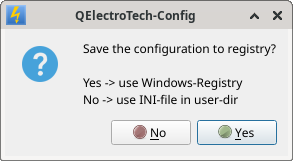
QET-Config.png 13.63 kb, 73 downloads since 2026-08-26
Fragen zu QET gehören in dieses Forum und werden nicht per PM beantwortet! – Questions regarding QET belong in this forum and will NOT be answered via PM! – Les questions concernant QET doivent être posées sur ce forum et ne seront pas traitées par MP !


 0001.zip