Re: Nouveautés de la version de développement 0.9 and 0.100.0 -0.100.1
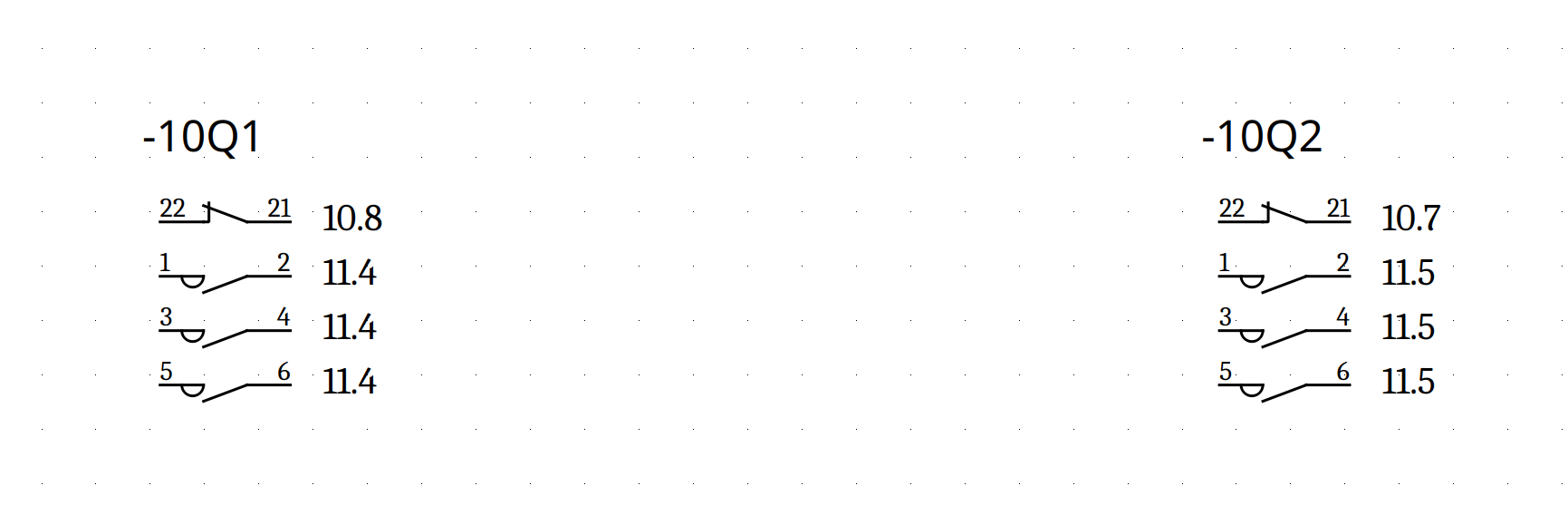
still got the same problem that there are only 1 & 3.
You are not logged in. Please login or register.
QElectroTech → News → Nouveautés de la version de développement 0.9 and 0.100.0 -0.100.1
still got the same problem that there are only 1 & 3.
Fixed your 3 contacts was simple not power.
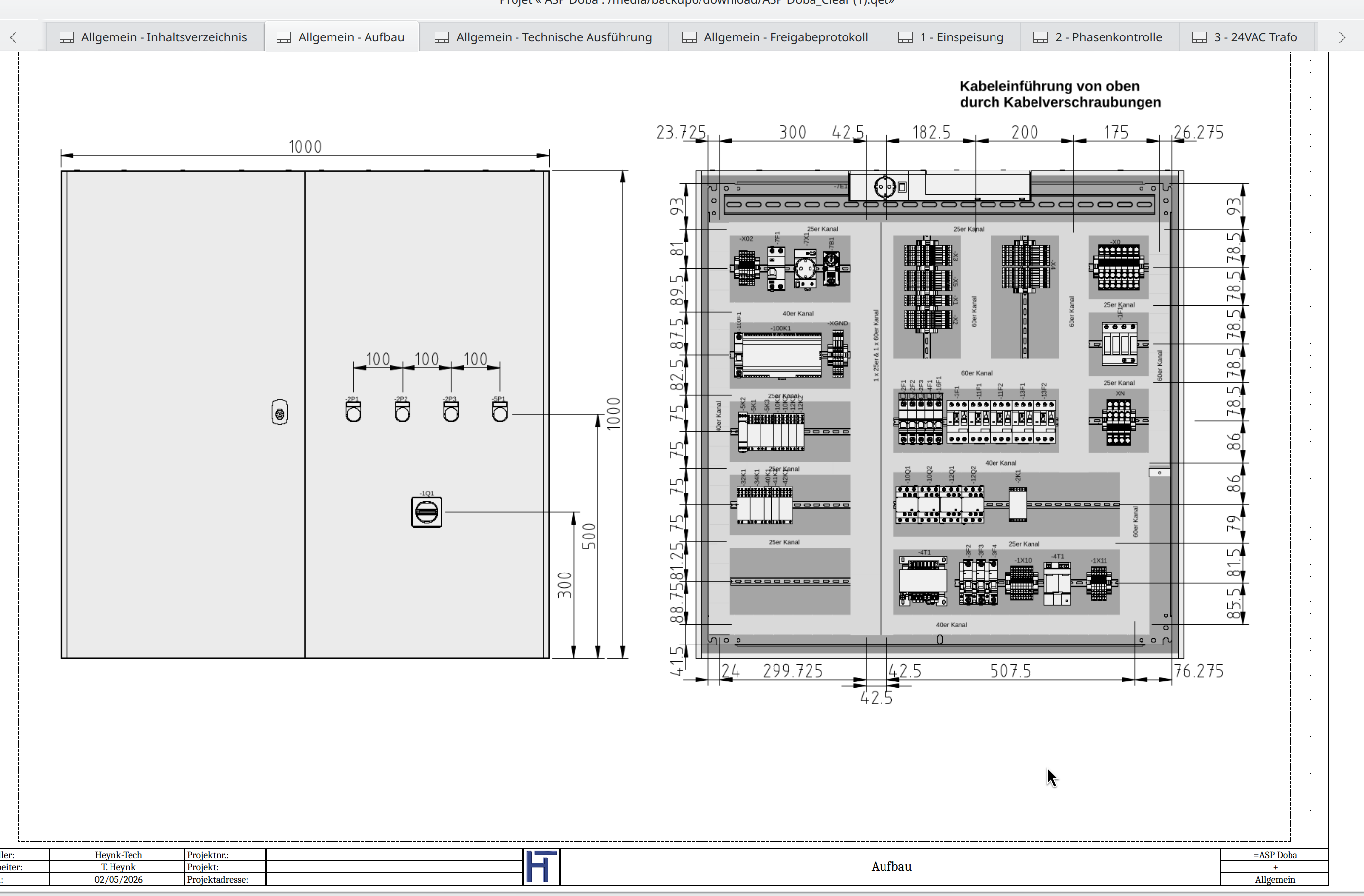
BTW, I love your cabinet page, very nice.
You use QET for this?
ahhhh. Thanks a lot Laurent!!!
No i made it with QCad. I want to have a real Scale.
@Laurent
I’ve only done some quick, simple testing, and everything seems to be working well so far. I haven't experienced any more crashes.
Great work!
Thanks for including On/Off property of conatct numbers.
@Kellermorph
I aggree with Laurent, your cabinet layout, as well as the entire schematic, look fantastic. As for the terminal and cable lists—did you draw all of those by hand?
@Kellermorph
I aggree with Laurent, your cabinet layout, as well as the entire schematic, look fantastic. As for the terminal and cable lists—did you draw all of those by hand?
Thanks for the compliment.
No, I do it using my Python add-on. It only takes a few clicks. I've also made it available here on the forum.
By the way, Qt5 or Qt6 allow you to integrate Python scripts,
for example https://forum.qt.io/topic/109216/embed- … -my-qt-app
But I don’t know how to package it for all platforms...
You're already working on the Terminal Strip Manager. So why add a new tool just for a single list?
Enjoy !
Pas de readytouse de ces évolutions ?
elles sont marquées Windows portable:
https://qelectrotech.github.io/qelectro … ce-mirror/
qelectrotech-0.100.1+git8842-x86-win64-readytouse.zip
PS: je te conseille le .MSI il est vérifié par signpath.io donc pas de virus détecté pendant l'approbation, et un certificat provisoire est joint. j'attends toujours le certificat EVO de signpath.io, mais c'est d'un compliqué .... pire qu'un labyrinthe... a accoupler aux actions Github aux tokens, etc...
Feat: Add ability to duplicate diagrams/folios with all metadata and …
Currently, there is no built-in way to duplicate an entire diagram (folio) directly from the elements panel. Users have to create a new page and manually copy-paste components, losing the specific page layout, border properties, and title block metadata (like plant, locmach, title, and author) in the process. This PR introduces a seamless "Duplicate" feature that creates an exact copy of selected diagrams.
https://github.com/qelectrotech/qelectr … r/pull/473
This adds native, clickable hyperlinks to PDF exports: cross-references jump
directly to the related component on its folio, framing the target element.When a project is exported to PDF, every cross-reference becomes an internal
link. Four kinds are covered:- **Master → contact**: the contact list on a coil/relay (`CrossRefItem`)
- **Folio report → report**: report element labels (`DynamicElementTextItem`)
- **Slave → master**: the `(folio-position)` reference shown on a slave
(both standalone `DynamicElementTextItem` and grouped `ElementTextItemGroup`)Clicking a link navigates **inside** the open document (no new viewer
instance) and zooms to frame the target element.1. **Injection** (`printDiagram`, only when the paint engine is a `QPdfEngine`):
link rectangles are added with `QPdfEngine::drawHyperlink()`. The scene→page
mapping is rebuilt to match exactly what `QGraphicsScene::render()` does
(top-left anchored, `KeepAspectRatio`, **no centering**), and rectangles are
passed in device pixels — `pageMatrix()` already applies the 72/resolution
scale and Y-flip internally.2. Each link URL encodes the target page and the target element's rectangle, in
PDF points on its own page: `#page=N&fitr=L_B_R_T`.3. **Post-processing** (`pdfConvertUriToGoTo`, run after the painter is closed):
the `/S /URI` annotations are rewritten to native `/S /GoTo` actions with a
`/D [pageObj 0 R /FitR L B R T]` destination, and the xref table is rebuilt.
Pages are enumerated from the `/Pages /Kids` tree (reliable), not by scanning
for `/Type /Page` in raw bytes.- `sources/print/projectprintwindow.{cpp,h}` — injection + post-processing
- `sources/qetgraphicsitem/crossrefitem.{cpp,h}` — `hoveredContactsMap()` accessor; store text rect for hit area
- `sources/qetgraphicsitem/dynamicelementtextitem.h` — `slaveXrefItem()` / `masterElement()` accessors
- `sources/qetgraphicsitem/elementtextitemgroup.h` — `slaveXrefItem()` accessor
- `qelectrotech.pro`, `cmake/qet_compilation_vars.cmake` — enable Qt gui-private headers (`<private/qpdf_p.h>`)- **Fit-to-page mode only.** Links are not injected in tiled mode (multiple
pages per folio), which would require a per-tile transform.
- Uses Qt private API (`QPdfEngine::drawHyperlink`), stable since Qt 4 but not
part of the public API; the build links against `gui-private`.
- Page-tree enumeration assumes the flat `/Kids` array Qt produces (no nested
page trees).
- The frame zoom is controlled by two constants in `destRectPdf` (`pad`,
`minSide`) and can be tuned.
- Tested on Qt5; the `/Kids` parsing and `pageMatrix` behaviour are identical on
Qt6.
Hi Laurent,
Following up on your message last night in the Qt6 development thread (post #163)
I attempted to reproduce your PDF Print Preview black screen issue on my machine today:
Test: PDF Preview Black Screen
Hardware: Mac Mini M4
OS: macOS Tahoe 26.5
Build: qelectrotech-0.100.1-r8847-arm64.dmg (latest dmg, Qt 5.15.18)
1. Opened QElectroTech and loaded a test project with two folios
2. Tried both File → Print → PDF, and File → Export in PDF — both arrive at QET's internal 'Export in PDF' dialog
3. QET's export/preview dialog opened with inline diagram preview rendering correctly (see Screenshot 1)
4. Looked for a "Clickable links" or "Hyperlinks" option — **not found** in the 'Export in PDF' dialog
5. Clicked Export in PDF button → PDF generated.
6. PDF opened in macOS Preview — both pages rendered correctly — no blank screen (see Screenshot 2)
7. Opened Print dialog in macOS Preview and no blank screen there either (see Screenshot 3)
Result
bug NOT reproduced ✅
Two points Claude AI suggests worth mentioning:
**1. Clickable links option absent.** There's no visible checkbox for clickable/hyperlinks in the export dialog on this build — via either the Print or Export in PDF path. Could you confirm whether the option appears in your build, and if so, which exact menu path triggers it? It's possible the option is conditionally compiled or requires a project with cross-references present to appear.
**2. Possible Sequoia-specific compositor issue.** the black screen may be a Qt5 + macOS Sequoia interaction rather than a QET code bug. Qt5's QPrintPreviewWidget relies on compositor behaviour that changed in Sequoia — specifically how WindowServer handles surface compositing for non-native windows. Running on Tahoe (26.5), that rendering path may have been fixed or changed again, which would explain why the black screen doesn't reproduce here. If this assessment is correct, the issue may resolve itself for users on Tahoe, and a macOS update note in the release would be the appropriate response rather than any code change.
Regarding your subsequent Edit in post #163:
2026-05-31 12:14:41.933 qelectrotech[2712:49999] The class 'NSSavePanel' overrides the method identifier. This method is implemented by class 'NSWindow'
12:14:47.097 Debug: Help code for QT 6 or later (sources/print/projectprintwindow.cpp:604, void ProjectPrintWindow::savePageSetupForCurrentPrinter())
Claude notes:
Two separate things there:
NSSavePanel overrides method identifier — harmless Objective-C runtime noise. Qt5 triggers this on macOS when the native save panel is invoked. Not related to the black screen.
The debug line is more interesting: Help code for QT 6 or later (sources/print/projectprintwindow.cpp:604, void ProjectPrintWindow::savePageSetupForCurrentPrinter()) — that's a qDebug() marker in the same file where the clickable hyperlinks feature lives. It means there's a #if QT_VERSION >= QT_VERSION_CHECK(6,0,0) branch in savePageSetupForCurrentPrinter() and Laurent is hitting a code path annotated as "Qt6 or later" despite running Qt5. That's either a logic error in the version guard, or the guard is absent and the comment is just informational.
Either way it confirms he's definitely going through projectprintwindow.cpp when he hits the black screen — so the feature path is being reached. It also hints that the print window's page-setup code may have Qt6-targeted changes that behave unexpectedly under Qt5/Sequoia.
The relevant line to look at would be projectprintwindow.cpp:604
Hoe it helps — let me know if you like me to run any further tests.
btw — I couldn't attach the screenshots mentioned as this forum's bot-guardian thinks I'm am a bot ![]()
Cheers,
hairy_kiwi
Hi hairy_kiwi,
I just tried qelectrotech-0.100.1-r8849-arm64.dmg on my new upgrade to macOS Tahoe 26.5 Mac Mini M2.
2. Tried both File → Print → PDF, and File → Export in PDF — both arrive at QET's internal 'Export in PDF' dialog -> just click PDF icon on interface, when QET finish import PDF, I have an black screen always on Tahoe 26.5, but not crash this time switch with command + Tab to return into QET or other program's launched.
I 'm tried with big projects:
Cheers,
Laurent
I don't have that problem anymore, and I can't reproduce it—it's very very strange... And the links to the PDFs work just fine, even with my odd %F page numbering.
Thanks for your help.
Regards,
Laurent
Hi Laurent,
Good to read your latest report on the issue!
For both files your .qet sample files, still using Mac Mini M4 · OS: macOS Tahoe 26.5 · Build: qelectrotech-0.100.1-r8847-arm64.dmg (Qt 5.15.18) — I too had no problem generating the PDF's without any black screen at any stage:
2022-7-01_Vibrafloor.pdf
modif_au_parc_bois_2026-04-29.pdf
I now see the links inside the PDF working too - nice work to everyone involved! ![]()
While opening modif_au_parc_bois_2026-04-29.qet I only received this warning in QET (at ~60% of loading the file):
"The information to be displayed is greater than the maximum quantity that can be displayed by the tables.
Please add a new table or adjust the existing tables to show all information."
Hi hairy_kiwi,
I started a video recording, but the problem persists. Could it be because I'm in the process of recompiling the MacPorts framework, and my Mac mini M2 (8GB RAM, 256GB storage) is now underpowered?
Hi Laurent,
While opening modif_au_parc_bois_2026-04-29.qet I only received this warning in QET (at ~60% of loading the file):
"The information to be displayed is greater than the maximum quantity that can be displayed by the tables.
Please add a new table or adjust the existing tables to show all information."
I'm currently working on a retrofit of a very old system, reviewing all the safety features, and adding an HMI. This version is outdated; newer versions are on my laptop at work, and yes, I've added a new table for this warning.
Thanks for explaining the source of that table warning ![]()
I wouldn't be surprised if your intermittent black screen issue is simply due to RAM availability; I was cautioned away from buying an 8GB machine these days, presumably for this kind of reason.
I put the latest symptoms to Claude, highlighting the intermittent nature of the issue...
Key context
M2 Mac Mini with 8GB uses unified memory — RAM and VRAM are the same pool.
Large QET projects + Qt's PDF rendering will compete directly with display compositing.
8GB unified on M2 is genuinely tight for large PDF rendering — the suspicion is reasonable.
Logging RAM usage
Best options, in order of effort:
powermetrics
sudo powermetrics --samplers gpu_power,tasks -i 1000 | tee powermetrics_log.txt
OR
sudo powermetrics --samplers gpu_power,tasks -i 1000 > powermetrics_log.txttee writes to the file AND keeps output visible in the terminal to see it's running.
Plain > redirection to a file works, but gives no terminal feedback.
Ctrl+C to stop.
Alternatives:
iStatMenus (paid, ~€12) — menubar graphs for RAM, GPU, thermals. The gold standard for ongoing monitoring on Apple Silicon.
Stats (free, App Store) — similar to iStatMenus, good enough for this.
It'll be interesting to hear what logging reveals while trying the replicate the issue.
Thanks, hairy_kiwi,
But for now, I can't afford to buy a new MAC MINI Apple Silicon M4/pro/studio with 24 or 64 GB of RAM.
Do you know of anyone who could sponsor us?
I can’t use my PayPal account to buy this M4 Pro/studio
with just 24 GB of RAM — I won’t have anything left to pay for the domain name and OVH… And then I’ll have to pay for the Apple Developer subscription and everything else out of my own pocket; my wife is going to give me an earful again ![]()
BTW, M5 and M6 is on the road ....
Best Reegards,
Laurent
Hi Laurent,
I'm not sure a any of the newer Apple Silicon models with 24 or 64GB is necessary...
For a full clean (Qt6) rebuild on mac mini M4 with -j8 and 16GB RAM:
cd ~/qelectrotech/build_qt6 && time (make clean && make -j8)gives a build time of 2m 07s
I'd happily make a contribution if there's a fundrasier event on Go Fund Me(?) etc, but I'm sorry I've no connections/company who might sponsor such a purchase outright.
How much are the QET annual costs: Apple Dev subscription + web hosting, etc?
Best regards,
Hamish
Hi Hamish,
Compile QET take with qmake ~ 1m 10 on Mac mini, here!
that's what takes so long:to compile https://invent.kde.org/graphics/digikam … type=heads
OVH account was X2 this year!!!
Before Gandi DNS cost €18,79 EUR ./Y now 38€ ...shit
https://qelectrotech.org/forum/viewtopi … 679#p15679
QET annual costs: ~450€
And I don't cost AI to prgress on CI/CD windows packaging/ XRFex/ and PDF hyperlinks.... 150€
Best Regards,
Laurent
[GitHub] You have used 90% of the Git LFS bandwidth included for the qelectrotech account
De : GitHub <noreply@github.com>
Date : 01/06/2026 22:21
Your plan includes 10.0 GB of Git LFS bandwidth per month at no extra cost. You have used 90% so far this billing cycle. for the qelectrotech account.
Your usage will reset in 30 days on July 01, 2026.
Kkkkrrr!
I 'm need to pay also for GitHUb now ... pffff shit....
What makes it use so much bandwidth ? If it resets every 30 days, 9GB in less than 2 days seems huge.
Hi everyone,
I just submitted an application to Anthropic's Claude for Open Source program on behalf of QElectroTech.
The program offers qualifying open source maintainers 6 months of Claude Max 20x (worth $1,200) for free. While QET is below the 5,000 GitHub stars threshold, I applied under the "ecosystem impact" exception track, highlighting that QET is packaged in Debian/Ubuntu/Fedora,Windows, macOS, translated into 25 languages, and remains one of the only fully libre electrical CAD tools available worldwide.
Applications close June 30, 2026 and are limited to 10,000 developers — we'll see if we make it!
If any other QET contributors want to apply individually, the form is here:
https://claude.com/contact-sales/claude-for-oss
Cheers,
Laurent
QElectroTech (QET) is a libre and open source CAD/CAE application for electrical schematic drawing, actively maintained since 2008. The project is hosted at https://github.com/qelectrotech/qelectrotech-source-mirror (489 stars) and at https://qelectrotech.org.
While our GitHub star count does not reach the 5,000 threshold, QET occupies a unique and critical position in the open source ecosystem for electrical engineering:
- QET is one of the only fully libre, cross-platform (Linux, macOS, Windows) electrical CAD tools available. Commercial alternatives (EPLAN, SEE Electrical, AutoCAD Electrical) cost thousands of euros per seat. QET is used by electricians, engineering students, small businesses, and public institutions worldwide who cannot afford proprietary software.
- QET is packaged in major Linux distributions: Debian, Ubuntu, Fedora, openSUSE, and Arch Linux — meaning it reaches a significantly larger user base than GitHub stars reflect. The Debian package alone covers hundreds of thousands of potential users across derivative distributions.
- The project maintains an official elements library (https://github.com/qelectrotech/qelectrotech-elements) with thousands of standardized electrical symbols (IEC, DIN, NEMA), actively contributed to by the community.
- QET is translated into 25 languages, reflecting its international adoption across Europe, Latin America, and Asia.
As a core maintainer and C++ contributor, I use Claude daily to accelerate development: reviewing patches, drafting architecture decisions, debugging Qt/C++ issues, writing CI/CD workflows, and improving documentation. Claude has materially improved the quality and velocity of contributions to a project that would otherwise rely entirely on volunteer spare time.
A Claude Max 20x subscription would allow me to run sustained coding sessions on QET's large C++ codebase without hitting usage limits — directly benefiting the thousands of users who depend on QET as their only viable libre electrical CAD tool.
QElectroTech → News → Nouveautés de la version de développement 0.9 and 0.100.0 -0.100.1
Powered by PunBB, supported by Informer Technologies, Inc.
Generated in 0.041 seconds (18% PHP - 82% DB) with 11 queries