Topic: Downloading French version from Qelectrotech

Hello,

As Belgium pensioned 68 years person , I have just downloaded QElectroTEchnic.
Because I m not an computer expert but an mechanic I have probably doing something wrong.
I have several times instal and uninstal  the program " Version 0.90 (2023-01-06)".
I got always the Frech version. How can I get a Dutch or English version
THanks in advance
Kindly regards jp

Re: Downloading French version from Qelectrotech

I guess, you are using windows? Start QElectroTech with Batch-file "Lancer_QET.bat"!

Menu -> Configuration -> Configurer QElectroTech -> TAB "Langues"

Select Language you prefer, press "OK" and restart QElectroTech.

Fragen zu QET gehören in dieses Forum und werden nicht per PM beantwortet! – Questions regarding QET belong in this forum and will NOT be answered via PM! – Les questions concernant QET doivent être posées sur ce forum et ne seront pas traitées par MP !

Re: Downloading French version from Qelectrotech

Dear,

Thanks for your help. I now even have a "Belgium Flemish" version.

Kindly Regards
jp

Re: Downloading French version from Qelectrotech

As a new user you should use QET 0.100-dev to be able to use Liberation-fonts, so that your Elements and Plans are compatible with other systems and users!

Fragen zu QET gehören in dieses Forum und werden nicht per PM beantwortet! – Questions regarding QET belong in this forum and will NOT be answered via PM! – Les questions concernant QET doivent être posées sur ce forum et ne seront pas traitées par MP !

Re: Downloading French version from Qelectrotech

plc-user wrote:

As a new user you should use QET 0.100-dev to be able to use Liberation-fonts, so that your Elements and Plans are compatible with other systems and users!

If someone can write a good changelog,maybe with Ai?  I can release the new version 0.100 and replace the old version 0.90, which does not work well. and have many bugs fixed since .

This work can be very easy for those who are proficient in AI prompts and have prepaid accounts.

"Le jour où tu découvres le Libre, tu sais que tu ne pourras jamais plus revenir en arrière..."Questions regarding QET belong in this forum and will NOT be answered via PM! – Les questions concernant QET doivent être posées sur ce forum et ne seront pas traitées par MP !

Re: Downloading French version from Qelectrotech

I think a New version would bé nice. I need to fix some minor thing ( I don't like how parts are rotated in the éléments editor, around the 0,0 coordinate instead of a point of the curent sélection)

Développeur QElectroTech

Re: Downloading French version from Qelectrotech

All people thanks for your support. For the moment i am happy I already can use the old version. IN th future I will change.
I have still a question. I  use the Mesa 7i77 card in my cnc milling machine. Their is a drawning from the Mesacard and
several bloks  with IO. I dragged an IO block to my project. I would make a connector to the IO blok but i can not fix the connector on the right place . The connector made connection on a grid point but the IO block is shifted between to grid points.
Is there a possibility to solve thie ?
KIndly regards
jp

Re: Downloading French version from Qelectrotech

Can somebody letme know or this is possibel or not ?
thanks

9 (edited by plc-user 2025-12-13 10:17:04)

Re: Downloading French version from Qelectrotech

I do not know that module!

Take a look at the Mesa 7i77 in collection-tree:
There is a base-module with four terminals for Power-Supply and six separate modules with eight terminals each for TB7 and TB8.
You can only connect conductors to terminals of an element: no terminal -> no possibility to connect a conductor.
If you want to connect something to other parts than Power-Supply or TB7/TB8, you need to rework the existing elements or have to create new ones!
If you create new modules, please make sure, that the terminals are at positions that fit to the grid of 10x10 points, so that automatic connection can be done, when pulling the element to the folio. (The existing modules need to be reworked to match the grid!)

Addendum:
The elements in QET 0.100-dev have terminals at positions without decimals. Try to use those.

Post's attachments
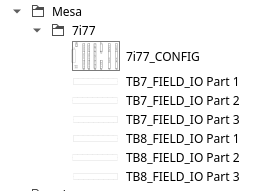
Attachment icon Bildschirmfoto_Mesa_7i77.png 7.48 kb, 2 downloads since 2025-12-12 

Fragen zu QET gehören in dieses Forum und werden nicht per PM beantwortet! – Questions regarding QET belong in this forum and will NOT be answered via PM! – Les questions concernant QET doivent être posées sur ce forum et ne seront pas traitées par MP !


10

Re: Downloading French version from Qelectrotech

Dear,

Thanks for your reply an d will use the Mesa 7i77 in the collection. A next question

I first made a schematic (electric drawning) and then print the schematic. The line thickness is about 1 mm and for me to heavy.
Is it possible to change the thickness to about 0.5 mm for the existing drawning and for next drawnings ?

kindly regards
jp

Re: Downloading French version from Qelectrotech

The line thickness on paper depends on so many factors:
The thickness of the lines in the element, the number of columns/rows in the folio, the PDF viewer's interpretation of the line thickness, the printer driver, printer, etc.
Without seeing anything (QET file, PDF, etc.), it is impossible to say anything about this! Even if one could look at it, it would be difficult!
What is not possible: editing the line thickness of connections or elements in the diagram editor.
There is no way around it: you have to ‘tweak’ the settings yourself to adjust the line thickness on the paper.

Fragen zu QET gehören in dieses Forum und werden nicht per PM beantwortet! – Questions regarding QET belong in this forum and will NOT be answered via PM! – Les questions concernant QET doivent être posées sur ce forum et ne seront pas traitées par MP !